

Our Top Picks
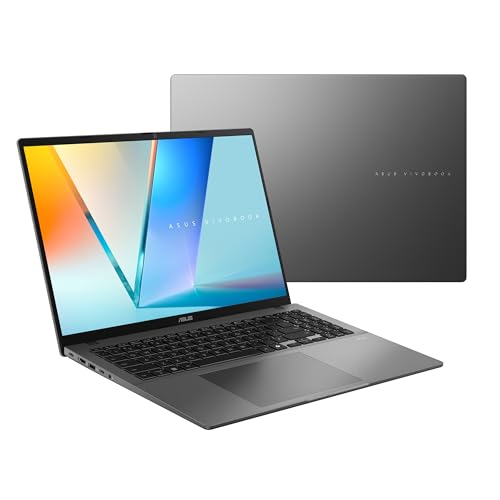
One hundred dollars is not much money. At $1,200, this series found its first factory-built 32GB-plus-RTX machine and its first RTX 5060 laptop. At $1,300, the headline is different: the extra $100 does not buy a new tier — it buys headroom, a bigger screen, and a better panel.
The Acer Nitro V 17 (ANV17-41-R8ML) pairs a brand-new RTX 5060 with a 17.3-inch screen for $1,079.99 on Amazon in November 2026 — $220 under budget, the cheapest RTX 5060 laptop we have verified.
The extra $100 also buys a TUF Gaming F16 with a 100% sRGB screen at $1,149, and a 16-inch Nitro V AI with a 180Hz display at $1,187.10. But the 32GB-plus-RTX breakthrough from the $1,200 guide is already dead — the Nitro V 16S AI jumped from $1,199.99 to $1,578.97 on Amazon in mid-November. All prices below are November 2026 snapshots.
Our top picks
Best for: Editors who want the newest GPU and the biggest timeline for the least money
Check price on AmazonBest for: Editors who want the toughest chassis and the most trustworthy Windows screen under $1,300
Check price on Amazon
Best for: Editors who also game and want the smoothest screen with the newest GPU
Check price on AmazonBest for: Editors who work away from a desk and live in Final Cut Pro or DaVinci Resolve on macOS
Check price on Amazon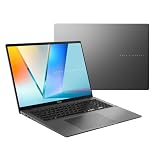
Best for: Color-critical work on a budget, where the screen matters more than the GPU
Check price on AmazonQuick Picks
| Laptop | Best For | Price (Nov 2026) | CPU / GPU | RAM / Storage |
|---|---|---|---|---|
| Acer Nitro V 17 (ANV17-41-R8ML) | Best Overall | $1,079.99 | Ryzen 5 240 / RTX 5060 | 16GB / 512GB |
| ASUS TUF Gaming F16 (FX608) | Best Build Quality | $1,149 | Core i7-14650HX / RTX 5060 | 16GB / 512GB |
| Acer Nitro V 16 AI (ANV16-61-R2QY) | Best 180Hz Screen | $1,187.10 | Ryzen AI 5 340 / RTX 5060 | 16GB / 512GB |
| Apple MacBook Air 15″ M4 | Best Battery Life | $1,199 | Apple M4 | 16GB / 256GB |
| ASUS Vivobook S16 OLED | Best OLED Screen | $879.99 | Core Ultra 7 355 / Intel Arc | 16GB / 1TB |
How to Choose a Laptop for Video Editing Under $1,300
CPU and GPU for editing
The CPU decodes footage and runs the timeline; the GPU accelerates effects and encoding. A 6-core modern CPU is the floor. An RTX 5060 with 8GB of VRAM is the new standard at this budget — NVENC hardware encoding and DLSS 4.
The RAM floor
Sixteen gigabytes is the floor for real editing in 2026, and it is the floor in every pick here. Thirty-two gigabytes is what a 4K timeline with multiple tracks actually wants — but the only factory 32GB-plus-RTX machine under $1,300 jumped to $1,578.97 in mid-November.
Storage speed and size
A 512GB Gen4 NVMe SSD is the floor, and every pick here meets it. A single hour of 4K footage can run 20–45GB, so 512GB fills fast. One terabyte is the comfortable size, and only the Vivobook S16 OLED offers it.
Screen color accuracy
One hundred percent sRGB is the minimum for color work you can trust; 100% DCI-P3 is better and only OLED delivers it at this budget. The gaming IPS panels here cover 100% sRGB at best — good enough for YouTube, not for client grading.
Thermal throttling
A laptop GPU only performs as well as its cooling allows. The RTX 5060 in these machines runs at 85–115W depending on the chassis, and a thin plastic body throttles sooner than a thick one with dual fans.
Battery life
Editing on battery is a compromise on every Windows laptop here — expect two to four hours of real timeline work. The MacBook Air 15 is the exception: real-world editing sessions run six to eight hours.
1. Acer Nitro V 17 (ANV17-41-R8ML) — Best Overall
Specs: AMD Ryzen 5 240 (6 cores, up to 5.0 GHz); NVIDIA GeForce RTX 5060 8GB GDDR7; 16GB DDR5; 512GB PCIe Gen4 NVMe SSD; 17.3″ FHD IPS display; dual-fan cooling.
The cheapest RTX 5060 laptop we have verified anywhere in this series, and the first 17.3-inch machine to lead a guide. Amazon lists the ANV17-41-R8ML at $1,079.99 in November 2026 — PC Guide flagged the deal on November 5 — against a $1,199.99 list. That leaves $220 of headroom, the most of any top pick in the video-editing series.
The Ryzen 5 240 is a 6-core Zen 4 chip with a dedicated Ryzen AI engine, and the RTX 5060 brings Blackwell’s NVENC encoder and DLSS 4 to a budget machine for the first time.
The honest caveats: the screen is FHD on a 17.3-inch panel, so it is the least sharp display here. The Ryzen 5 240 is the weakest CPU in this guide, with six cores where the TUF F16 has sixteen.
Pros: Cheapest verified RTX 5060 laptop in the series; biggest screen here at 17.3 inches; $220 of headroom.
Cons: FHD on a 17.3-inch panel is the least sharp screen here; weakest CPU in the guide; deal price, not list price.
Best for: Editors who want the newest GPU and the biggest timeline for the least money.
2. ASUS TUF Gaming F16 (FX608) — Best Build Quality
Specs: Intel Core i7-14650HX (16 cores, up to 5.2 GHz); NVIDIA GeForce RTX 5060 8GB GDDR7; 16GB DDR5-5600; 512GB PCIe Gen4 NVMe SSD; 16″ FHD+ IPS, 165Hz, 100% sRGB; MIL-STD-810H; dual Arc Flow fans.
The toughest laptop in this guide, and the one with the best screen among the Windows picks. Sam’s Club lists the FX608 at $1,149 in November 2026 against a $1,399 list — a 17% discount, in stock. The Core i7-14650HX is the strongest CPU here: sixteen cores against the Nitro V 17’s six.
The 100% sRGB panel is the other reason to pick it. Most gaming laptops at this price cover 60–70% of sRGB, which makes color decisions a guess; the TUF F16’s panel is the only Windows screen in this guide you can grade on short of OLED.
The honest caveats: $1,149 is a Sam’s Club price, and Sam’s Club is a membership warehouse — factor in the membership if you do not already have one. And the 32GB version of this exact machine lists at $1,999.99 at Walmart — do not confuse the two listings.
Pros: Strongest CPU in the guide; only Windows screen here with 100% sRGB; MIL-STD-810H build.
Cons: Sam’s Club membership required; 512GB storage only; the 32GB version costs $1,999.99 — same name, different machine.
Best for: Editors who want the toughest chassis and the most trustworthy Windows screen under $1,300.
3. Acer Nitro V 16 AI (ANV16-61-R2QY) — Best 180Hz Screen
Specs: AMD Ryzen AI 5 340 (6 cores, up to 4.8 GHz); NVIDIA GeForce RTX 5060 8GB GDDR7 (95W MGP); 16GB DDR5; 512GB PCIe Gen4 NVMe SSD; 16″ WUXGA IPS, 180Hz; Copilot+ PC.
The fastest screen in this guide, and the cheapest way to get a 180Hz panel with an RTX 5060. Our catalog check found the ANV16-61-R2QY at $1,187.10 from an authorized retailer, and Amazon lists it around $1,262.69 against Acer’s $1,299.99 list — so it fits, but only just.
The Ryzen AI 5 340 is a 6-core chip with a dedicated NPU, which makes this a Copilot+ PC — AI features in Premiere Pro and DaVinci Resolve run locally instead of in the cloud.
The honest caveats: the price sits on the ceiling — $1,299.99 at Acer’s own store, where it is out of stock, and the $1,187.10 catalog price is from a single authorized retailer. And the name trap is real: only the exact model number ANV16-61 tells you this is the 16GB machine, not the 32GB 16S.
Pros: Only 180Hz screen in the guide; Copilot+ PC with a dedicated NPU; RTX 5060 with $113 of headroom.
Cons: Fits only at the right seller — $1,299.99 at Acer’s store, out of stock; the Nitro V name game is at its worst here.
Best for: Editors who also game and want the smoothest screen with the newest GPU.
4. Apple MacBook Air 15″ M4 — Best Battery Life
Specs: Apple M4 (10-core CPU, 10-core GPU); 16GB unified memory; 256GB SSD; 15.3″ Liquid Retina display, P3 wide color, 500 nits; up to 18 hours video playback; fanless; 3.3 lb.
The only fanless machine in this guide, and the only one that edits all day on a single charge. The MacBook Air 15 M4 lists at $1,199 at Apple, and it returns from our $1,200 guide because nothing else at this budget does what it does: six to eight hours of real editing away from a wall outlet, a P3 screen brighter than every Windows panel here, and total silence.
The M4’s media engine handles 4K ProRes and H.264 timelines in Final Cut Pro and DaVinci Resolve with a smoothness that surprises people who only look at the spec sheet.
The honest caveats: 256GB of soldered storage is the smallest in this guide, and it is not upgradeable — a 4K project folder will not fit alongside your apps, so budget for external storage. The RAM is soldered too, and long 4K exports throttle about 18%. Flag: this was pick 4 in our $1,200 guide at the same price.
Pros: Best battery life in the guide by hours, not minutes; brightest non-OLED screen here; completely silent; lightest pick at 3.3 lb.
Cons: Only 256GB of soldered storage; soldered RAM; throttles about 18% on long 4K exports.
Best for: Editors who work away from a desk and live in Final Cut Pro or DaVinci Resolve on macOS.
5. ASUS Vivobook S16 OLED — Best OLED Screen
Specs: Intel Core Ultra 7 355 (8 cores, up to 4.7 GHz); Intel Arc Graphics; 16GB DDR5; 1TB PCIe NVMe SSD; 16″ OLED WUXGA, 95% DCI-P3, 300 nits, 60Hz; MIL-STD 810H.
The only OLED in this guide, and the only pick with a terabyte of storage. Target lists the Vivobook S16 OLED at $879.99 in November 2026 against a $1,449.99 list — $420 under budget, the biggest discount in this guide.
The screen is the reason it is here. A 95% DCI-P3 OLED with true blacks is the only panel in this guide you can genuinely grade color on, and at $879.99 it costs less than a color-accurate external monitor alone.
The honest caveats: there is no discrete GPU — 4K editing needs proxies, and effects-heavy timelines will stutter where the RTX picks sail through. The OLED panel is 60Hz. And the same-name trap: this $879.99 configuration shares its name with the Ryzen AI 9 465 version from our $1,400 programming guide at $1,399.99 — check the processor before you pay. Flag: this was pick 5 in our $1,200 guide.
Pros: Only OLED in the guide — 95% DCI-P3, true blacks; only 1TB SSD here; $420 under budget.
Cons: No discrete GPU — 4K needs proxies; 60Hz panel; shares its name with a $1,399.99 configuration.
Best for: Color-critical work on a budget, where the screen matters more than the GPU.
What to Avoid
The dead 32GB-plus-RTX deal. Our $1,200 guide celebrated the Acer Nitro V 16S AI as the first factory 32GB-plus-RTX machine to fit any budget — $1,199.99 on sale. By mid-November it was $1,578.97 on Amazon.
OLED plus RTX. It still does not fit. The Vivobook Pro 15 OLED with an RTX 4050 has no verified US price under $1,300 — the only prices we found are Indian listings around ₹1,21,999 — and the Vivobook Pro 16 OLED with an RTX 4060 lists at $1,499.99 and is out of stock.
RTX 4070. It still does not fit either. The cheapest verified RTX 4070 laptop is the MSI Katana 15 at $1,498 on Amazon — $198 over budget.
Eight-gigabyte “deals” and the OMEN glitch. Eight gigabytes of RAM cannot edit 4K in 2026, and the 8GB versions of machines in this guide are traps — the Yoga 7i 2-in-1 has an 8GB version at $599.99 with soldered memory you can never upgrade. Best Buy’s HP OMEN 16 listings at $341.99 and $366.99 are not real buyable prices — treat them as a glitch. The real OMEN 16 with an RTX 5060 is $1,399.99, over budget.
FAQs
Is $1,300 enough for real video editing?
Yes — for 1080p and light 4K work, with proxies for the heaviest timelines. Every pick here has 16GB of RAM, a 512GB or larger Gen4 SSD, and either an RTX 5060 or a screen good enough to grade on. What $1,300 does not buy is 32GB of RAM with a discrete GPU, or an OLED screen with a discrete GPU.
Which pick is best for 4K editing?
The Acer Nitro V 17, for the RTX 5060’s NVENC encoder and the widest timeline in the guide. The TUF Gaming F16 is the better choice if you also grade color on the laptop screen, thanks to its 100% sRGB panel. The MacBook Air 15 is the best 4K machine for Final Cut Pro — but its 256GB of storage forces you onto external drives.
Can I get 32GB of RAM under $1,300?
Yes, but not with a discrete GPU. The Dell Inspiron 16 with 32GB of DDR5 and a 1TB SSD is $739 on Amazon in a third-party configuration — the cheapest verified 32GB laptop in this series — but it has integrated graphics only. The factory 32GB-plus-RTX machine was $1,199.99 in early November and is $1,578.97 now.
Should I buy the RTX 5060 or the RTX 4060 at this budget?
The RTX 5060, at these prices. The Nitro V 17 with an RTX 5060 costs $1,079.99 — less than most RTX 4060 machines in this series cost a month ago — and brings DLSS 4 and a newer NVENC encoder. The RTX 4060 is only the better buy when it is much cheaper, and it is not.
Verdict
The best laptop for video editing under $1,300 is the Acer Nitro V 17 (ANV17-41-R8ML) at $1,079.99 on Amazon — the cheapest verified RTX 5060 laptop in this series, with the biggest screen and $220 of headroom. It is not the most powerful machine here, and its FHD panel is the least sharp, but no other pick gives you the newest GPU and the widest timeline for this little money.
If you grade color on the laptop, buy the ASUS TUF Gaming F16 at $1,149 instead — its 100% sRGB panel and sixteen-core CPU are worth the extra $69. If you edit away from a desk, buy the MacBook Air 15 M4 at $1,199 and budget for external storage. And if 32GB of RAM is non-negotiable, wait: the only factory 32GB-plus-RTX machine was $1,199.99 two weeks ago and is $1,578.97 today.
As an Amazon Associate, we earn from qualifying purchases.
Suggested internal links
- Best Laptop for Video Editing Under $1,200 — the RTX 4060 top pick and the first factory 32GB-plus-RTX machine.
- Best Laptop for Video Editing Under $900 — the first RTX 4060 with 16GB of RAM in the box.
- Best Laptop for Programming Under $900 — the first 32GB laptop under $900 in this series.
More from Amazon
Programs that pair well with the guide above. Offers and eligibility are set by Amazon and may change.
A free business account with business pricing and bulk-buying tools for work, shop or home office.
Create a business accountFree shipping on eligible items, Prime Video and more. Eligible new members can start with a free trial.
Start a Prime free trialAudiobooks and podcasts to listen to on the go. Eligible new members can start with a free trial.
Try Audible freeAd-free music streaming. Eligible new subscribers can start with a free trial.
Try Music Unlimited freeAs an Amazon Associate we earn from qualifying purchases.










Write Your Review
No reviews yet. Be the first to share your experience!