

Our Top Picks

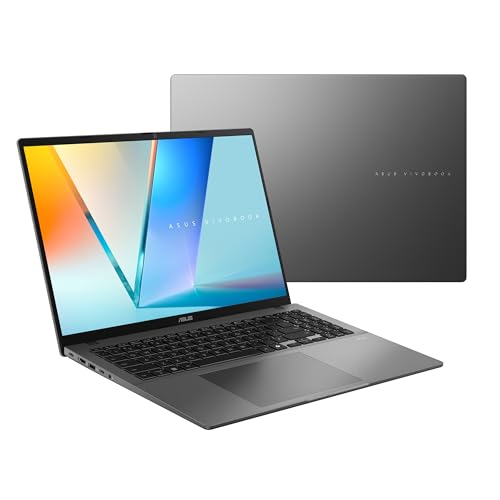
Three hundred dollars changes the whole conversation. At $900, the strongest editing machine was an RTX 4060 with 16GB of RAM in the box, and 32GB plus an RTX card stayed out of reach. At $1,200, that wall finally falls: a factory-built laptop with 32GB of RAM and a brand-new RTX 5060 fits — at exactly $1,199.99.
The extra money also buys a bigger, better screen: our top pick pairs an RTX 4060 with a 16-inch, 100% sRGB panel and a 1TB SSD for $1,099.99. A MacBook Air with a 15-inch P3 display fits too, and so does a 16-inch OLED for $879.99. What still does not fit is an OLED screen and an RTX GPU in the same machine, or any RTX 4070 laptop at a verified US price. All prices are November 2026 snapshots — check the current price on Amazon before buying.
Our top picks
Best for: Editors who want the strongest all-round RTX machine with a screen they can grade on
Check price on Amazon
Best for: Editors whose bottleneck is multitasking — big projects, many apps, 4K timelines
Check price on AmazonBest for: Editors who want the newest GPU and the best cooling, and don’t mind adding RAM and storage later
Check price on AmazonBest for: Editors who cut on the move, grade their own footage, and live in Final Cut Pro or Premiere Pro on macOS
Check price on Amazon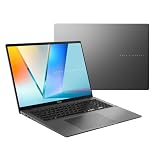
Best for: Editors who grade their own footage and want the biggest color-accurate screen for the least money
Check price on AmazonQuick Picks
| Laptop | Best For | Price (Nov 2026) | CPU / GPU | RAM / Storage | Screen |
|---|---|---|---|---|---|
| Acer Nitro V 16 (ANV16-41-R5J0) | Best Overall | $1,099.99 | Ryzen 7 8845HS / RTX 4060 | 16GB / 1TB | 16″ WUXGA 165Hz, 100% sRGB |
| Acer Nitro V 16S AI (ANV16S-41-R2AJ) | Best 32GB + RTX | $1,199.99 | Ryzen 7 260 / RTX 5060 | 32GB / 1TB | 16″ WUXGA 180Hz |
| Lenovo LOQ 15 (2026) | Best New GPU | $1,149.99 | Ryzen 7 250 / RTX 5060 | 16GB / 512GB | 15.3″ WUXGA 165Hz, 100% sRGB |
| Apple MacBook Air 15″ M4 | Best Battery Life | $1,199 | Apple M4 / 10-core GPU | 16GB / 256GB | 15.3″ Liquid Retina, P3 |
| ASUS Vivobook S16 OLED | Best OLED | $879.99 | Core Ultra 7 355 / Intel Arc | 16GB / 1TB | 16″ OLED WUXGA, 95% DCI-P3 |
How to Choose a Laptop for Video Editing Under $1,200
CPU and GPU for editing
Editing is two jobs: scrubbing the timeline and exporting the finished video. The CPU does the first, the GPU the second. A discrete NVIDIA GPU matters because of NVENC, its hardware encoder — it exports H.264 and H.265 far faster than a CPU alone. At $1,200 the RTX 4060 is the workhorse, and the RTX 5060 arrives for the first time: same 8GB of VRAM, newer architecture, better AV1 encoding.
RAM: 32GB plus RTX finally fits — barely
Sixteen gigabytes is the minimum for real editing in 2026, and every pick here has at least that. The new thing at $1,200 is that 32GB and an RTX card fit in one factory-built machine: the Acer Nitro V 16S AI at $1,199.99 — a sale price off a $1,299.99 list, with zero headroom.
Storage: 512GB is the floor, 1TB is the sweet spot
Four of the five picks here have a fast 1TB NVMe SSD; only the Lenovo LOQ ships with 512GB, and it has a free second M.2 slot. The exception is the MacBook Air: 256GB at $1,199 is genuinely tight for video work, and Apple storage is soldered.
Screen color accuracy
Most 15.6-inch gaming panels cover roughly 60–70% of sRGB — fine for cutting, not for grading. At $1,200 that changes: the Nitro V 16 and the LOQ 15 both ship with 100% sRGB panels, the MacBook Air covers the P3 gamut, and the Vivobook S16 OLED covers 95% of DCI-P3.
Thermal throttling
A laptop that boosts hard for thirty seconds and then throttles exports slower than a heavier machine that holds its clocks. Watch GPU wattage: the same RTX 4060 runs at 75W in the Gigabyte G5 KF and at 115W in the Lenovo LOQ. The MacBook Air has no fan — silent for short edits, a limit on hour-long 4K exports.
Battery life
The discrete GPU picks last two to four hours under load. The MacBook Air is in another league: Apple rates it at up to 18 hours of video playback, and real-world use lands at 12–15 hours.
1. Acer Nitro V 16 (ANV16-41-R5J0) — Best Overall
Specs: AMD Ryzen 7 8845HS (8 cores, up to 5.1 GHz); NVIDIA GeForce RTX 4060 8GB; 16GB DDR5 (upgradeable to 32GB); 1TB PCIe Gen4 NVMe SSD; 16″ WUXGA (1920 x 1200) IPS, 165Hz, 100% sRGB; USB4, HDMI 2.1; about 5.5 lb.
The best editing laptop under $1,200 fixes the most complaints at once. Acer lists the ANV16-41-R5J0 at $1,099.99, and Notebookcheck found it at $959 on Amazon in November. You get the 8-core Ryzen 7 8845HS, an RTX 4060 with NVENC, 16GB of DDR5, and a 1TB Gen4 SSD. The screen is the upgrade that matters most: a 16-inch, 16:10 panel at 1920 x 1200 and 165Hz with 100% sRGB coverage.
The caveats are the usual Nitro ones. Sixteen gigabytes of RAM is the floor — the machine upgrades to 32GB, but the upgrade now costs real money thanks to the RAM price surge.
Pros: RTX 4060 with 1TB SSD for $1,099.99 (or $959 on Amazon); 16-inch 100% sRGB screen; USB4 and HDMI 2.1; RAM and storage upgradeable.
Cons: 16GB of RAM, not 32GB; WUXGA resolution, not QHD; heavy plastic chassis.
Best for: Editors who want the strongest all-round RTX machine with a screen they can grade on.
2. Acer Nitro V 16S AI (ANV16S-41-R2AJ) — Best 32GB + RTX
Specs: AMD Ryzen 7 260 (8 cores); NVIDIA GeForce RTX 5060 8GB; 32GB DDR5; 1TB PCIe Gen4 NVMe SSD; 16″ WUXGA IPS, 180Hz; Wi-Fi 6.
The wall-breaker. NVIDIA’s own store lists this machine at $1,199.99, down from $1,299.99 — the first factory-built laptop with 32GB of RAM and a discrete RTX GPU to fit any budget in this series. The RTX 5060 is the new generation: same 8GB of VRAM as the 4060, newer architecture, better AV1 encoding.
The caveats start with the price: $1,199.99 is exactly the ceiling, and it is a sale price — at list, this machine costs $1,299.99 and does not fit. The Ryzen 7 260 is a 2025 refresh of the 8845HS silicon, not a brand-new architecture.
Pros: First 32GB + RTX factory machine to fit any budget; newest RTX 5060 GPU; 1TB SSD; fastest screen here at 180Hz.
Cons: Exactly at the ceiling — a sale price off a $1,299.99 list; Ryzen 7 260 is rebadged 8845HS silicon; only 8GB of VRAM.
Best for: Editors whose bottleneck is multitasking — big projects, many apps, 4K timelines.
3. Lenovo LOQ 15 (2026) — Best New GPU
Specs: AMD Ryzen 7 250 (8 cores, up to 5.1 GHz); NVIDIA GeForce RTX 5060 8GB (105W); 16GB DDR5 (one of two slots free); 512GB NVMe SSD (second M.2 slot free); 15.3″ WUXGA (1920 x 1200) IPS, 165Hz, 100% sRGB; 60Wh battery; USB4, HDMI 2.1.
The newest machine in this guide, and the best-cooled budget gaming laptop in most roundups. Walmart cut the 2026 LOQ 15 to $1,149.99 in mid-November — its lowest price ever, per Notebookcheck citing the Slickdeals tracker — against a $1,299.99 list elsewhere. You get the Ryzen 7 250, an RTX 5060 at 105W, and a 15.3-inch 100% sRGB panel.
The caveats are real. The screen is dim at about 277 nits — fine indoors, weak near a window. The 512GB SSD slows under long sustained writes, per Notebookcheck, so a second drive is on your shopping list. The single 16GB stick means single-channel memory until you add a second module, and the case gets hot under load.
Pros: Newest RTX 5060 at 105W; best cooling in the class; 100% sRGB screen; USB4 and a free second M.2 slot; $150 under budget.
Cons: Dim 277-nit screen; 512GB SSD slows under sustained writes; single-channel 16GB until upgraded; deal price, verify before buying.
Best for: Editors who want the newest GPU and the best cooling, and don’t mind adding RAM and storage later.
4. Apple MacBook Air 15″ M4 — Best Battery Life
Specs: Apple M4 (10-core CPU, 10-core GPU); 16GB unified memory; 256GB SSD; 15.3″ Liquid Retina display (2880 x 1864), P3 wide color, 500 nits; up to 18 hours video playback; fanless; 3.3 lb.
The only pick here that is not a gaming laptop, and the only one that edits all day without a charger. Apple’s list price is $1,199 — exactly at the ceiling — for the 15-inch MacBook Air M4 with 16GB of unified memory. The M4’s hardware media engine handles ProRes, H.264, and H.265 in Final Cut Pro and Premiere Pro without a discrete GPU, and the 15.3-inch P3 display is the brightest screen in this guide at 500 nits.
The caveats are the price of admission to macOS. Two hundred and fifty-six gigabytes of storage is genuinely tight for video work, and it is soldered — budget for an external SSD from day one. The 16GB of unified memory is also soldered, and 24GB costs $200 more, which does not fit. The fanless design throttles on long 4K exports — roughly an 18% clock drop on 30-minute-plus renders. And some Windows-only editing tools do not run on a Mac.
Pros: Best battery life by far; brightest, most color-accurate screen here; completely silent; lightest pick.
Cons: Only 256GB of storage, soldered; RAM soldered; throttles on long exports; macOS only.
Best for: Editors who cut on the move, grade their own footage, and live in Final Cut Pro or Premiere Pro on macOS.
5. ASUS Vivobook S16 OLED — Best OLED
Specs: Intel Core Ultra 7 355 (8 cores, up to 4.7 GHz); Intel Arc Graphics; 16GB DDR5; 1TB PCIe NVMe SSD; 16″ OLED WUXGA (1920 x 1200), 95% DCI-P3, 300 nits; MIL-STD 810H.
The cheapest color-accurate screen in this guide, and the biggest OLED here. Target lists this Vivobook S16 OLED at $879.99, down from $1,449.99 — a 16-inch OLED with 95% DCI-P3 coverage, a 1TB SSD, and 16GB of RAM for $320 under budget.
The trade is the GPU: there is no discrete card, so 4K without proxies will stutter and exports lean on the CPU and integrated Arc graphics. The OLED panel is WUXGA (1920 x 1200), not the sharper 2K or 3K OLEDs on more expensive machines, and at 300 nits it is dimmer than the MacBook Air. Flag: this is the same Vivobook S16 OLED line as our $1,400 programming guide’s pick — that one was the Ryzen AI 9 465 at $1,399.99.
Pros: Only OLED in the guide at $879.99; 95% DCI-P3; 1TB SSD; $320 under budget.
Cons: No discrete GPU — 4K needs proxies; WUXGA OLED, not 2K/3K; 300 nits; same-name trap.
Best for: Editors who grade their own footage and want the biggest color-accurate screen for the least money.
What to Avoid
OLED plus RTX in one machine. Still does not fit. The ASUS Vivobook Pro 16 OLED with an RTX 4060 (K6602VV) lists at $1,499.99 and is out of stock at the sellers we checked; the RTX 4050 OLED version (K6602VU) has no verified US price under $1,200.
Any RTX 4070 laptop. No verified RTX 4070 laptop fits under $1,200 in November 2026. The cheapest we found was the MSI Katana 15 with an RTX 4070 at $1,498 on Amazon.
The ASUS TUF Gaming A15 RTX 4060. The toughest laptop in the class, with a 90Wh battery and MIL-STD testing — and it does not fit at US prices in November 2026. ShopAbunda lists the FA507NV-EH53 at $1,288 with one unit left, and Amazon’s tracker shows $1,639.
Best Buy clearance prices that look too good to be true. Best Buy lists the HP OMEN 16 with an i7-13620H and RTX 4060 at $341.99 and the i9-13900HX version at $366.99, against comparable values of $1,399.99. Those are not real buyable prices — treat any listing that cheap as a glitch.
The $900 guide’s top pick — it is gone. The Acer Nitro V 15 (ANV15-51-789J) at $879.99 on Best Buy clearance is now sold out. The Nitro V 16 above is the replacement, with a bigger screen and a 1TB SSD for $220 more.
FAQs
Is $1,200 enough for real video editing?
Yes — for 1080p natively and 4K with proxies, and for the first time with 32GB of RAM and an RTX card in the same machine. Native 4K without proxies still wants more than 8GB of VRAM.
Should I buy the RTX 4060 Acer or the RTX 5060 Acer?
Buy the Nitro V 16 (RTX 4060, $1,099.99) for the best screen and price — 100% sRGB, 1TB, $100 under budget. Buy the Nitro V 16S AI (RTX 5060, $1,199.99) if your bottleneck is multitasking.
Can I color-grade on a gaming laptop screen?
At $1,200, finally, yes — on the right ones. The Nitro V 16 and the LOQ 15 both cover 100% of sRGB, the MacBook Air covers P3, and the Vivobook S16 OLED covers 95% of DCI-P3.
Is the MacBook Air really good for video editing?
For Final Cut Pro and Premiere Pro, yes — the M4 media engine is built for it, and the P3 screen and 18-hour battery are unmatched here. But 256GB of storage is tight, long exports throttle, and Windows-only tools do not run.
Verdict
The best laptop for video editing under $1,200 is the Acer Nitro V 16 (ANV16-41-R5J0) at $1,099.99 — an RTX 4060, a 1TB SSD, and a 16-inch 100% sRGB screen, with $100 to spare. If your projects are big, the Acer Nitro V 16S AI at $1,199.99 is the first factory 32GB + RTX machine to fit any budget — but it fits at exactly the ceiling, on a sale price. If you want the newest GPU and the best cooling, the Lenovo LOQ 15 (2026) at $1,149.99 is the RTX 5060 route. If you edit on the move, the MacBook Air 15″ M4 at $1,199 is silent, bright, and lasts all day — with only 256GB of storage. And if you grade your own footage, the ASUS Vivobook S16 OLED at $879.99 is the cheapest color-accurate screen here.
As an Amazon Associate, we earn from qualifying purchases.
Suggested internal links
- Best Laptop for Video Editing Under $900 — the RTX 4060 guide this one builds on, and the top pick that just sold out.
- Best Laptop for Video Editing Under $800 — the first RTX 4060 guide, and the upgrade math it corrects.
- Best Laptop for Programming Under $900 — the same budget, different priorities.
More from Amazon
Programs that pair well with the guide above. Offers and eligibility are set by Amazon and may change.
A free business account with business pricing and bulk-buying tools for work, shop or home office.
Create a business accountFree shipping on eligible items, Prime Video and more. Eligible new members can start with a free trial.
Start a Prime free trialAudiobooks and podcasts to listen to on the go. Eligible new members can start with a free trial.
Try Audible freeAd-free music streaming. Eligible new subscribers can start with a free trial.
Try Music Unlimited freeAs an Amazon Associate we earn from qualifying purchases.










Write Your Review
No reviews yet. Be the first to share your experience!