

Our Top Picks
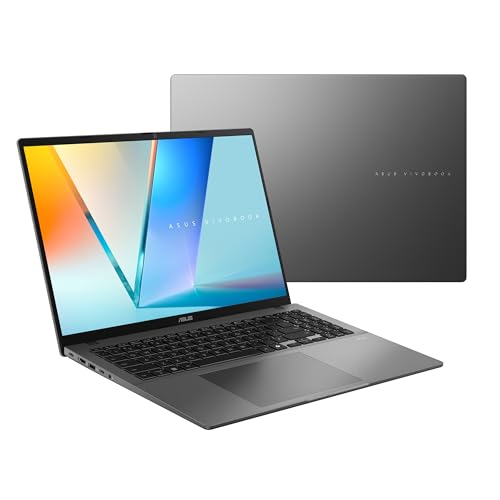
Fourteen hundred dollars is where a programming laptop stops being a compromise. At $1,300, a current-generation chip, 32GB and OLED finally arrived in one machine — on a Black Friday deal price. At $1,400, a brand-new Intel Core Ultra 9 laptop with 32GB of RAM, a 1TB SSD and a 3K OLED touchscreen fits, and four of the five machines in this guide carry 32GB.
The honest headline: 32GB is now the norm at this budget, not the exception. Every pick here has at least 16GB of DDR5 memory and an NVMe SSD — no 4GB RAM, no eMMC storage, no spinning hard drives. What still does not fit is a MacBook Pro 14 (about $1,599), a ThinkPad X1 Carbon (about $1,500 and up), a 64GB laptop from any trustworthy brand, or an OLED screen with 32GB and 1TB at 120Hz.
Our top picks

Best for: Developers who want the best all-round machine under $1,400 and carry it every day
Check price on Amazon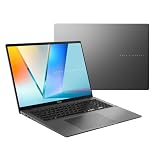
Best for: Developers who want the biggest OLED screen and the strongest integrated graphics under $1,400
Check price on Amazon
Best for: Developers who need maximum local storage and RAM per dollar and do not mind a plastic build
Check price on AmazonBest for: Web and scripting developers who want a premium OLED laptop and do not run heavy containers
Check price on Amazon
Best for: Developers buying a work machine where durability, support and Windows 11 Pro matter more than benchmark speed
Check price on AmazonQuick Picks
| Laptop | Best For | Price (Nov 2026) | CPU | RAM / Storage | Screen |
|---|---|---|---|---|---|
| ASUS Zenbook S14 (UX5406AA) | Best Overall | $1,299.99 | Intel Core Ultra 9 Series 3 | 32GB / 1TB | 14″ 3K OLED touch |
| ASUS Vivobook S16 OLED (M3607GA-ES99) | Best 16-inch | $1,399.99 | AMD Ryzen AI 9 465 | 32GB / 1TB | 16″ WUXGA OLED |
| MSI Venture A16 AI (A2HM) | Best Storage Value | $1,199 | AMD Ryzen 9-270 | 32GB / 2TB | 16″ FHD+ touch |
| Lenovo Yoga Slim 7i Aura Edition 14″ OLED | Best 14-inch OLED Value | $999.99 | Intel Core Ultra 7 256V | 16GB / 1TB | 14″ 2.8K OLED |
| Dell Pro 14 (PC14250) | Best Business 32GB | $1,349.99 | Intel Core 5 120U | 32GB / 512GB | 14″ FHD+ |
How to Choose a Laptop for Programming Under $1,400
CPU: cores matter more than clock speed
Compiling code, running test suites and juggling containers all scale with cores. The floor in this guide is an 8-core chip; the best picks have 10 to 16. Do not be fooled by a familiar name on old silicon: a Ryzen 7 7730U is a 2022 Zen 3 chip, a Core Ultra 7 155H is first-generation Ultra silicon, and a Core 5 120U is a 2024 refresh. At $1,400 you should be getting current-generation silicon — a Ryzen AI 9, a Core Ultra 9 Series 3 or a Ryzen 9-270.
RAM: 32GB is the new floor
Sixteen gigabytes is the minimum for real development work in 2026: an IDE, a browser full of tabs, a local database and Docker will eat it. Thirty-two gigabytes is what you want for containers, virtual machines, Android emulators or local AI models — and at $1,400 it finally fits from first-party retailers in four of our five picks. RAM is soldered on nearly every thin laptop here, so the amount you buy is the amount you keep.
Storage: 1TB of real NVMe, not eMMC or UFS
A 512GB SSD is workable if you keep projects in the cloud, but 1TB is the comfortable size once Docker images, SDKs and virtual machines pile up. Every pick here has an NVMe SSD. Watch for eMMC or UFS storage sold as an “SSD”, and 256GB drives on machines over $1,000. The MSI Venture A16 AI goes further with a 2TB drive — the most storage in any programming guide in this series.
Keyboard: you will type on it for thousands of hours
A programming laptop lives or dies by its keyboard. ThinkPads remain the benchmark, but the Zenbook S14 and Yoga Slim 7i both have well-spaced, backlit keyboards with decent travel — avoid shallow, mushy keyboards on machines that spent their budget on the screen.
Screen: OLED is now affordable, but check the refresh rate
Three of the five picks here have OLED screens: true blacks, sharp text and wide color make code easier on the eyes. The trade-off is refresh rate — the Vivobook S16’s OLED runs at 60Hz. Do not pay extra for a “120Hz OLED” at this price: the Vivobook S16 with OLED, 32GB and 1TB at 120Hz still does not exist under $1,400.
1. ASUS Zenbook S14 (UX5406AA) — Best Overall
Specs: Intel Core Ultra 9 Series 3 (2026, Panther Lake), 32GB LPDDR5X, 1TB PCIe 4.0 SSD, 14″ 3K (2880 x 1800) OLED touchscreen, Intel Arc graphics, Wi-Fi 7, Copilot+ PC, about 2.65 lb, 1-year warranty.
The Zenbook S14 is the first laptop in this series where everything fits: a current-generation flagship chip, 32GB of RAM, a 1TB SSD and a 3K OLED touchscreen, for $1,299.99 at Best Buy with $100 to spare. The Core Ultra 9 Series 3 is brand-new 2026 silicon, not a rebadged 2024 chip, and the 3K OLED is the sharpest screen in this guide.
The compromises are small but real. RAM is soldered, so 32GB is final. There is no discrete GPU, so local GPU-accelerated ML work is off the table. And the price is a sale price against a $1,899.99 list; open-box units were already showing at $1,139.99 to $1,166.99.
Pros: Current-gen Ultra 9; 32GB + 1TB with $100 headroom; sharpest screen here; lightest pick.
Cons: Soldered RAM; no discrete GPU; sale price, not the list price.
Best for: Developers who want the best all-round machine under $1,400 and carry it every day.
2. ASUS Vivobook S16 OLED (M3607GA-ES99) — Best 16-inch
Specs: AMD Ryzen AI 9 465 (10 cores, up to 5.0 GHz), 32GB DDR5, 1TB PCIe 4.0 SSD, 16″ WUXGA (1920 x 1200) OLED, AMD Radeon 880M graphics, Wi-Fi 6, Copilot+ PC, Windows 11 Home, 1-year warranty.
The Vivobook S16 OLED is the big-screen pick: a 16-inch OLED panel with a current-generation Ryzen AI 9 chip, 32GB of RAM and a 1TB SSD for $1,399.99 on Amazon, verified in early November 2026. The 10-core Ryzen AI 9 465 has an NPU rated at 50 TOPS, and the Radeon 880M integrated graphics are comparable to an entry-level discrete GPU — the most capable integrated graphics in this guide.
The price is the caveat. The list price is $1,699.99 at the ASUS eShop and Best Buy, so $1,399.99 is a deal price with exactly zero headroom — if the deal ends, this machine stops fitting. The OLED panel runs at 60Hz, not 120Hz. And the same-name trap here is the worst in the guide: the Vivobook S16 also ships as a 120Hz IPS touchscreen (M3607GA-IS99T) and as third-party “upgraded” units. Only the ES99 is the OLED machine at this price.
Pros: 16-inch OLED; current-gen Ryzen AI 9; 32GB + 1TB; strongest integrated graphics.
Cons: Deal price against a $1,699.99 list; zero headroom; 60Hz OLED; three machines share the name.
Best for: Developers who want the biggest OLED screen and the strongest integrated graphics under $1,400.
3. MSI Venture A16 AI (A2HM) — Best Storage Value
Specs: AMD Ryzen 9-270, 32GB DDR5, 2TB NVMe SSD, 16″ FHD+ (1920 x 1200) touchscreen, AMD Radeon graphics, Wi-Fi 6E, Windows 11, about 4.1 lb, 1-year warranty.
The Venture A16 AI is the storage king of this guide: 32GB of DDR5 RAM and a 2TB NVMe SSD for $1,199 — $200 under budget. The Ryzen 9-270 is a current-generation chip, and a second M.2 slot sits free for more storage later. For a developer who keeps Docker images, virtual machines and large SDKs local, 2TB removes a whole category of disk-space anxiety.
The honest warnings matter more here than on any other pick. The Amazon review base is thin — about a 1.5-star average from just two ratings at the end of October 2026. The screen is FHD+ IPS, not OLED, and the chassis is plastic, not metal. At about 4.1 lb it is also the heaviest machine in the guide. This is a value pick, not a premium one: you are trading build quality and screen for RAM and storage.
Pros: 2TB SSD, the most in the series; 32GB DDR5; $200 under budget; second M.2 slot free.
Cons: Thin review base (1.5 stars, 2 ratings); FHD IPS, not OLED; plastic chassis; heaviest pick.
Best for: Developers who need maximum local storage and RAM per dollar and do not mind a plastic build.
4. Lenovo Yoga Slim 7i Aura Edition 14″ OLED — Best 14-inch OLED Value
Specs: Intel Core Ultra 7 256V (8 cores, up to 4.8 GHz), 16GB LPDDR5X, 1TB PCIe SSD, 14″ 2.8K (2880 x 1800) OLED, Intel Arc 140V graphics, Wi-Fi 7, Copilot+ PC, Windows 11 Home, about 2.9 lb, 1-year warranty.
The Yoga Slim 7i Aura Edition is the bargain of this guide: a premium 14-inch laptop with a 2.8K OLED screen and a 1TB SSD for $999.99 at Staples, against a $1,599.99 list — $400 under budget. The Core Ultra 7 256V is efficient enough for genuine all-day battery life, and at 2.9 lb it is nearly as portable as the Zenbook S14.
The trade-off is RAM: 16GB, soldered, with no way to add more. At $1,400 that is the one spec that feels like a compromise — every other pick in this guide has 32GB. It is enough for most development work, but Docker plus an Android emulator plus a browser will push it. The other trap is the name: the Yoga Slim 7i Aura Edition is not the Yoga Slim 7x (Snapdragon ARM) and not the Yoga 7i 2-in-1 (a convertible). Check the model number before you buy.
Pros: 2.8K OLED screen; 1TB SSD; $400 under budget; light and efficient.
Cons: Only 16GB of RAM, soldered; no discrete GPU; easy to confuse with the Slim 7x and Yoga 7i.
Best for: Web and scripting developers who want a premium OLED laptop and do not run heavy containers.
5. Dell Pro 14 (PC14250) — Best Business 32GB
Specs: Intel Core 5 120U, 32GB DDR5, 512GB PCIe SSD, 14″ FHD+ (1920 x 1200) IPS, Intel Graphics, Wi-Fi 6E, Windows 11 Pro, about 3.1 lb, 1-year warranty with ProSupport options.
The Dell Pro 14 is the business pick: 32GB of DDR5 RAM and Windows 11 Pro for $1,349.99. It has the ports a developer actually uses, a spill-resistant keyboard, MIL-STD-810H tested durability, and Dell’s ProSupport service options the consumer machines here cannot match.
The compromises are honest ones. The Core 5 120U is a 2024 chip, a generation behind the Ryzen AI 9 and Ultra 9 in this guide, and the slowest CPU here. Storage is only 512GB — the tightest in the guide — and the FHD+ screen is a basic IPS panel, not OLED. The Dell Pro naming is also a maze: the Pro 14, Pro 14 Essential, Pro 14 Plus and 14 Plus are four different machines.
Pros: 32GB DDR5; Windows 11 Pro; business durability and support; good ports.
Cons: Oldest CPU here; only 512GB of storage; basic FHD+ screen; confusing Dell Pro naming.
Best for: Developers buying a work machine where durability, support and Windows 11 Pro matter more than benchmark speed.
What to Avoid
A 4GB RAM or eMMC machine at any price over $500. They still exist in listings that look legitimate, and they cannot run a modern IDE. If a listing does not say “NVMe SSD” and “8GB” at minimum, walk away.
“Latest generation” claims on old chips. A Ryzen 7 7730U is Zen 3 silicon from 2022, a Core Ultra 7 155H is first-generation Ultra, and a Core 5 120U is a 2024 refresh. All three still work, but none is current-generation.
The Vivobook S16 name game. Three laptops share the name: the OLED model (M3607GA-ES99), the 120Hz IPS touchscreen (M3607GA-IS99T), and third-party “upgraded” units. Only the ES99 is the OLED machine here.
The Zenbook confusion. The Zenbook S14 (UX5406AA, Core Ultra 9 Series 3, $1,299.99 at Best Buy) is a different, newer machine from the Zenbook 14 OLED (UX3405CA, Core Ultra 9 285H), which is $1,759.99 on Amazon and does not fit this budget.
Acer Nitro V 16S AI at today’s price. The RTX 5060 laptop with 32GB and 1TB hit $1,399.99 on November 16, but Amazon showed $1,578.97 to $1,639.99 the next day.
FAQs
Is 16GB of RAM enough for programming in 2026?
For most web development, scripting and learning, yes — 16GB runs an IDE, a browser and a local server comfortably. For Docker, virtual machines, Android emulators or local AI models, 32GB is safer, and at $1,400 it fits in four of the five machines here.
Is a MacBook worth it for programming under $1,400?
The MacBook Air 15-inch with the M5 chip fits at $1,249.99 and was our pick in the under-$1,300 guide, and the 13-inch M5 with 16GB and 512GB fits at $1,099. But the MacBook Pro 14 starts at about $1,599 and still does not fit. If you need macOS, buy the Air; if you need Windows or Linux, the Zenbook S14 gives you more for the money.
Do I need a discrete GPU for programming?
Almost certainly not. A discrete GPU matters for local AI training, CUDA work and game development — and the only one near this budget, the Acer Nitro V 16S AI with an RTX 5060, is $1,578.97 and up right now.
Should I buy now or wait for a better sale?
November is the best buying window of the year, and the Zenbook S14 at $1,299.99 and the Yoga Slim 7i at $999.99 are both sale prices that may not last. The Vivobook S16 OLED at $1,399.99 is already a deal price with no headroom. If you need a laptop now, buy now — but set a price alert on the Nitro V 16S AI.
Verdict
The ASUS Zenbook S14 is the best laptop for programming under $1,400. A current-generation Core Ultra 9 chip, 32GB of RAM, a 1TB SSD and a 3K OLED touchscreen for $1,299.99 — with $100 to spare — is a combination no earlier guide in this series could offer. Buy the Vivobook S16 OLED for the biggest screen, the MSI Venture A16 AI for 2TB of storage, the Yoga Slim 7i for a premium OLED laptop at $999.99, and the Dell Pro 14 for a business machine with real support. Prices are November 2026 snapshots.
As an Amazon Associate, we earn from qualifying purchases.
Suggested internal links
- Best Laptop for Programming Under $1,300 — the HP OmniBook X Flip 16 with Ryzen AI 9, 32GB and OLED for $999.99.
- Best Laptop for Programming Under $1,200 — the MSI Modern 15 H with 32GB and 1TB for $1,099.
- Best Laptop for Programming Under $1,100 — the HP OmniBook 7 Flip 16 with 32GB for $1,059.99.
More from Amazon
Programs that pair well with the guide above. Offers and eligibility are set by Amazon and may change.
A free business account with business pricing and bulk-buying tools for work, shop or home office.
Create a business accountFree shipping on eligible items, Prime Video and more. Eligible new members can start with a free trial.
Start a Prime free trialAudiobooks and podcasts to listen to on the go. Eligible new members can start with a free trial.
Try Audible freeAd-free music streaming. Eligible new subscribers can start with a free trial.
Try Music Unlimited freeAs an Amazon Associate we earn from qualifying purchases.










Write Your Review
No reviews yet. Be the first to share your experience!