

Our Top Picks
Three hundred dollars is the hardest laptop budget there is. It buys a real machine for lectures, essays, research, and video calls — and it is also the price where the traps live: frozen tabs, a screen you cannot read in daylight, and storage that fills up before midterms.
The honest answer is split. Under $300, a new Windows laptop is usable for real coursework — but only if it has 8GB of RAM and a Full HD screen, and only a few name-brand models clear both bars. A Chromebook is the safer bet for many students, because ChromeOS runs happily on 4GB of RAM, but only if every app your classes need runs in a browser.
Every pick below is verified against Meta Catalog data, manufacturer spec pages, and Amazon US listings in November 2026 — every price is a November 2026 snapshot, so check the current price on Amazon before buying.
Our top picks

Best for: A student who wants one Windows laptop to do everything — essays, research, video calls, and a dozen tabs
Check price on Amazon
Best for: A student on the tightest budget who works mostly one app at a time and wants full Windows and Office included
Check price on Amazon
Best for: A student who carries a laptop all day and values weight over screen sharpness
Check price on Amazon
Best for: A student whose classes live in Google Docs, Canvas, and the browser — and who wants the toughest laptop under $300
Check price on Amazon
Best for: A Chromebook student who keeps many tabs open and wants the most capable ChromeOS machine under $300
Check price on AmazonQuick Picks
| Laptop | CPU | RAM / Storage | Screen | Best for | Price checked Nov 2026 |
|---|---|---|---|---|---|
| Acer Aspire Go 15 | Intel Core i3-N305 | 8GB / 128GB UFS | 15.6″ FHD IPS | Best overall | $299.99 |
| Lenovo IdeaPad 1 15IJL7 | Intel Celeron N4500 | 8GB / 128GB SSD + 128GB eMMC | 15.6″ FHD | Cheapest Windows | $219 |
| HP 14-dq6015dx | Intel Processor N150 | 8GB / 128GB UFS | 14″ HD | Best 14-inch | $269.99 |
| ASUS Chromebook CM14 | MediaTek Kompanio 520 | 4GB / 64GB eMMC | 14″ FHD | Best Chromebook | $199.98 |
| HP Chromebook 14a-nf0099nr | Intel Processor N100 | 8GB / 128GB UFS | 14″ HD | Best Chromebook with 8GB | $289.90 |
How to Choose a College Laptop Under $300
The CPU and RAM floor for real schoolwork
Schoolwork in 2026 means a browser with a dozen tabs, a word processor, a video call, and a learning platform like Canvas running at the same time.
On Windows, the floor is 8GB of RAM. Windows 11 on its own takes close to 3.5GB, and a browser with ten tabs takes another 1.5–2GB. A 4GB Windows laptop leaves almost nothing for the actual work and will stutter the moment a video call starts. On ChromeOS the floor is lower — 4GB is genuinely workable, because ChromeOS is lighter.
For the processor, look for a quad-core chip: Intel’s N-series (N100, N150, N200), the Core i3-N305, or AMD’s Ryzen 3 7320U. A dual-core Celeron like the N4500 in our cheapest pick will do the job, but it is the slowest CPU here. Avoid anything older — Pentium Silver, Celeron N4020, and Atom chips belong in a drawer, not a lecture hall.
Storage: SSD beats eMMC, and 128GB is the minimum
Storage type matters more than storage size at this price. A real SSD — even a small 128GB one — boots in seconds and opens apps instantly. eMMC, the flash memory borrowed from phones, is noticeably slower. UFS sits in between: faster than eMMC, slower than NVMe, and it is what most sub-$300 laptops ship with.
Whatever the type, 128GB is the minimum. Windows 11 plus Office plus a few apps eats 50–60GB before you save a single file, and a 64GB eMMC machine leaves you deleting files by October. On a Chromebook 64GB is livable, because almost everything lives in Google Drive.
Battery life, screen, and weight
A college laptop lives away from the wall. Treat 8 hours of light use as the target; manufacturer “up to” claims are measured with the screen dimmed and Wi-Fi off, and a real school day lands 20–30% below the claim.
The screen is where budget laptops cut hardest. A Full HD (1920×1080) IPS panel is the standard to hold: sharp text and wide viewing angles. A 1366×768 HD panel — still common under $300 — shows visibly softer text and is usually a TN panel with narrow viewing angles and washed-out colors.
Weight matters too: a 15.6-inch laptop at 3.9 lb is a burden by the third class, while the 14-inch picks run 3.1–3.2 lb.
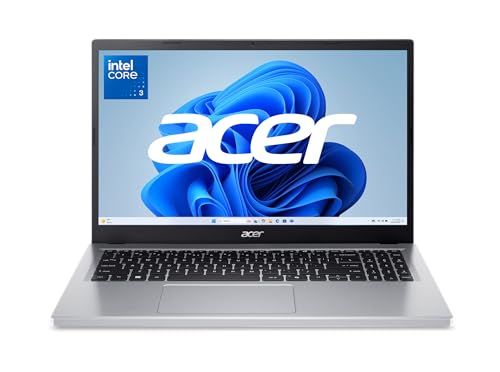
1. Acer Aspire Go 15 — Best Overall
Specs: 15.6″ FHD IPS (1920×1080); Intel Core i3-N305 (8 cores, up to 3.8GHz); 8GB LPDDR5 RAM; 128GB UFS storage; Wi-Fi 6; Windows 11 Home in S mode; 3.9 lb. Price checked November 2026: $299.99 on Amazon (list $391.99; the same config has sold for $259.99).
The Aspire Go 15 is the only laptop here that clears every bar: a real eight-core processor, 8GB of fast LPDDR5 memory, and a Full HD IPS screen. The Core i3-N305 is a genuine step up from the quad-core N-series chips in the other Windows picks, and Notebookcheck’s review of this exact model rated it 81%.
The honest caveats: the 128GB of storage is UFS, not a proper SSD, and it is soldered to the board along with the RAM — no upgrades, ever. Windows 11 ships in S mode, which only allows apps from the Microsoft Store; switching out is free and takes a minute in Settings. At 3.9 lb it is the heaviest laptop here, and the price moves between $259.99 and $299.99.
Pros: Strongest CPU under $300; 8GB LPDDR5; Full HD IPS screen; Wi-Fi 6; 81% Notebookcheck rating.
Cons: 128GB UFS, not an SSD; RAM and storage soldered; ships in Windows 11 S mode; 3.9 lb.
Best for: A student who wants one Windows laptop to do everything — essays, research, video calls, and a dozen tabs.
2. Lenovo IdeaPad 1 15IJL7 — Best Cheapest Windows Laptop
Specs: 15.6″ FHD (1920×1080); Intel Celeron N4500 (dual-core, up to 2.8GHz); 8GB DDR4 RAM; 128GB SSD + 128GB eMMC; Wi-Fi 6; Windows 11 Home; 1 year of Office 365 included; 3.4 lb. Price checked November 2026: $219 on Amazon (list $299).
At $219, the IdeaPad 1 is the cheapest real Windows laptop here. The good news: 8GB of RAM, a Full HD screen, and a genuine 128GB SSD alongside 128GB of eMMC. It also includes a year of Office 365, worth about $70.
The bad news is the processor. The Celeron N4500 is a dual-core chip from 2021, the slowest CPU here by a clear margin. One app at a time it is fine; a browser with twelve tabs plus a video call plus Word will make it hesitate.
Pros: $219 — cheapest Windows pick; 8GB RAM; Full HD screen; 256GB total storage; a year of Office 365 included.
Cons: Dual-core Celeron N4500 is the slowest CPU here; half the storage is slow eMMC.
Best for: A student on the tightest budget who works mostly one app at a time and wants full Windows and Office included.
3. HP 14-dq6015dx — Best 14-Inch Windows Laptop
Specs: 14″ HD (1366×768) anti-glare, 250 nits; Intel Processor N150 (quad-core, up to 3.6GHz); 8GB DDR4 RAM; 128GB UFS storage; Wi-Fi 6; Windows 11 Home; 3.24 lb. Price checked November 2026: $269.99 (the 16GB configuration costs $379.99).
The HP 14 is the portability pick: a 14-inch laptop at 3.24 lb that fits in a small bag. The Intel N150 is a proper quad-core chip — a clear step up from the dual-core Celeron in the IdeaPad 1.
The trade-off is the screen: a 1366×768 HD panel at 250 nits with about 62.5% sRGB coverage — softer text and duller colors than the Full HD IPS screens on the Acer and the Lenovo. Check the listing: HP sells this model number in 4GB, 8GB, and 16GB configurations, and the 16GB version costs $379.99. The $269.99 price is for the 8GB model only.
Pros: Lightest Windows pick at 3.24 lb; quad-core N150; 8GB RAM; Wi-Fi 6.
Cons: 1366×768 HD screen is the weakest display here; 250 nits is dim for bright rooms; three RAM configurations share one model number.
Best for: A student who carries a laptop all day and values weight over screen sharpness.
4. ASUS Chromebook CM14 — Best Chromebook
Specs: 14″ FHD (1920×1080) anti-glare; MediaTek Kompanio 520 (octa-core ARM); 4GB LPDDR4X RAM; 64GB eMMC storage; Wi-Fi 6; ChromeOS; MIL-STD-810H ruggedized; 15-hour claimed battery life; 3.1 lb; updates through June 2033. Price checked November 2026: $199.98 on Amazon (list $279.99).
The CM14 is the cheapest laptop here and, for the right student, the smartest buy. ChromeOS changes the math: 4GB of RAM is genuinely fine, 64GB of eMMC is livable because almost everything lives in Google Drive, and the Full HD anti-glare screen beats the HP 14’s display at $70 less. It is ruggedized to MIL-STD-810H, with up to 15 hours of claimed battery. At 3.1 lb it is the lightest machine here, and updates run through June 2033.
The catch is ChromeOS itself. If your classes need full Windows desktop software — SPSS, AutoCAD, Adobe desktop apps, or a proctored exam browser — this laptop cannot run it, at any price. Check your school’s software requirements first.
Pros: $199.98 — cheapest pick; Full HD anti-glare screen; MIL-STD-810H rugged build; 15-hour claimed battery; updates through June 2033; lightest at 3.1 lb.
Cons: ChromeOS cannot run Windows desktop software; 4GB RAM limits multitasking; 64GB eMMC fills fast.
Best for: A student whose classes live in Google Docs, Canvas, and the browser — and who wants the toughest laptop under $300.
5. HP Chromebook 14a-nf0099nr — Best Chromebook with 8GB
Specs: 14″ HD (1366×768) micro-edge anti-glare; Intel Processor N100 (quad-core, up to 3.4GHz); 8GB LPDDR5 RAM; 128GB UFS storage; Wi-Fi; ChromeOS; actively cooled with a fan; ~12-hour battery; updates through June 2033. Price checked November 2026: $289.90 (list $389.99).
The HP Chromebook 14a is the Chromebook for a student who wants the most headroom. The Intel N100 is a quad-core chip a clear step up from the Celeron chips that used to define this tier, and this is one of only two Chromebooks under $300 with 8GB. The 128GB of UFS storage is faster than the eMMC in the ASUS CM14, and the fan-cooled N100 holds its speed through a long video call plus a full row of tabs. Battery runs about 12 hours, and updates run through June 2033.
The weakness is the screen: 1366×768 HD, the softest display among the Chromebooks here. The ASUS CM14 gives you a Full HD panel for $90 less; what the HP gives you in return is double the RAM, a faster chip, and faster storage.
Pros: 8GB RAM — rare under $300; quad-core N100 with a cooling fan; 128GB UFS storage; 12-hour battery; updates through June 2033.
Cons: 1366×768 HD screen; price swings $290–$320 by seller; ChromeOS cannot run Windows software.
Best for: A Chromebook student who keeps many tabs open and wants the most capable ChromeOS machine under $300.
What to Avoid
4GB of RAM or 64GB of eMMC on a Windows laptop. Windows 11 takes close to 3.5GB before you open anything, so a 4GB machine is a frustration machine, not a study machine. A 64GB eMMC drive leaves about 20GB free after Windows and a few apps — one semester of files, then you are deleting things to install updates. On a Chromebook 64GB is workable; on Windows it is not.
TN panels and 1366×768 screens sold as “HD.” A 1366×768 TN panel is the cheapest screen a manufacturer can fit, and it shows: washed-out colors, narrow viewing angles, and soft text. Two of our picks carry HD screens — but if a laptop’s only selling point is its price, walk away.
No-name brands with big spec sheets. Listings for brands you have never heard of promise 16GB of RAM and 512GB of storage for $250, usually with a 2019 Pentium or Celeron chip and no warranty.
“Refurbished” with no grade and no warranty. A refurbished ThinkPad or Latitude can be the best laptop under $300 — an 8th-gen Core i5 with 8GB and a 256GB SSD beats every new machine here on build quality. But only buy from a seller that states the grade and a warranty of at least 90 days.
Windows 11 in S mode, unmentioned. Several sub-$300 laptops ship in S mode, which blocks apps outside the Microsoft Store. Switching out is free, but only if you know to do it.
FAQs
Is a $300 laptop good enough for college?
For most majors, yes. Essays, research, spreadsheets, video calls, and browser-based learning platforms all run fine on an 8GB Windows laptop or a 4GB Chromebook. Exceptions are engineering, architecture, data science, and video production — those students should look at the best laptop for college students under $700.
Should I buy a Windows laptop or a Chromebook under $300?
Buy Windows if any class needs desktop software — Office, SPSS, a proctored exam browser, or anything your school lists as Windows-only. Buy a Chromebook if your classes live in Google Docs, Canvas, and the browser: you get a better screen, longer battery, and a tougher build.
Can a $300 laptop handle Zoom and Teams calls?
Yes. Every pick here handles video calls, but the dual-core Celeron in the IdeaPad 1 will stutter if you share your screen with a dozen tabs open. The fan-cooled N100 in the HP Chromebook 14a is the smoothest video-call machine here.
Should I buy refurbished instead?
A refurbished business laptop — a ThinkPad T480 or a Latitude 5400 — can give you a better keyboard, a better screen, and a sturdier body than any new $300 laptop. Buy only from a seller that states the grade and offers at least a 90-day warranty.
Verdict
The best laptop for college students under $300 is the Acer Aspire Go 15 at $299.99: the only machine here with an eight-core processor, 8GB of fast RAM, and a Full HD IPS screen. If $300 is already a stretch, the Lenovo IdeaPad 1 at $219 is the cheapest honest Windows laptop. If your classes live in the browser, the ASUS Chromebook CM14 at $199.98 is the best value — a tougher build, a sharper screen, and seven years of updates — and the HP Chromebook 14a at $289.90 is the Chromebook to buy if you want 8GB of RAM and a fan-cooled N100.
Spend the money on RAM and screen first: a $300 laptop with 8GB and a Full HD panel will carry you through four years; a $250 laptop with 4GB and a dim HD screen will cost you a semester of frustration.
As an Amazon Associate, we earn from qualifying purchases.
Suggested internal links
- Best Laptop for College Students Under $700
- Best Laptop for Students Under $500
- Best Chromebook Under $300
More from Amazon
Programs that pair well with the guide above. Offers and eligibility are set by Amazon and may change.
A free business account with business pricing and bulk-buying tools for work, shop or home office.
Create a business accountFree shipping on eligible items, Prime Video and more. Eligible new members can start with a free trial.
Start a Prime free trialAudiobooks and podcasts to listen to on the go. Eligible new members can start with a free trial.
Try Audible freeAd-free music streaming. Eligible new subscribers can start with a free trial.
Try Music Unlimited freeAs an Amazon Associate we earn from qualifying purchases.










Write Your Review
No reviews yet. Be the first to share your experience!