

Our Top Picks
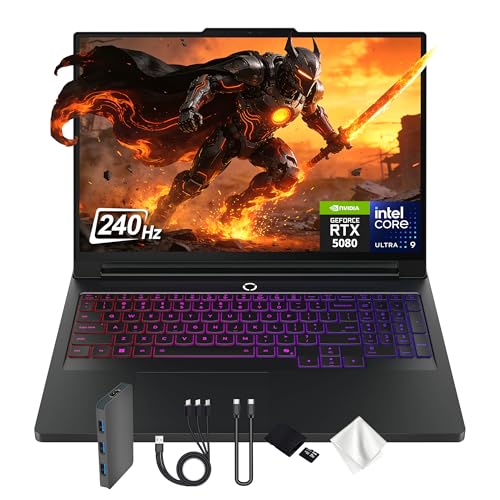 Lenovo Legion Pro 7i 16" WQXGA 240Hz Gaming32GB DDR5 | 1TB SSD22 x 14 x 3 inches12 PoundsCheck on Amazon
The Lenovo Legion Pro 7i is a 16-inch, high-end gaming laptop, and both Amazon listings reviewed here pair an Intel Core Ultra 9 275HX processor with an RTX 5080 graphics card, Windows 11 Pro and a 240Hz WQXGA screen. That is a short list of products, and it shapes what this page can honestly be: a close comparison of two listings for the same laptop family, plus a guide to the details in each title that do not add up yet, not a ranking of many rivals.
Everything below comes from the listing titles, published specifications and general buying knowledge. Nobody on the team has handled either laptop, so there are no statements about fan noise, battery life, keyboard feel or frame rates. Where a title is silent, the text says “check the listing”.
What the two titles actually state

Lenovo Legion Pro 7i Gen 10 w/ Ultra 9, NVIDIA GeForce RTX 5080, 16” OLED | Gaming Laptop with Intel Core Ultra 9 275HX 24C, 16GB, 32GB RAM, 1TB Gen 5 NVMe SSD, WQXGA 500 nits 240Hz, Windows 11 Pro


As an Amazon Associate we earn from qualifying purchases. Product prices and availability are accurate as of the date/time indicated.
Lenovo Legion Pro 7i 16" WQXGA 240Hz Gaming Laptop, Intel Core Ultra 9 275HX, GeForce RTX 5080 GDDR7, 32GB DDR5, 2TB Storage (1TB PCIe SSD&1TB Docking Station), Backlit Keyboard, Win 11 Pro, Black
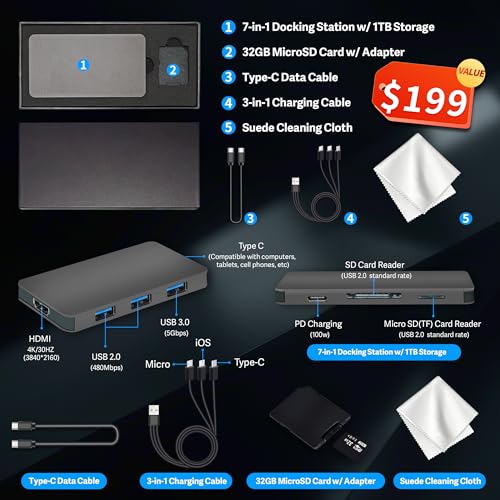


As an Amazon Associate we earn from qualifying purchases. Product prices and availability are accurate as of the date/time indicated.
| Detail | Listing A (Gen 10, OLED) | Listing B (docking-station storage) |
|---|---|---|
| Generation label | Gen 10 | Not stated |
| Processor | Intel Core Ultra 9 275HX, 24 cores | Intel Core Ultra 9 275HX |
| Graphics | NVIDIA GeForce RTX 5080 | GeForce RTX 5080, GDDR7 |
| Display | 16″ OLED, WQXGA, 500 nits, 240Hz | 16″ WQXGA, 240Hz (panel type not stated) |
| Memory | “16GB, 32GB RAM” (ambiguous) | 32GB DDR5 |
| Storage | 1TB Gen 5 NVMe SSD | “2TB”: 1TB PCIe SSD plus 1TB docking station |
| Operating system | Windows 11 Pro | Windows 11 Pro |
| Other | None named | Backlit keyboard, black finish |
Both titles are seller-written, and they use different habits. Listing A packs in panel brightness and the storage generation; listing B gives the memory type and a bigger storage headline. Neither gives weight, battery capacity, port selection or cooling details.
Who this laptop is for, and who should look elsewhere
A Core Ultra 9 and an RTX 5080 in a 16-inch chassis is a flagship pairing. On paper it targets players who want high settings at a QHD-class resolution without carrying an 18-inch machine, creators who need a powerful processor and graphics card for rendering or video, and people who want one machine to replace a desktop and a laptop.
It is a better fit for you if:
- you want strong graphics at 2560×1600 and the budget to match;
- you value a fast 240Hz panel and are willing to confirm which type of panel is in the box;
- you will mostly use the laptop plugged in, at a desk, with room for the power adapter.
You should look elsewhere if:
- you need long battery life away from a wall outlet, since high-end gaming laptops generally draw a lot of power under load and the titles state no battery figures;
- your games are mostly esports titles at 1080p, where a lower graphics tier reaches the same frame rates for far less;
- you want a thin, quiet office machine that also plays the occasional game.
Three details in the titles that need checking
“16GB, 32GB RAM” in listing A
The title lists two memory figures back to back. The most natural reading is that 16GB refers to video memory on the graphics card and 32GB to system memory, but a title should not make you guess. It could equally be a typing error. Before you buy, confirm the system RAM on the product page and, if it matters to you, the video memory of the RTX 5080 laptop part.
“2TB” with a docking station in listing B
The second title splits its 2TB into a 1TB internal drive and a 1TB docking station. A docking station is normally an external accessory, so this storage may only be available while the accessory is connected. For a laptop you carry, count the internal drive as 1TB and consider the rest a bonus. Ask what the accessory is, whether it needs separate power and what warranty applies to it.
OLED and brightness, versus 240Hz with no panel type
Listing A says OLED and 500 nits; listing B omits the panel technology. Do not assume the two panels are identical. OLED screens are valued for deep black levels and color, while many gaming LCDs are valued for brightness and for being free from burn-in concerns; either way, the panel type is a purchase-relevant detail that listing B does not confirm. Look for it on the manufacturer’s page for the exact model code.
What a Core Ultra 9 and an RTX 5080 mean on paper
Naming conventions give a rough class. The “HX” suffix on Intel’s mobile chips usually marks the high-performance line, and “Ultra 9” sits at the top of that family. The RTX 5080 name places the graphics card in the upper tier of its generation. Together they point to a laptop designed to avoid being the bottleneck in most current games and creative tasks.
What the names cannot tell you is how the manufacturer tuned the laptop. Laptop graphics cards can run at very different power limits, and a chassis with strong cooling can sustain higher clocks than a thinner one with the same card. That is why two laptops with matching component names can post different frame rates. The honest summary: expect top-tier hardware, check for third-party performance data on this exact model, and do not treat the component names as a measured result.
The display in context
WQXGA means 2560×1600, a 16:10 shape that gives more vertical room than a 16:9 screen. That is about 4.1 million pixels, nearly twice the roughly 2.1 million pixels of a 1080p screen. As a labeled estimate, assume a game that runs at 200 frames per second at 1080p. Because the graphics card now has about twice as many pixels to draw, a rough expectation is somewhere around 110 to 150 frames per second at 2560×1600, though the real figure varies by title and by how processor-bound the game is. The 240Hz refresh rate then matters most in fast competitive games that can reach very high frame rates; in heavy single-player games you may sit well below 240 frames per second and gain more from adaptive refresh than from the raw number.
Against the previous generation
Listing A labels itself Gen 10, which tells you it belongs to a numbered line, but neither title explains what changed from the generation before. The safest approach is to treat the generation label as a model-year marker, then compare the same four things against any discounted earlier model: processor family, graphics card tier, display type and memory capacity. If the earlier machine has the same screen and a lower graphics tier, the saving should be large to be worth it.
How it stacks up against rival gaming laptops
No rival models are listed in this set, so a model-by-model comparison would require outside facts that the titles do not give. A better use of space is a method. When you compare any other flagship 16-inch gaming laptop, line up five things: the graphics card tier and wattage, the processor family, the display type and refresh rate, the memory and storage that are actually internal, and the length and terms of the warranty. If a competing listing matches these five on paper, the decision moves to price, build quality and reviews written by owners.
Value: how to think about the price without quoting one
Both listings sit at the premium end of any sensible price ladder, and prices for laptops like this move often, so this page leaves out figures. What you can do is judge value by what you are paying extra for. If listing A costs more than listing B, the difference should buy you something you can name: the OLED panel, the faster drive generation, the clearer model labeling. If listing B costs more, the difference is mostly the docking-station accessory and the larger headline capacity, which is only worth paying for if you will use a desk and will not miss it on the road.
A useful trick is to price the pieces yourself. Look up what a 1TB internal drive costs separately and what a comparable external drive or dock costs, then see whether the bundle is a bargain or a markup. Add a realistic allowance for a protective sleeve and an extended warranty if you want one, and compare totals instead of sticker prices.
Power, heat and desk setup
A laptop that pairs a top-tier processor with a top-tier graphics card is built around a large power adapter and an active cooling system. The titles say nothing about adapter wattage, so check it on the product page. Use only the supplied or manufacturer-approved charger, place the laptop on a hard, flat surface so the vents can breathe, and avoid using it on bedding or a lap while gaming. Follow the manufacturer’s instructions for ventilation, cleaning dust from the vents and battery care.
If you game for hours at a time, a stand that lifts the rear of the chassis, an external keyboard and mouse, and a monitor on a separate arm will keep your hands and neck away from the warmest parts. That setup also happens to be the one where the docking-station style of storage in listing B is most useful.
The two listings in detail
Listing A: Legion Pro 7i Gen 10 with OLED, Core Ultra 9 275HX and RTX 5080
This is the more detailed of the two titles. It names the generation, the OLED panel, the brightness, the storage generation and the operating system. It suits a shopper who wants the OLED screen and a fast internal drive and is ready to confirm the memory figure.
- Pros: OLED panel named; 500 nits brightness stated; a Gen 5 NVMe drive named, which is a faster interface class than older drives; Gen 10 label gives a clearer line of descent.
- Cons: the memory wording is ambiguous; only 1TB of storage; no keyboard or finish details; the title uses a long keyword string, a common sign of a seller-edited listing.
Listing B: Legion Pro 7i with 32GB DDR5 and “2TB” storage
This one is cleaner on memory and flashier on storage, but quieter on the screen. It suits a shopper who works at a desk with accessories and does not mind verifying the display type.
- Pros: 32GB DDR5 stated plainly; a backlit keyboard named; 1TB internal SSD named; GDDR7 graphics memory type named.
- Cons: the docking-station storage may be external; panel technology not named; no generation label; a possible price premium for an accessory you may not need.
Alternative routes if neither listing fits
Because the shortlist holds only these two products, the alternatives below are approaches, not named models. Use them to decide what to search for next.
Step down one graphics tier in the same class of laptop
If your main target is 1080p or 1200p play, a laptop with a lower graphics tier from the same family may be enough, and the savings can fund a better warranty or an external monitor.
- Pros: lower purchase price; often lower heat and noise; the same overall experience at lower resolutions.
- Cons: less headroom for demanding new games at 2560×1600; weaker resale value in a few years.
Move up to an 18-inch performance laptop
Larger chassis tend to offer more cooling room, which can sustain higher power limits, and bigger screens suit desk setups.
- Pros: more cooling capacity in principle; larger screen.
- Cons: heavier and harder to carry; a higher price tier; many 18-inch laptops are desk machines in practice.
Pair a cheaper laptop with a desktop
If you only game at home, putting the money into a desktop for games and a lightweight laptop for travel can deliver more performance per dollar.
- Pros: desktop parts are easier to cool, upgrade and repair; a light laptop is nicer to carry.
- Cons: two machines to maintain; a desktop needs a monitor and peripherals; you lose the one-device simplicity.
Questions to ask before you buy
- What is the exact system RAM? Settle the “16GB, 32GB” wording on the product page.
- Is the extra storage inside the laptop? If it is a docking station, find out whether it needs its own power adapter and where it connects.
- Which panel is it? Confirm OLED or not, brightness and refresh rate for the exact model code.
- Who is the seller, and what does the warranty cover? A flagship laptop deserves a clear manufacturer warranty and a return window long enough to check the screen for dead pixels.
- What adapter ships with it? Use the supplied charger, keep vents clear, and follow the manufacturer’s instructions on power and ventilation, since a laptop of this class can run hot under load.
- Does the price make sense against the other listing? Compare both side by side before deciding that the accessory or the OLED panel is worth the difference.
A buying checklist with a worked example
| Spec concept | What to look for | Why it matters |
|---|---|---|
| System memory | 32GB stated unambiguously | Prevents buying on a typo |
| Internal storage | 1TB or more inside the chassis | External capacity does not travel |
| Display type | OLED or LCD, with brightness in nits | Changes contrast, color and burn-in considerations |
| Graphics power | The wattage figure on the manufacturer page | Same card name, different performance |
| Warranty | Terms, length, who services it | High-end laptops are costly to repair |
Here is a worked example with stated assumptions. A player keeps eight large games installed at an average of 100GB each, which is 800GB. Windows, updates and applications add 150GB, and a few hours of recorded clips add 100GB. The total is about 1,050GB. A 1TB internal drive, as in both listings, is already full once formatting overhead is counted, so you will uninstall titles or add a second drive. If listing B’s second terabyte lives in an external docking station, you can keep the clips and older games there while the laptop sits at your desk. When you travel, you are back to 1TB. That is the real value of the “2TB” headline: useful at home, not on the road. Check for a second internal M.2 slot, because that, not the headline number, solves the problem for good.
Verdict
On paper, both Legion Pro 7i listings describe a flagship 16-inch gaming laptop with the same processor and graphics card. If the OLED screen and the Gen 5 internal drive matter most, listing A is the more specific bet, provided you confirm the memory. If you value clear memory wording and use a desk with an extra storage accessory, listing B can work, provided you confirm the panel and the nature of the docking station. Neither title substitutes for the product page, the warranty terms or independent performance data, and both belong at the top of the price range, so only buy if the budget is comfortable and the return window is generous.
Related guides
Frequently asked questions about the Legion Pro 7i
Is the Lenovo Legion Pro 7i good for gaming?
On paper, yes. Both listings pair an Intel Core Ultra 9 275HX with an RTX 5080 and a 16-inch 2560×1600, 240Hz screen, which is a flagship combination aimed at high settings at that resolution. Real performance depends on the game, cooling and the graphics power limit, none of which the titles state, so look for independent frame-rate data for the exact model before relying on it.
What does ’16GB, 32GB RAM’ mean in the Gen 10 listing?
The title is ambiguous. The most natural reading is 16GB of video memory on the graphics card and 32GB of system memory, but it could also be an error. Do not assume; open the product page or the manufacturer’s specification sheet for the model code and confirm the system RAM before you order. If the page cannot answer it, ask the seller.
Is the 2TB storage in the second listing all inside the laptop?
Probably not. The title describes 1TB of SSD plus a 1TB docking station, and a docking station is normally an external accessory. That means the second terabyte may only work while the accessory is connected. Count the internal drive as 1TB, and ask the seller what the accessory is, how it connects, whether it needs its own power supply and what warranty covers it, so you know what you are really getting for the headline figure.
Does the Legion Pro 7i have an OLED screen?
The listing that names the Gen 10 model says 16-inch OLED with 500 nits and 240Hz. The other listing gives WQXGA and 240Hz but does not name the panel type. Different listings can describe different configurations, so verify the display on the product page for the exact model code and do not assume the two screens are the same. Brightness, panel type and refresh rate should all be stated clearly before you order a laptop at this price tier.
Is 240Hz worth it on a 2560×1600 laptop screen?
It helps most in fast competitive games that can reach very high frame rates. At 2560×1600 a demanding single-player game may run well below 240 frames per second, so the benefit shows up more as smoothness with adaptive refresh than as a raw number. If you mainly play slower, graphics-heavy games, 240Hz is nice to have but not the deciding feature.
Should I buy the Legion Pro 7i or a cheaper laptop?
It depends on resolution and budget. If you play at 1080p, a laptop with a lower graphics tier will often reach comparable frame rates for less money. The Legion Pro 7i listings make more sense if you want strong graphics at 2560×1600, a fast screen and a powerful processor for creative work. Set a firm budget first, then compare warranties, return windows and what each seller includes in the box.




Write Your Review
No reviews yet. Be the first to share your experience!