

Our Top Picks
Two listings carry the name ASUS ROG Strix G18, and they are not the same laptop. One pairs an Intel Core i9 14900HX with an RTX 5070 and an 18-inch FHD+ 144Hz screen. The other, model G815LR-DB96, uses an Intel Core Ultra 9 290HX Plus with an RTX 5070 Ti and a 2.5K 300Hz ROG Nebula display. A third listing, the ROG Strix SCAR 18, steps up again to an RTX 5080 and 2TB of storage. Choosing between them is mostly a question of screen, graphics tier and budget.
The Editorial team wrote this article from published specifications, manufacturer documentation and buyer reviews. Nobody on the team has handled these machines, so you will not find noise readings, battery runtimes or frame-rate charts. What you will find is a careful reading of each title, including a typo, a missing operating system and a few claims that deserve a second look.
The three listings side by side

ASUS ROG Strix G18 (2025) Gaming Laptop, 18” FHD+ 16:10 144Hz/3ms Display NVIDIA® GeForce RTX™ 5070, Intel® Core™ i9 Processor 14900HX, 32B DDR5-5600, 1TB PCIe Gen 4 SSD, Wi-Fi 7


As an Amazon Associate we earn from qualifying purchases. Product prices and availability are accurate as of the date/time indicated.

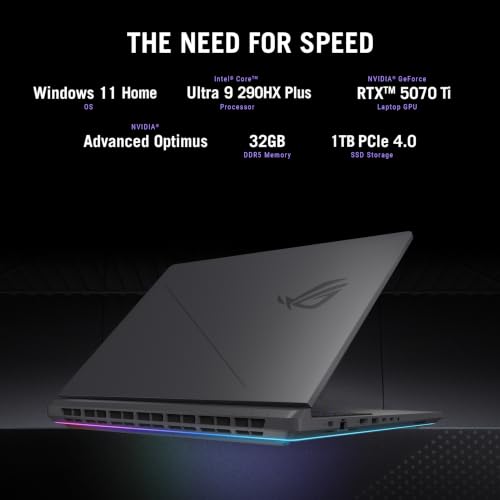
ASUS ROG Strix G18 Gaming Laptop, 18” ROG Nebula Display 16:10 2.5K 300Hz/3ms, NVIDIA GeForce RTX 5070 Ti, Intel Core Ultra 9 290HX Plus, 32GB DDR5, 1TB PCIe Gen4 SSD, Wi-Fi 7, Win11 Home, G815LR-DB96



As an Amazon Associate we earn from qualifying purchases. Product prices and availability are accurate as of the date/time indicated.

ASUS ROG Strix SCAR 18 (2025) Gaming Laptop, 18” ROG Nebula HDR 16:10 2.5K 240Hz/3ms, NVIDIA® GeForce RTX™ 5080, Intel® Core™ Ultra 9 275HX, 32GB DDR5-5600, 2TB PCIe Gen 4 SSD, Wi-Fi 7, Windows 11 Pro






As an Amazon Associate we earn from qualifying purchases. Product prices and availability are accurate as of the date/time indicated.
| Model | Key points from the title | Price tier | Best for |
|---|---|---|---|
| ROG Strix G18 (core i9 listing) | 18″ FHD+ 16:10 144Hz/3ms, RTX 5070, Core i9 14900HX, DDR5-5600, 1TB PCIe Gen 4 SSD, Wi-Fi 7 | Mid-range | Large-screen gaming at the lowest price in this set |
| ROG Strix G18 (G815LR-DB96) | 18″ ROG Nebula 16:10 2.5K 300Hz/3ms, RTX 5070 Ti, Core Ultra 9 290HX Plus, 32GB DDR5, 1TB Gen4 SSD, Wi-Fi 7, Win11 Home | Premium | A sharper, faster screen and a stronger GPU |
| ROG Strix SCAR 18 | 18″ ROG Nebula HDR 16:10 2.5K 240Hz/3ms, RTX 5080, Core Ultra 9 275HX, 32GB DDR5-5600, 2TB Gen 4 SSD, Wi-Fi 7, Windows 11 Pro | Premium (highest graphics tier) | Buyers who want the top GPU and 2TB |
Tiers are relative within these three listings only. The two premium entries sit close together on price, so check current prices before comparing.
Who the G18 suits, and who should skip it
An 18-inch gaming laptop is a desk-first machine. If you want a large 16:10 canvas that doubles as a work and study computer, and you can accept the weight and the power adapter that come with high-end parts, the G18 is a reasonable fit. It makes the most sense when you already know that a standard 15 or 16-inch screen feels cramped, or when you want one device to replace both a laptop and a small desktop.
Several buyers should hesitate:
- Commuters and frequent flyers. Bigger screens mean bigger chassis, larger bags and heavier adapters. Check the listing for the actual weight.
- Budget-minded shoppers. All three listings are in the high-end range. The best ASUS laptops by use case guide covers a wider price spread if you are still deciding on a budget.
- Quiet-room users. High-power laptop chips produce heat, and cooling fans can be loud under sustained load. That is a category trait, not a measurement of this model.
- Creative professionals who need accurate colour. The titles mention FHD+ and 2.5K resolutions and one mentions HDR, but they do not state colour coverage or calibration.
What the titles say, and what they leave out
The first G18 title is generous with specifics: 18-inch FHD+ 16:10, 144Hz and 3ms, an RTX 5070, a Core i9 14900HX, DDR5-5600, a 1TB PCIe Gen 4 SSD and Wi-Fi 7. The second adds the model code G815LR-DB96, names the display (ROG Nebula, 2.5K, 300Hz), the GPU (RTX 5070 Ti), the processor (Core Ultra 9 290HX Plus), 32GB of DDR5, 1TB, Wi-Fi 7 and Windows 11 Home.
Three details need caution:
- The typo. The first listing says “32B DDR5-5600”. That is almost certainly meant to be 32GB, but the title does not say so, and we cannot confirm it from the title alone. Verify the memory size on the product page.
- The missing operating system. The first title does not name an operating system, while the second says Windows 11 Home and the SCAR says Windows 11 Pro. Ask whether Windows is installed.
- The year in parentheses. The first title and the SCAR title include a model-year marker, and the second does not. Model years can mean different things to different sellers, so rely on the model code, not the year.
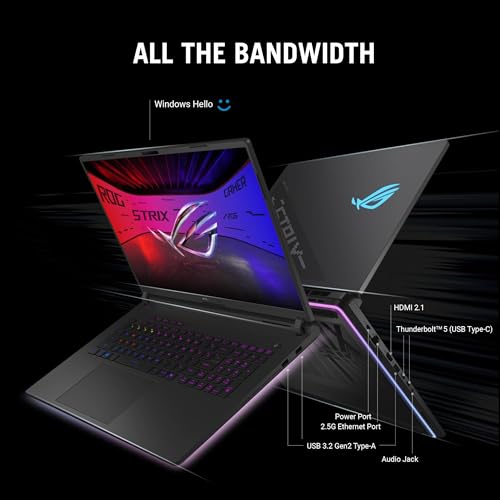
Titles also leave out the graphics power limit, battery size, adapter wattage, port selection, weight, keyboard details and warranty. Those matter at this price. All of the spec claims in the titles are seller claims, so confirm them against manufacturer documentation.
Questions to ask before you buy
- Which exact model code is the first listing, and what does the manufacturer’s page say about its memory and operating system?
- Who is the seller, and is the manufacturer warranty honored?
- Is a 300Hz 2.5K panel worth a premium over a 144Hz FHD+ one for the games I play?
- What is the adapter wattage, and is it in the box?
- How much RAM and storage can be added later?
- What is the return window for opened laptops?
The two G18 listings
ASUS ROG Strix G18 with RTX 5070 and Core i9 14900HX
This is the lower-cost entry. It combines a high-end Core i9 14900HX, an RTX 5070, DDR5-5600 memory, a 1TB Gen 4 SSD, Wi-Fi 7 and an 18-inch 16:10 FHD+ display at 144Hz with a 3ms response claim. The processor name belongs to an earlier Intel naming generation than the Core Ultra chips on the other two listings. That does not make it slow, but it does mean you should compare current benchmarks and buyer feedback instead of assuming it will fall short.
The display is the trade-off. FHD+ on an 18-inch panel is a gentle pixel density, so text and edges look less sharp than on a 2.5K panel, and 144Hz is a modest refresh rate next to the 240 and 300Hz options. In return, the graphics card has fewer pixels to draw, which can help frame rates at native resolution. If you want the largest screen at the lowest price in this group, it deserves attention, as long as the memory size and operating system are confirmed.
- Pros: lowest price tier in the set, RTX 5070 graphics, Wi-Fi 7, 1TB Gen 4 SSD.
- Cons: “32B” typo creates doubt about the RAM size, no operating system in the title, lower refresh rate and resolution than the other two, no model code stated.
- Check the listing for: memory size, operating system, battery capacity, warranty.
- Question to ask: will an FHD+ 144Hz panel feel like a downgrade on an 18-inch screen?
ASUS ROG Strix G18 G815LR-DB96
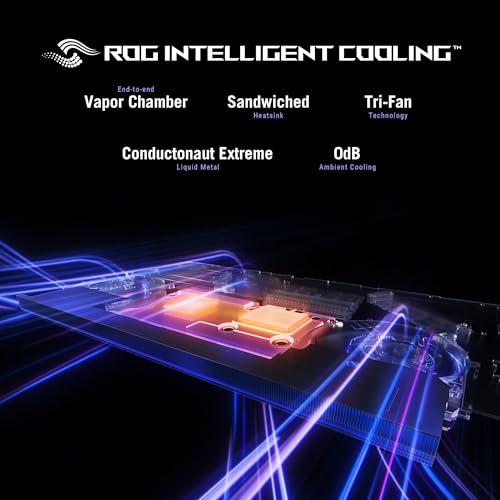
The second listing moves up in every visible way: an RTX 5070 Ti, a Core Ultra 9 290HX Plus, a 2.5K ROG Nebula display at 300Hz, 32GB of DDR5, 1TB of storage, Wi-Fi 7 and Windows 11 Home. A model code on the title is a practical advantage because it lets you look up the exact configuration on the manufacturer’s site and compare it against documentation.
The 300Hz panel is the headline, and it is worth asking whether it helps your games. A high refresh rate rewards fast shooters and other competitive titles that can reach very high frame rates. Graphically demanding single-player games often run well below that at 2.5K, in which case the panel’s top speed is rarely reached. The sharper resolution still benefits text and detail every day.
- Pros: RTX 5070 Ti, 2.5K 300Hz Nebula display, 32GB RAM, model code and operating system named.
- Cons: premium price tier, 1TB storage only, close in price to the SCAR 18 listing.
- Check the listing for: power limit of the graphics chip, adapter wattage, warranty, ports.
- Question to ask: is the price gap to the SCAR 18 small enough to justify going up to the RTX 5080 and 2TB?
The alternative from this set
ASUS ROG Strix SCAR 18
Only one other laptop appears in this group of listings, so it is the one to compare. The SCAR 18 title lists an 18-inch ROG Nebula HDR 16:10 2.5K 240Hz display, an RTX 5080, a Core Ultra 9 275HX, 32GB of DDR5-5600, a 2TB Gen 4 SSD, Wi-Fi 7 and Windows 11 Pro. Compared with the G18 G815LR-DB96, it steps up the graphics tier and doubles the storage, but it lowers the refresh rate from 300Hz to 240Hz and appears to name a lower-tier processor (275HX rather than 290HX Plus). Both are premium-tier laptops, and their prices are close.
The titles do not explain what separates the SCAR line from the G line in build, cooling or keyboard, so treat that as a question for the manufacturer’s documentation. Windows 11 Pro rather than Home may matter if you need features such as remote desktop hosting.
- Pros: RTX 5080, 2TB SSD, HDR mentioned, Windows 11 Pro.
- Cons: premium price tier, 240Hz rather than 300Hz, the title includes a model-year marker rather than a model code.
- Check the listing for: exact model code, HDR details, power limit, warranty.
If you want to look beyond ASUS, the Acer versus Asus comparison and the ASUS versus HP comparison help you place these laptops against the competition. Those comparisons use other products than the ones listed here.
What an 18-inch gaming laptop changes day to day
The extra screen area is the obvious upside: two windows side by side feel less cramped, and the 16:10 shape gives more vertical room for documents, spreadsheets and timelines than a 16:9 panel of the same width. The costs are less obvious until the laptop arrives.
- Space. Measure your desk and your bag. An 18-inch chassis can overhang a small desk, and ordinary laptop sleeves will not fit. Look for the dimensions on the product page.
- Weight. Between the laptop and a high-wattage adapter, the total you carry can be considerable. Check the listing for both figures.
- Heat and noise. High-performance processors and graphics chips need robust cooling. Expect fan noise under load, and leave room around the vents.
- Battery habits. Gaming on battery is rarely a good idea with this class of hardware, because performance is usually reduced and the charge drains quickly. Treat the laptop as a plug-in machine.
- Peripherals. A good mouse and a headset matter more than they seem, because the laptop speakers and trackpad will not match the hardware inside.
Mistakes buyers make with listings like these
Pricey laptop listings attract a few predictable errors. Avoid them and you will save yourself a return.
- Trusting a title without a model code. One of the two G18 listings has no model code, which makes it harder to match to documentation. Ask for it.
- Treating a typo as a detail. “32B” may be harmless, but it could also signal careless listing work. Check that the rest of the title matches the product page.
- Paying for refresh rate you cannot use. A 300Hz panel is a premium feature. If you play heavy single-player games, put the money into the graphics tier or storage.
- Forgetting storage. A 1TB drive sounds large but fills quickly with several big games. The SCAR 18 listing is the only one here with 2TB.
- Ignoring service terms. The more a laptop costs, the more painful a slow repair is. Ask how claims are handled.
- Chasing the biggest number. An RTX 5080 does not help if the games you play are limited by the processor or by a modest screen. Match the parts to the way you play.
Buying checklist, with a worked example
| Spec concept | What to look for | Why it matters |
|---|---|---|
| Display | Resolution, refresh rate, panel type, HDR claim | Sets both image quality and the frame rate your GPU must chase |
| GPU tier | RTX 5070, 5070 Ti or 5080, plus the power limit | The biggest driver of game performance |
| RAM | Confirmed size, speed, upgrade path | The “32B” typo is a reminder to verify |
| Storage | 1TB or 2TB, spare slot | Large game libraries fill 1TB quickly |
| Operating system and service | Windows edition, warranty terms | Missing from some titles |
Worked example: what does the extra resolution cost the GPU?
This uses typical panel resolutions as assumptions, because the titles give names, not pixel counts. An 18-inch 16:10 FHD+ panel is usually 1920×1200, or about 2.3 million pixels. A 2.5K 16:10 panel is usually 2560×1600, or about 4.1 million pixels. That is roughly 78 percent more pixels to draw every frame, so if all else is equal, a game running at a given frame rate at FHD+ needs noticeably more GPU work at 2.5K.
Refresh rate adds another angle. At 144Hz each frame lasts about 6.9 milliseconds, at 240Hz about 4.2 milliseconds and at 300Hz about 3.3 milliseconds. Whether your laptop can produce a frame that fast depends on the game. In a lightweight competitive title it might, while in a demanding one the panel would spend most of its time below its top speed. The practical takeaway: if you play mostly demanding games, put the budget into the GPU tier first and treat refresh rate as a bonus.
A safety note applies to all of these laptops: follow the manufacturer’s instructions for the battery and charger, keep vents clear, avoid using the laptop on soft surfaces and stop using it if the battery swells or the case becomes unusually hot.
Verdict
The lower-priced G18 is the entry route to an 18-inch ROG screen, but verify its memory and operating system before you buy. The G815LR-DB96 is the most complete G18 listing, with a sharper 300Hz panel, a stronger GPU and a model code you can look up. The SCAR 18 is the one for buyers who want the RTX 5080 and 2TB and accept a 240Hz screen. For most people who game on a desk, the G815LR-DB96 is the balanced choice, and the SCAR 18 is the step up when graphics matter most.
Frequently asked questions
Is the ASUS ROG Strix G18 a good gaming laptop?
Based on the listings, it is aimed at high-end gaming: an RTX 5070 or RTX 5070 Ti, a Core i9 or Core Ultra 9 processor, DDR5 memory and a Wi-Fi 7 card. It suits desk-based gamers who want a large 16:10 screen and room to multitask. It is less suited to frequent travelers, people who need a quiet machine, or buyers watching their budget. Compare each listing’s screen and graphics tier before choosing.
What does the “32B DDR5” in the first listing mean?
It is most likely a typo for 32GB, but the title does not say so, and we cannot confirm it from the title alone. Check the product page or ask the seller before you buy. If the memory turns out to be different from what you expected, you will want to know before the return window ends, and a seller who answers clearly is a good sign.
G18 or SCAR 18: which should I pick?
The SCAR 18 listing has an RTX 5080 and 2TB of storage, while the G18 G815LR-DB96 has an RTX 5070 Ti, a 300Hz screen and 1TB. If graphics power and storage are your priorities and the prices are close, the SCAR is the stronger on paper. If you value the faster, sharper display, the G18 is appealing. Confirm current prices, because the two sit close together, and ask each seller about warranty terms before you decide.
Is 300Hz worth it?
It is worth it if your games can run at very high frame rates, which fast competitive titles often can. In graphically heavy single-player games it is rarely reached at 2.5K, so the panel’s top speed goes unused. Think about the games you actually play before paying a premium for refresh rate alone, and remember that a sharper 2.5K screen improves everything you look at, not just games.
Does the first G18 listing include Windows?
The title does not say. The other two listings name Windows 11 Home and Windows 11 Pro, so the omission stands out. Ask the seller or check the product page. If no operating system is installed, factor in the cost and effort of buying and installing a licence yourself, and make sure the drivers you need are available from the manufacturer.
How should I handle warranty and returns?
Confirm who sells the laptop, the length of the warranty, whether it is the full manufacturer warranty and the return window for opened gaming laptops. Titles seldom state these terms. Register the product promptly, keep the receipt, and follow the manufacturer’s instructions for the battery and the charger. If the seller is a third party, ask how claims would work in practice before ordering.




Write Your Review
No reviews yet. Be the first to share your experience!