
The decision with Approaching Infinity is not whether a laptop can run it. IBOL’s published requirements are four lines long — Windows 7, a 1Ghz processor, 512 MB of memory and 250 MB of storage — and every laptop clears them easily. The real decision is what else the machine has to do: this is a turn-based space roguelike built around long, text-heavy sessions of sector exploration, so the screen you read for hours, the memory headroom beside the game, and the drive space for the rest of your library matter more than power.
This guide is for players who want one Windows laptop that handles this game easily and still earns its place the rest of the week, and for anyone replacing an ageing machine before settling into the full 1.0 release, which arrived in April 2025 after a long Early Access run. The five picks below were chosen from their listing names and specifications, from dedicated-graphics gaming models down to a slim OLED machine with integrated graphics.
Quick Picks
As an Amazon Associate we earn from qualifying purchases
| Product | Best for | Key spec from title |
|---|---|---|
| HP Victus 15 | One desk machine for this game plus a modern library | RTX 5060 with 32GB DDR5 and 1TB SSD |
| Lenovo Legion 5 Gen 10 | Long reading-heavy sessions at a desk | 15.1-inch WQXGA OLED 2560 x 1600 screen |
| Acer Nitro V 15 | An Intel processor now and a second drive slot later | Intel Core i9-13900H processor |
| MSI Katana 15 | A no-extras 1080p gaming setup | RTX 4050 with 6GB GDDR6 graphics |
| ASUS Zenbook 14 OLED | Shorter sessions away from a desk | Radeon 780M integrated graphics |
How to Choose
Start from the four published lines
Approaching Infinity publishes a single minimum tier and nothing above it. The block lists an operating system, a processor speed, a memory figure and a storage figure, and it stops there: no graphics line, no DirectX line, no sound line and no recommended tier to aim higher against. That shape changes how you shop. There is no printed graphics requirement for a card to meet, so a dedicated card in these picks is headroom for the rest of your library, not a box this game asks you to tick. Judge each machine on the four printed lines first, then on everything around them.
Check the Windows version, not just the Windows name
The operating system line reads Windows 7, and all five picks ship with Windows 11 Home, so the printed requirement is covered. The subtler check sits underneath it: the Steam client’s own note on the store page says the client supports only Windows 10 and later versions from January 1st, 2024. A machine still running Windows 7 could not open the store properly even though the game’s own line names that system. Every pick here avoids the problem by arriving on Windows 11, and none of them asks you to upgrade an old installation before your first session.
Give the game memory headroom it does not ask for
The published memory line is 512 MB, a figure any current laptop passes before it finishes booting. The reason to care about memory here is everything that runs beside the game: a browser full of wiki pages, a chat window, a music player and the operating system itself. The picks split into two camps — 16 GB in the Legion, Nitro, Katana and Zenbook, and 32 GB in the Victus. Sixteen is comfortable for the game plus a handful of tabs; thirty-two suits players who keep large guides open or leave other programs running through long sessions.
Match the screen and drive to long sessions
Sector maps, planet surveys and faction screens make this a reading game, so the display deserves as much thought as the processor. Four picks use 15.6-inch 1920 x 1080 panels, the Legion steps up to a 15.1-inch 2560 x 1600 OLED, and the Zenbook uses a smaller 14-inch OLED. Storage is the easy part: the game needs 250 MB, and every pick carries at least 512 GB, so the drive decision is really about the rest of your library. The Nitro adds a second M.2 slot, which suits players who expect that library to grow.
The 5 Best Options
HP Victus 15

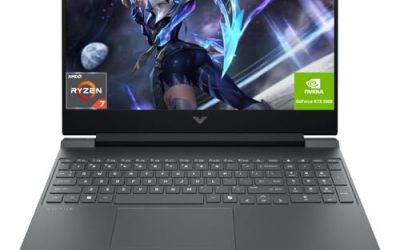
The Victus is the pick for players who want this game covered and a modern library covered with it. Its listing pairs a Ryzen AI 7 350 with a dedicated RTX 5060 and the largest memory figure here, 32 GB of DDR5, so long sector sessions can sit beside a browser and chat without the machine feeling crowded. The 15.6-inch 144Hz screen and the wired Ethernet port suit a fixed desk setup, and the bundled USB-C hub in the listing title widens the port count on day one.
Specs
- Processor: AMD Ryzen AI 7 350 (the listing’s table prints the 5 GHz boost figure as the processor speed)
- Graphics: NVIDIA GeForce RTX 5060, dedicated
- Memory: 32 GB DDR5 (the table lists a 4800 MHz memory speed)
- Storage: 1 TB SSD, PCIe x4 interface
- Display: 15.6-inch, 1920 x 1080, 144Hz
- Keyboard: RGB backlit, per the listing title
- Networking: RJ-45 Ethernet port
- Included: Thunderobot 7-in-1 USB-C hub, per the listing title
- Operating system: Windows 11 Home
- Colour: Black; series TPN-Q279
Best for: One desk machine that covers this game and a current games library.
Watch out for: This is a seller bundle — the hub in the title is part of this listing’s package, and the specification table prints the processor’s boost figure in the speed field, so confirm the exact configuration on the page before ordering.
Lenovo Legion 5 Gen 10

The Legion is built around its screen, which matters in a game spent reading sector maps and faction text. The listing’s 15.1-inch panel runs at 2560 x 1600 with an OLED surface and 500 nits, the sharpest and brightest display in this set. Behind it sit a Ryzen 7 260 and an RTX 5060 with 8 GB of GDDR7, plus a USB4 port and HDMI 2.1 for a desk monitor. Its 16 GB of memory is the smaller figure here, though it is socketed DDR5 rather than soldered.
Specs
- Processor: AMD Ryzen 7 260, 3.80 GHz up to 5.10 GHz
- Graphics: NVIDIA GeForce RTX 5060 Laptop GPU, 8 GB GDDR7
- Memory: 16 GB DDR5-5600, SODIMM
- Storage: 1 TB SSD, M.2 2242 PCIe Gen4
- Display: 15.1-inch WQXGA OLED, 2560 x 1600, 500 nits, non-touch
- Keyboard: 24-zone RGB backlit
- Ports: USB4, USB-C, HDMI 2.1, Ethernet (RJ-45)
- Operating system: Windows 11 Home
Best for: Long reading-heavy sessions at a desk, with an external monitor in the setup.
Watch out for: The listing’s item weight reads 7.09 pounds, which reads as a packaged figure rather than the machine alone — check the dimensions and weight lines carefully if you plan to carry it.
Acer Nitro V 15

The Nitro V 15 suits players who prefer an Intel machine and room to grow. Its listing leads with a Core i9-13900H and an RTX 4060, and the internal layout is the expandable one here: two DDR5 slots taking memory to 32 GB and two M.2 slots, so a second SSD can join the fitted 1 TB drive later. The 15.6-inch IPS panel refreshes at 180Hz, the fastest figure in this set, and Thunderbolt 4 covers fast desk peripherals. For a minimum block as small as this game’s, that is far more processor than the title asks for — the value is in the upgrade paths.
Specs
- Processor: Intel Core i9-13900H
- Graphics: NVIDIA GeForce RTX 4060 Laptop GPU (the listing’s headline text names no graphics memory figure)
- Memory: 16 GB DDR5, two slots, 32 GB maximum as listed
- Storage: 1 TB PCIe Gen 4 SSD, two M.2 slots as listed
- Display: 15.6-inch FHD IPS, 180Hz
- Ports: Thunderbolt 4 USB Type-C, HDMI 2.1, Ethernet (RJ-45)
- Wireless: Wi-Fi 6
- Keyboard: Backlit
- Operating system: Windows 11 Home
- Model: ANV15-51-99XD
Best for: Players who want an Intel processor now and a second drive slot later.
Watch out for: Parts of the listing’s own copy drift into “Nitro V 16” wording — match the model code ANV15-51-99XD on the page to be sure the configuration in front of you is the 15-inch one described here.
MSI Katana 15

The Katana is the straightforward gaming pick: a 13th-generation Intel processor, a dedicated RTX 4050 and a 144Hz Full HD screen, with no bundle extras in the title to untangle. Its 16 GB of DDR5 and 1 TB NVMe SSD match the middle of this set, and the specification is aimed squarely at 1080p play across a general library rather than at this one undemanding title. Buyers who want a single-purpose gaming machine that also shrugs off a text-heavy roguelike will find the shape familiar and the parts list easy to compare.
Specs
- Processor: Intel Core i7-13620H (the listing bullet gives a 1.8 GHz base figure)
- Graphics: NVIDIA GeForce RTX 4050, 6 GB GDDR6 per the listing’s bullet text
- Memory: 16 GB DDR5-4800
- Storage: 1 TB NVMe SSD
- Display: 15.6-inch Full HD IPS, 144Hz
- Ports: USB Type-C as listed
- Operating system: Windows 11 Home
- Model: B13VEK-277US; colour Black
Best for: A no-extras 1080p gaming laptop that covers this game without thought.
Watch out for: The listing’s technical table prints a 16 GB graphics card ram size against the 6 GB GDDR6 in its own bullet text — the bullet figure is the one used here, and it is worth confirming on the page before ordering.
ASUS Zenbook 14 OLED

The Zenbook is the honest exception in this lineup: it has no dedicated graphics card at all. Its Radeon 780M is integrated into the Ryzen 7 8840HS and shares system memory, and that matters for demanding modern games — but Approaching Infinity publishes no graphics line at all, so there is no printed requirement for it to miss. What you get instead is a 14-inch OLED touchscreen, a 512 GB SSD and the lightest, slimmest shape here, suited to shorter sessions on a sofa or in transit rather than a permanent desk.
Specs
- Processor: AMD Ryzen 7 8840HS, up to 5.1 GHz as listed
- Graphics: AMD Radeon 780M, integrated
- Memory: 16 GB LPDDR5X
- Storage: 512 GB M.2 NVMe PCIe 4.0 SSD
- Display: 14-inch WUXGA OLED touchscreen, 1920 x 1200
- Wireless: Wi-Fi 6E
- Operating system: Windows 11 Home
- Model: UM3406HA-WS74T; colour Jade Black
Best for: Shorter sessions away from a desk, on the lightest machine here.
Watch out for: The memory is soldered LPDDR5X and the graphics share it — and the listing describes a touchscreen while the maker’s sheet for this line also lists non-touch panels, so confirm the exact UM3406HA-WS74T configuration before ordering.
Which One Fits Your Situation
One laptop for this game and everything else
If Approaching Infinity is one title among many, the Victus and Legion carry the broadest specifications here: dedicated RTX 5060 graphics, 1 TB drives and, in the Victus, 32 GB of memory. The Victus suits a fixed desk with its Ethernet port and bundled hub; the Legion suits players who read dense screens for hours and want the sharper OLED panel in front of them.
A growing library and room to expand
Players who collect games should look at the Nitro first. Its second M.2 slot means the 1 TB fitted drive is a starting point rather than a ceiling, and its two memory slots allow a move to 32 GB later. The Katana covers the same library at 1080p with a simpler, fixed specification and no expansion story to plan around.
Sessions away from a desk
The Zenbook fits players who treat this game as a travelling companion. It is the smallest and lightest pick, its OLED screen keeps planet surveys legible in varied light, and its integrated graphics are no obstacle against a requirements block that prints no graphics line. Charge it, close it, and a run can resume wherever you stopped.
Guides and wikis open beside the game
Roguelike runs generate questions, and answering them mid-session means a browser beside the game. The Victus, with 32 GB of memory, absorbs that habit most easily; the Legion’s higher-resolution screen also helps by fitting the game window and a guide page side by side without shrinking either into illegibility. Both keep the game itself trivially within their specifications while doing so.
Common Mistakes
- Shopping for a graphics card requirement that was never published — the block has no graphics line, so there is nothing for a card to be measured against.
- Assuming a recommended tier exists and hunting for it; the publisher lists a minimum tier only.
- Taking the Windows 7 line at face value — the Steam client’s own note limits the client to Windows 10 and later, whatever the game’s line says.
- Confusing this app with the Interface Expansion DLC, which is a separate app and not the game covered here.
- Ordering from a headline alone: the Katana’s table and bullet text disagree on graphics memory, and the Victus table prints a boost figure as its processor speed — read the full listing.
Frequently Asked Questions
Does Approaching Infinity need a gaming laptop?
No. The published minimum block asks for Windows 7, a 1Ghz processor, 512 MB of memory and 250 MB of storage, with no graphics line at all. Any current laptop, including the integrated-graphics Zenbook here, clears those figures. The gaming models in this guide earn their place through the rest of your library, not through this title.
Is there a recommended specification to aim for?
No. The store page publishes a minimum tier and nothing above it — there is no recommended processor, memory or graphics figure to target. Buyers sometimes fill that gap with guesses from similar games, but the honest position is the printed one: four lines, all of them low, and every pick in this guide passes each line by a wide margin.
Does the game run on Mac or Linux?
The published requirements cover Windows only. The store page prints a single Windows block, and the Mac and Linux requirement lists are empty, so there is no Mac or Linux edition described by the publisher’s own page. All five picks run Windows 11 Home, which also satisfies the Steam client’s current Windows 10-or-later position.
How much storage and memory should I allow?
The game’s own figures are tiny: 250 MB of storage and 512 MB of memory. Allow far more for the machine around it — Windows itself, the Steam client and your other games. Every pick here carries at least 512 GB of SSD storage and 16 GB of memory, and the Victus doubles both figures, so none of them makes the game’s requirements a real consideration.
More from Amazon
Programs that pair well with the guide above. Offers and eligibility are set by Amazon and may change.
A free business account with business pricing and bulk-buying tools for work, shop or home office.
Create a business accountFree shipping on eligible items, Prime Video and more. Eligible new members can start with a free trial.
Start a Prime free trialAudiobooks and podcasts to listen to on the go. Eligible new members can start with a free trial.
Try Audible freeAd-free music streaming. Eligible new subscribers can start with a free trial.
Try Music Unlimited freeAs an Amazon Associate we earn from qualifying purchases.









Write Your Review
No reviews yet. Be the first to share your experience!