
The Doors of Trithius publishes only a minimum specification, and that single fact shapes this purchase. There is no recommended tier to aim at, so the real decision is how much headroom to buy above a modest floor: 6 GB of memory, 1 GB of storage, and a graphics line that names a GeForce 7600 with 512 Mb or equivalent. Every laptop below clears those lines on paper, so the choice turns on platform, screen, and how you play.
This roundup is for roguelike players choosing between the native Mac edition, the Windows edition, and Linux, including anyone eyeing a first laptop for an Early Access game still in active development. The picks come straight from the listing names and specifications: two MacBook Air models that run the Universal build natively, a Snapdragon Windows laptop with an honest translation caveat, a slim Ryzen OLED machine, and a Victus with a dedicated graphics card.
Quick Picks
As an Amazon Associate we earn from qualifying purchases
| Product | Best for | Key spec from title |
|---|---|---|
| Apple MacBook Air 13 (M4) | Native Mac play in the lightest body here | M4 chip, 16GB memory, 256GB SSD |
| Apple MacBook Air 15 (M4) | A bigger screen for long desk sessions | M4 chip, 16GB memory, 512GB SSD |
| Lenovo Yoga Slim 7x | A sharp OLED touch screen on Windows | Snapdragon X Elite, 32GB memory, 1TB SSD |
| ASUS Zenbook 14 OLED | Standard Windows hardware in a slim body | Ryzen 7 8840HS, 16GB memory, 512GB SSD |
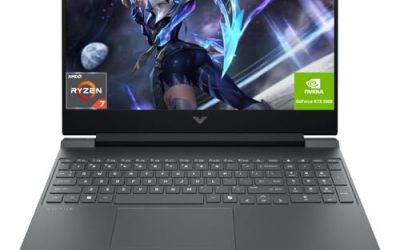
| HP Victus 15 | A dedicated graphics card for a wider library | Ryzen AI 7 350, RTX 5060, 32GB memory |
How to Choose
Buy against the minimum, because no recommended tier exists
The store page publishes one tier only, and it does the same on Windows, Mac, and Linux. That changes the buying logic: instead of matching a recommended build, you clear the minimum with room to spare and then spend on the screen, keyboard, and portability you actually want. The floor itself is low, at 6 GB of memory and 1 GB of storage. One caution is built into the game’s state: it is still in Early Access, with the developer estimating a full release around 2027, so the published page can be revised as development continues. Headroom bought today is the hedge against that.
Choose the platform edition before the hardware
Each platform carries its own minimum block, and your laptop decides which edition you can play. The Mac block names macOS 11 Big Sur or newer and describes a Universal build for Apple Silicon and Intel machines. The Windows block asks for Windows 10 or 11 in 64-bit form, and the Linux block names Ubuntu 22.04 LTS or an equivalent 64-bit distribution. A Mac buyer and a Windows buyer are shopping for different editions of the same game, so settle that first. Only after the platform is fixed do the screen size, memory, and graphics questions below mean anything.
Weigh memory and storage against a very small footprint
The published memory line is 6 GB and the storage line is 1 GB, figures every pick here passes several times over. The five listings span 16 GB to 32 GB of memory and 256 GB to 1 TB of storage, so the real question is the rest of your library and your files, not this one install. Watch the configuration wording on each listing: the MacBook Air and the Yoga Slim 7x are sold in fixed memory and storage combinations, so the figures printed on the page you order from are the figures you live with.
Decide whether a dedicated graphics card matters to you
The minimum graphics line names a GeForce 7600 with 512 Mb or equivalent, an entry-level card class from an older generation, and that wording matters. The MacBook Air models and the Zenbook rely on integrated graphics that share system memory, while the Victus carries a dedicated RTX 5060 with its own memory. Judged only against the published line, integrated graphics sit inside the “or equivalent” wording. A dedicated card is the pick when the rest of your library includes heavier 3D games; for this turn-based roguelike alone, it is capacity you may never call on.
The 5 Best Options
Apple MacBook Air 13 (M4)

This is the straightforward native Mac pick. The Mac minimum names Apple M1 or newer, and the notes describe a Universal build that runs natively on Apple Silicon, so the M4 chip in this listing plays the Mac edition directly with no translation layer involved. Its 16 GB of unified memory is well past the published 6 GB line, the 256 GB SSD swallows the 1 GB install, and the 13.6-inch display clears the stated minimum resolution of 1280 x 768. At 2.73 pounds, it is also the lightest machine in this roundup.
Specs
- Chip: Apple M4
- Memory: 16GB unified memory
- Storage: 256GB SSD
- Display: 13.6-inch Liquid Retina display
- Camera: 12MP Center Stage camera
- Security: Touch ID
- Weight: 2.73 pounds
- Color: Midnight
- Model number: MW123LL/A
Best for: Mac players who want the native edition in a laptop that disappears into a bag.
Watch out for: This listing family sells several memory and storage combinations under near-identical titles, so confirm the 16GB and 256GB figures and the MW123LL/A model number on the page before ordering.
ASIN: B0DZD9S5GC
Apple MacBook Air 15 (M4)

Choose this Air when the screen is the point. The 15.3-inch Liquid Retina panel gives the world map, dungeon layouts, and long text passages more room than the 13-inch model, which suits a turn-based game played in long sittings at one desk. Underneath, it is the same native Mac story: an M4 chip that the Mac minimum explicitly covers, 16 GB of unified memory against a 6 GB requirement, and a Universal build that runs on Apple Silicon without translation. Storage doubles to 512 GB, which leaves generous space beyond the 1 GB install line for saves and other games.
Specs
- Chip: Apple M4
- Memory: 16GB unified memory
- Storage: 512GB SSD
- Display: 15.3-inch Liquid Retina display, 2880 x 1864
- Camera: 12MP Center Stage camera
- Security: Touch ID
- Color: Midnight
- Graphics: Integrated
Best for: Desk-based Mac players who read a lot of on-screen text and want the larger panel.
Watch out for: The 15-inch family is also sold in several capacities and colors under the same title wording, so confirm the 512GB Midnight configuration on the listing before ordering.
ASIN: B0DZD9VLQ4
Lenovo Yoga Slim 7x

The hardware here is generous: a Snapdragon X Elite chip, 32 GB of memory, a 1 TB SSD, and a 14.5-inch 3K OLED touch display. The honest caveat is architectural. This laptop runs Windows 11 Pro on ARM, and the game’s Windows edition is written for Intel and AMD chips, so on this machine it runs through the built-in translation layer rather than natively. It also cannot run the Mac edition at all. Buy it for its screen, memory, and battery hardware with that translation point understood, not as a native Windows gaming machine.
Specs
- Processor: Snapdragon X Elite X1E-78-100, 12 cores, up to 3.4 GHz
- Memory: 32GB LPDDR5X, soldered
- Storage: 1TB SSD, M.2 2242 PCIe Gen4
- Display: 14.5-inch 3K OLED touch, 2944 x 1840, 90Hz
- Operating system: Windows 11 Pro 64 ARM
- Camera: 1080P FHD IR hybrid camera
- Battery: 70Wh
- Weight: 2.82 pounds
- Color: Cosmic Blue
Best for: Windows users who prize the OLED touch screen and accept translated play for this title.
Watch out for: Windows on ARM is the whole story here: check that your other essential programs and games accept ARM or translation before making this your only machine.
ASIN: B0FBMMMMWX
ASUS Zenbook 14 OLED

This is the conventional Windows route in a slim body. Its Ryzen 7 8840HS is a standard Intel-compatible architecture chip, so the Windows edition runs natively, with no translation layer and no edition questions. Graphics come from the integrated Radeon 780M, which shares system memory rather than carrying its own; judged against a minimum line that names a 512 Mb card class or equivalent, that is a reasonable match on paper, though it is not a dedicated card. The 14-inch WUXGA OLED touchscreen, 16 GB of memory, and 512 GB SSD round out a tidy, portable specification.
Specs
- Model: UM3406HA-WS74T
- Processor: AMD Ryzen 7 8840HS, up to 5.1 GHz
- Graphics: Integrated AMD Radeon 780M
- Memory: 16GB LPDDR5X
- Storage: 512GB M.2 NVMe PCIe 4.0 SSD
- Display: 14-inch WUXGA OLED touchscreen, 1920 x 1200
- Operating system: Windows 11 Home
- Wireless: Wi-Fi 6E
- Color: Jade Black
Best for: Windows players who want native play and an OLED screen without a gaming chassis.
Watch out for: Listings under this model name vary, and some are seller-upgraded bundles with accessories added, so confirm the UM3406HA-WS74T model number and the factory configuration on the page you order from.
ASIN: B0DFWZ77LB
HP Victus 15

The Victus is the pick for buyers whose library reaches beyond one lightweight roguelike. Its dedicated NVIDIA GeForce RTX 5060, Ryzen AI 7 350 processor, 32 GB of memory, and 1 TB SSD are far beyond anything the published minimum asks, and the 15.6-inch FHD screen refreshes at 144Hz for faster games. The Windows edition runs natively on this standard architecture. The trade is size and intent: this is a gaming chassis, larger and heavier than the slim machines above, and this particular listing is a seller bundle that adds a Thunderobot 7-in-1 USB-C hub, per its title.
Specs
- Processor: AMD Ryzen AI 7 350, up to 5.0 GHz
- Graphics: NVIDIA GeForce RTX 5060, dedicated
- Memory: 32GB DDR5
- Storage: 1TB SSD
- Display: 15.6-inch FHD, 1920 x 1080, 144Hz
- Operating system: Windows 11 Home
- Keyboard: RGB backlit
- Networking: RJ-45 Ethernet port
- Series: TPN-Q279
- Color: Black
Best for: Players who want one Windows laptop for this game and a heavier 3D library.
Watch out for: This ASIN is a seller bundle, and its specification table prints the 5 GHz boost figure as the processor speed, so confirm the hub contents and the RTX 5060 configuration on the listing before ordering.
ASIN: B0G1N8R9Z4
Which One Fits Your Situation
You carry your laptop everywhere and play in short bursts
The MacBook Air 13 is the fit. At 2.73 pounds it is the lightest machine here, its M4 chip runs the Mac edition natively under the Universal build, and its 16 GB of memory and 256 GB SSD sit far above the published 6 GB and 1 GB lines. Short sessions of exploration and turn-based battles ask nothing more of it.
You play long sessions at one desk and read a lot of text
Take the MacBook Air 15. The 15.3-inch panel gives the map and the game’s many text passages room to breathe, the M4 chip covers the Mac minimum natively, and the 512 GB SSD doubles the smaller Air’s storage for a growing library. It trades a little portability for comfort across hours of play.
You want Windows in a slim body and native compatibility
The Zenbook 14 OLED is the safer Windows pick, because its Ryzen 7 chip runs the Windows edition natively. The Yoga Slim 7x offers a sharper screen and more memory, but only through ARM translation, so choose it only if that caveat is acceptable for your whole library, not just this game.
Your library includes demanding 3D games as well
The Victus 15 earns its size here. Its dedicated RTX 5060 and 144Hz screen serve the heavier titles in a collection, while this roguelike’s modest published minimum is cleared many times over. If The Doors of Trithius were your only game, the slim machines above would do; the Victus is for everything around it.
Common Mistakes
- Hunting for a recommended specification that the store page never publishes, on any platform.
- Assuming the Yoga Slim 7x runs Windows games natively; it translates them, and it cannot run the Mac edition.
- Buying an older Intel Mac that sits below the macOS 11 Big Sur floor named in the Mac minimum.
- Skipping the notes lines: 32-bit Windows systems are not supported, and the display must reach at least 1280 x 768.
- Ordering from a lookalike listing; several of these families sell multiple configurations under near-identical titles, so match the model number and ASIN.
Frequently Asked Questions
Does the game run natively on Apple Silicon Macs?
Yes. The Mac minimum names Apple M1 or newer alongside Intel Core 2 Duo machines, and its notes describe a Universal build that runs natively on Apple Silicon and Intel Macs. The floor is macOS 11 Big Sur. Both MacBook Air picks use the M4 chip, so they play the Mac edition directly, with no translation layer involved.
Why is there no recommended specification to match?
Because the store page publishes a minimum only, and it does so on Windows, Mac, and Linux alike. Treat that single tier as the floor and buy headroom above it rather than a matched build. The game is also in Early Access, so the page may be revised as development continues toward the developer’s estimated 2027 full release.
Can the Yoga Slim 7x play the Mac edition of the game?
No. The Yoga Slim 7x is a Windows 11 Pro laptop built on an ARM processor, so the Mac edition is closed to it. It plays the Windows edition through the operating system’s translation layer instead of natively. If native play matters most, pick the Zenbook or Victus for Windows, or a MacBook Air for the Mac edition.
Do I need a dedicated graphics card for this game?
The published graphics line names a GeForce 7600 with 512 Mb or equivalent, which is an entry-level card class from an older generation. The integrated graphics in the MacBook Air models and the Zenbook’s Radeon 780M fall under that “or equivalent” wording. A dedicated card, such as the Victus’s RTX 5060, is about the rest of your library rather than this minimum.
More from Amazon
Programs that pair well with the guide above. Offers and eligibility are set by Amazon and may change.
A free business account with business pricing and bulk-buying tools for work, shop or home office.
Create a business accountFree shipping on eligible items, Prime Video and more. Eligible new members can start with a free trial.
Start a Prime free trialAudiobooks and podcasts to listen to on the go. Eligible new members can start with a free trial.
Try Audible freeAd-free music streaming. Eligible new subscribers can start with a free trial.
Try Music Unlimited freeAs an Amazon Associate we earn from qualifying purchases.









Write Your Review
No reviews yet. Be the first to share your experience!