
Quest for Infamy asks almost nothing of a laptop on paper: the published Windows minimum names a 900 Mhz processor, 128 MB of memory and 1800 MB of storage, figures from another era of PC hardware. The real decision is not raw power but fit — whether you want a big bright screen for the hand-painted art and voiced dialogue, a light machine you can carry between rooms, or a gaming laptop that also covers the rest of your library without fuss.
This guide is for players returning to the valley of Krasna, newcomers who enjoy classic quest games with a villain in the lead, and anyone who wants one dependable Windows laptop for older adventures. The five picks below were chosen from their listing names and specifications: two mainstream gaming laptops with RTX 5060 graphics, an Intel Core i9 Nitro, a lighter RTX 4050 Katana, and a slim OLED Zenbook whose integrated graphics still clear this game’s modest published lines.
Quick Picks
As an Amazon Associate we earn from qualifying purchases
| Product | Best for | Key spec from title |
|---|---|---|
| HP Victus 15 | A roomy library of older adventures alongside newer games | RTX 5060 with 32GB DDR5 RAM |
| Lenovo Legion 5 Gen 10 | Readers who want the sharpest screen for hand-painted scenes | 15.1-inch WQXGA OLED 500 nits |
| Acer Nitro V 15 | Players who keep many games installed at once | Intel Core i9-13900H with RTX 4060 |
| MSI Katana 15 | A straightforward gaming laptop for quest nights | RTX 4050 with 1TB NVMe SSD |
| ASUS Zenbook 14 OLED | Playing on the sofa or while travelling light | Ryzen 7 8840HS with 512GB SSD |
How to Choose
Start from the published block, not the game’s age
Quest for Infamy dates from 2014, but the only figures that matter are the ones on its Steam page. The Windows minimum prints a 900 Mhz processor, 128 MB of memory, DirectX Version 5.2 and 1800 MB of storage; the recommended tier raises those to a 1.2 Ghz processor, 256 MB of memory and 2 GB of storage, and prints no DirectX line at all. Every laptop in this guide clears those lines many times over, so the useful comparison is not whether a machine qualifies, but how its screen, weight and storage suit the way you play.
Windows is the edition the page actually sells
The live store page prints two requirement tabs, Windows and SteamOS + Linux, and the picks here are Windows laptops. A Mac requirements block exists in the game’s underlying data record, with old OS X figures and an X11 note, but the page does not print or sell a Mac edition, so do not plan around it. The Linux block is real but different: it asks for 1 GB of memory and 1900 MB of storage at minimum, against 128 MB and 1800 MB on Windows, with sound through ALSA or PulseAudio.
Let the client footnote settle the operating system question
The game’s own OS lines name Windows XP, Vista, 7 or 8, which reads like permission to dust off an old machine. The page carries a footnote that overrides that idea: starting January 1st, 2024, the Steam Client supports only Windows 10 and later versions. A laptop that cannot run the current client cannot reach your library, however light the game itself is. Every pick here ships with Windows 11 Home, so the client, the store and the published Windows block line up without any workaround or second operating system to maintain.
Screen and sound do the heavy lifting in a quest game
This is a hand-painted adventure built on exploration, conversation and voiced insults, and the published sound line asks only for a Direct X compatible sound card. What changes your evening is the display you read dialogue on and the speakers or headphone jack you hear it through. The Legion’s 15.1-inch WQXGA OLED gives the sharpest text of the five, the Victus and Katana use 15.6-inch 144Hz panels, and the Zenbook trades size for a 14-inch OLED touchscreen you can hold closer on a sofa or fold into a small bag.
The 5 Best Options
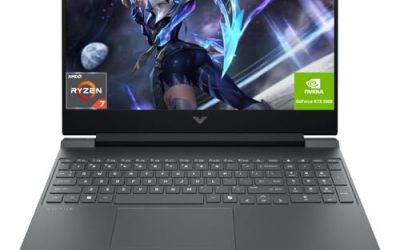
HP Victus 15

The Victus is the easy default for a player who wants Quest for Infamy plus a wide shelf of other games on one machine. Against a published recommended line of a 1.2 Ghz processor and 256 MB of memory, its Ryzen AI 7 350 and 32 GB of DDR5 are far beyond the ask, and the 1 TB SSD swallows the game’s 2 GB recommended footprint without thought. The 15.6-inch 144Hz panel keeps the hand-painted scenes large and readable, and the bundled USB-C hub adds ports for a mouse, headset and external drive at a desk.
Specs
- Processor: AMD Ryzen AI 7 350, up to 5.0 GHz as listed
- Graphics: NVIDIA GeForce RTX 5060 (the listing’s technical table prints no graphics memory figure)
- Memory: 32 GB DDR5
- Storage: 1 TB SSD
- Display: 15.6-inch FHD 1920×1080, 144Hz
- Keyboard: RGB backlit, with RJ-45 Ethernet port
- Bundle: Thunderobot 7-in-1 USB-C hub included
- Operating system: Windows 11 Home
- Model: TPN-Q279, Black
Best for: A single machine for this adventure and a large mixed library.
Watch out for: The listing’s technical table names the RTX 5060 without printing a graphics-memory figure, and this is a seller bundle — confirm the exact configuration and hub contents on the page before ordering.
Lenovo Legion 5 Gen 10

Choose the Legion if the screen matters most to you. Quest for Infamy is a talky, hand-painted adventure, and the Legion’s 15.1-inch WQXGA OLED panel shows that art at 2560×1600 with deep contrast for the valley’s torchlit inns and night scenes. Its Ryzen 7 260 and RTX 5060 sit far above the published block, which names only a Direct X compatible graphics card, and the 16 GB of DDR5 memory is many times the 256 MB recommended figure. The 24-zone RGB backlit keyboard keeps late sessions comfortable at a desk.
Specs
- Processor: AMD Ryzen 7 260 (3.80 GHz up to 5.10 GHz)
- Graphics: NVIDIA GeForce RTX 5060 Laptop GPU 8 GB GDDR7
- Memory: 16 GB DDR5-5600 SODIMM
- Storage: 1 TB SSD M.2 2242 PCIe Gen4 TLC
- Display: 15.1-inch WQXGA OLED 2560×1600, 500 nits, non-touch
- Keyboard: 24-zone RGB backlit
- Operating system: Windows 11 Home
Best for: Desk players who read a lot of dialogue and want the sharpest screen.
Watch out for: Storage sits on an M.2 2242 module, so check that format before planning a second drive, and confirm the exact configuration selected on the page before ordering.
Acer Nitro V 15

The Nitro suits players who install first and tidy up later. Its 1 TB Gen 4 SSD, with a second M.2 slot named in the listing, holds the game’s 2 GB recommended footprint alongside a large library, and the Intel Core i9-13900H is the strongest processor in this group. The 15.6-inch FHD IPS panel runs at 180Hz, which the game does not need but which serves faster titles in the same library. Wi-Fi 6, Thunderbolt 4 and a wired Ethernet port cover desk and travel connections without extra adapters in most setups.
Specs
- Processor: Intel Core i9-13900H
- Graphics: NVIDIA GeForce RTX 4060 Laptop GPU (the listing headline prints no graphics memory figure)
- Memory: 16 GB DDR5, two slots, 32 GB maximum as listed
- Storage: 1 TB PCIe Gen 4 SSD, two M.2 slots as listed
- Display: 15.6-inch FHD IPS 180Hz
- Connectivity: Wi-Fi 6, Thunderbolt 4, Ethernet RJ-45
- Keyboard: backlit
- Operating system: Windows 11 Home
- Model: ANV15-51-99XD
Best for: Players who keep a big library installed and want wired desk connections.
Watch out for: The listing headline names the RTX 4060 without printing a graphics-memory figure in the text — verify the full specification on the page before ordering.
MSI Katana 15

The Katana is the straightforward gaming pick for someone whose library leans on adventures and older releases. Its Core i7-13620H and RTX 4050 clear the published recommended tier — a 1.2 Ghz processor and 256 MB of memory — with room to spare, while the 1 TB NVMe SSD keeps install queues short. The 15.6-inch Full HD IPS screen at 144Hz gives dialogue text a comfortable size, and the black chassis keeps a low profile in a shared room. It is a sensible middle step between the slim Zenbook and the RTX 5060 pair.
Specs
- Processor: Intel Core i7-13620H
- Graphics: NVIDIA GeForce RTX 4050 6 GB GDDR6 per the listing’s bullet text
- Memory: 16 GB DDR5-4800
- Storage: 1 TB NVMe SSD
- Display: 15.6-inch Full HD IPS 144Hz
- Ports: USB Type-C as listed
- Operating system: Windows 11 Home
- Model: B13VEK-277US, Black
Best for: A shared household gaming laptop for adventures and older releases.
Watch out for: The listing’s technical table prints a 16 GB graphics card ram size while its own bullet text says the RTX 4050 carries 6 GB GDDR6 — go by the bullet figure and confirm on the page.
ASUS Zenbook 14 OLED

The Zenbook is the honest portability pick, and honesty matters here: its Radeon 780M graphics are integrated and share the 16 GB of system memory rather than sitting on a separate card. That still answers this game’s published graphics line, which asks only for a Direct X compatible graphics card, and the Linux block accepts integrated GPUs from after 2008. What you gain is a 14-inch OLED touchscreen in a slim Jade Black body with a 75Wh battery, suited to playing on a sofa, in bed or on a train between stops.
Specs
- Processor: AMD Ryzen 7 8840HS, up to 5.1 GHz as listed
- Graphics: integrated AMD Radeon 780M
- Memory: 16 GB LPDDR5X
- Storage: 512 GB M.2 NVMe PCIe 4.0 SSD
- Display: 14-inch WUXGA OLED touchscreen 1920×1200 as listed
- Battery: 75Wh
- Connectivity: Wi-Fi 6E
- Operating system: Windows 11 Home
- Model: UM3406HA-WS74T, Jade Black
Best for: Playing away from a desk, on a sofa or while travelling.
Watch out for: Graphics are integrated and share system memory, and the listing describes a touchscreen while the maker’s spec sheet for this model line also lists a non-touch panel — confirm the panel type on the page.
Which One Fits Your Situation
You are rebuilding a classic quest library
If Krasna is one stop among many, the Victus or the Nitro make the most sense. Both carry a 1 TB SSD, so a shelf of older adventures sits installed and ready instead of being shuffled on and off the drive, and their RTX graphics cover newer releases in the same library. The Victus adds a bundled USB-C hub for a desk setup; the Nitro adds a second M.2 slot named in its listing.
You read every line of dialogue at a desk
Pick the Legion. Its 15.1-inch WQXGA OLED panel renders the game’s painted scenes and text at 2560×1600, the highest resolution in this group, and the 24-zone RGB backlit keyboard suits evening sessions. With 16 GB of memory against a published recommended figure of 256 MB, the machine is never the bottleneck for a game of this size.
You play away from a desk
Take the Zenbook. At 14 inches with a 75Wh battery it is the pick built for sofas, beds and train tables, and its integrated Radeon 780M still answers a published graphics line that asks only for Direct X compatibility. The trade is honest: 512 GB of storage holds this 2 GB game easily, but a growing library of larger titles will fill it sooner than the 1 TB drives here.
One laptop serves the whole household
The Katana fits a shared machine that gets used for schoolwork, streaming and games in rotation. Its Core i7-13620H and 16 GB of memory handle mixed everyday loads, the RTX 4050 covers this adventure and plenty of older titles, and the plain black 15.6-inch chassis looks at home in any room. Confirm the graphics memory figure on the page, since the listing’s own fields disagree about it.
Common Mistakes
- Treating the Mac block in the game’s data record as a Mac edition you can buy — the live store page prints only Windows and SteamOS + Linux tabs.
- Planning to run the game on Windows XP, Vista, 7 or 8 because the minimum line names them — the Steam Client has required Windows 10 or later since January 1st, 2024.
- Looking for a DirectX figure in the Windows recommended tier — there is none; only the minimum tier prints DirectX Version 5.2.
- Assuming both platforms ask for the same storage — the Windows minimum prints 1800 MB while the Linux minimum prints 1900 MB.
- Paying for flagship graphics just for this title — the published graphics line asks only for a Direct X compatible graphics card, so weigh the rest of your library instead.
Frequently Asked Questions
Is there a Mac version of Quest for Infamy?
Not one that the store page sells. The live Steam page for the game prints requirement tabs for Windows and SteamOS + Linux only. A Mac block with older OS X figures sits in the underlying data record, but it never appears on the page, so plan on playing through the Windows edition on a Windows laptop like the five picks above.
What does the game actually ask of a laptop?
Very little, by modern standards. The published Windows minimum names a 900 Mhz processor, 128 MB of memory, a Direct X compatible graphics card and 1800 MB of storage; the recommended tier lifts the processor to 1.2 Ghz, memory to 256 MB and storage to 2 GB. Every pick in this guide passes those lines with a wide margin.
Why do the Windows and Linux storage figures differ?
Because the two published blocks were written separately. The Windows minimum asks for 1800 MB of available space, while the Linux minimum asks for 1900 MB, alongside 1 GB of memory instead of 128 MB and sound through ALSA or PulseAudio. Both recommended tiers settle at 2 GB of storage. Quote each block on its own terms rather than averaging them.
Do I need a dedicated graphics card to play it?
No. The published Windows graphics line names only a Direct X compatible graphics card, with no model or memory figure attached, and the Linux block accepts integrated GPUs made after 2008. That is why the Zenbook’s integrated Radeon 780M qualifies here, even though the four gaming laptops in this guide carry dedicated RTX cards for heavier games.
More from Amazon
Programs that pair well with the guide above. Offers and eligibility are set by Amazon and may change.
A free business account with business pricing and bulk-buying tools for work, shop or home office.
Create a business accountFree shipping on eligible items, Prime Video and more. Eligible new members can start with a free trial.
Start a Prime free trialAudiobooks and podcasts to listen to on the go. Eligible new members can start with a free trial.
Try Audible freeAd-free music streaming. Eligible new subscribers can start with a free trial.
Try Music Unlimited freeAs an Amazon Associate we earn from qualifying purchases.









Write Your Review
No reviews yet. Be the first to share your experience!