
Planescape: Torment is a story-driven isometric RPG set in Sigil, a city where doorways open onto other planes of existence. You play an immortal amnesiac searching for answers about his past lives, joined by an unusual group of companions. The game is famous for its writing: long conversations carry as much weight as combat, and progress often comes from talking and choosing carefully.
Because so much of the experience is reading, the best laptops for Planescape: Torment pair clear, comfortable screens with enough battery for long sessions on the sofa. As an Amazon Associate, we earn from qualifying purchases. The five picks below cover Mac and Windows machines, and every one clears the game’s modest published requirements easily.
How to Choose a Laptop for Planescape: Torment
Start with the edition. The original 1999 release was a Windows game, while the Enhanced Edition from Beamdog is the version sold on storefronts today, and it has real Windows, macOS, and Linux editions. Steam publishes requirement blocks for all three systems, so Mac owners can play natively. One honest caveat: the published Mac minimum is an older block naming OS X 10.15, a Catalina-era listing rather than a modern Apple silicon one, so check the current store page notes if you use a recent Mac.
The hardware bar itself is tiny. The published minimum asks for a dual core processor, 1 GB of RAM, OpenGL 2.0 compatible graphics, and just 2 GB of storage, so any laptop sold today handles the game comfortably. Choose on reading comfort instead of raw power: a sharp screen with good contrast for long stretches of text, and battery life that survives an evening away from the charger. Even the smallest SSD here leaves room for a whole library of classic RPGs alongside it.
Apple MacBook Air 13 M4

The MacBook Air 13 M4 is the natural starting point for Mac players, because the Enhanced Edition has a genuine macOS release and this machine runs it in complete silence. There is no fan at all, so nothing whirs while you read through a long conversation. The 13.6-inch Liquid Retina screen renders text crisply, and the slim chassis slips into a bag for travel days.
Apple lists this configuration with 16GB of unified memory and a 256GB SSD, far beyond the game’s 1 GB memory and 2 GB storage minimums. Touch ID and the 12MP Center Stage camera round out a machine that also handles everyday work without fuss. For one light laptop covering daily tasks and evenings in Sigil, this is the simplest pick.
Specs
- Processor: Apple M4 chip
- Memory: 16GB unified memory
- Storage: 256GB SSD
- Display: 13.6-inch Liquid Retina
- Camera: 12MP Center Stage camera
- Security: Touch ID
- Color: Midnight
- ASIN: B0DZD9S5GC
Apple MacBook Air 15 M4

If your eyes prefer larger text, the MacBook Air 15 M4 stretches the same fanless design across a 15.3-inch Liquid Retina display. Dialogue boxes and journal entries get more room to breathe, which matters in a game where one conversation can run for many screens. It stays thin and quiet, so it still works as a lap and sofa machine.
This listing pairs 16GB of unified memory with a 512GB SSD, giving you space for the game plus other classic titles. Touch ID and the 12MP Center Stage camera carry over from the smaller model. Choose this one if the 13-inch screen feels cramped when reading.
Specs
- Processor: Apple M4 chip
- Memory: 16GB unified memory
- Storage: 512GB SSD
- Display: 15.3-inch Liquid Retina
- Camera: 12MP Center Stage camera
- Security: Touch ID
- Color: Midnight
- ASIN: B0DZD9VLQ4
Lenovo Yoga Slim 7x

The Yoga Slim 7x is the Windows pick for readers who prize the screen above all. Its 14.5-inch 3K OLED touch display, listed at 1000 nits, gives shadowed streets and glowing portals deep contrast, and small text stays easy on the eyes. The Snapdragon X Elite processor keeps the machine cool and quiet in a slim Cosmic Blue chassis.
One honest note: this is a Windows on ARM laptop, and Planescape: Torment is an older Windows title, so it runs through the built-in translation layer rather than natively. Check the game’s current ARM guidance on its store page before you commit. The listing includes 32GB of memory and a 1TB SSD.
Specs
- Processor: Snapdragon X Elite X1E-78-100, 12 cores, up to 3.4 GHz as listed
- Memory: 32GB LPDDR5X
- Storage: 1TB SSD M.2 2242 PCIe Gen4
- Display: 14.5-inch 3K OLED touch, 1000 nits as listed
- Camera: 1080p FHD/IR hybrid camera
- Connectivity: Wi-Fi 7, 3 x USB-C
- Operating system: Windows 11 Pro
- Color: Cosmic Blue
- ASIN: B0FBMMMMWX
ASUS Zenbook 14 OLED

The Zenbook 14 OLED is a compact Windows laptop built around a 14-inch WUXGA OLED touchscreen, a lovely match for a text-heavy RPG. Scenes in darker districts hold their detail, and the touchscreen gives you an extra way to tap through menus and dialogue options. The Ryzen 7 8840HS processor and Radeon 780M graphics are far stronger than this game asks for, so the machine doubles as a capable everyday laptop.
The listing specifies 16GB of LPDDR5X memory and a 512GB SSD in the UM3406HA configuration, finished in Jade Black. It is light enough to carry daily and quiet enough for bedtime reading, a balanced choice for work, study, and evenings in Sigil.
Specs
- Processor: AMD Ryzen 7 8840HS
- Graphics: AMD Radeon 780M
- Memory: 16GB LPDDR5X
- Storage: 512GB SSD
- Display: 14-inch WUXGA OLED touchscreen, 1920×1200
- Model: UM3406HA-WS74T
- Operating system: Windows 11 Home
- Color: Jade Black
- ASIN: B0DFWZ77LB
HP Victus 15
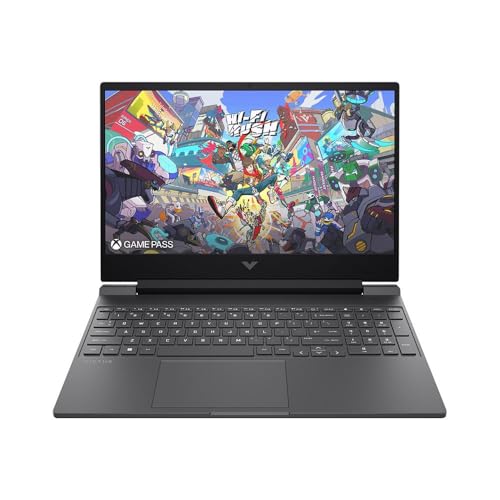
The Victus 15 suits players who want a bigger screen and a dedicated graphics card for the rest of their library. Planescape: Torment asks for almost nothing, but the GeForce RTX 5060 means the same laptop also handles modern releases when you take a break from the classics. The 15.6-inch display gives dialogue generous room, and the full-size keyboard suits long desk sessions.
The listing pairs an AMD Ryzen AI 7 350 processor with 16GB of DDR5 memory and a 1TB NVMe SSD, plus wired Ethernet through its RJ-45 port. It is the heaviest machine here, so it suits a mostly stationary setup. Choose it if one laptop needs to cover both an RPG backlog and newer, heavier games.
Specs
- Processor: AMD Ryzen AI 7 350
- Graphics: NVIDIA GeForce RTX 5060 8GB GDDR7
- Memory: 16GB DDR5-5600
- Storage: 1TB PCIe Gen4 NVMe M.2 SSD
- Display: 15.6-inch
- Ports: USB Type-A, USB Type-C, HDMI, RJ-45 Ethernet
- Connectivity: Wi-Fi and LAN
- ASIN: B0FLRWF779
Comparison Table
| Product | Best for | Key spec |
|---|---|---|
| Apple MacBook Air 13 M4 | Silent Mac play anywhere | 13.6-inch Liquid Retina, fanless |
| Apple MacBook Air 15 M4 | Bigger text on a Mac | 15.3-inch Liquid Retina, 512GB SSD |
| Lenovo Yoga Slim 7x | OLED screen lovers | 14.5-inch 3K OLED touch, 1000 nits |
| ASUS Zenbook 14 OLED | Compact Windows all-rounder | 14-inch WUXGA OLED touchscreen |
| HP Victus 15 | One laptop for old and new games | GeForce RTX 5060, 15.6-inch display |
FAQ
Does Planescape: Torment: Enhanced Edition run on a Mac?
Yes. The Enhanced Edition has a real macOS release alongside its Windows and Linux editions, and Steam publishes a Mac requirement block for it. That published minimum is an older block naming OS X 10.15, from the Catalina era rather than the Apple silicon era; check the current store page notes before buying, but both MacBook Air picks here are legitimate.
Should I play the Enhanced Edition or the original release?
The Enhanced Edition is the practical choice on a modern laptop. It is the version storefronts sell today, it adds native support for current resolutions and operating systems including macOS and Linux, and it keeps the original story and writing intact. The 1999 original was Windows-only and takes more effort to set up on current hardware.
Can an ordinary everyday laptop run this game?
Comfortably, yes. The published minimum is a dual core processor, 1 GB of RAM, OpenGL 2.0 compatible graphics, and 2 GB of storage, which every laptop here passes many times over. Pick based on screen comfort, battery life, and portability, since those shape a reading-heavy game far more than raw power.
Conclusion
Planescape: Torment rewards patience and attention, and the right laptop simply keeps text clear and sessions comfortable. The MacBook Air models offer silent, native Mac play, the Yoga Slim 7x and Zenbook 14 bring vivid OLED screens to Windows, and the Victus 15 adds headroom for newer games.
More from Amazon
Programs that pair well with the guide above. Offers and eligibility are set by Amazon and may change.
A free business account with business pricing and bulk-buying tools for work, shop or home office.
Create a business accountFree shipping on eligible items, Prime Video and more. Eligible new members can start with a free trial.
Start a Prime free trialAudiobooks and podcasts to listen to on the go. Eligible new members can start with a free trial.
Try Audible freeAd-free music streaming. Eligible new subscribers can start with a free trial.
Try Music Unlimited freeAs an Amazon Associate we earn from qualifying purchases.










Write Your Review
No reviews yet. Be the first to share your experience!