
A laptop on a desk leaves little room for comfortable typing: an external keyboard often ends up squeezed between the laptop and the desk edge. An under-desk keyboard tray solves that by moving the keyboard to its own sliding platform below the desktop, where it can sit at a lower, more natural height and tuck away when you need the legroom back.
The five trays below cover the two mounting styles you will find: clamp-on platforms that grip the desk edge with no drilling, and screw-mounted drawers that ride on a fixed track. Where a listing disagrees with itself, both figures are shown.
As an Amazon Associate, we earn from qualifying purchases.
Quick answer
The VIVO MOUNT-KB05E is the simplest clamp-on option, with a wide 27-inch platform and no drilling. The BONTEC tray adds stated slide measurements and a desk-thickness range. If you want height and tilt adjustment, the 3M AKT90LE is the adjustable pick, while the Kensington and Fellowes drawers suit simpler screw-mounted installs.
How to choose
Mounting style comes first. Clamp-on trays such as the VIVO and BONTEC grip the desk edge, so they suit desks you do not want to drill into. They need a clear, straight edge and enough thickness for the clamps to bite. Screw-mounted drawers such as the 3M, Kensington and Fellowes models attach underneath on a track, which usually feels more rigid but requires drilling and clear depth below the desktop.
Measure the space under your desk. A track-mounted tray needs uninterrupted depth for its track, and a clamp-on tray needs room to slide without hitting a modesty panel, a crossbar or your knees. Check the stated platform width against your keyboard; a width including the clamps is wider than the usable typing surface.
Decide how much adjustment you need. Some trays are fixed-height platforms that simply slide; others add height settings, tilt or swivel.
Think about the mouse. Some trays are one wide shared platform, some include a mouse pad or a separate mouse tray that can sit on either side, and some provide a wrist rest. Left-handed users should confirm the mouse area can move to the left.
VIVO Large Keyboard Tray Under Desk Pull Out (MOUNT-KB05E)

The VIVO MOUNT-KB05E is a clamp-on slide-out platform built around what VIVO calls an Extra Sturdy C Clamp Mount System, so it attaches to the desk edge without the drilling a track mount requires. The platform measures 27 by 11 inches, or 33 inches across once the clamps are included, which gives a full-size keyboard comfortable room on a single shared surface. It is finished in black.
Because the platform is one flat surface, there is no separate mouse section; the listing does not describe a distinct mouse area, a wrist rest or any tilt or swivel adjustment. It also does not state a desk-thickness range, a weight capacity or a numeric slide extension, so those points are recorded as not stated rather than borrowed from other VIVO models.
Specs
- Mount: clamp-on C-clamp, no drilling stated
- Platform: 27 x 11 inches (33 inches including clamps)
- Product dimensions: 32.5 x 12.5 x 3.8 inches
- Item weight: 10.45 pounds
- Slide extension, tilt, swivel, desk-thickness range, weight capacity: not stated
- Model: MOUNT-KB05E
BONTEC Keyboard Tray Under Desk, Pull Out Keyboard and Mouse Tray
The BONTEC tray is the other clamp-on option here, finished in white, and its listing is unusually specific about the sliding geometry. The platform is 25.6 by 11.8 inches excluding the clamps, 30 inches wide including them. BONTEC states the tray extends up to 7.87 inches from the desk edge and slides under a total of 11.4 inches from it, and notes the distance from the center stretcher to the desk edge should exceed 11.4 inches for the tray to stow fully.
The listing gives a clear fit window: maximum desk thickness of 1.57 inches, minimum 0.5 inches, clamps 1.8 inches wide. It states the tray holds up to 11 pounds and holds a keyboard, mouse and other small accessories on the shared surface. The wrist support is an edge design: the tray edge is shaped to offer wrist and hand support, not a separate padded wrist rest.
Specs
- Mount: clamp-on C-clamp
- Platform: 25.6 x 11.8 inches (30 inches including clamps)
- Slide: extends up to 7.87 inches; slides under 11.4 inches from desk edge
- Desk thickness: 0.5 inches minimum, 1.57 inches maximum
- Weight capacity: up to 11 pounds, as stated
- Item weight: 8.36 pounds
- Wrist support: shaped tray edge, not a separate padded rest
- Colour: white (this listing); tilt and swivel not stated
3M Keyboard Tray, Adjustable Height and Tilt (AKT90LE)

The 3M AKT90LE is the most adjustable tray in this group. It mounts under the desk on a 23-inch track and needs a minimum mounting depth of 23-1/4 inches. The platform swivels side to side, tilts forward 10 degrees and backward 15 degrees, with tilt set by a dial knob and height by a lever-free lift-and-lock mechanism.
The listing gives two different height ranges for this same model, not reconciled here: one passage states 4 inches above the mounting surface and 6 inches below it, another states 2 inches above and 5-1/2 inches below. Treat the exact range as unconfirmed. No platform width and depth is stated, so none is printed for this pick. It includes a leatherette gel wrist rest with antimicrobial product protection and a Precise Mouse Pad that can sit on the right or left of the keyboard. The tray material is listed as wood; the unit weighs 10.55 pounds.
Specs
- Mount: screw-mounted under-desk track, 23-inch track
- Minimum mounting depth: 23-1/4 inches
- Platform size: not stated
- Height adjustment: conflicting figures stated (4 inches above, 6 inches below in one passage; 2 inches above, 5-1/2 inches below in another)
- Tilt: 10 degrees forward, 15 degrees backward, dial knob
- Swivel: side to side; angle not stated
- Wrist rest: leatherette gel wrist rest included
- Mouse area: Precise Mouse Pad, right or left
- Item weight: 10.55 pounds; material: wood
Kensington Keyboard Tray Under Desk, SmartFit Slide-Out Drawer (K60004US)
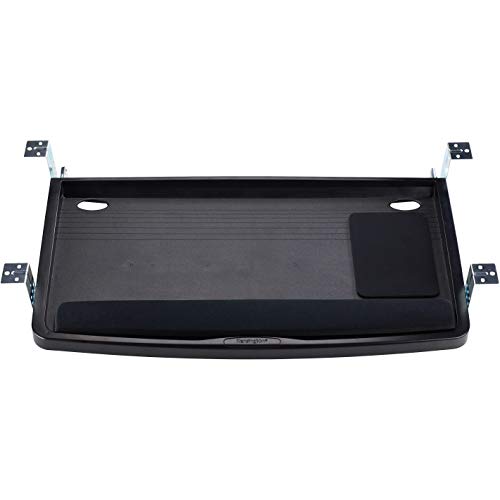
The Kensington K60004US is a screw-mounted slide-out drawer with cable management and what Kensington calls an extra-wide tray. Its listing is not consistent about the size: the product name gives 24.5 by 11.75 inches, while the manufacturer description calls it an extra-wide 26-inch tray and the size fields give 26 x 13.2 x 2.75 inches. Neither figure is settled, so measure your keyboard against the smaller one to be safe.
Height is the second unsettled point: parts of the listing say the drawer installs at three different height levels, while the product description says the SmartFit System lets you mount it at one of four heights. Either way, height is chosen at installation rather than adjusted on the fly. The drawer includes an integrated mousing area with a wrist rest and a mouse pad. The unit weighs 5 pounds; no desk-thickness range or weight capacity is stated.
Specs
- Mount: screw-mounted under-desk drawer
- Tray size: conflicting figures stated (24.5 x 11.75 inches in the product name; 26 inches wide, 26 x 13.2 x 2.75 inches, in the description and size fields)
- Height: conflicting figures stated (three levels in one passage; four heights in another)
- Slide: easy-glide slide-out drawer; extension not stated
- Mouse area: integrated mousing area with mouse pad; wrist rest included
- Cable management: stated in the product name
- Item weight: 5 pounds; weight capacity not stated
- Model: K60004US
Fellowes Office Suites Underdesk Keyboard Drawer (9140305)

The Fellowes Office Suites drawer is a straightforward screw-mounted option that rides on ball-bearing glide tracks, which Fellowes says ensure the drawer slides smoothly back and forth. Installation uses a drill-hole template taped to the underside of the desk, and a 23-1/2 inch wide space is required. The stated dimensions are 11.63 x 22.37 x 2.25 inches and the drawer weighs 3.9 pounds, the lightest pick here.
Height is set at installation with three adjustments, placing the tray 2-1/2, 2-1/8 or 1-3/4 inches below the track. A separate mouse tray is included and can mount to the right or left side of the keyboard tray, or stow underneath when not in use, making this the most flexible option here for left-handed mouse placement. No wrist rest is stated for this model, so none is claimed, and no weight capacity is stated.
Specs
- Mount: screw-mounted under-desk with glide tracks
- Product dimensions: 11.63 x 22.37 x 2.25 inches
- Installation space required: 23-1/2 inches wide
- Slide: ball-bearing glide tracks; extension not stated
- Height: three settings, 2-1/2, 2-1/8 or 1-3/4 inches below track
- Mouse area: separate mouse tray, mounts right or left or stows underneath
- Wrist rest and weight capacity: not stated
- Item weight: 3.9 pounds
- Model: 9140305
Who should skip
Skip under-desk trays entirely if your desk has a low crossbar, a modesty panel or a shallow apron under the front edge, because both styles need clear space to slide. Skip the clamp-on models if your desktop is glass, very thick, or has a bevelled edge the clamps cannot grip evenly. Skip the fixed-height drawers if you need to change keyboard height during the day; only the 3M here adjusts after installation. And if your keyboard is an oversized gaming board, check its width against the smaller tray figures above first.
FAQ
Will a clamp-on tray damage my desk?
Clamp-on trays grip the desk edge rather than screwing into it, which is why they suit desks you cannot drill. The BONTEC listing states a fit window of 0.5 to 1.57 inches of desktop thickness, so a desk outside that range is a poor fit.
How much room do I need under the desk?
Enough clear depth for the tray to slide fully in and out, plus knee room. The 3M AKT90LE needs a minimum mounting depth of 23-1/4 inches, the Fellowes drawer a 23-1/2 inch wide installation space, and the BONTEC more than 11.4 inches from the center stretcher to the desk edge to stow completely.
Can I use a mouse on these trays?
Yes, but the arrangement differs. The VIVO and BONTEC use one shared platform. The 3M includes a mouse pad that can sit on either side, the Kensington has an integrated mousing area, and the Fellowes a separate mouse tray that mounts on either side or stows underneath.
Do these trays work with a laptop on a stand?
Yes, and that is the usual pairing: the laptop sits raised on the desk while the keyboard and mouse live on the tray below. What matters is that tray height and chair position let your forearms stay roughly level while typing.
Final verdict
For most laptop desk setups, a clamp-on platform is the easiest starting point: the VIVO MOUNT-KB05E gives the widest stated typing surface with no drilling, and the BONTEC adds published slide distances, a stated desk-thickness window and a stated capacity. If you want real adjustability, the 3M AKT90LE is the only pick here with height, tilt and swivel, though its height figures conflict on its own page. The Kensington and Fellowes drawers are simpler fixed installs, the Fellowes standing out for its ambidextrous mouse tray and light weight. Measure your desk edge, underside depth and keyboard width first; those numbers narrow this list faster than any feature does.
Product and ASIN Reference
| Product | ASIN |
|---|---|
| VIVO Large Keyboard Tray Under Desk Pull Out (MOUNT-KB05E) | B07HFDJCSL |
| BONTEC Keyboard Tray Under Desk with C-clamp, White | B0BDFB9J6S |
| 3M Keyboard Tray, Adjustable Height and Tilt (AKT90LE) | B001B0BBTW |
| Kensington SmartFit Slide-Out Keyboard Drawer (K60004US) | B00004Z6N4 |
| Fellowes Office Suites Underdesk Keyboard Drawer (9140305) | B0002LD0ZY |
More from Amazon
Programs that pair well with the guide above. Offers and eligibility are set by Amazon and may change.
A free business account with business pricing and bulk-buying tools for work, shop or home office.
Create a business accountFree shipping on eligible items, Prime Video and more. Eligible new members can start with a free trial.
Start a Prime free trialAudiobooks and podcasts to listen to on the go. Eligible new members can start with a free trial.
Try Audible freeAd-free music streaming. Eligible new subscribers can start with a free trial.
Try Music Unlimited freeAs an Amazon Associate we earn from qualifying purchases.










Write Your Review
No reviews yet. Be the first to share your experience!