
Our Short List of 3
All 5 Picks at a Glance
| Product | Specs | Action |
|---|---|---|
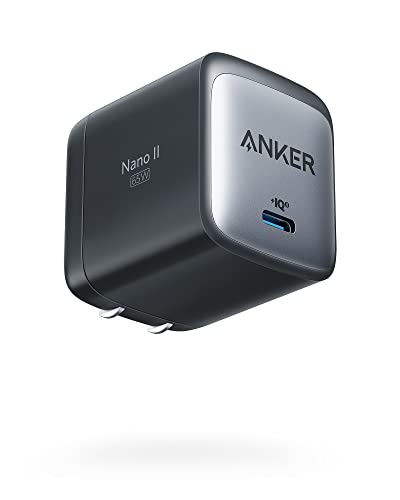 Anker Nano II 65W | Check price on Amazon | |
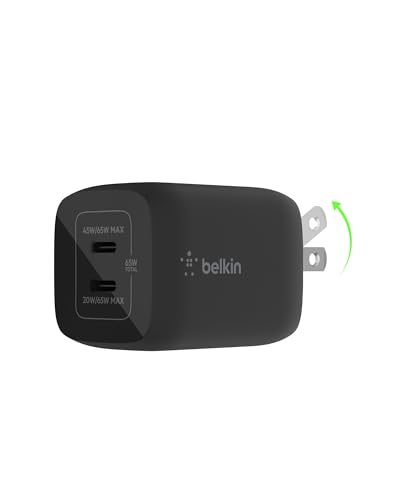 Belkin BoostCharge Pro 65W Dual USB-C | Check price on Amazon | |
 Spigen ArcStation Pro GaN 652 65W | Check price on Amazon | |
 Amazon Basics 65W 2-Port GaN Nano | Check price on Amazon | |
 Nekteck 65W GaN II Single-Port | Check price on Amazon |
The best laptop charger for seniors is the Anker Nano II 65W: one USB-C port, a foldable plug, and a small, light body that is easy to grip, with 65W covering most thin-and-light laptops, ultrabooks, and Chromebooks. Readers who also charge a phone from the same outlet should look at the Belkin BoostCharge Pro 65W Dual, which adds a second USB-C port, while the Amazon Basics 65W 2-Port GaN Nano is the simplest budget option.
Choosing a charger starts with the laptop, not the listing. Read the wattage printed on the original adapter, check whether the laptop charges over USB-C or a round barrel connector, and match or exceed that wattage. Every pick below is a wall charger with no app or setup step, so keep one plugged in at the desk, where the cable is always in the same place.
As an Amazon Associate, we earn from qualifying purchases.
Table of Contents
- Anker Nano II 65W
- Belkin BoostCharge Pro 65W Dual USB-C
- Spigen ArcStation Pro GaN 652 65W
- Amazon Basics 65W 2-Port GaN Nano
- Nekteck 65W GaN II Single-Port
- How to Choose
- Who Should Skip
- Frequently Asked Questions
- Conclusion
Anker Nano II 65W
The Anker Nano II 65W is the simplest pick in this roundup. It has one USB-C port, one job, and no buttons, switches, or settings: plug it into the wall, plug the cable into the laptop, and charging starts. The foldable prongs fold flat, and the charger weighs about 109 grams, so it is easy to grip and carry without adding noticeable weight.
The single port delivers the full 65W to the laptop, covering most thin-and-light laptops, ultrabooks, and Chromebooks that shipped with a 45W or 65W adapter. Gallium nitride, or GaN, keeps this brick small, and it supports PPS, a charging mode some phones use for their fastest charge. One port means a phone needs its own charger or a turn on this one.
Match model A2663 exactly. Anker sells several similar 65W chargers, including the three-port Anker 735, and a different marketplace carries a different ASIN, so confirm the United States listing. Pair it with a 100W-rated cable, since a 3A cable caps output at 60W.
Belkin BoostCharge Pro 65W Dual USB-C
The Belkin BoostCharge Pro 65W Dual USB-C is the pick for readers who charge a laptop and a phone from one outlet. Its two USB-C ports share the 65W budget: the laptop gets the full 65W alone, and the two devices split the power when both are connected.
One charger replaces two bricks in two outlets, and each cable stays plugged into the same block. The charger supports PPS for faster phone charging, and the GaN design keeps the body compact. The plug is fixed rather than foldable, but it sits flat and holds well in a loose outlet.
Match the standalone block listing, model WCH013dq, in black. Belkin also sells this model bundled with a cable under a different listing, so check the title. The standalone block needs a separate 100W-rated USB-C cable. Keep the charger on the desk, not on the floor, where cables become a trip hazard.
Spigen ArcStation Pro GaN 652 65W
The Spigen ArcStation Pro GaN 652 65W is the most compact dual-port pick here, delivering up to 65W across two USB-C ports with GaN III technology, PPS support, and a foldable plug. One device alone gets the full 65W, and two devices split the budget, the same trade as the Belkin.
The 652 is the 65W member of Spigen’s ArcStation Pro GaN line, and the model numbers are close: the 651 is the single-port 65W version, the 352 is 35W, and the 452 is 45W, so match the 652 and model PE2204UJ exactly. Its compact body fits a crowded power strip without blocking the next outlet.
Pair the 652 with a 100W-rated cable so the cable does not cap the output at 60W, and keep the cable short so it does not trail across the floor. Folded prongs do not snag a bag lining or scratch a laptop lid.
Amazon Basics 65W 2-Port GaN Nano
The Amazon Basics 65W 2-Port GaN Nano is the budget pick: two USB-C ports share a 65W budget, the GaN body fits a palm and leaves the neighboring outlet free, and it is the lowest-cost way to stop moving one charger between rooms.
The same sharing rule applies: one device alone can draw the full 65W, and two devices split it, so charge the phone first or give the laptop its own port when heavy work is running. The charger has no display, no buttons, and no app, so there is nothing to learn and nothing to forget.
Match model L6LWC048-CS-R exactly, and confirm the listing says 65W and two ports, since Amazon Basics sells several similar GaN chargers. No cable is included, so pair it with a 100W-rated cable, and keep the spare in one fixed place, such as the bedside table.
Nekteck 65W GaN II Single-Port
The Nekteck 65W GaN II is the pick for a reader who wants one port, one cable, and no decisions at all. A single USB-C port delivers the full 65W to the laptop, with no second port to split the power. A review source notes that this charger is USB-IF certified, meaning an independent body checked it against the USB-C specification.
The single-port design is also the limitation: a phone needs a separate charger or a turn on this one, so readers who charge two devices at once should look at the Belkin or Spigen picks. It suits a fixed desk setup best: plug it in once and leave it there. Unplug it by gripping the plug itself, never by pulling the cable, which frays the cable at the connector.
Match model PD65U-1TGB exactly. Nekteck also sells a 60W GaN charger with a similar name, so confirm the listing says 65W. No cable is included; pair it with a 100W-rated cable, since a 3A cable caps output at 60W.
How to Choose
Start with the wattage printed on the original adapter: the output line shows volts and amps, and multiplying them gives watts. That number is the target to match or exceed. A 65W charger covers most thin-and-light laptops, ultrabooks, and Chromebooks, which commonly ship with 45W or 65W adapters. If the original says 90W or 100W, a 65W charger charges slowly under load, so step up.
Check the connector next. Most recent laptops charge over USB-C with Power Delivery, while older models use a round barrel connector, and a USB-C charger does not fit a barrel port. Power Delivery negotiates the power: the charger lists what it can supply, the laptop picks what it needs, and both agree before power flows, which is why a higher-wattage charger is safe for a lower-wattage laptop.
Count the devices that share the outlet. One port is simplest and delivers the full wattage to the laptop; two ports cover a laptop and a phone but share the budget. The cable matters as much as the brick: a 3A cable caps output at 60W, so use a 5A cable rated for 100W. Prefer a foldable plug for travel and a fixed plug for the desk, and keep the charger off the floor, where cables become a trip hazard.
Who Should Skip
Readers with gaming laptops, large workstations, or 16-inch models that shipped with 90W or 100W adapters should skip these 65W picks and choose a charger rated at least as high as the original adapter. Readers whose laptops charge only through a round barrel connector should also skip these USB-C chargers; none fits a barrel port, and the right replacement is the adapter the laptop maker lists for that model.
Readers who need three or more devices from one outlet should look at a larger multi-port charger or a second charger instead. None of these five picks includes a cable in the box, so a separate 100W-rated USB-C cable is part of the setup. Most owners of thin-and-light laptops, ultrabooks, and Chromebooks will find one of these five picks fits.
Frequently Asked Questions
Is a higher-wattage charger safe for a lower-wattage laptop?
Yes, as long as the connector matches. USB-C Power Delivery negotiates the power before it flows, so the laptop draws only what it needs. A 100W charger on a 45W laptop is safe; the reverse is the problem, since a charger rated below the original adapter charges slowly.
Can one charger charge a laptop and a phone at the same time?
Yes, on a multi-port model such as the Belkin, Spigen, or Amazon Basics pick. The ports share the 65W budget, so the laptop gets less than the full 65W while the phone charges. If the laptop needs close to 65W while working, give it its own port. A single-port charger can charge only one device at a time.
Why does my laptop charge slowly with a 65W charger?
The cable is the usual cause: a 3A USB-C cable caps the output at 60W, so use a 5A cable rated for 100W. The other common cause is sharing, since a second device takes part of the budget on a multi-port charger. Heavy work also draws power, so a busy laptop charges more slowly than one sitting idle.
What if my laptop has a round barrel connector instead of USB-C?
Then a USB-C charger will not fit, and none of these picks will work for that laptop. Check the laptop maker’s adapter list for the exact model, match the connector size and the wattage, and confirm the part number. Many older Dell, HP, and Lenovo laptops use barrel connectors, and the same brand often sold several sizes, so the model name alone is not enough.
Conclusion
The Anker Nano II 65W is the best laptop charger for most seniors: one port, a foldable plug, and a small, light body that is easy to grip. Readers who charge a phone from the same outlet should choose the Belkin BoostCharge Pro 65W Dual or the compact Spigen ArcStation Pro GaN 652, while the Amazon Basics 65W 2-Port GaN Nano is the simplest budget pick and the Nekteck 65W GaN II is the easiest single-port option. Match the wattage to the original adapter, confirm the laptop charges over USB-C, pair the charger with a 100W-rated cable, and keep it in one fixed place.
Product and ASIN Reference
| Product | ASIN |
|---|---|
| Anker Nano II 65W | B08T5QN2TR |
| Belkin BoostCharge Pro 65W Dual USB-C | B0C2YXBGY3 |
| Spigen ArcStation Pro GaN 652 65W | B09QQ662C1 |
| Amazon Basics 65W 2-Port GaN Nano | B0DBPPN3HW |
| Nekteck 65W GaN II Single-Port | ⚠ B09KRZFGM8 |
More from Amazon
Programs that pair well with the guide above. Offers and eligibility are set by Amazon and may change.
A free business account with business pricing and bulk-buying tools for work, shop or home office.
Create a business accountFree shipping on eligible items, Prime Video and more. Eligible new members can start with a free trial.
Start a Prime free trialAudiobooks and podcasts to listen to on the go. Eligible new members can start with a free trial.
Try Audible freeAd-free music streaming. Eligible new subscribers can start with a free trial.
Try Music Unlimited freeAs an Amazon Associate we earn from qualifying purchases.




Write Your Review
No reviews yet. Be the first to share your experience!