
Our Short List of 3
All 5 Picks at a Glance
| Product | Specs | Action |
|---|---|---|
 Logitech Brio 101 | Check price on Amazon | |
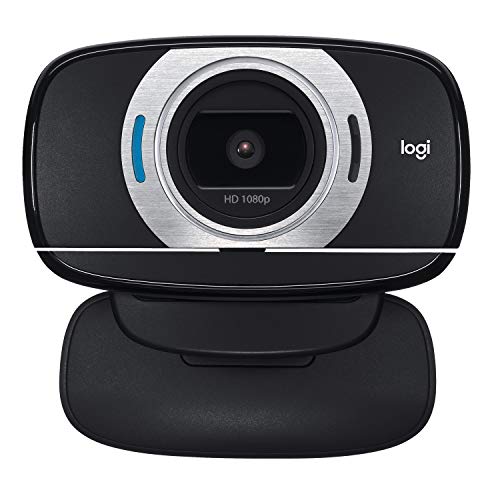 Logitech C615 HD | Check price on Amazon | |
 NexiGo N660P Gen 2 | Check price on Amazon | |
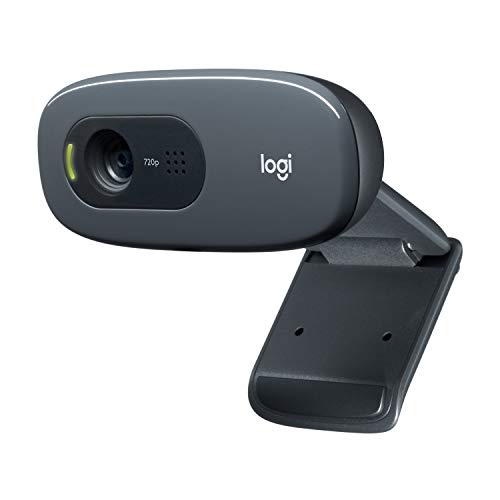 Logitech C270 HD | Check price on Amazon | |
 NexiGo N60 1080p | Check price on Amazon |
A built-in laptop camera often leaves family squinting at a dark, grainy picture, and a standalone webcam fixes that with one USB plug. The best webcam for seniors is the Logitech Brio 101, which gives a clear 1080p picture, a built-in microphone, and a privacy shutter in a camera that needs no software and no setup beyond plugging it in.
The five cameras below were chosen for simple setup first and picture quality second. Every pick plugs into a USB port and works with Zoom, Microsoft Teams, and Google Meet without a driver download. Each one has a built-in microphone, so there is no separate headset to charge or pair. Match the camera to the calls you make most, and check the model number on the listing before ordering.
As an Amazon Associate, we earn from qualifying purchases.
Table of Contents
- How to Choose a Webcam for Seniors
- Logitech Brio 101
- Logitech C615 HD
- NexiGo N660P Gen 2
- Logitech C270 HD
- NexiGo N60 1080p
- What to Avoid When Buying a Webcam
- Frequently Asked Questions
- Conclusion
How to Choose a Webcam for Seniors
Start with setup. A plug-and-play USB camera starts working the moment it is plugged in, with no driver to install and no account to create. USB-A fits the rectangular port found on most laptops, while USB-C fits the smaller oval port on newer machines. If the laptop has only USB-C ports, a USB-A camera needs a small adapter, so check the ports first and pick a camera that matches.
Next, look at the picture and the sound. A 1080p camera shows a clear face on a family call, and 720p is enough when the connection is slow or the screen is small. Autofocus keeps the picture sharp when you lean in or sit back, and automatic light correction brightens a dim room without any settings to change. A built-in microphone means the camera handles both picture and voice.
Finally, check privacy and mounting. A physical privacy shutter or sliding cover blocks the lens with a flick, which is the simplest way to know the camera is off. A universal clip mounts on a laptop lid or a monitor in seconds. Keep the lens clean with a soft dry cloth, and never share personal details on video calls with strangers.
Logitech Brio 101
The Logitech Brio 101 is the simplest premium pick in this roundup. It records Full HD 1080p video at 30 frames per second with auto-light balance, which adjusts the picture when a window sits behind you or the room light is low. The built-in microphone picks up a normal speaking voice from a desk distance, and the integrated privacy shutter slides over the lens when the call ends.
Setup is the Brio 101’s main strength. It connects over USB-A and works with Zoom, Microsoft Teams, and Google Meet on Windows and Mac without a driver download. The clip mounts on a laptop lid or a monitor and holds the camera steady. One listing detail deserves a check: Logitech sells the same camera as the Brio 100 in off-white under a separate listing, so match the black Brio 101 listing and model number 960-001589 exactly.
Logitech C615 HD
The Logitech C615 HD is the portable pick. It records Full HD 1080p video at 30 frames per second with autofocus, which keeps the picture sharp when you move closer to show a photo or lean back in a chair. The fold-and-go design closes flat for travel, and the 360-degree swivel turns the camera toward a second person.
Light correction brightens a dim room. The C615 clips onto a laptop lid or a monitor, and it also fits a standard tripod. Confirm the listing before ordering: the part number should read 960-001056 for the standalone camera, and renewed units circulate under separate listings.
NexiGo N660P Gen 2
The NexiGo N660P Gen 2 is the smooth-motion pick. It records 1080p video at 60 frames per second, which gives smoother motion for group calls where people move around. Autofocus keeps the picture sharp when you lean in or sit back, and automatic white balance and exposure adjust the picture when the light in the room changes. Dual noise-reducing microphones capture a clear voice without a separate headset.
A sliding privacy shutter covers the lens when the call ends, so you can see at a glance that the camera is off. The N660P connects over USB-A with a 6.5-foot cable and works with Zoom, Microsoft Teams, Google Meet, and Skype on Windows and Mac without a driver download. It clips onto a laptop lid or a monitor, and a standard tripod thread on the bottom fits a tripod. Two listing details deserve a check: NexiGo sells the same camera in white under a separate listing, so match the black Gen 2 listing and model number N660P exactly. The original N660P also circulates under a separate listing, so confirm the listing says Gen 2 before ordering.
Logitech C270 HD
The Logitech C270 HD is the simplest budget pick. It records 720p video at 30 frames per second with a fixed-focus lens, which means there is no focus to hunt or adjust. RightLight 2 auto light correction brightens a dim room, and the noise-reducing microphone handles a normal speaking voice.
The C270 clips onto a laptop lid or a monitor and connects over USB-A with a 5-foot cable. It works with Zoom, Microsoft Teams, Google Meet, and Skype on Windows, Mac, and Chrome OS. Confirm the listing before ordering: the model number should read 960-000694 for the current camera. An older packaging of this camera circulates under a different code, so match the listing to the ASIN in the table below.
NexiGo N60 1080p
The NexiGo N60 1080p is the budget pick with a privacy cover. It records Full HD 1080p video at 30 frames per second through a fixed-focus glass lens, and the 110-degree field of view fits two people into the frame without moving the camera.
A built-in noise-cancelling microphone handles a normal speaking voice, and a sliding privacy cover closes over the lens when the call ends. The N60 connects over USB-A with a 5-foot cable and works with Zoom, Skype, Microsoft Teams, and Google Meet on Windows, Mac, Linux, and Chrome OS without a driver download. Confirm the listing before ordering: NexiGo sells newer N60 Pro models under separate listings, so match the original N60 listing and model number N60 exactly.
What to Avoid When Buying a Webcam
Avoid buying on resolution alone. A 4K sensor does not help on a family video call, because conferencing apps compress video before it reaches the other person, and a 4K camera often needs a faster USB port and extra software. A clear 1080p picture with good light correction serves a video call better than a 4K label.
Avoid a camera with no microphone unless you already own one. The picks here all have a built-in microphone, and the N660P and N60 add noise reduction, so each camera works as a complete call device without extra gear.
Avoid renewed or bundle listings unless you mean to buy them. Several cameras in this roundup circulate as renewed units or in bundles under separate listings, and the ASIN in the table below matches the standard new standalone listing for each camera. Check the model number on the listing before ordering. Finally, avoid ignoring the USB requirement: a USB-A camera needs a USB-A port or an adapter, so check the laptop’s ports first.
Frequently Asked Questions
Do I need to install software to use these webcams?
No. All five cameras are plug-and-play over USB, so the laptop recognises them as soon as they are plugged in. Zoom, Microsoft Teams, and Google Meet list the camera and its built-in microphone in their settings without any download.
Will the camera work with my laptop?
Yes, if the laptop has a matching USB port. All five picks use USB-A, the rectangular port found on most laptops, and the clip fits a laptop lid or a monitor. If the laptop has only USB-C ports, use a small USB-A to USB-C adapter or ask a family member to fit one.
How do I know the camera is off?
Use the physical cover. The Brio 101 has an integrated privacy shutter, the NexiGo N660P has a sliding privacy shutter, and the NexiGo N60 has a sliding privacy cover, so a flick closes the lens. The other two picks have no built-in shutter, so slide a small lens cover over the lens or unplug the camera when the call ends. Never trust a software light alone.
Is 720p enough for a family video call?
Yes, for most calls. A 720p picture is clear on a laptop screen, and it needs less internet speed than 1080p, which helps when the connection is slow. Choose 1080p when the family watches on a large television or when two people share the frame, because the extra detail keeps faces clear.
Conclusion
The best webcam for seniors is the one that starts working with a single plug and stays out of the way. The Logitech Brio 101 is the best all-rounder, with a clear 1080p picture, a built-in microphone, and a privacy shutter in one simple camera. The Logitech C615 suits a laptop that moves between rooms, thanks to its folding design and swivel mount. The NexiGo N660P Gen 2 gives the smoothest motion for group calls, with 1080p video at 60 frames per second, and the Logitech C270 and NexiGo N60 cover the budget end.
Product and ASIN Reference
| Product | ASIN |
|---|---|
| Logitech Brio 101 | B0BXGFFSL1 |
| Logitech C615 HD | B004YW7WCY |
| NexiGo N660P Gen 2 | B0DJKYXP4G |
| Logitech C270 HD | ⚠ B004FHO5Y6 |
| NexiGo N60 1080p | ⚠ B088TSR6YJ |
More from Amazon
Programs that pair well with the guide above. Offers and eligibility are set by Amazon and may change.
A free business account with business pricing and bulk-buying tools for work, shop or home office.
Create a business accountFree shipping on eligible items, Prime Video and more. Eligible new members can start with a free trial.
Start a Prime free trialAudiobooks and podcasts to listen to on the go. Eligible new members can start with a free trial.
Try Audible freeAd-free music streaming. Eligible new subscribers can start with a free trial.
Try Music Unlimited freeAs an Amazon Associate we earn from qualifying purchases.
Write Your Review
No reviews yet. Be the first to share your experience!