

Key takeaways
- General college student, Windows software: Surface Laptop 13.8-inch or Dell XPS 13 with the touch display option.
- Note-takers who annotate PDFs and handwrite: HP OmniBook X Flip 14 or Lenovo Yoga 9i 2-in-1 Aura Edition (convertibles with a stylus option).
- Design, architecture and media students: Dell XPS 14 with the OLED touch panel.
- Middle school, high school and web-based coursework: Lenovo Chromebook Plus 14, Acer Chromebook Plus Spin 514 or HP Chromebook 14 x360 Plus.
The best touch screen laptops for students in 2026 are the Microsoft Surface Laptop 13.8-inch for a Windows clamshell with a touch display, the Lenovo Yoga 9i 2-in-1 Aura Edition for a premium convertible, the HP OmniBook X Flip 14 for a stylus-ready 2-in-1, and the Lenovo Chromebook Plus 14 for a light, long-lasting touch OLED at a lower tier. For classroom budgets, the Acer Chromebook Plus Spin 514 and the HP Chromebook 14 x360 Plus cover note-taking and web-based coursework.
Touch is useful for students only when it changes how they study: tapping through slides, annotating PDFs with a stylus, sketching diagrams or flipping a convertible into tablet mode on a crowded lecture bench. This guide explains which spec thresholds matter, sorts eight current touch laptops by student type, and tells you who should skip each one.
Quick answer: pick by student type
- General college student, Windows software: Surface Laptop 13.8-inch or Dell XPS 13 with the touch display option.
- Note-takers who annotate PDFs and handwrite: HP OmniBook X Flip 14 or Lenovo Yoga 9i 2-in-1 Aura Edition (convertibles with a stylus option).
- Design, architecture and media students: Dell XPS 14 with the OLED touch panel.
- Middle school, high school and web-based coursework: Lenovo Chromebook Plus 14, Acer Chromebook Plus Spin 514 or HP Chromebook 14 x360 Plus.
How we chose
This list comes from published specifications, manufacturer documentation and independent 2026 roundups, not from personal use. We began with what a student needs from the machine over four years, then applied these thresholds:
- Touch quality: a multi-touch display with a resolution of at least 1920 x 1200 so text stays crisp when you zoom into a PDF.
- Battery: a manufacturer or independent rundown figure of at least 12 hours, which is enough to cover a full class day with margin for aging.
- Weight: under 3.5 lb for a laptop that goes in a bag every day; under 3 lb is better.
- Memory and storage: 16 GB of memory for Windows laptops, and at least 256 GB of storage; 8 GB is acceptable only for Chromebooks that run mainly web apps.
- Durability and repair: a metal or reinforced chassis, a spill-resistant keyboard where listed, and a warranty that covers at least one year with an option to extend.
- Operating system fit: match the laptop to the software the school or course requires.
Where we could not confirm an exact spec for a specific configuration, the entry describes the spec class instead. Configurations differ by region and by retailer, so confirm processor, memory and display on the product page before buying.
What matters in a student touch laptop
Clamshell with touch versus convertible 2-in-1
A clamshell with a touch screen looks like an ordinary laptop. You can tap, scroll and pinch, but the screen does not fold back. A convertible folds flat or flips 360 degrees into tablet mode. Convertibles suit students who write by hand or read in bed. Clamshells tend to be lighter, stiffer and quieter on a desk. If you will never use tablet mode, a clamshell is the simpler choice.
Stylus support
Not every touch screen supports a pen. Active pens need specific digitizer support, so check the product page for the exact pen type and whether it is included. If handwritten notes are part of your plan, confirm pen support before you buy rather than assuming it works.
Display type: OLED versus IPS
OLED screens offer deep black levels and sharp contrast, which makes reading and video look better. Standard IPS panels are usually brighter in daylight and less likely to show image retention. For a student who studies in libraries and lecture halls, either works. Look for at least 300 nits of brightness if you will often sit near windows.
Chromebook, Windows or Mac
Chromebook Plus models run web apps, Google Workspace and Android apps, and they cost less. Windows runs engineering, statistics, design and legacy tools. Macs are strong laptops, but Apple laptops do not have touch screens, so they do not appear on this list. If your program requires specific software, check the department’s requirements first.
Comparison table
| Laptop | Type | Display | Operating system | Stylus | Tier |
|---|---|---|---|---|---|
| Microsoft Surface Laptop 13.8-inch | Clamshell | 13.8-inch PixelSense touch, 120 Hz on current model | Windows | Surface Pen compatible | Premium |
| Dell XPS 13 (touch option) | Clamshell | 13.4-inch touch option | Windows | Check product page | Mid-range to premium |
| Dell XPS 14 (OLED touch option) | Clamshell | 14-inch 2.8K OLED touch | Windows | Check product page | Premium |
| HP OmniBook X Flip 14 | Convertible | 14-inch 2K OLED touch | Windows | Optional stylus | Premium |
| Lenovo Yoga 9i 2-in-1 Aura Edition | Convertible | 14-inch class OLED touch | Windows | Lenovo pen support, check bundle | Premium |
| Lenovo Chromebook Plus 14 | Clamshell | 14-inch 1920 x 1200 OLED touch | ChromeOS | Not confirmed | Mid-range |
| Acer Chromebook Plus Spin 514 | Convertible | 14-inch touch | ChromeOS | Check product page | Entry-level to mid-range |
| HP Chromebook 14 x360 Plus | Convertible | 14-inch WUXGA touch | ChromeOS | Check product page | Entry-level |
The eight best touch screen laptops for students
1. Microsoft Surface Laptop 13.8-inch: best overall for Windows students
Spec line: 13.8-inch PixelSense touch display, 120 Hz · Snapdragon X-series processor on the current generation · 16 GB memory · 512 GB storage · about 20 hours of rated video playback on the manufacturer’s claim
The Surface Laptop pairs a high-quality touch panel with a light, stiff chassis, and the current generation leans on an Arm-based Snapdragon X processor for long battery life and quiet operation. The 3:2 screen shape shows more of a document or web page than a 16:9 panel of the same width. It runs Windows 11, so mainstream student software works, and the Surface Pen is supported.
Best for: students who want one polished laptop for classes, writing and light creative work.
Skip if: your program uses legacy engineering or lab software that has not been updated for Windows on Arm, or if you need many ports; the port selection is minimal.
Pros: sharp, smooth screen, long battery life, solid build. Cons: premium tier, limited ports, Arm compatibility to verify.
As an Amazon Associate we earn from qualifying purchases at no extra cost to you.

2. Lenovo Yoga 9i 2-in-1 Aura Edition: best premium convertible
Spec line: 14-inch class OLED touch display · Intel Core Ultra processor options · 360-degree hinge · premium aluminum chassis
The Yoga 9i is a flagship convertible, with a bright OLED screen and a hinge that folds into tablet, tent and stand modes. It suits students who alternate between typing and handwriting, and it has strong speakers for lectures and video. Exact memory, storage and stylus bundle vary by configuration, so check the product page before ordering.
Best for: students in design, humanities and any course with heavy annotation.
Skip if: you have a limited budget; this is a premium-tier laptop.
Pros: versatile hinge, OLED display, strong audio. Cons: heavier than a clamshell, premium tier.
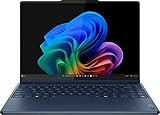
3. HP OmniBook X Flip 14: best 2-in-1 with stylus option
Spec line: 14-inch 2K OLED touch display · convertible hinge · optional stylus · Windows 11 AI PC class hardware
The OmniBook X Flip 14 is HP’s current mainstream premium convertible. A stylus option makes it a good fit for students who handwrite equations, label diagrams or mark up lecture slides. Its OLED panel makes text sharp and photos vivid. Confirm the processor and memory on the exact configuration, since several are sold.
Best for: note-takers and students who switch between laptop and tablet use.
Skip if: you want the lightest possible laptop; convertibles carry extra hinge weight.
Pros: OLED, stylus option, convertible design. Cons: premium tier, configurations vary.

4. Dell XPS 13 with touch display: best compact Windows clamshell
Spec line: 13.4-inch display, touch option · 2.5K panel on the touch configuration · Windows 11
The XPS 13 has long been a student favorite because it is compact and fits easily into a small bag. The touch option adds tap and pinch input without turning the laptop into a convertible. Check the exact build, because touch is an option and the non-touch version is more common.
Best for: students who commute and want a small Windows laptop with a premium feel.
Skip if: you need a large screen for spreadsheets or split-window work; 13 inches is tight.
Pros: compact, premium build, sharp screen. Cons: few ports, touch is optional so make sure you select it.

5. Dell XPS 14 with OLED touch: best for creative students
Spec line: 14-inch 2.8K OLED touch display · Windows 11 · premium chassis
The XPS 14 has a larger, richer display than the XPS 13 and has the performance headroom for photo editing, 3D modeling and video work. It is the most expensive laptop on this list and the least portable, but it is a long-term machine for students in creative programs.
Best for: design, film, architecture and photography students.
Skip if: your coursework is mostly writing and web research; a lower-tier laptop will do.
Pros: excellent OLED screen, strong performance. Cons: premium tier, heavier, shorter battery under heavy loads.
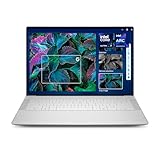
6. Lenovo Chromebook Plus 14: best touch OLED Chromebook
Spec line: MediaTek Kompanio Ultra 910 · 16 GB memory · 256 GB UFS storage · 14-inch 1920 x 1200 OLED touch · 2.78 lb · about 19 hours of battery on an independent roundup’s figure
This is the standout for students who live in the browser. It is light, has a sharp OLED panel and offers long battery life, and ChromeOS is simple to manage and quick to boot. Sixteen gigabytes of memory is generous for a Chromebook, so it keeps many tabs and Android apps open without slowing down.
Best for: high school and college students whose work is in Google Workspace, Microsoft 365 in the browser and web learning platforms.
Skip if: you need Windows-only software such as statistics suites, CAD or specialized lab tools.
Pros: light, long battery life, OLED touch, simple security. Cons: no desktop Windows apps, stylus support not confirmed.

7. Acer Chromebook Plus Spin 514: best convertible Chromebook value
Spec line: 14-inch touch display · 360-degree convertible hinge · Chromebook Plus hardware class
The Spin 514 is a practical convertible for students who want tablet mode for reading and note-taking at a modest tier. It is sold in several processor and memory options, so choose a build with at least 8 GB of memory and 128 GB of storage.
Best for: students who need a flexible, affordable touch laptop for web-based coursework.
Skip if: you need long battery life above all, or a premium display.
Pros: convertible design, accessible tier. Cons: specs vary by configuration, display is not OLED.

8. HP Chromebook 14 x360 Plus: best budget convertible
Spec line: 14-inch WUXGA touch display · Intel N150 processor · 128 GB UFS storage · 360-degree convertible hinge
This model targets schools and families that want a touch convertible at the entry-level tier. The Intel N150 is a low-power processor that handles web browsing, documents and video calls without trouble, but it is not designed for heavy multitasking. Treat it as a coursework machine rather than a long-term creative laptop.
Best for: younger students and anyone whose workload is browser-based.
Skip if: you open dozens of tabs or run Android apps heavily; the entry processor will feel slow.
Pros: low tier, convertible, touch. Cons: modest performance, limited storage.

Worked example: will the battery last a school day?
Manufacturer battery claims come from light-use rundowns, so a student should derate them. A simple rule: multiply the claimed hours by 0.6 for real mixed use with Wi-Fi, a bright screen and video calls. Here is how that works for three laptops.
- Claimed 20 hours: 20 x 0.6 = 12 hours of real use. Covers a full day with margin.
- Claimed 19 hours: 19 x 0.6 = about 11.4 hours. Covers a full day.
- Claimed 10 hours: 10 x 0.6 = 6 hours. Covers a morning, so plan to charge at lunch.
Now compare with a realistic school day: six hours of classes with note-taking, plus two hours in the library, plus one hour of video on the commute. That is nine hours of use. Any laptop with a claimed figure under 15 hours will need a charger in your bag. Because batteries lose capacity over time, give yourself extra margin if you plan to keep the laptop four years.
Decision logic: choose in four steps
- Check course software. If the department requires Windows-only tools, drop the Chromebooks. If it requires Apple-only tools, you need a Mac and should give up touch.
- Decide how you take notes. If you handwrite, you need a convertible or a pen-compatible clamshell. If you type, a clamshell is lighter.
- Set your weight limit. If you walk to class, stay under 3 lb. If you mostly study at a desk, the weight matters less.
- Match the tier to the years. A premium laptop with 16 GB of memory stays useful for four years; an entry-level Chromebook is easier to replace after two or three.
Student fit matrix
| Student | Best pick | Why | Skip |
|---|---|---|---|
| Business or humanities college student | Surface Laptop 13.8-inch | Light, long battery, Windows apps | HP Chromebook 14 x360 Plus |
| Handwritten notes | HP OmniBook X Flip 14 | Convertible with stylus option | Dell XPS 13 |
| Design or film student | Dell XPS 14 OLED touch | Big color-rich OLED screen and performance | Any entry-level Chromebook |
| High school student, web apps | Lenovo Chromebook Plus 14 | Light, long battery, simple management | Dell XPS 14 |
| Tight budget | HP Chromebook 14 x360 Plus | Entry-level touch convertible | Premium convertibles |
| Engineering student | Dell XPS 13 touch option, Yoga 9i | Full Windows, wide software support | Chromebooks |
Care and safety tips for a touch laptop
- Clean the screen with a slightly damp microfiber cloth with the laptop off; do not spray liquid directly onto the panel.
- Use a sleeve with padding on the screen side, because a bag full of books can press on the display.
- Do not lift a convertible by the screen alone; hold it from the base.
- Keep the charger and cable undamaged, and stop using any battery that swells, overheats or smells unusual.
- Turn on a device password or biometric login and enable find-my-device features in case the laptop is lost on campus.
Six more touch laptops worth shortlisting
The eight picks above cover the main student types, but several other touch laptops show up often in buyer comparisons. These six fill gaps: a mid-range OLED convertible, a detachable tablet-style Windows machine, a mainstream x86 convertible, a larger-screen 2-in-1, a second Chromebook convertible and a dual-screen option for heavy multitaskers. Confirm the exact processor, memory and storage on the product page, because each model is sold in several configurations.
9. Lenovo Yoga 7i 2-in-1 14-inch: best mid-range OLED convertible
Spec line: 14-inch 2K OLED touch display · Intel Core Ultra 5 class processor · 16 GB memory · 512 GB storage · 360-degree hinge
The Yoga 7i brings an OLED panel and a full convertible hinge to a tier below the flagship Yoga 9i. It suits students who want sharp text for reading and a flip-over screen for handwriting, without paying for a premium chassis. Some bundles include a Lenovo pen, so check the listing before assuming one is in the box.
Best for: note-takers who want OLED and tablet mode at a lower tier than the Yoga 9i. Skip if: you want the lightest possible laptop; the hinge and OLED panel add weight compared with a plain clamshell.
Pros: OLED screen, true 360-degree hinge, 16 GB memory on common builds. Cons: heavier than a clamshell, pen not always included.

10. Microsoft Surface Pro 12-inch: best detachable for light carry
Spec line: 12-inch touchscreen · Snapdragon X-series Plus processor · 16 GB memory · 256 GB storage · detachable tablet design · Windows 11
The Surface Pro is a tablet with a kickstand that becomes a laptop when you attach a keyboard cover. The 12-inch size is easy to carry and fits on small lecture desks. It supports pen input, which suits annotation and sketching. Treat the keyboard cover and pen as likely extra purchases, because they are often sold separately from the tablet.
Best for: students who commute on foot and mostly read, annotate and write short papers. Skip if: you type for hours on your lap; a detachable keyboard is less stable than a laptop base, and Arm-based Windows may not run every legacy program.
Pros: very light, pen-friendly, quiet. Cons: accessories add to the total cost, lap use is awkward.

11. Dell 14 Plus 2-in-1: best mainstream Windows convertible
Spec line: 14-inch 2K touchscreen · Intel Core Ultra 7 class processor · 2-in-1 convertible hinge · backlit keyboard · Windows 11
This is a mainstream convertible that leans toward everyday coursework rather than flagship polish. It gives full x86 Windows compatibility, which matters for engineering and statistics software that has not been updated for Arm. Listings vary widely in memory and storage, so choose a build with 16 GB and at least 512 GB when the option exists.
Best for: students who need Windows-only programs and want a flip-over screen. Skip if: you want an OLED panel; many builds use an IPS display.
Pros: broad software compatibility, convertible design, mid-range tier. Cons: configurations vary, build feels less premium than the flagship models.
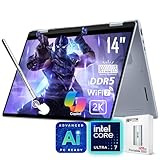
12. Samsung Galaxy Book5 360: best larger-screen AMOLED 2-in-1
Spec line: 15.6-inch FHD AMOLED touchscreen · Intel Core Ultra processor · 16 GB memory · 512 GB storage · 360-degree hinge
A 15.6-inch convertible gives more room for split-screen study, spreadsheets and lecture slides than the 13 and 14-inch models. The AMOLED panel is vivid for video and photo work. The trade-off is bag weight and size, so it suits students who keep the laptop on a desk for most of the day.
Best for: students who value screen space, such as business, finance and science majors. Skip if: you walk far with your laptop every day; a 15-inch class convertible is noticeably heavier than a 14-inch one.
Pros: large vivid screen, tablet mode, roomy keyboard deck. Cons: bulkier in a bag, shorter real battery life than a smaller Chromebook.

13. Acer Chromebook Plus Spin 714: best step-up convertible Chromebook
Spec line: 14-inch WUXGA IPS touchscreen · Intel Core Ultra 5 class processor · 8 GB memory · 256 GB storage · 360-degree hinge · ChromeOS
The Spin 714 sits above the Spin 514 in processor class and build, and it keeps ChromeOS simple to manage. The IPS panel is bright enough for daylight reading, and the convertible hinge covers tablet and tent modes. It is a sensible upgrade for students who outgrow an entry-level Chromebook but still work mostly in the browser.
Best for: college students on web-based coursework who want a faster Chromebook. Skip if: you need Windows desktop software, or a premium OLED display.
Pros: faster than entry-level Chromebooks, convertible, simple security. Cons: 8 GB memory on common builds, not OLED.

14. ASUS Zenbook Duo: best dual-screen option for multitaskers
Spec line: dual 14-inch 3K OLED touch displays · Intel Core Ultra 9 class processor · 32 GB memory · 1 TB storage · detachable keyboard
The Zenbook Duo has two full-size touch screens, so you can keep lecture slides on one and notes or a browser on the other. A detachable keyboard sits over the lower screen or stands apart. It is a niche pick, and it is heavier and costs more than a normal laptop.
Best for: graduate and creative students who run several windows at once. Skip if: you carry your laptop all day, or want an entry-level tier; this is a premium-tier machine.
Pros: two touch screens, strong performance class, OLED. Cons: premium tier, extra weight, shorter battery life with both screens on.

Full comparison table: all 14 touch laptops
| Laptop | Type | Operating system | Screen class | Tier |
|---|---|---|---|---|
| Microsoft Surface Laptop 13.8-inch | Clamshell | Windows | 13.8-inch, 120 Hz | Premium |
| Lenovo Yoga 9i 2-in-1 Aura Edition | Convertible | Windows | 14-inch OLED | Premium |
| HP OmniBook X Flip 14 | Convertible | Windows | 14-inch 2K OLED | Premium |
| Dell XPS 13 (touch option) | Clamshell | Windows | 13.4-inch | Mid-range to premium |
| Dell XPS 14 (OLED touch) | Clamshell | Windows | 14-inch 2.8K OLED | Premium |
| Lenovo Chromebook Plus 14 | Clamshell | ChromeOS | 14-inch OLED | Mid-range |
| Acer Chromebook Plus Spin 514 | Convertible | ChromeOS | 14-inch | Entry-level to mid-range |
| HP Chromebook 14 x360 Plus | Convertible | ChromeOS | 14-inch WUXGA | Entry-level |
| Lenovo Yoga 7i 2-in-1 14-inch | Convertible | Windows | 14-inch 2K OLED | Mid-range to premium |
| Microsoft Surface Pro 12-inch | Detachable | Windows | 12-inch | Mid-range to premium |
| Dell 14 Plus 2-in-1 | Convertible | Windows | 14-inch 2K | Mid-range |
| Samsung Galaxy Book5 360 | Convertible | Windows | 15.6-inch AMOLED | Mid-range to premium |
| Acer Chromebook Plus Spin 714 | Convertible | ChromeOS | 14-inch WUXGA | Entry-level to mid-range |
| ASUS Zenbook Duo | Dual-screen | Windows | Dual 14-inch OLED | Premium |
How to choose: concrete thresholds
Use these cut-offs to narrow the list of 14 quickly.
- Memory: 16 GB or more for any Windows laptop you will keep four years; 8 GB is the floor for ChromeOS, and 16 GB is better if you keep many tabs and Android apps open.
- Storage: at least 256 GB; choose 512 GB if you will install large design, video or statistics programs.
- Weight: under 3 lb if you walk to class; 3 to 3.5 lb is fine for bus or car commutes; above 3.5 lb only if screen size matters more than portability.
- Battery: take the claimed hours and multiply by 0.6. You want at least 8 real hours for a normal class day, so a claim of about 14 hours or more.
- Brightness: at least 300 nits if you sit near windows; OLED panels look vivid indoors but reflect more in bright rooms.
- Pen use: if you handwrite daily, pick a convertible or a detachable with confirmed pen support and check whether the pen is included.
- Updates: for a Chromebook, confirm the automatic update expiration date falls after your graduation date.
- Tier: entry-level for school-age students and tight budgets, mid-range for most college students, premium for creative majors or anyone who wants a laptop to last past four years.
Frequently asked questions
What is the best touch screen laptop for students?
The Microsoft Surface Laptop 13.8-inch is the best all-round touch laptop for Windows students because of its screen, light chassis and long battery life.
For a cheaper, web-based workflow, the Lenovo Chromebook Plus 14 gives a touch OLED screen and long battery life.
Is a touch screen worth it for college?
Yes if you annotate PDFs, handwrite notes or sketch diagrams; otherwise it is a convenience rather than a necessity.
Touch adds some cost and a small battery penalty, so skip it if you only type and browse.
Should students buy a 2-in-1 or a regular laptop with touch?
Buy a 2-in-1 if you will use tablet mode for handwriting or reading; buy a touch clamshell if you want a lighter, stiffer laptop.
A convertible hinge adds weight, so a student who never folds the screen back is better served by a clamshell.
Do touch screen laptops need a stylus?
No, but a stylus is useful for handwritten notes, math and diagrams, and some models include or sell one separately.
Confirm the exact pen type before you buy, because pens are not interchangeable across brands.
Is a Chromebook enough for a college student?
It is enough if your coursework runs in a browser or on Android apps, and not enough if your program requires Windows-only or Mac-only software.
Ask your department for a software list before you buy.
How much memory should a student laptop have?
Choose 16 GB for Windows laptops and at least 8 GB for Chromebooks, with 256 GB of storage when possible.
A student with many browser tabs, a video call and a document open at once will find 8 GB limiting on Windows.
Does a touch screen hurt battery life?
Slightly, because the touch layer uses power, but display brightness and processor load have a much larger effect.
OLED panels can be efficient with dark themes, and lower brightness extends battery life on any laptop.
How long will a student laptop last?
Plan for four years from a premium Windows laptop and two to three years from an entry-level Chromebook.
Check that the ChromeOS model’s automatic update expiration date covers your years of study, since Chromebooks stop receiving updates on a fixed schedule.
More from Amazon
Programs that pair well with the guide above. Offers and eligibility are set by Amazon and may change.
A free business account with business pricing and bulk-buying tools for work, shop or home office.
Create a business accountFree shipping on eligible items, Prime Video and more. Eligible new members can start with a free trial.
Start a Prime free trialAudiobooks and podcasts to listen to on the go. Eligible new members can start with a free trial.
Try Audible freeAd-free music streaming. Eligible new subscribers can start with a free trial.
Try Music Unlimited freeAs an Amazon Associate we earn from qualifying purchases.



Write Your Review
No reviews yet. Be the first to share your experience!