

Key takeaways
- Fully rugged (IP65 or IP66): sealed ports, shock-mounted storage, glove-friendly touch, usually thick and heavy. Choose for mining, utilities, military, oil and gas, and open vehicles.
- Semi-rugged (IP53 range): a reinforced chassis and spill-resistant keyboard in a body closer to a business laptop. Choose for field service, inspection, logistics, public safety in vehicles, and construction offices.
- Business laptop: no real ingress rating. Choose only if the “rugged” requirement is really just a durable lid and a good keyboard.
The best rugged laptop for most field crews in 2026 is the Panasonic Toughbook 55 mk3, because it combines a user-serviceable modular body with a hot-swappable battery system and a realistic 4.6 to 4.9 pound weight. If water, dust and drops are a daily reality rather than an occasional risk, step up to a fully rugged IP66 machine such as the Getac B360 G3 or the Panasonic Toughbook 40 mk2. Ordinary business laptops fail in the places where rugged laptops live, so the right pick depends on how hard your environment really is.
Our top picks


As an Amazon Associate we earn from qualifying purchases at no extra cost to you.
Quick Comparison of the Best Rugged Laptops
| Pick | Best for | Rating class | Display | Weight | Price tier |
|---|---|---|---|---|---|
| Panasonic Toughbook 55 mk3 | Best overall semi-rugged | MIL-STD-810H, IP53 | 14-inch FHD, up to 1,000 nits | 4.6 lb (HD), 4.9 lb (touch) | Premium |
| Getac B360 G3 | Best fully rugged for sunlight | MIL-STD-810H, MIL-STD-461G, IP66 | 13.3-inch FHD touch, 1,400 nits | From 5.11 lb | Quote-based |
| Panasonic Toughbook 40 mk2 | Best modular 14-inch fully rugged | MIL-STD-810H, IP66 | 14-inch FHD glove touch, up to 1,200 nits | About 7.4 lb (3.35 kg) | Premium |
| Getac S410 G5 | Best for existing Getac fleets | MIL-STD-810H, IP53 | 14-inch FHD, up to 1,000 nits | About 5.25 lb | Mid to premium |
| Durabook S14I | Best newer semi-rugged platform | MIL-STD-810H, IP53 | Optional 1,200-nit touch | Varies by build | Mid to premium |
| Dell Latitude 7230 Rugged Extreme | Best rugged detachable tablet | MIL-STD-810H, IP65 | 12-inch FHD+, 1,200 nits | 2.78 to 3.49 lb (tablet only) | Premium |
| Panasonic Toughbook 33 mk3 | Best rugged 2-in-1 for vehicles | MIL-STD-810H, IP65 | 12-inch QHD, up to 1,200 nits | 3.4 lb tablet, 6.2 lb with keyboard | Premium |
Specifications in this guide come from manufacturer spec sheets and reputable reviews and can vary by region and configuration. Several rugged models are sold through quotes and resellers, so confirm the exact build before you order.
Rugged, Semi-Rugged or Business Laptop: What the Ratings Actually Mean
Rugged laptops are described with two kinds of labels, and mixing them up is the most common buying mistake. MIL-STD-810H is a United States military test method standard. A manufacturer states that a model passed selected procedures such as drop, vibration, dust, humidity, altitude and temperature extremes. It is not a single pass-or-fail grade, so two laptops that both say MIL-STD-810H can be certified to very different severity levels. Always read which procedures and which drop height the maker claims.
The IP rating is more concrete. The first digit covers solids and dust, the second covers water. IP5x means dust-protected, not fully dust-tight. IP6x means dust-tight. For water, IPx3 handles spray at an angle, IPx5 handles water jets, and IPx6 handles powerful jets. Per Rugged PC Review, the Toughbook 55’s IP53 rating means the dust protection is strong but water is only covered when it falls as spray within roughly 60 degrees of vertical. That is fine for a rain shower on a job site and not fine for a pressure washer or a drop in a puddle.
- Fully rugged (IP65 or IP66): sealed ports, shock-mounted storage, glove-friendly touch, usually thick and heavy. Choose for mining, utilities, military, oil and gas, and open vehicles.
- Semi-rugged (IP53 range): a reinforced chassis and spill-resistant keyboard in a body closer to a business laptop. Choose for field service, inspection, logistics, public safety in vehicles, and construction offices.
- Business laptop: no real ingress rating. Choose only if the “rugged” requirement is really just a durable lid and a good keyboard.
Best Overall Semi-Rugged: Panasonic Toughbook 55 mk3
The Toughbook 55 mk3 is the pick for crews who need real durability without carrying a brick. Per Panasonic’s spec sheet, it uses 13th Gen Intel Core processors, either the Core i5-1345U vPro or the Core i7-1370P vPro, with up to 64 GB of RAM and up to 3 TB of storage. It weighs 4.6 pounds with the HD screen and 4.9 pounds with the touchscreen, which is roughly two thirds of the weight of a typical 14-inch fully rugged machine.
The magnesium alloy body is certified to MIL-STD-810H and IP53, covering a three-foot drop, vibration, dust, sand, altitude, freeze and thaw, and humidity procedures. The standout feature is modularity. Panasonic describes six user-replaceable expansion areas (xPAKs), so a department can standardize on one body and add a barcode reader, extra ports, a smart card reader or other modules per role. The battery is a 10.8V, 6500 mAh pack with an up to 10-hour rating, and adding the optional second battery supports hot swapping and a rated runtime of up to 20 hours.
Who it is for: utility workers, field engineers, inspectors, and IT departments that want one standard laptop across many roles.
- Pros: light for its class, hot-swappable batteries, modular expansion areas, bright screen options, long service life.
- Cons: 13th Gen CPUs are no longer the newest platform, IP53 is not waterproof, and the premium price is hard to justify for office use.
Best Fully Rugged for Outdoor Visibility: Getac B360 G3
The Getac B360 G3 is the strongest choice when you work in direct sun, rain and dust. It uses Intel Core Ultra Series 2 processors in Core Ultra 5 and Core Ultra 7 options, with 16 GB of RAM as standard and configurations up to 64 GB, plus PCIe NVMe storage from 256 GB to 2 TB. The 13.3-inch Full HD LumiBond touchscreen reaches 1,400 nits, which is the brightest panel in this group and the one that stays legible without shading it with your hand.
Getac rates the B360 G3 for IP66, MIL-STD-810H and MIL-STD-461G, and claims a six-foot operating drop rating. Optional dual hot-swappable batteries keep a shift running without shutdown. Starting weight is 5.11 pounds, so it is much lighter than most fully rugged 14-inch machines, but the 13.3-inch screen is smaller than the 14-inch standard that competitors use.
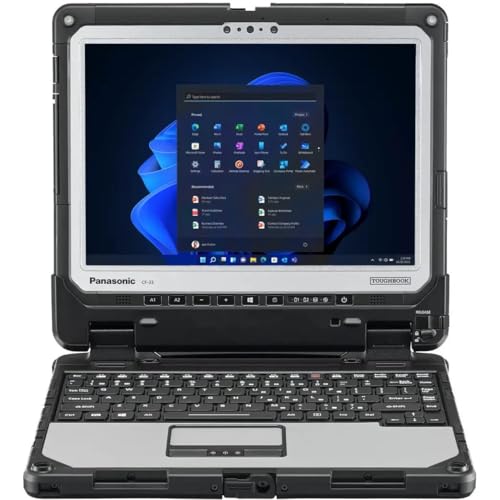
Who it is for: surveyors, first responders, forestry and agriculture crews, and anyone who works outdoors in full sun.
- Pros: very bright screen, glove-friendly touch, IP66 sealing, current Intel platform, broad dock ecosystem, strong warranty options.
- Cons: smaller screen than 14-inch rivals, quote-led pricing makes comparison harder.
Best Modular 14-Inch Fully Rugged: Panasonic Toughbook 40 mk2
The Toughbook 40 mk2 is the answer for teams that need a full-size fully rugged laptop and want to configure it like a server. It offers Intel Core Ultra 5 or Core Ultra 7 vPro processors and 16 GB to 64 GB of DDR5 memory. Its 14-inch Full HD glove-enabled touchscreen reaches up to 1,200 cd/m2. It adds Wi-Fi 7, optional 4G or 5G, GNSS, and four expansion areas for modules.
It carries IP66 and MIL-STD-810H ratings with a 1.8 meter (about six-foot) drop claim. The tradeoff is weight: roughly 3.35 kg (about 7.4 pounds). Panasonic cites an up to 12-hour MobileMark 2025 result, which is a vendor benchmark and typically higher than real mixed use with the screen at full brightness and a modem active.
Who it is for: police and fire fleets, military vehicle mounts, heavy industry and remote engineering.
- Pros: large screen, flexible module bays, newest Wi-Fi, strong sealing, long battery claim.
- Cons: heavy, SKUs and support vary by region, expensive.
Best for Existing Getac Fleets: Getac S410 G5
The Getac S410 G5 is a semi-rugged 14-inch laptop with a Full HD screen up to 1,000 nits, up to 16 GB of RAM, up to 2 TB of storage and a weight of about 5.25 pounds. It is rated IP53 and MIL-STD-810H, with a three-foot operating drop claim, supports Wi-Fi 6E, and offers optional 4G LTE or 5G Sub-6. Getac says it accepts up to three batteries at once, which is a practical advantage for people who cannot plug in for a full shift.
It is built on a 13th Gen Intel platform, which is older than the Core Ultra generation in the Durabook S14I. That matters less if your organization already stocks Getac docks, vehicle mounts and batteries, because compatibility reduces total cost of ownership more than a one-generation CPU gap.
- Pros: multi-battery support, familiar ecosystem, optional cellular, 14-inch screen.
- Cons: older CPU generation, lower drop claim than newer rivals, IP53 only.
Best Newer Semi-Rugged Platform: Durabook S14I
The Durabook S14I is a semi-rugged 14-inch laptop on a newer Intel Core Ultra platform. Per the manufacturer-derived listings, it supports Wi-Fi 7, optional 5G and GPS, an optional 1,200-nit touchscreen and an optional second hot-swappable battery. It is rated IP53 and MIL-STD-810H, with a four-foot drop claim. As with any IP53 laptop, it is not intended for driving rain or heavy dust exposure.
Because configuration details such as exact weight and RAM ceilings vary by reseller, ask for a written spec sheet before ordering a fleet. The S14I makes the most sense when you want a modern semi-rugged chassis at a lower cost than a fully rugged machine and your workers are mostly in vehicles, warehouses and indoor industrial sites.
- Pros: newer platform, Wi-Fi 7, optional 5G and GPS, hot-swappable second battery option.
- Cons: IP53 limits wet work, configuration details differ by seller.
Best Rugged Detachable: Dell Latitude 7230 Rugged Extreme
The Latitude 7230 Rugged Extreme is a 12-inch tablet that docks into a rugged keyboard when you need a laptop. Per Dell’s specifications, it has a 12-inch FHD+ (1920 x 1200) anti-glare touchscreen at 1,200 nits that works with gloves and is protected by Gorilla Glass 5. It uses 12th Gen Intel Core i3, i5 or i7 processors, 8 GB to 32 GB of LPDDR5, and storage from 256 GB to 2 TB.
Weight is 2.78 to 3.49 pounds for the tablet alone. With the optional keyboard attached, TechRadar measured a combined weight of about 2.36 kg. It is rated IP65 and MIL-STD-810H with a four-foot drop claim and works from minus 29 to 63 degrees Celsius. The battery is a 35.6 Wh pack with support for two hot-swappable batteries, giving a combined 71.2 Wh, and Rugged PC Review lists up to 20 hours of runtime for the two-battery setup.
One caution: retail listings mark the 7230 as end-of-life in some channels, so check current availability and support terms before committing. If you can still source it, it remains one of the lightest sealed rugged options.
- Pros: light, bright, sealed, flexible tablet and laptop modes, two-battery runtime.
- Cons: older 12th Gen CPUs, end-of-life status in some channels, 12-inch workspace.
Best Rugged 2-in-1 for Vehicles: Panasonic Toughbook 33 mk3
The Toughbook 33 mk3 is a fully rugged 12-inch 2-in-1 with a detachable premium keyboard. Panasonic’s spec sheet lists a 12-inch QHD (2160 x 1440) sunlight-viewable, glove-enabled screen up to 1,200 cd/m2, an Intel Core i5-1245U vPro (i7 options also offered), and Windows 11 Pro. It is built to MIL-STD-810H and IP65, survives 150 cm drops with the keyboard attached, and works from minus 29 to plus 63 degrees Celsius.
The tablet is 3.4 pounds, and with the Premium Keyboard it weighs about 6.2 pounds. It uses two hot-swappable 22 Wh batteries, 44 Wh combined, with long-life batteries as an option. Runtime figures vary by source from about 6.5 hours up to 10 hours or more with the long-life packs. Panasonic’s UK page shows the mk3 as end-of-life with an mk4 replacing it, so look for the newest version if you are buying new, and treat mk3 units as a good value on the secondary or refurbished market.
- Pros: vehicle-friendly 2-in-1 design, excellent screen, easy battery swaps, fully sealed.
- Cons: heavy with keyboard, mk3 is end-of-life, premium price.
How to Choose a Rugged Laptop: A Decision Matrix
| Your situation | Best match | Why |
|---|---|---|
| Rain, mud, dust, daily drops | Getac B360 G3 or Toughbook 40 mk2 | IP66 sealing and a six-foot drop claim |
| Mostly vehicle and indoor work | Toughbook 55 mk3 or Durabook S14I | Lighter, cheaper, IP53 is enough |
| Direct sun on the screen | Getac B360 G3 | 1,400-nit panel |
| Carry on foot all day | Dell 7230 Rugged Extreme tablet | Under 3.5 lb tablet, IP65 |
| Mixed fleet, many roles | Toughbook 55 mk3 | Six modular expansion areas |
| Already own Getac docks | Getac S410 G5 | Accessory compatibility |
Worked Example: Cost per Year of a Rugged Laptop
A consumer laptop costs less up front, but the math often flips in tough environments. Call the price of a standard business laptop P. If a rugged model costs 2P and lasts 5 years, its purchase cost works out to 0.4P per year. The business laptop at P that lasts 3 years costs about 0.33P per year. On sticker price alone the cheaper machine still wins, so the real advantage of the rugged laptop comes from avoided downtime and avoided replacements.
Add the failures. Suppose the business laptop fails twice in three years from drops or dust, and each failure costs two lost workdays plus a repair or replacement allowance. If a lost workday is worth real output, two failures can erase the entire price gap, and the rugged laptop becomes the cheaper option per working year. Use the same method for your own fleet: list purchase price, expected battery replacements, expected repairs, and hours of lost productivity per failure. If downtime is expensive, semi-rugged is often the sweet spot. If a failure puts safety at risk, pay for IP66 and a higher drop rating.
Ownership Realities: What Wears First
- Batteries: lithium-ion cells lose capacity with cycles. Budget for a replacement every two to three years on heavily used machines, and prefer models with hot-swappable packs so a swap does not interrupt work.
- Port covers and gaskets: rubber seals dry out and crack. Inspect them on a schedule and replace them before the seal fails, because a failed gasket cancels the IP rating.
- Touchscreens: glove-enabled panels still scratch. Apply a replaceable screen protector and clean with a soft cloth, not abrasive wipes.
- Docks and mounts: vehicle docks wear connectors faster than the laptop itself. Choose a platform whose dock is available for your full planned service life.
- Software support: rugged laptops stay in service for years. Confirm BIOS and driver support, TPM and Windows 11 readiness before buying.
Common mistakes include buying fully rugged when semi-rugged would do, which adds weight and cost, and buying semi-rugged for wet work, which exposes dust and moisture risks. Another frequent error is ignoring screen brightness: a 300-nit consumer panel is hard to read outside, while 1,000 to 1,400 nits is workable in sun.
Specs That Matter Most
- Processor and platform generation: newer Core Ultra platforms improve efficiency and Wi-Fi 7 support, which matters for field connectivity and battery life.
- RAM and storage: 16 GB is a sensible minimum today. Removable NVMe drives simplify data security, since a drive can be pulled and stored separately.
- Display brightness and touch: look for 1,000 nits or more, glove mode and a rain mode that ignores water droplets.
- Connectivity: optional 4G or 5G and GNSS add cost but remove dependence on hotspots.
- Legacy ports: serial, Ethernet and USB-A remain common on rugged units and are useful for diagnostic equipment.
- Security: TPM 2.0, vPro, smart card readers and fingerprint options matter for public safety and government work.
Frequently Asked Questions
What is the difference between rugged and semi-rugged laptops?
Fully rugged laptops generally carry IP65 or IP66 sealing and higher drop ratings, while semi-rugged laptops usually carry IP53 and lower drop claims in a lighter body. Fully rugged suits wet, dusty and high-impact jobs. Semi-rugged suits vehicles, warehouses and field offices.
Is MIL-STD-810H enough to trust?
It is a useful signal but not a guarantee. Manufacturers choose which test procedures to run, so ask which ones were completed and at what severity. Pair it with an IP rating and a stated drop height for a complete picture.
How long do rugged laptop batteries last?
Vendor claims range from about 10 hours on the Toughbook 55 mk3 to 12 hours on the Toughbook 40 mk2 and up to 20 hours with dual batteries. Real runtime is shorter with a bright screen, cellular modem and heavy workloads, so plan on hot-swappable packs for full shifts.
Can a rugged laptop be used as a normal office laptop?
Yes, but it is heavier and costs more than a standard laptop with similar performance. If you only need occasional protection from spills and bumps, a premium business laptop with a durable chassis may be enough.
Should I buy an end-of-life rugged model?
It can be a smart value if support and spare batteries remain available. Confirm warranty terms, parts supply and Windows driver updates in writing, and compare against the current replacement model before you buy a fleet.
Do rugged laptops need special accessories?
Not required, but vehicle docks, spare batteries, screen protectors and hard carrying cases extend service life and reduce downtime. Check that accessories are sold for your specific model for its full planned service life.






Write Your Review
No reviews yet. Be the first to share your experience!