

Our Top Picks
An OLED laptop under $1,100 used to mean a compromise: a gorgeous screen bolted to 8GB of RAM, a 256GB drive, or a last-generation chip. November 2026 changes that math — Black Friday pricing has pushed several genuinely good OLED machines under the $1,100 line, and for the first time in this series the top pick ships with 32GB of RAM and a 1TB SSD.
Every price in this guide is a November 2026 snapshot from a real listing. Prices move fast in sale season, so check the current price on Amazon before buying.
Our top picks

Best for: Anyone who wants the best OLED laptop under $1,100 without a single specification compromise — this is the one to buy
Check price on AmazonBest for: Students and presenters who want a big OLED screen that folds flat
Check price on AmazonBest for: Buyers who want Dell build quality and a sharper-than-WUXGA touchscreen
Check price on Amazon
Best for: Travelers who want the sharpest screen and the longest battery life
Check price on Amazon
Best for: Budget buyers who want the biggest OLED screen for the least money
Check price on AmazonQuick Picks
| Laptop | Price (Nov 2026) | Display | CPU | RAM / Storage | Best for |
|---|---|---|---|---|---|
| ASUS Zenbook 14 OLED UM3406GA-XS79 | $999.99 | 14″ WUXGA OLED, 100% DCI-P3 | Ryzen AI 7 445 | 32GB / 1TB | Best overall |
| HP OmniBook X Flip 16″ 2K OLED | $999.99 | 16″ 2K OLED touchscreen | Core Ultra 5 (2026) | 16GB / 512GB | Best 2-in-1 |
| Dell 14″ 2K OLED touchscreen | $999.99 | 14″ 2K OLED touchscreen | Ryzen AI 7 445 | 16GB / 512GB | Best Dell |
| Lenovo Yoga Slim 7x | $1,019.99 | 14.5″ 3K OLED touchscreen | Snapdragon X Elite | 16GB / 512GB | Best screen and battery |
| ASUS Vivobook S16 OLED | $849.99 | 16″ WUXGA OLED | Core Ultra 7 355 | 16GB / 512GB | Best big screen |
How to Choose an OLED Laptop Under $1,100
OLED panel type and resolution
Every real OLED panel in this guide is a true emissive OLED with perfect blacks and per-pixel lighting. Resolution matters more than the OLED badge alone: a 14-inch WUXGA panel (1920 x 1200) is sharp at about 162 pixels per inch, while a 3K panel (2944 x 1840) is visibly crisper for text and photo work. Touchscreens cost extra and add glare.
Brightness and HDR
Most OLED laptop panels peak at 400 to 600 nits, which is plenty indoors. HDR on a laptop OLED is real — the per-pixel contrast means HDR content genuinely looks better than on any IPS panel — but check for a DisplayHDR True Black rating rather than a generic “HDR” sticker.
Color accuracy
For photo and video work, 100% DCI-P3 coverage is the number to look for, and every pick in this guide covers it. If a listing does not publish a gamut figure, assume the worst: some budget “OLED” listings are actually IPS panels wearing an OLED name — the Samsung Galaxy Book4 Edge 15.6-inch is IPS (1920 x 1080), not AMOLED, confirmed by Samsung’s own spec page.
CPU and GPU for everyday work
No OLED laptop under $1,100 ships with a discrete GPU, so none of these machines is a gaming laptop or a heavy video-editing workstation. What you get is a modern integrated GPU — AMD Radeon, Intel Arc, or Qualcomm Adreno — which handles 4K video playback, light photo editing, and casual games. The CPU matters more: a current Ryzen AI, Core Ultra, or Snapdragon X chip is fast and efficient, while a 2023-era chip like the Ryzen 5 7520U is slower.
RAM floor
16GB is the floor in 2026, and it is non-negotiable. Memory prices roughly doubled during 2026 as AI data centers bought up DRAM supply, and 8GB configurations have crept back into listings near $1,000. Every pick in this guide ships with 16GB or more; the top pick goes further, with 32GB — the first time a 32GB OLED laptop has fit under $1,100 in this series.
Storage speed and size
512GB is the minimum usable size; Windows, apps, and a photo library fill 256GB within months. All five picks ship with fast PCIe SSDs, and the top pick doubles the standard to 1TB. Most of these machines have a single M.2 slot, so a 512GB model can grow later — soldered RAM cannot.
Battery life
OLED panels draw more power on bright white documents than IPS panels do. Snapdragon machines are the efficiency kings here — 17 hours or more in light use — while x86 machines typically deliver 8 to 12 hours. A 70Wh battery is a good sign; anything under 55Wh in a 14-inch chassis is a red flag.
Burn-in risk
OLED burn-in is real but manageable: modern panels use pixel shifting, brightness limiting, and screen savers to prevent static images from leaving a ghost. For normal mixed use — documents, browsing, video — it is a non-issue over the life of the laptop.
1. ASUS Zenbook 14 OLED UM3406GA-XS79 — Best Overall
Price: $999.99 at the ASUS eShop (in stock, November 2026; list price $1,499.99). Check price on Amazon
Specs: 14″ WUXGA (1920 x 1200) OLED, 60Hz, 100% DCI-P3, 1,000,000:1 contrast; AMD Ryzen AI 7 445; 32GB LPDDR5X on board; 1TB M.2 NVMe PCIe 4.0 SSD; Wi-Fi 6E; Windows 11 Pro; 1.2 kg; 14.9 mm thin.
Why it wins: This is the machine our under-$800 and under-$900 guides both listed as not fitting — the 32GB/1TB configuration of the Zenbook 14 OLED, at $999.99. At $1,100 it is the top pick, and the first laptop in this series to put 32GB of RAM and a 1TB SSD behind an OLED panel under $1,100. The Ryzen AI 7 445 is a current-generation chip with a 50 TOPS neural processor. It is $100 under budget at a verified in-stock price: the ASUS eShop lists it at $999.99 against a $1,499.99 list price.
Pros:
- Only pick with 32GB of RAM and 1TB of storage
- Current Ryzen AI 7 445 chip
- 100% DCI-P3 OLED with a 1,000,000:1 contrast ratio
- Windows 11 Pro included, not Home
Cons:
- 60Hz panel — no high refresh rate
- RAM is soldered, so buy the configuration you need
- Non-touch screen
Best for: Anyone who wants the best OLED laptop under $1,100 without a single specification compromise — this is the one to buy.
2. HP OmniBook X Flip 16″ 2K OLED — Best 2-in-1
Price: $999.99 at an authorized retailer (November 2026). Check price on Amazon
Specs: 16″ 2K OLED touchscreen; Intel Core Ultra 5 (2026); 16GB memory; 512GB SSD; Copilot+ PC; Eclipse Gray.
Why it wins: The only 16-inch 2-in-1 OLED in this guide, and the only pick that converts into a tablet. The 2K OLED touchscreen is the largest panel here, and the Core Ultra 5 (2026) is a current chip with an NPU for Copilot+ features. At $999.99 it sits $100 under budget.
Pros:
- Biggest screen in the guide at 16 inches
- 2-in-1 convertible with a touchscreen and stylus support
- 2K resolution is sharper than the WUXGA picks
Cons:
- 512GB storage is half the top pick’s, and only one M.2 slot
- Heavier than the 14-inch picks
- Battery life trails the Snapdragon machines
Best for: Students and presenters who want a big OLED screen that folds flat.
3. Dell 14″ 2K OLED Touchscreen — Best Dell
Price: $999.99 at Best Buy (verified November 12, 2026). Check price on Amazon
Specs: 14″ 2K OLED touchscreen; AMD Ryzen AI 7 445; 16GB memory; 512GB SSD.
Why it wins: Dell’s 14-inch 2K OLED touchscreen is the sharpest 14-inch panel in this guide after the Lenovo’s 3K screen, and it pairs that panel with the same Ryzen AI 7 445 chip as the top pick. Our under-$900 guide flagged this machine as costing more than listed — the verified Best Buy price for the Ryzen AI 7 445 model (16GB/512GB) was $999.99, not the $849.99 our under-$800 guide had recorded. At $1,100 it fits with $100 to spare.
Pros:
- 2K OLED touchscreen — sharper than the WUXGA picks
- Same current Ryzen AI 7 445 chip as the top pick
- Dell’s build quality and support network
- Touchscreen included at no premium over the non-touch picks
Cons:
- 512GB storage is half the top pick’s
- 16GB RAM is soldered
- No Thunderbolt — USB-C only
Best for: Buyers who want Dell build quality and a sharper-than-WUXGA touchscreen.
4. Lenovo Yoga Slim 7x — Best Screen and Battery
Price: $1,019.99 at an authorized retailer (November 2026). Check price on Amazon
Specs: 14.5″ 3K (2944 x 1840) OLED touchscreen, 90Hz; Snapdragon X Elite; 16GB LPDDR5X; 512GB SSD; Windows 11 Pro; 70Wh battery.
Why it wins: The sharpest screen in the guide — a 3K OLED touchscreen at 90Hz — and the longest battery life, thanks to the Snapdragon X Elite and a 70Wh battery. It was the top pick of our under-$700 guide at a $649.99 Black Friday price; at $1,019.99 it returns as a pick, not the top pick, because the Zenbook beats it on RAM and storage for $20 less.
Pros:
- Only 3K 90Hz panel in the guide
- Best battery life here — Snapdragon efficiency plus a 70Wh battery
- Touchscreen and Windows 11 Pro
- Premium build at 1.19 kg
Cons:
- $1,019.99 leaves only $80 of headroom
- 512GB storage and 16GB RAM are half the top pick’s
- Snapdragon means some x86 apps run through emulation
Best for: Travelers who want the sharpest screen and the longest battery life.
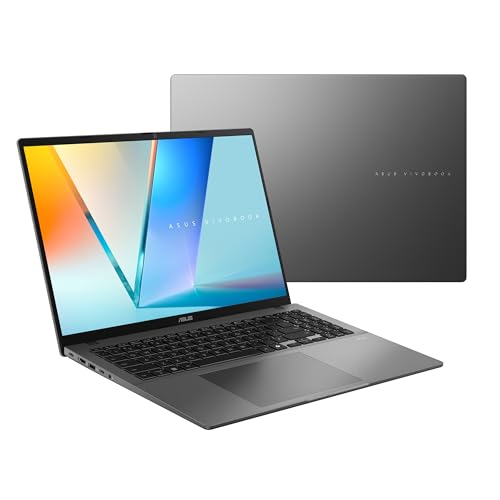
5. ASUS Vivobook S16 OLED — Best Big Screen
Price: $849.99 at an authorized retailer (November 2026). Check price on Amazon
Specs: 16″ WUXGA OLED; Intel Core Ultra 7 355; 16GB RAM; 512GB SSD; Copilot+ PC; matte gray.
Why it wins: The cheapest pick in the guide by $150, and the only 16-inch OLED under $900 that is not a 2-in-1. The Core Ultra 7 355 is a current chip, the 16-inch panel is roomy for split-screen work, and at $849.99 it leaves $250 in the budget for a mouse, a sleeve, or a USB-C hub.
Pros:
- Cheapest pick here — $250 under budget
- 16-inch screen for split-screen work
- Current Core Ultra 7 355 processor
- Copilot+ PC with an NPU
Cons:
- WUXGA resolution is the lowest pixel density here
- 60Hz panel
- 512GB storage, single M.2 slot
Best for: Budget buyers who want the biggest OLED screen for the least money.
What to Avoid
The 8GB trap. Memory prices roughly doubled in 2026, and 8GB configurations have crept back into listings near $1,000. The worst offenders: the ASUS Zenbook 14 UX3480 at $799.99 at Best Buy ships with 8GB of RAM and a 256GB drive, and the Acer Swift Go 14 SFG14-73-58EP at $745 ships with 8GB/512GB, just $15 less than the 16GB version. Both are soldered, so the mistake is permanent. Do not buy an 8GB laptop in 2026.
IPS lookalikes. Not every laptop with “OLED” in a listing title has an OLED panel. The Samsung Galaxy Book4 Edge 15.6-inch is IPS (1920 x 1080), not AMOLED — confirmed by Samsung’s own spec page, even though the 14-inch and 16-inch Edge models are AMOLED. The Lenovo Yoga 7i 16-inch 2K touchscreen ($649.99) and the HP OmniBook X Flip 2K touchscreen ($649.99) are both IPS too.
The 256GB trap. A 256GB drive is not enough in 2026. Windows, apps, and a photo library fill it within months, and several OLED laptops in this price range still ship with 256GB. 512GB is the floor; 1TB is comfortable.
4GB RAM, eMMC storage, and TN panels. These are walk-away specs in any laptop, and they still appear in listings near $1,000 from marketplace sellers.
“OLED” screens from untraceable sellers. If the seller cannot name the panel manufacturer or the exact model number, the screen is not what the listing claims.
Still doesn’t fit: the ASUS Zenbook 14 OLED UM3406GA-WS79T (32GB/1TB) at $1,399.99, the ASUS Zenbook S14 with 32GB and 1TB (over $1,400), the Samsung Galaxy Book5 Pro 360 OLED (over $1,100 at verified retailers), and any OLED laptop with a discrete GPU — the cheapest RTX laptop with an OLED screen is the Legion 5a Gen 11 at $1,560.23.
FAQ
Can I get a new OLED laptop under $1,100?
Yes — and for the first time in this series, a good one. Five verified new machines fit under $1,100 in November 2026, and the top pick ships with 32GB of RAM and a 1TB SSD. Almost every pick is on sale, though: the Zenbook 14 OLED at $999.99 is $500 off its $1,499.99 list price, and the Yoga Slim 7x has swung between $649.99 and $1,299.99 in a month.
Is 16GB of RAM enough in an OLED laptop under $1,100?
Yes, 16GB is the floor and it is enough for office work, browsing, photo editing, and light video work. 32GB is better for heavy multitasking, and the top pick is the only machine here that offers it under $1,100. 8GB is not enough in 2026 — do not buy it.
Do OLED laptops have burn-in problems?
Burn-in is real but manageable: modern panels use pixel shifting and screen savers to prevent static images from leaving a ghost. For normal mixed use — documents, browsing, video — it is a non-issue over the life of the laptop.
Can an OLED laptop under $1,100 handle video editing?
Light video editing, yes. The Ryzen AI 7 445 and Core Ultra 7 chips handle 1080p and light 4K editing, and the 100% DCI-P3 OLED panels are genuinely good for color work. Heavy 4K editing wants a discrete GPU, and no OLED laptop under $1,100 has one.
Is a refurbished OLED laptop worth it?
Sometimes. Our under-$800 guide found a certified refurbished Acer Swift Go 16 AI at $490.90 (Acer via eBay after coupon) — the cheapest 16GB OLED in the series by more than $250. The trade-offs are cosmetic wear, a shorter warranty, and a coupon-dependent price. At $1,100, though, you can buy new.
Verdict
The best OLED laptop under $1,100 is the ASUS Zenbook 14 OLED UM3406GA-XS79 at $999.99. It is the first machine in this series to put 32GB of RAM and a 1TB SSD behind an OLED panel under $1,100, with a current Ryzen AI 7 445 chip and a 100% DCI-P3 panel — $100 under budget at a verified in-stock price.
If you want a 2-in-1, buy the HP OmniBook X Flip 16″ 2K OLED at $999.99. If you want the sharpest screen and the longest battery life, buy the Lenovo Yoga Slim 7x at $1,019.99. If you want the biggest screen for the least money, buy the ASUS Vivobook S16 OLED at $849.99. Whatever you buy, check the RAM before you check the price: 16GB is the floor, 8GB is a trap.
As an Amazon Associate, we earn from qualifying purchases.
Suggested internal links
More from Amazon
Programs that pair well with the guide above. Offers and eligibility are set by Amazon and may change.
A free business account with business pricing and bulk-buying tools for work, shop or home office.
Create a business accountFree shipping on eligible items, Prime Video and more. Eligible new members can start with a free trial.
Start a Prime free trialAudiobooks and podcasts to listen to on the go. Eligible new members can start with a free trial.
Try Audible freeAd-free music streaming. Eligible new subscribers can start with a free trial.
Try Music Unlimited freeAs an Amazon Associate we earn from qualifying purchases.










Write Your Review
No reviews yet. Be the first to share your experience!