
Into the Breach turns every battle into a compact puzzle. On an eight-by-eight grid, your mechs face the Vek, and the game shows exactly what each enemy plans to do on the next turn. Winning is less about raw firepower and more about repositioning: a punch that pushes a bug into water, a shield placed on the building about to be hit, a mech parked where a new enemy would surface. Islands chain into a campaign, and the Advanced Edition adds more squads, pilots, and enemies.
Because the presentation is simple 2D and the turns are unhurried, this is one of the least demanding games in its genre. Almost any current laptop handles it, so the real choices are screen size, memory headroom for guide pages beside the game, and portability. As an Amazon Associate, we earn from qualifying purchases. The five laptops below cover both native versions, from a fanless Mac to gaming laptops that treat this title as a light side load.
How to Choose a Laptop for Into the Breach
Into the Breach runs natively on Windows and macOS, and both versions are the same game, so the picks below mix both platforms fairly. There is no operating system question to route around: buy the platform you prefer for everything else, and the game will be waiting.
The hardware bar is low. The game draws simple sprites on small grids and never asks the graphics hardware to do anything heavy. Integrated graphics from recent years are genuinely enough, and 8GB of memory covers the game itself. Extra hardware helps around the game instead: 16GB or more keeps a browser, a chat app, and the wiki comfortable beside it, and an SSD makes island transitions feel instant.
Screen choice matters more than silicon. The grid is dense with icons, so a sharp panel at 13 to 16 inches keeps the battlefield readable. Battery life and weight decide whether the laptop travels and how long a run lasts away from an outlet.
Apple MacBook Air 13 (M4)

The MacBook Air 13 with the M4 chip is the natural first pick for the native macOS version. It is fanless, so a tense final island plays out in complete silence, and the 13.6-inch Liquid Retina display renders the grid and its telegraphed attack lines crisply. Its 24GB of unified memory and 1TB SSD are far more than the game asks for, with room left for a large library.
Portability is the argument: the Air slips into a bag and disappears, Apple lists up to 18 hours of battery life, and Touch ID signs you in quickly. If your gaming happens in short bursts between other work, it fits that rhythm best.
Specs
– Processor: Apple M4 chip
– Memory: 24GB unified memory
– Storage: 1TB SSD
– Display: 13.6-inch Liquid Retina
– Battery: Up to 18 hours as listed
– Design: Fanless aluminum enclosure, Midnight finish
– Operating system: macOS
– ASIN: B0F9BCLYHC
Dell XPS 13 9350
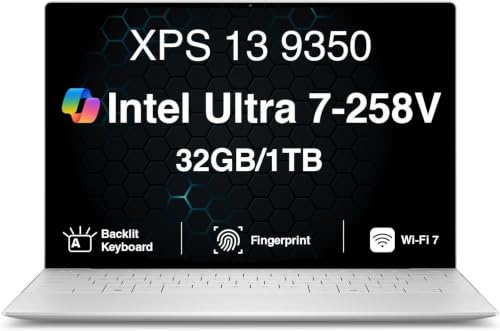
The XPS 13 9350 is the Windows counterpart for players who want the smallest serious laptop in the bag. Its Core Ultra 7 258V processor and Arc 140V integrated graphics sit well beyond what this game draws, and 32GB of memory means the wiki, a chat window, and a dozen tabs never crowd the game out. The 13.4-inch FHD+ panel runs at 120Hz as listed, which keeps cursor movement across the grid direct.
The listing claims up to 26 hours of battery life, the kind of figure that means charging overnight and carrying it all day. The trade-off is two Thunderbolt 4 ports and nothing else, balanced by a fingerprint reader in the power button for quick sign-ins. For short tactics sessions, that minimalism is easy to live with.
Specs
– Processor: Intel Core Ultra 7 258V, up to 4.8 GHz as listed
– Graphics: Intel Arc 140V integrated
– Memory: 32GB
– Storage: 1TB PCIe SSD
– Display: 13.4-inch FHD+ 1920×1200, 120Hz, 500 nits as listed
– Ports: 2x Thunderbolt 4
– Wireless: Wi-Fi 7 as listed
– Battery: Up to 26 hours as the listing claims
– Operating system: Windows 11 Pro
– ASIN: B0H5TKFRVM
ASUS Zenbook 14 OLED (UM3406HA)

The Zenbook 14 OLED UM3406HA splits the difference between the ultraportables above: a 14-inch OLED touchscreen in a 2.65 lb body, as listed. The Ryzen 7 8840HS and its Radeon 780M integrated graphics are far stronger than this game requires, with headroom left for heavier 2D and indie titles. The OLED panel gives the grid deep blacks and clean contrast, so intent markers stay easy to read.
Its 16GB of LPDDR5X memory and 512GB PCIe 4.0 SSD keep the system responsive, and the port mix beats the XPS: USB4, HDMI 2.1, and USB-A all appear in the listing. The 75Wh battery suits a full day away from the desk. In Jade Black with a backlit keyboard, it reads as a work laptop first.
Specs
– Processor: AMD Ryzen 7 8840HS, up to 5.1 GHz
– Graphics: AMD Radeon 780M integrated
– Memory: 16GB LPDDR5X
– Storage: 512GB PCIe 4.0 SSD
– Display: 14-inch WUXGA OLED touchscreen, 1920×1200
– Battery: 75Wh
– Weight: About 2.65 lb
– Operating system: Windows 11 Home
– ASIN: B0DFWZ77LB
Lenovo Legion 5 Gen 10

The Legion 5 Gen 10 is the pick for players whose library extends well past tactics games. Its Ryzen 7 260 processor and RTX 5060 graphics are enormous overkill for Into the Breach, and that is the honest framing: it earns its place by handling demanding modern titles too, with the Breach as a light interlude. The 15.1-inch WQXGA OLED screen runs at 165Hz as listed.
Memory sits in SO-DIMM slots, the 1TB SSD swallows a big library, and the listing names USB4, HDMI 2.1, wired Ethernet, and a 24-zone RGB backlit keyboard. It is the heaviest machine here, so treat it as a desktop that occasionally moves rooms.
Specs
– Processor: AMD Ryzen 7 260, up to 5.1 GHz as listed
– Graphics: NVIDIA GeForce RTX 5060, 8GB GDDR7
– Memory: 16GB DDR5-5600, SO-DIMM slots
– Storage: 1TB SSD M.2 PCIe Gen4
– Display: 15.1-inch WQXGA OLED 2560×1600, 165Hz, 500 nits as listed
– Keyboard: 24-zone RGB backlit as listed
– Ports: USB4 40Gbps, HDMI 2.1, RJ-45 Ethernet as listed
– Operating system: Windows 11 Home
– ASIN: B0FXMY8FYW
HP Victus 15

The Victus 15 is the second gaming laptop in the lineup, built around a Ryzen AI 7 350 processor and RTX 5060 graphics. Like the Legion, it far exceeds anything this game can use; its place here is as a general gaming machine that runs the Breach without effort. The 15.6-inch FHD screen refreshes at 144Hz as listed, with 32GB of DDR5 memory and a 1TB SSD in this configuration.
That memory is the headline for multitaskers: guides, voice chat, and the game can all stay open together. The listing includes RJ-45 Ethernet for a wired desk connection and an RGB backlit keyboard. One caution from the listing: this offer bundles a 7-in-1 USB-C hub, so confirm the exact configuration on the product page before ordering.
Specs
– Processor: AMD Ryzen AI 7 350, up to 5.0 GHz as listed
– Graphics: NVIDIA GeForce RTX 5060, 8GB GDDR7
– Memory: 32GB DDR5
– Storage: 1TB SSD
– Display: 15.6-inch FHD, 144Hz as listed
– Keyboard: RGB backlit as listed
– Ports: RJ-45 Ethernet as listed; bundled 7-in-1 USB-C hub as listed
– Operating system: Windows 11 Home
– ASIN: B0G1N8R9Z4
Comparison Table
| Product | Best for | Key spec |
|---|---|---|
| Apple MacBook Air 13 (M4) | Silent travel play on macOS | 24GB unified memory, 1TB SSD |
| Dell XPS 13 9350 | Smallest Windows option | 32GB memory, 13.4-inch 120Hz panel |
| ASUS Zenbook 14 OLED (UM3406HA) | OLED screen in a light body | Ryzen 7 8840HS, 75Wh battery |
| Lenovo Legion 5 Gen 10 | A broader gaming library | RTX 5060, 15.1-inch OLED 165Hz |
| HP Victus 15 | Memory-heavy multitasking | 32GB DDR5 memory, RTX 5060 |
FAQ
Does Into the Breach run natively on a Mac?
Yes. The game has a native macOS version alongside the Windows release, and the two play identically. The MacBook Air above runs that native build, no translation layer involved.
How much memory does the game actually need?
Very little. The game itself is comfortable in 8GB, but 16GB or more is the sensible target for a laptop also used for browsing and chat, since those apps, not the game, fill memory during a session.
Is a gaming laptop worth it for this game alone?
Not for this game alone. A gaming laptop earns its place when the rest of your library includes demanding titles. For the Breach, any ultraportable above is more machine than the game can use.
Conclusion
Into the Breach rewards thought, not hardware. Choose by the rest of your life: the Air for silence and travel, the XPS 13 for the smallest Windows footprint, the Zenbook for its OLED panel, and the Legion or Victus for a heavier library. Pick the machine you will actually carry.
More from Amazon
Programs that pair well with the guide above. Offers and eligibility are set by Amazon and may change.
A free business account with business pricing and bulk-buying tools for work, shop or home office.
Create a business accountFree shipping on eligible items, Prime Video and more. Eligible new members can start with a free trial.
Start a Prime free trialAudiobooks and podcasts to listen to on the go. Eligible new members can start with a free trial.
Try Audible freeAd-free music streaming. Eligible new subscribers can start with a free trial.
Try Music Unlimited freeAs an Amazon Associate we earn from qualifying purchases.










Write Your Review
No reviews yet. Be the first to share your experience!