
Serpent in the Staglands is an old school isometric RPG built around a hand drawn pixel look, a party of companions, and real time combat that pauses whenever you need to think. It sends your group through forests, farms, and small settlements where dialogue, careful positioning, and patient exploration matter more than fast reflexes. Sessions stretch long, because the game rarely rushes you and its storytelling rewards slow reading.
The published requirements are gentle, naming a 2.4 GHz class processor, 3 GB of memory, graphics with 512 MB of memory, and 3 GB of storage. Almost any current laptop clears that bar, so choose by screen clarity, keyboard comfort, and battery life instead. As an Amazon Associate, we earn from qualifying purchases.
How to Choose a Laptop for Serpent in the Staglands
Platform comes first. Serpent in the Staglands has real Windows, macOS, and Linux editions, and the store page publishes requirement blocks for all three. One honest caveat: the published Mac minimum is an older block, naming Mac OS X 10.6 and a Pentium IV class processor from the Intel era, so Apple silicon owners should check the current store guidance before buying the game. The Windows and Linux minimums are similarly modest, naming Windows XP era systems and Ubuntu 10.10.
Because the requirements sit so low, focus on the screen. The isometric view packs small sprites, dense text, and a detailed interface into every scene, so a sharp panel helps during long sessions. A 14 inch or larger display gives dialogue and inventory screens room to breathe. Memory and storage are easy: every pick below carries far more of both than the game asks for. If you choose a Windows on ARM machine such as the Yoga Slim 7x below, check the game’s current ARM guidance, since older titles vary on that platform.
Apple MacBook Air 13 M4

The MacBook Air 13 M4 is the lightest way into the Staglands. Its 13.6 inch Liquid Retina screen renders the pixel art scenery and small interface text crisply, and the fanless chassis stays silent during quiet exploration scenes. The Midnight finish, Touch ID, and 12MP Center Stage camera round out a machine that also handles everyday work between sessions.
With 16GB of unified memory and a 256GB SSD, this configuration sits far above the published minimums, leaving room for a whole library of classic RPGs beside it. The honest note is the one above: the game’s published Mac requirements are an older Intel era block, so confirm the current store notes on Apple silicon before settling in.
Specs
- Processor: Apple M4 chip
- Memory: 16GB unified memory
- Storage: 256GB SSD
- Display: 13.6 inch Liquid Retina
- Camera: 12MP Center Stage camera
- Security: Touch ID
- Color: Midnight, model MW123LL/A
- ASIN: B0DZD9S5GC
Apple MacBook Air 15 M4

Players who read a lot of dialogue tend to appreciate the MacBook Air 15 M4. The 15.3 inch Liquid Retina display, at 2880 by 1864, gives party portraits, journal entries, and crowded town scenes more space, which suits a game that tells much of its story through text panels and environmental detail.
This configuration pairs the M4 chip with 16GB of unified memory and a 512GB SSD, so loading between areas feels effortless. It stays thin and quiet like the smaller Air, and the same platform note applies: the Mac edition is real, while its published minimum block dates from the Intel era, so check current store guidance for Apple silicon.
Specs
- Processor: Apple M4 chip
- Memory: 16GB unified memory
- Storage: 512GB SSD
- Display: 15.3 inch Liquid Retina, 2880 by 1864
- Camera: 12MP Center Stage camera
- Security: Touch ID
- Color: Midnight, model MW1M3LL/A
- ASIN: B0DZD9VLQ4
Lenovo Yoga Slim 7x

The Yoga Slim 7x takes a different route: a slim Windows machine built around the Snapdragon X Elite. Its 14.5 inch 3K OLED touch display reaches 1000 nits as listed, which makes the moody forest palette and dark dungeon corners look rich, and the panel is large enough to keep the whole party and interface in comfortable view.
Inside, 32GB of LPDDR5X memory and a 1TB SSD give this slim laptop generous headroom for a big game library and everyday multitasking. Because it is a Windows on ARM machine, treat it as the one pick where homework matters: check the game’s current ARM guidance before you buy, since a 2015 era title may lean on translation layers rather than native support.
Specs
- Processor: Snapdragon X Elite X1E-78-100, 3.40 GHz as listed
- Memory: 32GB LPDDR5X-8448MT/s, soldered
- Storage: 1TB SSD M.2 2242 PCIe Gen4
- Display: 14.5 inch 3K touch OLED, 1000 nits as listed
- Camera: 1080P FHD/IR hybrid camera
- Wireless: Wi-Fi 7
- Operating system: Windows 11 Pro
- ASIN: B0FBMMMMWX
ASUS Zenbook 14 OLED

The Zenbook 14 OLED is the Windows pick for readers who want a vivid screen in a light frame. Its 14 inch WUXGA OLED touchscreen shows the game’s hand drawn scenery with deep contrast, and the Ryzen 7 8840HS with Radeon 780M integrated graphics sits comfortably above the modest published requirements.
A 512GB PCIe 4.0 SSD and 16GB of LPDDR5X memory keep the system responsive through long sessions, while Wi-Fi 6E and a 75Wh battery suit playing away from a desk. The Jade Black finish and slim build make it easy to carry, and since it runs standard Windows on x86 hardware, the game installs the ordinary way with no translation questions.
Specs
- Processor: AMD Ryzen 7 8840HS, up to 5.1 GHz as listed
- Graphics: AMD Radeon 780M integrated
- Memory: 16GB LPDDR5X
- Storage: 512GB M.2 NVMe PCIe 4.0 SSD
- Display: 14 inch WUXGA OLED touchscreen, 1920×1200
- Wireless: Wi-Fi 6E, Bluetooth 5.3
- Battery: 75Wh
- Color: Jade Black, model UM3406HA-WS74T
- ASIN: B0DFWZ77LB
HP Victus 15
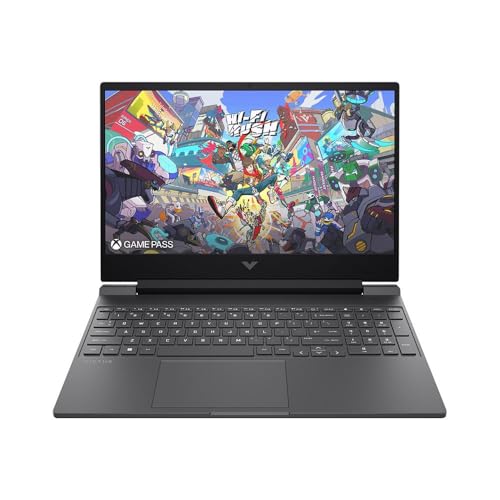
The Victus 15 is the pick for players who want a larger screen and a dedicated graphics card for a wider game library. Its 15.6 inch Full HD IPS anti-glare panel runs at 144Hz as listed, giving isometric scenes plenty of room, and the full size keyboard suits long stretches of hotkey driven party commands.
The Ryzen AI 7 350 and GeForce RTX 5060 far exceed anything this game asks, which simply means the machine also covers newer titles in the same library. This listing pairs them with 16GB of DDR5-5600 memory and a 1TB PCIe Gen4 NVMe SSD, plus Wi-Fi 6E and a wired RJ-45 port.
Specs
- Processor: AMD Ryzen AI 7 350, 2.0GHz as listed
- Graphics: NVIDIA GeForce RTX 5060 8GB GDDR7
- Memory: 16GB DDR5-5600
- Storage: 1TB PCIe Gen4 NVMe M.2 SSD
- Display: 15.6 inch Full HD IPS anti-glare, 144Hz
- Wireless: Wi-Fi 6E, Bluetooth 5.3
- Ports: USB Type-A and Type-C, HDMI, RJ-45 Ethernet
- Weight: 5.06 lb as listed
- ASIN: B0FLRWF779
Comparison Table
| Product | Best for | Key spec |
|---|---|---|
| Apple MacBook Air 13 M4 | Lightest travel pick | 13.6 inch Liquid Retina, 16GB memory |
| Apple MacBook Air 15 M4 | Reading lots of dialogue | 15.3 inch Liquid Retina, 2880 by 1864 |
| Lenovo Yoga Slim 7x | Slim Windows OLED | 14.5 inch 3K OLED touch, 1000 nits as listed |
| ASUS Zenbook 14 OLED | Vivid screen, light frame | 14 inch WUXGA OLED touchscreen |
| HP Victus 15 | Big screen, wide library | RTX 5060, 15.6 inch 144Hz display |
FAQ
Does Serpent in the Staglands run on Mac laptops?
Yes, a real Mac edition exists alongside the Windows and Linux editions. The honest caveat is that the published Mac minimum is an older block naming Mac OS X 10.6 and Intel era hardware, so Apple silicon owners should check the current store guidance before buying.
What specifications does the game actually need?
The published minimums name a 2.4 GHz Pentium IV class processor or equivalent, 3 GB of memory, graphics with 512 MB of memory, and 3 GB of storage. Every laptop in this guide clears those figures by a wide margin, so screen quality and comfort matter more than raw power here.
Can I play it on a laptop with integrated graphics?
Yes. The game’s published graphics minimum is only 512 MB, so integrated graphics such as the Radeon 780M in the Zenbook 14 OLED or the graphics inside the M4 chip sit well above the requirement on paper. On the Windows on ARM Yoga Slim 7x, check the game’s current ARM guidance first, as older games vary on that platform.
Conclusion
Serpent in the Staglands asks very little of modern hardware, which makes the choice simple: pick the screen and chassis you will enjoy for long evenings of reading and exploration. The MacBook Air models suit quiet, portable play with a real Mac edition, the Zenbook and Victus cover Windows players who want OLED color or a bigger panel, and the Yoga Slim 7x adds a slim ARM option for anyone who checks its guidance first.
More from Amazon
Programs that pair well with the guide above. Offers and eligibility are set by Amazon and may change.
A free business account with business pricing and bulk-buying tools for work, shop or home office.
Create a business accountFree shipping on eligible items, Prime Video and more. Eligible new members can start with a free trial.
Start a Prime free trialAudiobooks and podcasts to listen to on the go. Eligible new members can start with a free trial.
Try Audible freeAd-free music streaming. Eligible new subscribers can start with a free trial.
Try Music Unlimited freeAs an Amazon Associate we earn from qualifying purchases.









Write Your Review
No reviews yet. Be the first to share your experience!