
Our Top Picks
 ASUS ROG Strix G16 Gaming Laptop16GB DDR5 | 1TB SSD13.94 x 0.89 x 10.39 inches5.51 poundsCheck on Amazon

Call of Duty asks a lot of a laptop. One evening can jump from a campaign mission to hours of multiplayer and a few battle royale drops, and the hardware has to keep up with all of it. Fast chips feed the action, strong graphics cards draw busy maps, and a high-refresh screen keeps movement smooth when the fight gets crowded. Storage matters too, since the game and its updates take a large share of a drive.
As an Amazon Associate, we earn from qualifying purchases.
The five laptops below cover that ground in different ways: raw graphics power, sharp high-refresh panels, or a light frame that travels well. Every figure and graphics name comes straight from the maker’s listing.
How to Choose a Laptop for Call of Duty
Start with the screen. The listings here quote refresh figures of 144Hz, 165Hz, and 240Hz. A higher figure means the panel redraws more often each second, keeping motion clear when you turn quickly. Match the screen to the graphics card: a strong card pairs well with a 240Hz panel, while a mid-range card suits a 144Hz or 165Hz screen.
Graphics names here are copied exactly as the listings print them, from the NVIDIA GeForce RTX 4060 Laptop GPU up to the NVIDIA GeForce RTX 5070 Ti Laptop GPU. The chip matters too, since multiplayer loads the processor with players, effects, and voice chat at once.
Storage deserves real attention. The install, seasonal updates, and extra modes add up fast, so a 1TB solid-state drive is the comfortable pick, and 2TB is better still. Memory of 16GB handles the game itself, while 32GB leaves room for chat apps, a browser, and recording tools alongside.
Cooling decides how a laptop feels in hour three. Listings call out designs such as liquid metal on the processor and extra intake fans, details that help a machine hold its speed. Finally, check the ports: a built-in RJ-45 Ethernet jack, where a listing names one, gives multiplayer a steady wired link.
Lenovo Legion Pro 5i Gen 8

The Legion Pro 5i Gen 8 builds its case on balance. Its Intel Core i7-13700HX has 16 cores and 24 threads, and the NVIDIA GeForce RTX 4070 Laptop GPU brings 8GB of GDDR6 memory, a pairing that suits the campaign and long multiplayer nights alike. The 16-inch WQXGA screen runs at 165Hz as listed, so the picture stays sharp and quick.
Lenovo also gets the practical details right. The listing names an RJ-45 Ethernet port, plus HDMI and USB-C for a monitor or capture gear. With 32GB of DDR5 memory and a 1TB SSD, there is room for the game, its updates, and squad apps in the background.
Specs
– Processor: Intel Core i7-13700HX (16 cores, 24 threads, up to 5.0 GHz)
– Graphics: NVIDIA GeForce RTX 4070 Laptop GPU, 8GB GDDR6
– Memory: 32GB DDR5
– Storage: 1TB PCIe NVMe M.2 SSD
– Display: 16-inch WQXGA (2560 x 1600), 165Hz
– Ports: RJ-45 Ethernet, HDMI, USB-C 3.2 Gen 2, USB-A
– Wireless: Wi-Fi 6, Bluetooth
– Operating system: Windows 11 Home
– ASIN: B0CDQRY4HX
ASUS ROG Zephyrus G16 (2025)

The Zephyrus G16 is the pick for players who carry their setup. At 4.30 lb in a CNC aluminum chassis only 0.59 inches thin, it travels like a work laptop, yet the listing pairs an Intel Core Ultra 9 285H with an NVIDIA GeForce RTX 5070 Ti Laptop GPU and 12GB of GDDR7 memory. Its 16-inch ROG Nebula OLED screen runs at 240Hz as listed, with G-SYNC named in the listing.
That mix makes it easy to play in a hotel room, then close the lid and head out. The honest trade-off is ports: this slim design skips a built-in Ethernet jack, so plan on Wi-Fi or a USB-C adapter for a wired link. The 2TB SSD is the roomiest drive here, a plus for travelers.
Specs
– Processor: Intel Core Ultra 9 285H
– Graphics: NVIDIA GeForce RTX 5070 Ti Laptop GPU, 12GB GDDR7
– Memory: 32GB LPDDR5X
– Storage: 2TB SSD
– Display: 16-inch ROG Nebula OLED 2.5K (2560 x 1600), 240Hz, G-SYNC
– Cooling: ROG Intelligent Cooling
– Weight: 4.30 lb, 0.59-inch thin CNC aluminum chassis
– Operating system: Windows 11 Pro
– ASIN: B0G1W7V6VP
ASUS ROG Strix G16
The Strix G16 aims at players who want a full-power gaming rig that still moves between rooms. Its NVIDIA GeForce RTX 4060 Laptop GPU runs at 140W Max TGP as listed, fed by an Intel Core i7-13650HX. The 16-inch FHD screen refreshes at 165Hz as listed and covers 100% sRGB with Pantone Validation, so campaign cutscenes look true as well.
ASUS cools this model with ROG Intelligent Cooling, which the listing describes as Thermal Grizzly Conductonaut Extreme liquid metal on the CPU plus a third intake fan, hardware aimed at holding speed through long sessions. With 16GB of DDR5-4800 memory and a 1TB PCIe Gen4 SSD, the Strix covers the game’s needs with room for other titles.
Specs
– Processor: Intel Core i7-13650HX
– Graphics: NVIDIA GeForce RTX 4060 Laptop GPU at 140W Max TGP, 8GB GDDR6
– Memory: 16GB DDR5-4800
– Storage: 1TB PCIe Gen4 SSD
– Display: 16-inch FHD, 165Hz, 100% sRGB, Pantone Validated
– Cooling: ROG Intelligent Cooling with liquid metal and a third intake fan
– Wireless: Wi-Fi 6E
– Weight: 5.51 lb
– Operating system: Windows 11 Home
– ASIN: B0CRDCXRK2
MSI Katana 15 HX
The Katana 15 HX (B14WGK-016US) puts a big chip in a 15.6-inch frame. The listing names an Intel Core i9-14900HX, near the top of Intel’s laptop line, alongside an NVIDIA GeForce RTX 5070 graphics card. That strong processor keeps busy multiplayer lobbies fed while the graphics card draws the map.
Its 15.6-inch QHD screen runs at 165Hz as listed, a step up in sharpness from FHD panels of the same size. The 32GB of DDR5 memory gives chat and recording tools room beside the game, and the 1TB NVMe SSD holds the install with space to spare.
Specs
– Processor: Intel Core i9-14900HX
– Graphics: NVIDIA GeForce RTX 5070
– Memory: 32GB DDR5
– Storage: 1TB NVMe SSD
– Display: 15.6-inch QHD (2560 x 1440), 165Hz
– Keyboard: RGB backlit keyboard
– Model: Katana 15 HX B14WGK-016US
– Operating system: Windows 11 Home
– ASIN: B0DZFVBQLK
Lenovo LOQ 15
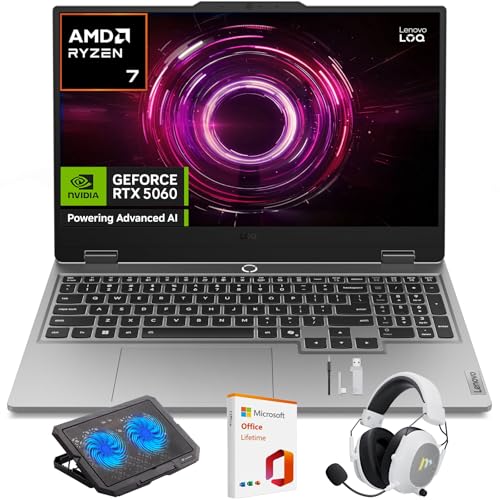
The LOQ 15 is the straightforward entry in this group, and that is its strength. The listing pairs an AMD Ryzen 7 250 with an NVIDIA GeForce RTX 5060 behind a 15.6-inch FHD screen that refreshes at 144Hz as listed. For players stepping up from an older machine, that combination covers campaign and multiplayer without flagship hardware.
It keeps the details simple: a backlit keyboard for late sessions, Wi-Fi 6 for wireless play, and a weight of about 5.06 lb that moves between desk and backpack easily. The 512GB SSD is the smallest here, so heavy libraries may mean picking which games stay installed.
Specs
– Processor: AMD Ryzen 7 250
– Graphics: NVIDIA GeForce RTX 5060
– Memory: 16GB DDR5
– Storage: 512GB SSD
– Display: 15.6-inch FHD (1920 x 1080), 144Hz
– Keyboard: Backlit keyboard
– Wireless: Wi-Fi 6
– Weight: about 5.06 lb
– Operating system: Windows 11 Home
– ASIN: B0GLN1C5PD
Comparison Table
| Product | Best for | Key spec |
|---|---|---|
| Lenovo Legion Pro 5i Gen 8 | Balanced power with wired play | RTX 4070, 165Hz WQXGA, RJ-45 Ethernet |
| ASUS ROG Zephyrus G16 (2025) | Travel play | RTX 5070 Ti, 240Hz OLED, 4.30 lb |
| ASUS ROG Strix G16 | Long sessions at home | RTX 4060 at 140W Max TGP, liquid metal cooling |
| MSI Katana 15 HX | Strongest chip in a 15.6-inch frame | Core i9-14900HX, RTX 5070, QHD 165Hz |
| Lenovo LOQ 15 | First gaming laptop | RTX 5060, 144Hz FHD |
FAQ
How much storage should a laptop have for Call of Duty?
Plan for more than the base install. Updates and extra modes grow over time, so a 1TB drive keeps the game and a few other titles comfortable. A 512GB drive works if this is the main game installed.
Is 16GB of memory enough for Call of Duty?
Yes, 16GB runs the game well. If you keep voice chat, a browser, and recording tools open together, 32GB gives the setup more breathing room, and three of the five picks include it.
Should I play over Wi-Fi or a wired connection?
A wired Ethernet link is the steadier choice for multiplayer when the laptop offers the port, as the Legion Pro 5i Gen 8 does in its listing. The Wi-Fi 6 and Wi-Fi 6E named in these listings handle play well when a cable is not practical.
Conclusion
Each laptop here takes a different route into the same game: the Legion Pro 5i Gen 8 balances power with a wired port, the Zephyrus G16 packs flagship graphics into a light frame, the Strix G16 focuses on cooling, the Katana 15 HX leads on processor strength, and the LOQ 15 keeps the entry simple. Match the screen, graphics card, and storage to how and where you play, and any of the five will carry your squad nights well.
More from Amazon
Programs that pair well with the guide above. Offers and eligibility are set by Amazon and may change.
A free business account with business pricing and bulk-buying tools for work, shop or home office.
Create a business accountFree shipping on eligible items, Prime Video and more. Eligible new members can start with a free trial.
Start a Prime free trialAudiobooks and podcasts to listen to on the go. Eligible new members can start with a free trial.
Try Audible freeAd-free music streaming. Eligible new subscribers can start with a free trial.
Try Music Unlimited freeAs an Amazon Associate we earn from qualifying purchases.










Write Your Review
No reviews yet. Be the first to share your experience!