
A laptop keyboard and trackpad are fine for a quick email on the sofa, but hours of typing at a desk call for a full-size keyboard and a real mouse. A wireless keyboard and mouse combo solves that in a single purchase: the keyboard and mouse arrive in one box, share one connection method, and work together from the moment you plug in or pair up, with no tangle of cables.
The five combos below cover the main ways people work: full-size 2.4 GHz sets for a fixed desk, a quiet slim set for shared spaces, and one Bluetooth-only combo that uses no receiver at all. Each pick is a genuine set sold as one product, with specs from the manufacturer’s own listing.
As an Amazon Associate, we earn from qualifying purchases.
Quick answer
A wireless keyboard and mouse combo gives a laptop a proper desk setup in one purchase: one box, one connection, matched battery habits. Full-size 2.4 GHz sets like the Logitech MK545 and Dell KM3322W suit fixed desks, the HP 230 covers Windows and Mac, and the Bluetooth-only Logitech MK250 frees up every USB port.
How to choose
Start with the connection. Most combos here use 2.4 GHz wireless through a small USB receiver: plug it in once and both devices work. The trade-off is that the receiver occupies a USB port full time, which matters on slim laptops with only two ports. A Bluetooth combo avoids the receiver entirely, but your laptop needs Bluetooth and you should expect a short pairing step instead of instant plug-and-play.
Next, look at the layout. A full-size keyboard with a number pad suits spreadsheet work and data entry. A compact or slim keyboard takes up less desk space, and some compact boards still keep a number pad, so check the layout description rather than assuming small means stripped down.
Battery life is the third factor, and it is where combos differ most. The sets below quote from twelve months up to three years depending on the device. Those figures are the manufacturers’ own statements, so treat them as guidance rather than a guarantee, and check which batteries each device takes, because listings do not always agree on the exact count.
Finally, confirm operating system support. Most of these combos list Windows and Chrome OS, fewer list Mac OS, and one lists Android and Linux variants.
Logitech MK545 Advanced Wireless Keyboard and Mouse Combo

The MK545 Advanced is the traditional desk combo of this group: a full-size keyboard with a textured palm rest, media controls and F-key shortcuts, paired with a mouse and a single Logitech Unifying receiver. One tiny receiver connects both devices through a single USB port. Adjustable tilt legs give three typing angles: a natural flat position plus 4 and 8 degree tilts.
Battery life is the headline here: Logitech states the keyboard stays powered for 36 months and the mouse for 24 months. One caution: the listing’s own fields do not agree on the exact battery count, so treat that detail as unsettled. Compatibility is listed for Windows and Chrome OS.
Specs
- Connection: 2.4 GHz wireless via one Unifying USB receiver for both devices
- Wireless range: 10 metres
- Keyboard layout: Full size with textured palm rest, media controls and F-key shortcuts
- Tilt legs: 3 positions (natural, 4 degrees, 8 degrees)
- Battery life: Up to 36 months (keyboard), up to 24 months (mouse)
- Battery count: Not stated (the listing’s fields disagree)
- Operating systems: Windows 7, 10, 11 or later; Chrome OS
Dell Wireless Keyboard and Mouse KM3322W
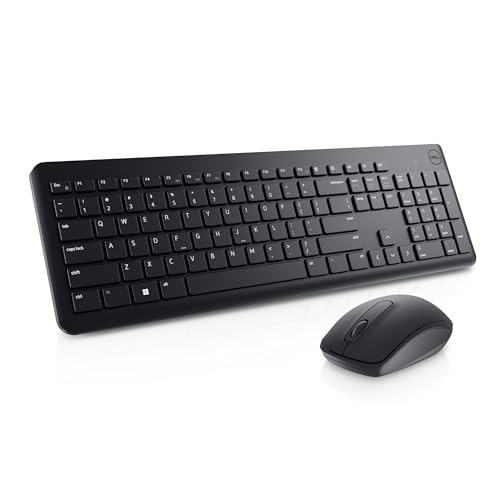
Dell’s KM3322W is a full-size combo aimed at everyday office work. The keyboard includes a number pad, six multimedia keys, a tilt leg and anti-fade plunger keys, and it is spill-resistant. The mouse is a three-button design with a mechanical scroll wheel and a 1000 DPI optical LED sensor, well matched to documents and browsing.
Dell quotes battery life of 36 months for the keyboard and 18 months for the mouse, and the set runs on AA batteries that are included; the listing gives no per-device battery-type split beyond that. The keyboard also carries 128-bit AES encryption, and Dell’s description includes a three-year Advanced Exchange Service. Compatibility is the broadest here, covering Android, Chrome OS, Mac OS, Linux and Windows, so this is the pick if your laptop runs something other than current Windows.
Specs
- Connection: 2.4 GHz wireless
- Keyboard layout: Full size with number pad, 6 multimedia keys and tilt leg
- Keys: Anti-fade plunger keys, spill-resistant design
- Mouse: Optical LED sensor, 1000 DPI, three buttons and scroll wheel
- Battery life: Up to 36 months (keyboard), up to 18 months (mouse)
- Batteries: 2 AA required, included (per-device split not stated)
- Security: 128-bit AES encryption on the keyboard
- Operating systems: Android, Chrome OS, FreeDOS, Mac OS, Red Hat Enterprise Linux 6, Windows 10, 11, 7 and 8
HP 230 Wireless Mouse and Keyboard Combo

The HP 230 pairs a full-sized, low-profile chiclet membrane keyboard with a numeric keypad and twelve dedicated keyboard shortcuts, with a mouse whose sensitivity adjusts up to 1600 DPI. Both devices connect over 2.4 GHz wireless through a single USB-A receiver, with a stated range of up to 32.8 feet, or 10 metres. Note that this is a dongle-based 2.4 GHz set, not a Bluetooth one, despite wording slips in its listing copy. The design emphasis is on durability and low noise.
HP states up to 16 months of keyboard use and up to 12 months of mouse use from a single set of batteries. As with the MK545, the listing’s battery-count fields conflict, so no single settled count is given here. Compatibility covers Windows 10, 7 and 8 plus Mac OS, and a two-year limited warranty is stated in the description.
Specs
- Connection: 2.4 GHz wireless via a single USB-A receiver (dongle, not Bluetooth)
- Wireless range: Up to 32.8 ft (10 m)
- Keyboard layout: Full size, low-profile chiclet membrane, numeric keypad
- Shortcuts: 12 dedicated keyboard shortcuts
- Mouse: Adjustable DPI up to 1600
- Battery life: Up to 16 months (keyboard), up to 12 months (mouse)
- Battery count: Not stated (the listing’s fields disagree)
- Operating systems: Windows 10, 7 and 8; Mac OS
- Warranty: 2-year limited warranty
Logitech MK250 Bluetooth Wireless Keyboard and Mouse Combo

The MK250 is the odd one out in this group, in a useful way: it connects by Bluetooth only. There is no dongle and no receiver at all, so both devices pair directly with your laptop and every USB port stays free. The keyboard is a compact, space-saving design that still includes a numpad and all essential keys, with deep-profile keys, and the mouse is a small ambidextrous model suited to travel bags.
Logitech quotes a 12-month battery life for the combo without splitting the figure between keyboard and mouse, so it is recorded that way here. The set runs on AAA batteries, which are included. Compatibility is listed as Windows 10, 11 or later, macOS 12 or later and Chrome OS. Logitech also states recycled plastic content of a minimum of 66 percent for the mouse and 64 percent for the keyboard.
Specs
- Connection: Bluetooth only, no receiver or dongle
- Keyboard layout: Compact, space-saving, with number pad and deep-profile keys
- Mouse: Small, ambidextrous
- Battery life: 12 months (not split by device in the listing)
- Batteries: 2 AAA required, included
- Operating systems: Windows 10, 11 or later; macOS 12 or later; Chrome OS
- Design: Spill-resistant keyboard
- Recycled plastic: Minimum 66 percent (mouse), 64 percent (keyboard)
- Colour: Graphite
Logitech MK470 Slim Wireless Keyboard and Mouse Combo

The MK470 Slim is built for quiet, compact desks. It uses a modern slim layout and an ultra-quiet design, and it connects over 2.4 GHz through a plug-and-play USB receiver with a 10 metre range. The box includes the keyboard, mouse, pre-installed batteries, receiver and documentation. This listing is for the Rose finish.
Battery life is quoted as up to 36 months for the keyboard and up to 18 months for the mouse. The battery count is another unsettled one: the technical details field and the box contents description give different answers, so no single count is stated here. Compatibility per the technical details is Windows 10, 11 or later and Chrome OS; the description also mentions Windows 8, Windows 7 and Surface devices. Whether the compact keyboard keeps a number pad is not stated, so confirm the layout on the product page if one is essential.
Specs
- Connection: 2.4 GHz wireless via USB receiver, plug and play
- Wireless range: 10 metres
- Keyboard layout: Slim, modern compact layout, ultra quiet
- Battery life: Up to 36 months (keyboard), up to 18 months (mouse)
- Battery count: Not stated (the listing’s fields disagree)
- Operating systems: Windows 10, 11 or later; Chrome OS
- Number pad: Not stated
- Colour: Rose
Who should skip
Skip these combos if you want a mechanical keyboard or a gaming setup, since every set here is a membrane-style office combo. Skip them if you prefer to choose your keyboard and mouse separately, because a combo locks you into the paired design. The Bluetooth-only MK250 is the wrong pick if your laptop lacks Bluetooth, and the receiver-based sets are the wrong pick if every USB port is already in use. If you need one keyboard that hops between several computers all day, a dedicated multi-device keyboard will serve you better.
FAQ
Do both devices in a combo really share one receiver?
For the 2.4 GHz sets, yes: the Logitech MK545 states that one Unifying receiver connects both the keyboard and the mouse, the HP 230 uses a single USB-A receiver, and the MK470 lists one USB receiver for the set. The Logitech MK250 is the exception, because it uses Bluetooth and has no receiver.
Which of these combos works with a Mac laptop?
The HP 230 and the Dell KM3322W both list Mac OS, and the Logitech MK250 lists macOS 12 or later. The MK545 and MK470 list Windows and Chrome OS in their technical details, so Mac users should stick with the first three.
How long do the batteries last in these combos?
The stated figures range from the MK250’s 12 months up to 36 months for the keyboards in the MK545, KM3322W and MK470 sets, with mice from 12 to 24 months. These are the manufacturers’ own figures, and the exact battery counts differ between fields on some listings.
Is a compact combo keyboard missing a number pad?
Not always. The Bluetooth MK250 is compact yet still includes a numpad, while the slim MK470 listing does not state a numpad claim either way. If you enter figures all day, choose a set whose listing explicitly confirms the number pad, such as the full-size MK545, KM3322W or HP 230.
Final verdict
For a permanent desk, the Logitech MK545 Advanced is the safest all-round choice: full-size layout, palm rest, one receiver for both devices and the longest stated mouse battery life of the group. The Dell KM3322W runs it close and adds the widest operating system support. Choose the HP 230 for Mac support with a full numeric keypad, the MK250 if freeing up every USB port matters most, and the MK470 Slim if a quiet, compact set fits your desk better.
Product and ASIN Reference
| Product | ASIN |
|---|---|
| Logitech MK545 Advanced Wireless Keyboard and Mouse Combo | B079HR85C3 |
| Dell Wireless Keyboard and Mouse – KM3322W | B0BWNBYWJZ |
| HP 230 Wireless Mouse and Keyboard Combo | B093KTJ7FH |
| Logitech MK250 Bluetooth Wireless Mouse and Keyboard Combo | B0F36RKWDH |
| Logitech MK470 Slim Wireless Keyboard and Mouse Combo | B0BL2RSCG9 |
More from Amazon
Programs that pair well with the guide above. Offers and eligibility are set by Amazon and may change.
A free business account with business pricing and bulk-buying tools for work, shop or home office.
Create a business accountFree shipping on eligible items, Prime Video and more. Eligible new members can start with a free trial.
Start a Prime free trialAudiobooks and podcasts to listen to on the go. Eligible new members can start with a free trial.
Try Audible freeAd-free music streaming. Eligible new subscribers can start with a free trial.
Try Music Unlimited freeAs an Amazon Associate we earn from qualifying purchases.










Write Your Review
No reviews yet. Be the first to share your experience!