

Key takeaways
- Wireless or wired keyboard for laptop typing? Compare five picks on connection, battery life, layout and key feel, from the MX Keys S to the Keychron C2.
A laptop’s built-in keyboard is fine for short bursts, but for long typing days an external keyboard lets you position the screen and the keys independently, which is easier on your neck and wrists. The first decision is the connection. A wireless keyboard frees the desk, travels between rooms and can pair with more than one device. A wired keyboard removes batteries, charging and pairing from the equation entirely, and it works the moment it is plugged in.
This guide puts the three wireless picks first and the two wired picks after them, so you can compare within each camp before choosing between camps. Mechanical switches appear on both sides of the divide, so the connection and the key feel are separate decisions. Battery figures for the wireless models are manufacturer-rated or listing-stated, and they are framed that way throughout.
As an Amazon Associate, we earn from qualifying purchases.
Quick answer
Wireless keyboards suit laptop users who move between rooms or dock and undock often, and the Bluetooth models here pair with up to three devices. Wired keyboards suit a fixed desk: no charging, no batteries, no pairing. Mechanical switches are available on both sides, so choose the connection first and the key feel second.
Logitech MX Keys S Wireless Keyboard, Pale Grey

The MX Keys S is the full-featured wireless option. It connects over Bluetooth Low Energy or the included Logi Bolt USB receiver, and the listing states that the Bolt receiver is not compatible with other Logitech receivers, so plan to use the one in the box. It pairs with up to three devices, which covers the common laptop, desktop and tablet rotation.
The keys are backlit, and the built-in Li-Po 1500 mAh battery recharges over USB-C. Logitech rates the battery life at up to 10 days with the backlighting on or up to 5 months with it off; those are manufacturer-rated figures, and your setting choices will decide which end of that range you see. It is a full-size board with 104 keys, model 920-011559.
| Feature | Detail |
|---|---|
| Connection | Bluetooth Low Energy and Logi Bolt USB receiver |
| Devices | Pairs with up to 3 |
| Battery | Li-Po 1500 mAh, USB-C rechargeable |
| Battery life | Up to 10 days backlit or up to 5 months unlit (manufacturer-rated) |
| Keys | 104 |
| Model | 920-011559 |
Logitech K380 Multi-Device Bluetooth Keyboard, Dark Grey
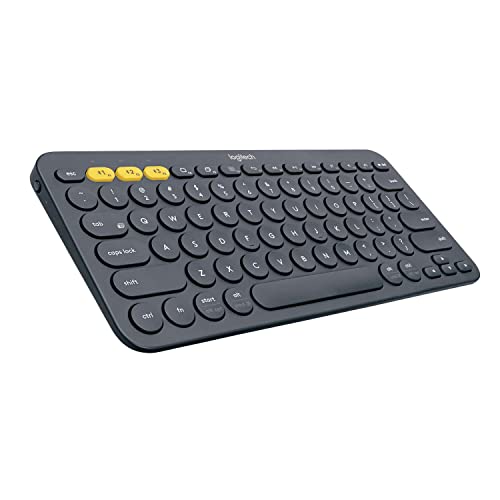
The K380 is the compact, simple end of wireless. It is Bluetooth only, with no receiver in the box, so your laptop needs Bluetooth for it to work at all. Its Easy-Switch pairing holds up to three devices, and you move between a laptop, a tablet and a phone by switching the active connection.
It has 80 keys in a compact layout, runs on 2 AAA batteries, and has no backlighting. The listing states a battery life of up to 2 years, which is a listing-stated figure rather than a measured one. For a small desk or a keyboard that lives in a bag next to the laptop, the trade is straightforward: fewer features, almost no upkeep.
| Feature | Detail |
|---|---|
| Connection | Bluetooth only, no receiver included |
| Devices | Pairs with up to 3 via Easy-Switch |
| Keys | 80 |
| Power | 2 AAA batteries |
| Battery life | Up to 2 years (listing-stated) |
| Backlighting | None |
Keychron K8 Wireless Mechanical Keyboard, RGB Backlight

The K8 sits on the wireless side of this guide, but it is really a dual-mode board: Bluetooth 5.1 connects it to up to three devices, and a USB-C wired mode is there when you want it. That makes it the natural pick if you like the idea of wireless but want a cable fallback at a fixed desk.
It is an 87-key tenkeyless board in an aluminum frame, with hot-swappable Gateron G Pro Brown switches, so the switches can be changed without soldering. The rechargeable battery capacity is 4000 mAh as manufacturer-stated. RGB backlighting and both Mac and Windows layouts are included. The model is k8c3, and other K8 variants with different backlights or switches carry different listings, so check the variant name when you order.
| Feature | Detail |
|---|---|
| Layout | 87-key tenkeyless |
| Connection | Bluetooth 5.1 (up to 3 devices) and USB-C wired mode |
| Switches | Hot-swappable Gateron G Pro Brown |
| Battery | 4000 mAh rechargeable (manufacturer-stated capacity) |
| Backlighting | RGB |
| Model | k8c3 |
Logitech K120 Wired Keyboard for Windows, Black

The K120 is the wired baseline: plug the USB cable in and type. There are no drivers to install, no batteries to replace and nothing to pair, which is why this style of board remains the default for shared desks and spare setups. It is a full-size 104-key layout with a number pad.
The keys are membrane rather than mechanical, and the design is spill-resistant with a curved space bar. The model is 920-002478. Note that the K120 also appears in a keyboard-and-mouse combo listing; that combo is a different product, and this pick is the keyboard on its own.
| Feature | Detail |
|---|---|
| Layout | 104 keys with number pad |
| Connection | USB wired, plug-and-play |
| Switch type | Membrane |
| Design | Spill-resistant, curved space bar |
| Model | 920-002478 |
Keychron C2 Full Size Wired Mechanical Keyboard, RGB Backlight
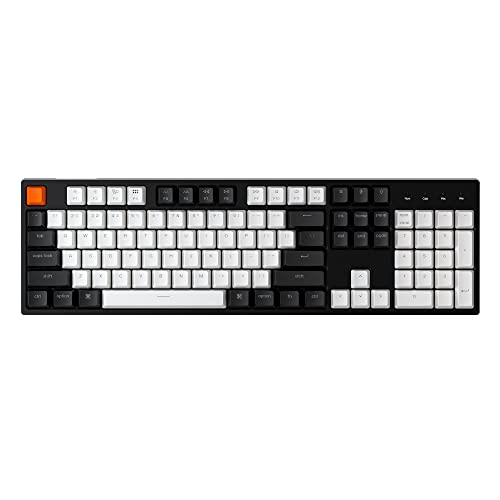
The C2 brings the mechanical side of this guide to a wired, full-size board. It has 104 keys, connects by a wired USB-C link, and the box includes a braided USB-A to Type-C cable. Its Gateron G Pro Brown switches are hot-swappable, and the listing rates them at up to 50 million keystrokes.
RGB backlighting and both Mac and Windows layouts are included. This listing is the hot-swappable RGB version of the C2; Keychron also sells a non-backlit retro version under a different listing, and the two should not be merged when you compare details. If your desk never moves and you want mechanical keys without battery management, this is the wired equivalent of the K8 above.
| Feature | Detail |
|---|---|
| Layout | 104 keys, full size |
| Connection | Wired USB-C, braided USB-A to Type-C cable included |
| Switches | Hot-swappable Gateron G Pro Brown |
| Switch rating | Up to 50 million keystrokes (listing-stated) |
| Backlighting | RGB |
How to choose
Choose the connection first. If the keyboard will travel between a desk, a couch and a bag, wireless is the practical choice. If it will sit in one place for years, a wired board removes charging and pairing from your routine for good.
Count your devices next. All three wireless picks here pair with up to three devices, which matters if you switch between a laptop and a tablet during the day. The K380 is Bluetooth only, so it cannot help a device without Bluetooth; the MX Keys S adds a USB receiver, and the K8 adds a wired mode as well.
Then look at layout. Full-size boards (MX Keys S, K120, C2) include a number pad, which suits spreadsheet work. Tenkeyless (K8) and compact (K380) layouts free up desk space and bring the mouse closer. Finally, decide on key feel: membrane keys on the K120 are the simple, quiet option, while the hot-swappable mechanical switches on the K8 and C2 let you change switches later without replacing the board. Treat every battery figure as manufacturer-rated and assume heavy backlight use shortens it.
Who should skip
Skip the K380 if your laptop lacks Bluetooth, because there is no receiver in its box to fall back on. Skip wired boards entirely if you present, teach or type from across the room. Skip full-size keyboards if your desk is narrow; the number pad costs width you may not have. And skip mechanical boards if you type in a shared quiet space where key noise carries — the membrane K120 is the considerate choice there.
FAQ
Is a wireless keyboard responsive enough for typing?
For typing, yes. The wireless picks here are built for everyday work, and text entry does not stress a Bluetooth connection the way fast-paced gaming can. If you want a guaranteed cable path as well, the Keychron K8 offers both Bluetooth and a wired USB-C mode.
How long do the wireless batteries actually last?
Only manufacturer-rated and listing-stated figures are available. Logitech rates the MX Keys S at up to 10 days with backlighting on or up to 5 months with it off, and the K380’s listing states up to 2 years on its AAA batteries. Backlight use is the biggest variable.
Can one keyboard serve my laptop and my tablet?
Yes. The MX Keys S, K380 and Keychron K8 each pair with up to three devices and switch between them, so one board can cover a laptop, a tablet and a phone without re-pairing each time.
Are the Keychron keyboards only for Mac?
No. Both the K8 and the C2 listings include Mac and Windows layouts, so they can be set up for either system. Check the variant name when ordering, since switch and backlight versions carry separate listings.
Final verdict
Pick the MX Keys S if you want the complete wireless feature set: three-device pairing, a receiver option, backlighting and USB-C charging. Pick the K380 for a compact second keyboard with almost no upkeep. The K8 is the flexible middle, mechanical with both Bluetooth and a wired mode. On the wired side, the K120 is the dependable fixed-desk board, and the C2 is its mechanical counterpart for typists who want hot-swappable switches without batteries.
More from Amazon
Programs that pair well with the guide above. Offers and eligibility are set by Amazon and may change.
A free business account with business pricing and bulk-buying tools for work, shop or home office.
Create a business accountFree shipping on eligible items, Prime Video and more. Eligible new members can start with a free trial.
Start a Prime free trialAudiobooks and podcasts to listen to on the go. Eligible new members can start with a free trial.
Try Audible freeAd-free music streaming. Eligible new subscribers can start with a free trial.
Try Music Unlimited freeAs an Amazon Associate we earn from qualifying purchases.


Write Your Review
No reviews yet. Be the first to share your experience!