

Key takeaways
- Dim the room, not the screen. OLED and mini-LED panels look best in lower ambient light.
- Use the manufacturer’s streaming app or recommended browser to unlock 4K and HDR.
- Turn on HDR only for HDR content on Windows to avoid washed-out desktop colours.
- Lower the refresh rate to 60 Hz while watching to save power, if the laptop does not do it automatically.
- Use headphones for spatial audio and noise-free listening on planes.
- Enable battery saver when travelling, and download films in advance.
The best laptop for watching movies in 2026 has an OLED or mini-LED screen with high peak brightness, wide colour coverage and long battery life, and the Samsung Galaxy Book6 Pro 16 and the MacBook Pro 14 are the strongest all-round choices. For a lighter and more affordable pick, the ASUS Zenbook S 14 and the Dell XPS 14 with OLED give you deep blacks in a travel-friendly body. Processor power barely matters for playback, so the screen, speakers and battery should drive your decision.
Our top picks
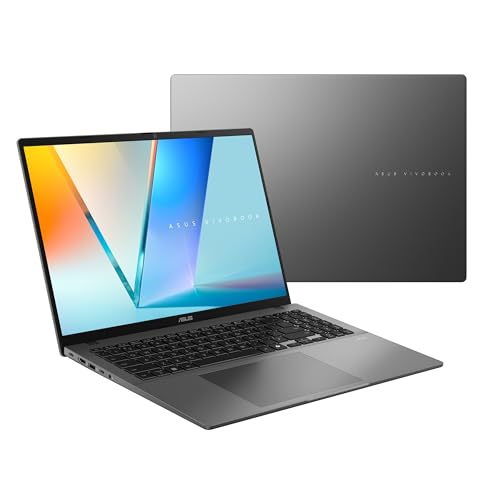


As an Amazon Associate we earn from qualifying purchases at no extra cost to you.
Quick comparison of the seven picks
| Pick | Best for | Display | Peak brightness | Battery | Weight |
|---|---|---|---|---|---|
| Samsung Galaxy Book6 Pro 16 | Best overall big screen | 16-inch 2880×1800 AMOLED, 30 to 120 Hz | 500 nits SDR, up to 1,000 nits HDR (Samsung) | 78 Wh, about 20 h video loop in one review | 1.59 kg |
| MacBook Pro 14 (M5 Pro) | Best HDR picture and speakers | 14.2-inch 3024×1964 mini-LED, 120 Hz | XDR HDR with local dimming | 72.4 Wh, up to 22 h streaming | About 1.6 kg class |
| Lenovo Yoga Pro 9i 16 Gen 10 | Brightest Tandem OLED | 16-inch 3200×2000 Tandem OLED, 120 Hz | 1,600 nits peak (Notebookcheck) | 84 Wh | From 1.92 kg |
| ASUS Zenbook S 14 (UX5406) | Light and bright OLED | 14-inch 2880×1800 OLED, 120 Hz | About 450 nits SDR, 1,050 nits HDR measured | 77 Wh, ASUS claims up to 27 h | 1.2 kg |
| Dell XPS 14 (2026) OLED | Premium Windows travel laptop | 14-inch 2880×1800 OLED, 120 Hz | About 400 nits measured by Reviewed | 70 Wh | 1.36 kg |
| Lenovo Yoga Slim 7x (Gen 11) | Longest battery | 14-inch 2880×1800 OLED, 120 Hz option | Up to 1,100 nits (Lenovo) | 70 Wh, up to 29 h claimed | 1.17 kg |
| MacBook Air 15 (M5) | Quiet couch laptop | 15.3-inch 2880×1864 IPS, P3 | 500 nits class | 66.5 Wh | 1.51 kg |
Figures come from Apple, Samsung, ASUS, Lenovo and Dell product pages, plus Notebookcheck and other published reviews. Brightness numbers differ between manufacturer claims and independent measurements, so both are noted where available.
What makes a laptop good for movies
Movie watching puts very little load on a processor, so the usual spec race does not apply. Four things decide the experience.
- Panel type. OLED and mini-LED panels produce far deeper blacks than standard LCD panels, which is the biggest improvement for dark scenes. Standard IPS panels are bright and affordable but show raised blacks in a dim room.
- Peak brightness and HDR. HDR films need a bright panel to show highlights. Look for panels that reach at least 600 nits in HDR, and ideally 1,000 nits or more, as measured by independent reviewers.
- Colour coverage. 100 percent DCI-P3 or P3 coverage reproduces the wide colour range that modern films are graded in.
- Battery life. A flight or train ride can hold one or two films. Aim for at least 12 hours of video playback so you do not need a charger.
Secondary factors include speakers, screen size, the aspect ratio and resolution. A 16:10 panel shows slightly more vertical space than a 16:9 panel, so a widescreen film appears with letterbox bars, which is normal.
Streaming caveats you should know
Hardware is only half the story. Streaming services limit the highest quality by platform: Netflix 4K and HDR playback typically requires a supported browser or app, a capable screen and a display connection with the required content protection. On Windows, Netflix 4K often depends on using the Microsoft Edge browser or the Windows app, while on a Mac it relies on Safari or the app. Many laptops also play HDR content only when the operating system’s HDR setting is switched on, which can make everyday desktop colours look washed out. Check each service’s help pages for the current requirements.
Decision matrix: pick by how you watch
| How you watch | Priority | Best match |
|---|---|---|
| At home in a dark room, big screen preferred | Contrast and size | Galaxy Book6 Pro 16 or Yoga Pro 9i 16 |
| HDR films with strong speakers | HDR performance and sound | MacBook Pro 14 |
| Frequent flights and train trips | Battery and weight | Yoga Slim 7x or Zenbook S 14 |
| Dual use for work and movies on Windows | Balanced design | Dell XPS 14 |
| Living-room laptop with quiet operation | Silence and comfort | MacBook Air 15 |
Best overall: Samsung Galaxy Book6 Pro 16
The Galaxy Book6 Pro 16 has a 16-inch 2880×1800 Dynamic AMOLED 2X touchscreen with a variable refresh rate from 30 Hz to 120 Hz. Samsung quotes up to 500 nits in SDR and up to 1,000 nits in HDR, and Notebookcheck measured peaks near 1,200 nits. The laptop uses the Intel Core Ultra 7 356H or Core Ultra X7 358H, comes with 16 GB or 32 GB of RAM and has a 78 Wh battery. It is only 11.9 mm thick and weighs 1.59 kg. One review measured nearly 20 hours of video playback.
The anti-reflective coating helps in bright rooms, and the large 16-inch panel gives a truly cinematic feel for a laptop. The main caveat is PWM flicker, which Notebookcheck flagged and which a small number of viewers find tiring in dim rooms. Reviewers also call it expensive.
Who it suits: viewers who want a big, vivid screen in a thin body.
Pros: large high-contrast AMOLED, bright HDR, excellent battery life, light for its size.
Cons: PWM flicker, limited ports, high cost.
Best for HDR and sound: MacBook Pro 14
Apple’s MacBook Pro 14 with M5 Pro has a 14.2-inch Liquid Retina XDR mini-LED display at 3024×1964 and 254 pixels per inch with a 120 Hz refresh rate. Mini-LED backlighting with local dimming produces strong HDR highlights and very deep blacks, though it can show slight blooming around bright objects on black backgrounds. The 72.4 Wh battery is rated up to 22 hours of video streaming. Apple has built its speaker system around spatial audio support, and the laptop reaches its quoted battery life when playing local video.
It is the most expensive option here and the processing power is more than a movie viewer needs, so this is a sensible pick mainly if you also work on the machine. The M5 base MacBook Pro or the MacBook Air offers a similar viewing experience at a lower cost for those who do not need the Pro chip.
Who it suits: HDR enthusiasts who also create or edit content.
Pros: excellent HDR picture, 120 Hz, superb battery, strong speaker system.
Cons: expensive for watching alone, with slight blooming possible on mini-LED.
Brightest Tandem OLED: Lenovo Yoga Pro 9i 16 Gen 10
The Yoga Pro 9i 16 Gen 10 offers a 16-inch 3.2K (3200×2000) Tandem OLED that Notebookcheck measured at around 1,600 nits peak. Tandem OLED stacks two emissive layers, which improves brightness and lifespan over a standard OLED panel. It supports 120 Hz, has an 84 Wh battery and weighs from 1.92 kg without touch. Processors go up to the Core Ultra 9 285H with graphics up to an RTX 5070, which makes it a good machine for work and gaming as well as movies.
It is heavier than the ultraportables, so it works better as a desk or couch laptop than a travel companion. PCWorld praised the Gen 10 model for being excellent throughout.
Who it suits: viewers who want a bright HDR panel and extra graphics power for games or editing.
Pros: very bright Tandem OLED, big battery, strong performance.
Cons: heavier, and soldered memory.
Best light OLED: ASUS Zenbook S 14 (UX5406)
The Zenbook S 14 (2026) has a 14-inch ASUS Lumina OLED at 2880×1800 and 120 Hz. ASUS quotes up to 1,100 nits peak brightness, and Notebookcheck measured about 450 nits SDR and 1,050 nits HDR, up from the earlier model. The laptop weighs about 1.2 kg, is 1.1 cm thin and has a 77 Wh battery with ASUS claiming up to 27 hours of video playback in its own test. The reviewed processor was the Intel Core Ultra 9 386H.
A 14-inch screen is smaller than the 16-inch options, but for a laptop that fits in a small bag it offers a rare mix of weight, brightness and battery. Graphics are modest, which is fine for video.
Who it suits: travellers who watch on planes and trains.
Pros: light, bright OLED, long battery life.
Cons: smaller screen, soldered RAM and modest graphics.
Best premium Windows all-rounder: Dell XPS 14 (2026)
The 2026 XPS 14 offers an OLED option with a 14-inch 2880×1800 120 Hz touchscreen, a 70 Wh battery and a weight of about 1.36 kg. Reviews list a Core Ultra X7 358H processor with Arc B390 graphics and 32 GB of LPDDR5X memory. Tom’s Guide noted that the Tandem OLED does not get as bright as last year’s model or a MacBook Pro, and Reviewed measured a decent 400 nits. Dell’s claim of up to 40 hours of battery life applies to the IPS display versions only, so the OLED model will run for a shorter time.
The OLED is a modest additional cost over the LCD version according to reviews, and it adds the contrast that movies demand. If you mostly watch in a dim room, that trade is worthwhile; if you often watch near windows, the LCD version with much longer battery life may suit you better.
Who it suits: Windows users who want one laptop for work and movies.
Pros: premium build, three Thunderbolt 4 ports, good keyboard.
Cons: OLED brightness is lower than rivals, and battery life is shorter than the LCD version.
Best battery life: Lenovo Yoga Slim 7x (Gen 11)
The Yoga Slim 7x with Snapdragon X2 Elite or X2 Plus has a 14-inch OLED offered at 2880×1800 and 120 Hz, which Lenovo rates up to 1,100 nits and full DCI-P3. It weighs 1.17 kg and has a 70 Wh battery that Lenovo says can reach up to 29 hours. Notebookcheck reported almost 25 hours of local video playback on an early pre-production unit. That makes it the best option for marathon viewing away from a socket.
It runs Windows on Arm, so streaming apps and browsers work well, but a few niche apps may not. For movie watching, that is rarely a problem.
Who it suits: frequent travellers and commuters.
Pros: excellent battery life, light, bright OLED.
Cons: Arm compatibility for some software, and graphics are modest.
Best quiet couch laptop: MacBook Air 15 (M5)
The MacBook Air 15 with M5 has a 15.3-inch 2880×1864 Liquid Retina IPS display with P3 wide colour, a 66.5 Wh battery and a weight of 1.51 kg. It is fanless and silent during video playback, which matters in quiet rooms. The panel is a standard LCD, so blacks are not as deep as on OLED or mini-LED laptops, but it is bright and accurate, and it is the most affordable pick here.
Who it suits: casual viewers who want a big, quiet screen.
Pros: large and sharp screen, silent, long battery life, light for its size.
Cons: LCD blacks and no HDR highlights like mini-LED.
Worked example: how many films per charge?
Suppose a typical film runs 2 hours and 15 minutes, which equals 2.25 hours. A laptop with 12 hours of real-world video playback delivers about 5 films on one charge. With 20 hours it manages roughly 8 films. Manufacturer figures are often measured at low brightness, so real-world numbers drop when you raise brightness for HDR. For travel, calculate with 70 percent of the claimed runtime: a laptop rated at 20 hours then gives about 14 hours, still enough for six films. This is a planning estimate rather than a measured result.
Tips for a better picture and longer battery
- Dim the room, not the screen. OLED and mini-LED panels look best in lower ambient light.
- Use the manufacturer’s streaming app or recommended browser to unlock 4K and HDR.
- Turn on HDR only for HDR content on Windows to avoid washed-out desktop colours.
- Lower the refresh rate to 60 Hz while watching to save power, if the laptop does not do it automatically.
- Use headphones for spatial audio and noise-free listening on planes.
- Enable battery saver when travelling, and download films in advance.
Sound, ports and connecting a bigger screen
Laptop speakers have improved, but physics limits them. Thin bodies cannot move much air, so bass is light compared with a soundbar or headphones. Look for models with four or more speaker drivers and check reviews for distortion at high volume, since the specification sheet rarely tells you. If you watch with others, a Bluetooth speaker or a small soundbar makes dialogue clearer than any laptop alone.
Ports matter if you want to cast the picture to a television. A laptop with HDMI output, like the Galaxy Book6 Pro, connects to a TV with a single cable. Models that rely on Thunderbolt or USB4 only need a USB-C to HDMI adapter, which is inexpensive. Check that the adapter supports 4K at 60 Hz and the content-protection standard your streaming service requires, otherwise the service may drop the picture to a lower resolution. Wireless casting is convenient but compresses the picture and adds delay, so a cable gives the best quality.
OLED care and ownership realities
OLED panels can show burn-in if a static image stays on screen for many hours, such as a taskbar or a paused video. Manufacturers add pixel shifting and dark themes to reduce this, and normal movie watching rarely causes trouble. To protect the panel, set the screen to turn off after a few minutes of inactivity, use a moving wallpaper or dark mode, and avoid leaving the brightness at maximum for long periods. Mini-LED and LCD panels do not suffer from burn-in, although mini-LED can show slight halos around bright objects on dark backgrounds.
Battery wear is the other long-term factor. Lithium batteries lose capacity gradually, and charging to 100 percent every day with the laptop hot accelerates the process. Many laptops include a charge limit setting that stops at 80 percent, which is worth enabling if you mostly use the laptop at a desk. Clean the screen with a soft microfibre cloth and avoid pressing on the panel, since glossy OLED coatings scratch more easily than matte finishes.
Frequently Asked Questions
Is OLED better than IPS for watching movies?
Yes for contrast and black levels, because OLED pixels turn off completely. IPS panels can be brighter in some cases, but blacks look grey in dim rooms. OLED is the better choice for dark scenes.
Does the processor matter for movie watching?
Not much. Any modern laptop decodes 4K video smoothly. Spend your budget on the display, battery and speakers instead.
Can a laptop play 4K HDR streaming properly?
Yes, if the screen supports HDR and you use a streaming app or browser that the service supports. Some services limit 4K on certain browsers or require specific display connections, so check the service’s help pages.
What screen size is best for movies?
16 inches gives the most cinematic feel, while 14 inches is easier to carry. A larger screen also helps when sharing a film with a friend.
Is a mini-LED display as good as OLED?
Mini-LED reaches higher brightness for HDR highlights and avoids burn-in concerns, while OLED has perfect blacks and no blooming. Both look excellent, so choose based on brightness needs and the laptop you prefer.


Write Your Review
No reviews yet. Be the first to share your experience!