

Our Top Picks
Pros & cons
what a 4K timeline actually needs. Accept the 85W GPU cap and 512GB of storage.
The extra $100 over our $1,300 guide changes everything: at $1,300, the only factory 32GB-plus-RTX laptop jumped to $1,578.97 in mid-November. At $1,400, the breakthrough is back. The Acer Nitro V 16 ANV16-72-73C7 ships with 32GB of DDR5 and an RTX 5060 for $1,399.99 — the first new laptop in this series under $1,400 to pair a discrete GPU with the RAM a 4K timeline actually wants. The compromises are not gone: an 85W-capped RTX 5060, 512GB of storage, and a gaming IPS panel. Prices below are November 2026 snapshots; check the current price on Amazon before you buy.
Our top picks

Best for: Editors cutting 4K timelines who need 32GB of RAM and a real GPU in one new machine
Check price on AmazonBest for: Editors who render long exports and grade on an external monitor
Check price on Amazon
Best for: Editors who want an RTX 5060 and a 16-inch screen for the least money
Check price on Amazon
Best for: Editors on a tighter budget who need NVENC and CUDA now
Check price on Amazon
Best for: Color grading and 1080p editing on a budget
Check price on AmazonQuick Picks
| Laptop | Best For | Price (Nov 2026) | CPU / GPU | RAM / Storage |
|---|---|---|---|---|
| Acer Nitro V 16 ANV16-72-73C7 | Best Overall | $1,399.99 | Core 7 240H / RTX 5060 | 32GB / 512GB |
| HP OMEN 16 (16-am2013dx) | Newest CPU | $1,399.99 | Core Ultra 7 356H / RTX 5060 | 16GB / 512GB |
| Gigabyte GAMING A16 5VH | Best Value | $1,299.99 | Ryzen 7 260 / RTX 5060 | 16GB / 512GB |
| MSI Cyborg 15 | Cheapest RTX 5060 | $1,199.99 | Core 7 240H / RTX 5060 | 16GB / 512GB |
| ASUS Vivobook S16 OLED | Best OLED Screen | $879.99 | Core Ultra 7 355 / Intel Arc | 16GB / 1TB |
How to Choose a Laptop for Video Editing Under $1,400
CPU and GPU for editing
The CPU decodes footage and runs the timeline; the GPU accelerates effects, grading, and encoding. A modern 8-core CPU is the floor, and every pick here meets it. The RTX 5060 with 8GB of GDDR7 VRAM is the new standard — NVENC encoding, CUDA, and DLSS 4. Watch the wattage: 85W in the Nitro V 16 and the Gigabyte A16, up to 115W in the OMEN 16.
The RAM floor
Sixteen gigabytes is the floor for real editing in 2026. Thirty-two is what a 4K timeline with several tracks actually wants — and this is the first guide where a factory 32GB machine with a discrete GPU fits. The trap: the Nitro V 16’s 32GB is also its maximum supported memory, with no upgrade path. The OMEN 16 ships a single 16GB stick with one free slot, but RAM prices in November 2026 make a matching stick an expensive afterthought.
Storage speed and size
A 512GB Gen4 NVMe SSD is the floor, and four of five picks ship exactly that. An hour of 4K footage runs 20–45GB, so 512GB fills fast — plan on an external SSD from day one. One terabyte is the comfortable size, and only the Vivobook S16 OLED offers it.
Screen color accuracy
One hundred percent sRGB is the minimum for color work you can trust; 100% DCI-P3 is better, and only OLED delivers it here. The gaming IPS panels here cover roughly 100% sRGB at best. HP does not publish the OMEN 16’s coverage, and a related configuration lists just 62.5% sRGB. The Vivobook S16 OLED, at 95% DCI-P3, is the only panel here you can genuinely grade on.
Thermal throttling
A laptop GPU only performs as well as its cooling allows. The RTX 5060 runs at 85–115W depending on the chassis, and a thin plastic body throttles sooner than a thick one with dual fans.
Battery life
Editing on battery is a compromise on every Windows laptop here — expect two to four hours of real timeline work, less while rendering. The MacBook Air 15 is the exception, at six to eight hours.
1. Acer Nitro V 16 ANV16-72-73C7 — Best Overall
Specs: Intel Core 7 240H (10 cores, up to 5.2 GHz); NVIDIA GeForce RTX 5060 8GB GDDR7 (85W MGP); 32GB DDR5; 512GB PCIe Gen4 SSD; 16″ WUXGA (1920 x 1200) IPS 180Hz; Wi-Fi 6; Windows 11 Home.
The top pick, and the reason this guide exists: the first factory-built laptop in this series to pair 32GB of RAM with a discrete GPU under $1,400, with $0.01 to spare. Walmart lists it at $1,399.99, in stock, in November 2026; Acer’s own store shows it at $1,349.99 but out of stock. Thirty-two gigabytes changes what the machine can do — a 4K timeline with several tracks and Lumetri color no longer pushes it into swap — and the 10-core CPU and RTX 5060 bring NVENC and CUDA to both editors. The caveats: the GPU is capped at 85W, storage is 512GB, Acer lists 32GB as this model’s maximum memory, and the panel’s color coverage is not published.
Pros: Only factory 32GB + RTX 5060 under $1,400; 10-core CPU; 180Hz 16:10 display.
Cons: Exactly at the ceiling; 85W GPU cap; 512GB storage; RAM maxed at 32GB.
Best for: Editors cutting 4K timelines who need 32GB of RAM and a real GPU in one new machine.
2. HP OMEN 16 (16-am2013dx) — Newest CPU, Full-Power GPU
Specs: Intel Core Ultra 7 356H (16 cores, up to 4.7 GHz); NVIDIA GeForce RTX 5060 8GB GDDR7 (up to 115W); 16GB DDR5-5600 (single stick, one free slot); 512GB Gen4 NVMe SSD; 16″ WUXGA (1920 x 1200) IPS 165Hz; 70Wh battery; 330W adapter; 5.38 lb.
The newest machine here. The Core Ultra 7 356H is a 2026 Panther Lake chip with 16 cores, and its RTX 5060 can run at up to 115W — CNET measured the full 115W on a related OMEN 16 — well above the 85W cap on the other RTX picks. Best Buy lists it at $1,399.99, in stock, against a $2,099.99 list price, and buyers rate it 4.5 out of 5 from 31 reviews. The catch is the screen and the memory: HP does not publish this SKU’s panel color coverage, and a related configuration lists just 62.5% sRGB — the weakest in this guide. The 16GB of RAM arrives as a single stick, so the machine runs single-channel until you add a matching stick.
Pros: Newest CPU here; full 115W RTX 5060; fast Gen4 SSD.
Cons: Exactly at the ceiling; weakest panel color in the guide; single-stick RAM; 512GB storage.
Best for: Editors who render long exports and grade on an external monitor.
3. Gigabyte GAMING A16 5VH — Best Value RTX 5060
Specs: AMD Ryzen 7 260 (8 cores); NVIDIA GeForce RTX 5060 8GB GDDR7; 16GB DDR5; 512GB M.2 NVMe SSD; 16″ WUXGA (1920 x 1200) IPS 165Hz; Wi-Fi 6E; Bluetooth 5.3; HDMI 2.1; USB-C; 180-degree lay-flat hinge.
The cheapest way to get a current-generation RTX 5060 with a 16-inch screen and $100 left over. B&H Photo lists it at $1,299.99, in stock, in November 2026. The Ryzen 7 260 is an 8-core Hawk Point chip, the RTX 5060 brings NVENC and CUDA, and the lay-flat hinge is useful for showing a client a cut. The caveat is the GPU wattage: Notebookcheck’s review of the Intel version of this same A16 chassis found the RTX 5060’s low power cap “hammers the frame-rates down to the point you end up questioning whether it’s a 5050 in disguise” — and this Ryzen version carries the same 85W-class cap. Storage is 512GB, RAM is 16GB, and Gigabyte does not publish this panel’s color coverage.
Pros: $100 under budget; RTX 5060 with NVENC and CUDA; 8-core Ryzen 7; good ports including HDMI 2.1.
Cons: 85W-class GPU cap; 16GB RAM; 512GB storage; panel color not published.
Best for: Editors who want an RTX 5060 and a 16-inch screen for the least money.
4. MSI Cyborg 15 — Cheapest RTX 5060 Here
Specs: Intel Core 7 240H; NVIDIA GeForce RTX 5060 8GB GDDR7; 16GB RAM; 512GB SSD; 15.6″ FHD (1920 x 1080) 144Hz IPS-level display; DLSS 4; Max-Q; MSI AI Engine; 4-zone RGB keyboard.
The cheapest RTX 5060 laptop in this guide, and by $200. Electronic Express, an authorized MSI retailer, lists it at $1,199.99, in stock, in November 2026. You get the same Core 7 240H and RTX 5060 8GB as the top pick, with NVENC, CUDA, and DLSS 4, for $200 less — money that buys the external SSD every 512GB machine here needs. The trade-offs are visible: the 15.6-inch panel is 1920 x 1080, the lowest resolution in this guide, and MSI calls it “IPS-level” rather than IPS. Sixteen gigabytes of RAM is the floor, not the ceiling, and 512GB of storage fills fast. But the core editing hardware — 10-core CPU, RTX 5060, NVENC — is the same as machines costing $200 more.
Pros: Cheapest RTX 5060 in the guide; same Core 7 240H and RTX 5060 as the top pick; $200 headroom for storage.
Cons: Lowest-resolution panel here (1080p, IPS-level); 16GB RAM; 512GB storage; plastic chassis runs warm.
Best for: Editors on a tighter budget who need NVENC and CUDA now.
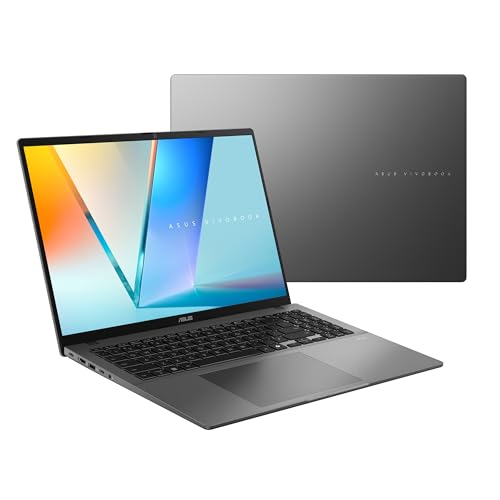
5. ASUS Vivobook S16 OLED — Best OLED Screen
Specs: Intel Core Ultra 7 355 (8 cores, up to 4.7 GHz); Intel Arc Graphics; 16GB DDR5; 1TB PCIe NVMe SSD; 16″ OLED WUXGA, 95% DCI-P3, 300 nits, 60Hz; MIL-STD 810H.
The only OLED in this guide, and the only pick with a terabyte of storage. Target lists it at $879.99 in November 2026 against a $1,449.99 list — $520 under budget, the biggest discount in this guide. A 95% DCI-P3 OLED with true blacks is the only panel here you can genuinely grade color on, and at $879.99 it costs less than a color-accurate external monitor alone. The 1TB SSD fits an editing library, and the Core Ultra 7 355 handles 1080p timelines and proxy-based 4K work without complaint. The honest caveats: there is no discrete GPU — 4K editing needs proxies, and effects-heavy timelines will stutter where the RTX picks sail through. Same-name trap: this $879.99 configuration shares its name with the Ryzen AI 9 465 version from our $1,400 programming guide at $1,399.99 — check the processor before you pay.
Pros: Only OLED in the guide — 95% DCI-P3, true blacks; only 1TB SSD here; $520 under budget.
Cons: No discrete GPU; 60Hz panel; same-name trap with the $1,399.99 Ryzen version.
Best for: Color grading and 1080p editing on a budget.
What to Avoid
An RTX 4070 laptop. The cheapest verified RTX 4070 laptop in the US is still the MSI Katana 15 at $1,498 — $98 over this budget. Catalog listings at $621.71 are implausible gray-market prices, and a $1,156.07 drop-shipper listing is not a retailer we would trust.
A Lenovo Legion 5. US prices start at $1,749. No US Legion Slim 5 configuration fits under $1,400 either.
OLED plus RTX. It still does not fit: the Vivobook Pro 16 OLED with an RTX 4060 lists at $1,499.99 and is out of stock, and the K6602VU has no verified US price.
A price that looks too good. Walmart lists an ASUS ROG Strix G16 with a Ryzen 9 9955HX, an RTX 5060, 16GB of RAM, and a 1TB SSD at $1,399 — while Newegg lists the same configuration at $2,819. One of those prices is wrong, and the $1,399 one is the one to distrust.
A Chromebook, 4GB of RAM, eMMC storage, or a TN panel. Chromebooks cannot run desktop Premiere Pro or DaVinci Resolve, 4GB of RAM cannot hold a timeline, eMMC storage is too slow to scrub footage, and a TN panel’s colors shift when you tilt the screen.
A refurbished laptop, unless you know what you are doing. A used RTX 4070 laptop or a refurbished MacBook Pro 14 can beat every pick here on paper. But used prices swing daily, batteries are worn, and warranties are thin. If the laptop earns your living, buy new — or buy used only from the manufacturer’s own refurbished store.
FAQs
Is 32GB of RAM necessary for video editing under $1,400?
For 1080p editing, no — 16GB is enough, and four of the five picks here ship 16GB. For 4K timelines with multiple tracks, 32GB is the difference between a smooth timeline and one that stutters into swap.
Can you edit 4K on a laptop under $1,400?
Yes, with the right machine and workflow. The RTX 5060 picks here cut 4K in Premiere Pro and DaVinci Resolve with proxies, and the 32GB Nitro V 16 handles native 4K best in this series. The Vivobook S16 OLED needs proxies for 4K, but its screen is the best in the guide for grading the result.
Is the RTX 5060 good enough for Premiere Pro and DaVinci Resolve?
Yes. The 8GB of GDDR7 VRAM is enough for 4K timelines, NVENC speeds up exports in both editors, and CUDA accelerates effects and color tools. The wattage matters more than the name: the 85W RTX 5060 renders more slowly than the 115W version in the OMEN 16.
Should I buy a refurbished laptop instead of a new one under $1,400?
Only from the manufacturer’s own refurbished store, and only if you accept a shorter warranty and a used battery. A refurbished MacBook Pro 14 or a used RTX 4070 laptop can out-spec every pick here, but prices move daily and the risk is yours.
MacBook Air 15 M4 or a Windows RTX 5060 laptop — which edits better?
It depends on your footage. The MacBook Air 15 M4, at $1,199, is silent, runs six to eight hours of real editing on battery, and its hardware ProRes acceleration is superb — but it ships with only 256GB of storage, which is unusable for video work without an external drive. The Windows RTX 5060 machines give you NVENC and CUDA. If you shoot ProRes and live in Final Cut, take the MacBook and buy a drive. If you shoot H.264/H.265 and live in Premiere or DaVinci, take the RTX 5060.
Verdict
Buy the Acer Nitro V 16 ANV16-72-73C7 at $1,399.99. It is the first new laptop under $1,400 that pairs 32GB of RAM with an RTX 5060 — what a 4K timeline actually needs. Accept the 85W GPU cap and 512GB of storage.
If you grade color for clients, buy the ASUS Vivobook S16 OLED at $879.99 instead and edit with proxies — its 95% DCI-P3 OLED is the only panel here you can trust. If you render long exports and grade on an external monitor, the HP OMEN 16 at $1,399.99 has the fastest GPU in the guide. The $1,400 budget finally buys a real editing laptop — with a compromise you can live with.
As an Amazon Associate, we earn from qualifying purchases.
Suggested internal links
- Best Laptop for Video Editing Under $1,300
- Best Laptop for Video Editing Under $1,200
- Best Laptop for Video Editing Under $1,100
More from Amazon
Programs that pair well with the guide above. Offers and eligibility are set by Amazon and may change.
A free business account with business pricing and bulk-buying tools for work, shop or home office.
Create a business accountFree shipping on eligible items, Prime Video and more. Eligible new members can start with a free trial.
Start a Prime free trialAudiobooks and podcasts to listen to on the go. Eligible new members can start with a free trial.
Try Audible freeAd-free music streaming. Eligible new subscribers can start with a free trial.
Try Music Unlimited freeAs an Amazon Associate we earn from qualifying purchases.










Write Your Review
No reviews yet. Be the first to share your experience!