

Key takeaways
- Working from home asks different things of a laptop than a commute does. You are not carrying it through airports, so weight matters less.
Working from home asks different things of a laptop than a commute does. You are not carrying it through airports, so weight matters less. You are sitting at it for eight hours, on video calls, with a calendar, a chat app, a browser full of tabs, and a spreadsheet open at the same time. That makes screen size, memory, a decent webcam and speakers, and a keyboard you can live with more important than a feather-light chassis.
This guide is for remote employees, freelancers, and anyone setting up a home office who prefers Lenovo’s IdeaPad and Essential families. We compare seven 15.6-inch models using only the specs in their listings, and explain how to read memory, storage, and display details so a 2026 purchase stays comfortable for years of daily work.
Quick Picks
Our top picks
 Lenovo 15.6" FHD Business Laptop
- SMOOTH, RELIABLE EVERYDAY PERFORMANCE: Powered by the Intel…
- Equipped with 8GB LPDDR5-4800 high-speed memory and 128GB…
- IMMERSIVE 15.6" FHD ANTI-GLARE DISPLAY: Enjoy crisp 1920x1080…
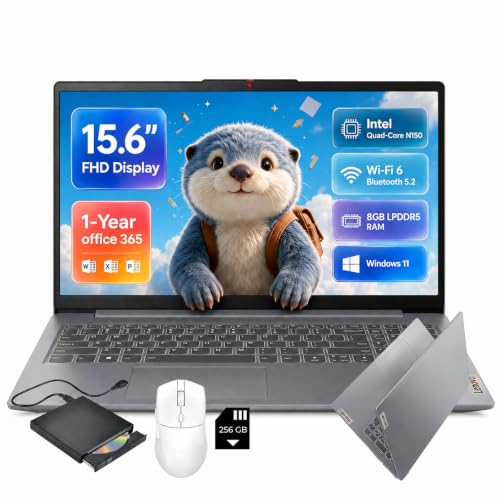

 Lenovo IdeaPad Slim 3i 15.6" FHD Laptop
- 【Processor】 Intel N150 Processor with 4 Cores, 4…
- 【Display】 15.6-inch Full HD (1920 × 1080) LED…
- 【Memory & Storage】 8GB LPDDR5 RAM and 128GB…



As an Amazon Associate we earn from qualifying purchases at no extra cost to you.
| Product | Best for | Key spec from the title |
|---|---|---|
| Lenovo 15.6″ FHD Business Laptop | Bundled-software buyers | 8GB DDR5, 128GB storage, 1TB cloud, Office 365 |
| Lenovo IdeaPad Slim-3i (N150) | Extra storage via SD card | Quad-core N150, 8GB LPDDR5, 128GB UFS plus 256GB SD card |
| Lenovo IdeaPad Slim 3 (Ryzen 5) | Everyday work with an AMD chip | Ryzen 5, 8GB DDR5, 256GB SSD |
| Lenovo IdeaPad Slim 3i (Arctic Grey) | Simple, light office tasks | N150, 8GB RAM, 128GB SSD, Microsoft 365 |
| Lenovo Essential with 500GB Ext HDD | Backing up work files | 8GB DDR5, 128GB storage, 500GB external drive |
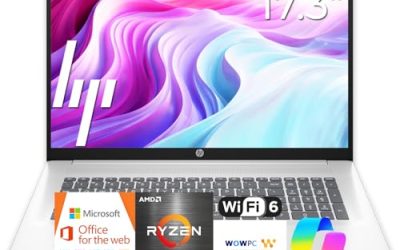
| Lenovo V15 15.6″ | More internal storage | 8GB DDR5, 256GB SSD, WiFi 6, Copilot AI |
| Lenovo Essential 15.6″ (Bluetooth 5.2) | Wireless desk setups | 8GB DDR5, WiFi 6, Bluetooth 5.2, anti-glare |
How to Choose
Memory and the multitasking load
Every model here lists 8GB of memory, which is the realistic minimum for a work-from-home setup running video calls and several browser windows. The memory type differs: DDR5 and LPDDR5 are newer standards than DDR4. Models that list soldered memory cannot be upgraded later, so decide on capacity at purchase. If your job involves large spreadsheets, design files, or many virtual desktops, look for a model that allows memory upgrades or choose a configuration with more RAM.
Storage: internal speed versus extra capacity
A 256GB SSD is more comfortable than 128GB for a work laptop, because the operating system, Office apps, and meeting software take up a large share. Some listings add an SD card or an external hard drive; these help with backups but are slower than internal SSD storage. UFS storage is also slower than a standard SSD, so keep working files on the internal drive.
Display, webcam, and anti-glare finish
Choose full HD resolution and an anti-glare coating if your desk sits near a window. A 15.6-inch panel gives enough room for two windows side by side. Titles rarely list webcam resolution, so check the listing for the camera and microphone details, since a weak webcam is a common cut corner on lower-tier laptops.
Connectivity for a home office
Look for Wi-Fi 6 and Bluetooth 5.2 for stable calls and wireless headsets, plus a USB-C port for docks and monitors. If you use a wired network or external display often, review the port list for Ethernet-style adapters and HDMI. A dock turns almost any of these laptops into a desk workstation.
The 7 Best Options
Lenovo 15.6″ FHD Business Laptop
This Lenovo targets users who want software included from day one. The title lists an Intel processor, 8GB of DDR5 memory, 128GB of storage, 1TB of cloud storage, Copilot AI, and Office 365. The 15.6-inch FHD screen suits home-office documents and video calls, and the slim design suits students as well. Because it bundles Copilot AI and cloud storage, a new remote worker can sign in, open documents, and join a call without buying extra software first. The truncated title leaves the exact processor unnamed, so read the listing if your employer lists minimum requirements.
- Strength: 8GB of DDR5 memory supports multitasking in meetings.
- Strength: Office 365 and cloud storage are part of the listing.
- Trade-off: only 128GB of local storage and no stated processor model.
Skip it if you keep large files on the laptop or need exact processor details.
Lenovo IdeaPad Slim-3i (N150)
The IdeaPad Slim-3i uses a quad-core Intel N150, 8GB of LPDDR5 memory, and 128GB of UFS storage, with a 256GB SD card for extra space. The title also lists a one-year Office 365 subscription, an FHD display, Wi-Fi 6, USB-C, and Windows 11. The quad-core N150 is an efficiency-focused chip, so it fits a day of mail, chat, and browser-based tools better than local video editing. The USB-C port is the feature that matters most for a home office, since one cable to a dock can carry a monitor, keyboard, and charging.
- Strength: USB-C and Wi-Fi 6 are useful for docks and modern routers.
- Strength: the 256GB SD card adds capacity for archives.
- Trade-off: UFS and SD storage are slower than a typical internal SSD.
Skip it if you want all of your storage on a fast drive.
Lenovo IdeaPad Slim 3 (Ryzen 5)
This IdeaPad Slim 3 is the AMD option. The title lists a 15.6-inch FHD business laptop, Ryzen 5, 8GB of DDR5 RAM, and a 256GB SSD with Windows 11. It balances a stronger processor class and a roomier internal drive for office work, which makes it a sensible primary work machine. For a worker who runs a CRM, a browser with many tabs, and a video call at once, the extra processor class is the kind of headroom that keeps the day smooth. Look at the listing for battery details, since the title does not list them.
- Strength: a Ryzen 5 processor sits above N150-class chips for multitasking.
- Strength: 256GB of SSD storage is more comfortable than 128GB.
- Trade-off: the title does not mention bundled Office software.
Skip it if you want a subscription included in the box.
Lenovo IdeaPad Slim 3i (Arctic Grey)
This model has an Intel N150, 8GB of RAM, and a 128GB SSD with Microsoft 365 and Windows 11, in an Arctic Grey finish. It is a plain, quiet choice for a remote worker whose day is email, chat, and documents. The SSD matters more than it sounds: boot times, app launches, and file searches feel quicker on it than on slower UFS or eMMC designs. If your job is mostly web-based tools, this simple setup can be all you need.
- Strength: the listing includes Microsoft 365 for office tasks.
- Strength: the SSD is faster than UFS or eMMC storage.
- Trade-off: 128GB fills up with updates and apps over time.
Skip it if you handle large media files or datasets.
Lenovo Essential with 500GB External HDD
This Lenovo Essential includes a 500GB external hard drive alongside 8GB of DDR5 and 128GB of internal storage. It also lists an FHD anti-glare display, long battery life, and Office 365, so it serves a worker who needs a built-in backup plan. Freelancers who deliver files to clients, for example, can keep a second copy of every project close at hand without paying for extra cloud space. Remember to unplug the drive when it is not in use to keep the desk tidy.
- Strength: the external drive offers a simple way to back up work files.
- Strength: an anti-glare FHD screen helps in bright rooms.
- Trade-off: external hard drives are slower and add a device to manage.
Skip it if you prefer cloud backups and a tidy desk.
Lenovo V15 15.6″
The V15 lists an Intel processor, 8GB of DDR5, and a 256GB SSD, with Copilot AI, Wi-Fi 6, Office 365, and a portable design. It is aimed at office users who want internal storage that is larger than the entry level. The mix of a 256GB SSD and Wi-Fi 6 is the kind of balanced pairing that suits a day of video calls and file downloads. Buyers should still check the listing for the screen details, since the title cuts off before listing the display.
- Strength: 256GB of SSD storage suits Windows plus work files.
- Strength: Wi-Fi 6 helps with video calls on busy home networks.
- Trade-off: the processor model is not named in the title.
Skip it if you need the exact CPU to match company software requirements.
Lenovo Essential 15.6″ (Bluetooth 5.2)
This Essential model includes an Intel CPU, 8GB of DDR5, 128GB of storage, 1TB of cloud storage, Office 365, Copilot AI, WiFi 6, and Bluetooth 5.2. The anti-glare screen suits desks near windows, and Bluetooth 5.2 supports modern wireless headsets and mice. That matters if you use a wireless headset for calls and a wireless mouse at the same time, since older Bluetooth versions can drop connections more often. It also pairs well with a standing desk, where fewer cables mean less clutter.
- Strength: Bluetooth 5.2 and Wi-Fi 6 suit a wireless desk setup.
- Strength: Office 365 and cloud storage reduce extra purchases.
- Trade-off: 128GB of local storage requires careful file management.
Skip it if you want a bigger internal drive.
Which One Fits Your Situation
You spend the day in video meetings
The Lenovo Essential with Bluetooth 5.2 and anti-glare display pairs well with wireless headsets, and the IdeaPad Slim-3i adds USB-C for a dock.
You want the strongest processor class
The IdeaPad Slim 3 with Ryzen 5 and a 256GB SSD is the best fit for demanding multitasking in this list. It suits a role that mixes calls, spreadsheets, and web apps all day.
You worry about backups
The Lenovo Essential with the 500GB external drive gives a ready-made backup path.
You want more internal storage
The V15 offers a 256GB SSD with Wi-Fi 6, making it a good middle ground. It keeps work files on a fast drive without asking you to manage cards or external disks.
Common Mistakes
- Treating an SD card or external drive as equal to internal SSD speed.
- Buying 128GB of storage for a laptop that will hold work files for years.
- Ignoring the webcam and microphone, which matter in daily meetings.
- Assuming Copilot AI changes performance without checking the processor.
- Overlooking whether bundled Office is a trial or a one-year subscription.
Related guides
- Affordable Gaming Mouse For Alienware Laptop
- Laptop Docking Stations For Dual Monitors
- Travel Backpack With Laptop Compartment
Frequently Asked Questions
Is 8GB enough for working from home?
For video calls, email, and documents, yes. Heavy multitasking or large files benefit from 16GB.
Do I need a Ryzen 5 over an N150 processor?
Not for light tasks, but a Ryzen 5 offers more headroom for many windows. Choose it if you run several applications at once, such as a browser, chat, and a spreadsheet during a meeting.
Is a 15.6-inch laptop good for a home office?
Yes. It gives a comfortable workspace and a full keyboard. Add an external monitor for a larger setup, and consider a stand to raise the screen to eye level so your neck stays comfortable through long days.
Should I rely on cloud storage?
Cloud storage is useful for sync and sharing, but keep an internal drive large enough for active files and a separate backup. Company policy may also limit which cloud services you can use, so confirm that before relying on a bundled plan.

Write Your Review
No reviews yet. Be the first to share your experience!