

Key takeaways
- Thermals: gaming laptops collect dust in the fan intake. Clean vents with compressed air every three to six months, and lift the back with a stand for better airflow.
- Battery health: keep the laptop plugged in when gaming and use the manufacturer’s battery-care mode to cap charge near 80 percent for desk use.
- What wears first: hinges, plastic lids and thermal paste. Budget lines such as LOQ, Nitro V and Victus often show lid flex before anything else.
- Upgrades: memory in two-slot laptops is cheap to double; one of the most effective upgrades is moving single-stick configurations to dual-channel RAM, which raises integrated and discrete graphics performance.
- Common mistakes: buying a laptop with only 8GB of memory, ignoring the panel version in the model number, and expecting the charger to be small. Many of these laptops ship with 170W to 245W bricks.
The best 144Hz laptop for most people in 2026 is the ASUS TUF Gaming A16 with an RTX 5060, because it pairs a 144Hz 16-inch screen with a 90 Wh battery and upgradeable memory and storage. If you want the cheapest way into 144Hz gaming, the Lenovo LOQ 15 with an RTX 5050 is the value pick, and the Lenovo Legion 5i is the step-up choice for buyers who want a faster panel and stronger cooling.
A 144Hz screen redraws the image 144 times per second, compared with 60 times on a basic laptop. In fast games and even in scrolling and cursor movement, that means less motion blur and lower input delay. But the screen is only half of the story: a laptop can only show 144 frames per second if its graphics chip can produce them, so this guide ranks seven real models by what matters together: the GPU, the panel, weight, battery and upgradeability. Specifications come from manufacturer spec sheets, retailer listings and published reviews, and where numbers differ between sources the guide says so.
Our top picks


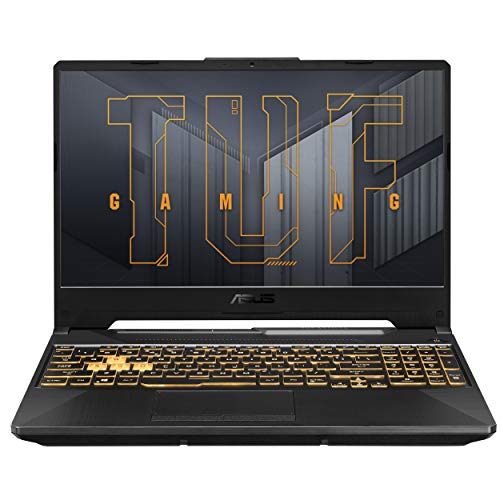

As an Amazon Associate we earn from qualifying purchases at no extra cost to you.
Quick comparison of the best 144Hz laptops
| Pick | Best for | GPU | Display | Weight | Battery |
|---|---|---|---|---|---|
| ASUS TUF Gaming A16 (2025) | Best overall | RTX 5060 (up to 115W) | 16-inch 1920×1200, 144Hz (165Hz QHD option) | 4.85 lb | 90 Wh |
| Lenovo LOQ 15IRX10 | Best value | RTX 5050, 8GB (100W) | 15.6-inch 1920×1080, 144Hz, G-Sync | About 5.3 lb | 60 Wh |
| Acer Nitro V 15 (ANV15-52) | Best light budget pick | RTX 5050, 8GB (up to 75W) | 15.6-inch 1920×1080, 144Hz or 165Hz by model | 4.65 lb | 57 or 76 Wh |
| HP Victus 15 | Best for upgrades and thermals | RTX 5050, 8GB (80W) | 15.6-inch 1920×1080, 144Hz IPS | About 5.1 to 5.2 lb | 70 Wh |
| MSI Thin 15 (B13V) | Best low-cost portable | RTX 4050, 6GB (45W) | 15.6-inch 1920×1080, 144Hz | 4.1 lb | 52.4 Wh |
| Lenovo Legion 5i (Gen 10, 15IRX10) | Best step-up performance | RTX 5060 (up to 115W) | 15.1 to 15.3-inch, 165Hz or 180Hz | About 4.1 to 4.6 lb | 60 or 80 Wh |
| Acer Nitro V 16 (ANV16-72) | Best big screen | RTX 5060, 8GB | 16-inch 16:10, 180Hz options | 5.29 lb | 76 Wh |
What 144Hz actually gives you
Refresh rate is the number of times per second the panel updates. At 60Hz each frame lasts about 16.7 milliseconds. At 144Hz each frame lasts about 6.9 milliseconds, so new information reaches your eyes roughly 9.8 milliseconds sooner on average per frame. In competitive shooters, racing games and fast platformers that is a noticeable change, and many people also feel it in everyday desktop use because windows and the mouse pointer move more smoothly.
There is a ceiling effect worth knowing. The jump from 60Hz to 144Hz is large, the jump from 144Hz to 240Hz is much smaller, and neither helps if the game only renders 70 frames per second. A budget RTX 5050 can often keep older and esports titles above 144 frames per second at 1080p, while demanding modern games usually need lower settings or upscaling. Choose the GPU for the games you play, then confirm the screen. Pairing a 144Hz panel with an entry GPU in a heavy title leaves the panel under-used, which is not a flaw, but it does mean you should not overpay for the panel alone.
Best overall: ASUS TUF Gaming A16 (2025)
The TUF Gaming A16 (FA608 series) is the most balanced 144Hz laptop in this guide. Its RTX 5060 laptop GPU has 8GB of GDDR7 memory and ASUS lists a maximum Dynamic Boost of up to 115W, paired with the AMD Ryzen 7 260 (eight cores, 16 threads, up to 5.1GHz). The 144Hz option is a 16-inch 1920×1200 16:10 IPS-level panel with 3ms response, G-Sync, a MUX switch and Advanced Optimus. A sharper 2560×1600 option at 165Hz also exists, so check the exact model number.
Memory, storage and battery: 16GB of DDR5-5600 in user-replaceable SO-DIMM slots (up to 64GB), two M.2 PCIe 4.0 slots, and a 90 Wh battery with USB-C charging. LaptopMedia reported over 14 hours in its light-load battery measurement, which is unusual for a gaming laptop and mostly comes from the efficient Ryzen chip and the 90 Wh pack. It weighs 4.85 lb.
Who it is for: students and professionals who also game, and anyone who wants a single laptop for school or work and weekend gaming.
Trade-off: the 144Hz configuration uses a modest color gamut, so photo editors should pick the QHD version. Plastic-heavy construction is typical of the TUF line.
Best value: Lenovo LOQ 15IRX10 with RTX 5050
The LOQ 15IRX10 is Lenovo’s budget gaming line, and the RTX 5050 version delivers strong frame rates for the cost. The 15.6-inch 1920×1080 IPS panel runs at 144Hz with G-Sync and 300 nits. The RTX 5050 has 8GB of GDDR7 and a 100W limit, and common CPUs are the Intel Core i5-13450HX (10 cores, 16 threads) or i7-13650HX.
Other specs: memory and storage vary by seller from 12GB to 64GB and 512GB to 4TB, a 60 Wh battery with USB-C charging, 170W or 245W adapters, and a port list that includes USB-C, HDMI, three USB-A ports and Ethernet. The laptop weighs around 5.3 lb and measures about 0.86 to 0.94 inch thick.
Who it is for: first-time gaming laptop buyers who want the best frame rates per dollar and do not need long battery life.
Trade-off: retail listings claim around six hours of battery use, but that is a seller figure and heavy use will be far shorter. The panel covers about 100 percent of sRGB in some listings, which is fine for games but not for color-critical work.
Best light budget pick: Acer Nitro V 15 (ANV15-52)
The Nitro V 15 is the lightest RTX 5050 option here at about 4.65 lb (2.11 kg), and its 362 x 240 x 23.5 mm body fits into a normal backpack easily. The 15.6-inch Full HD IPS panel is 144Hz in some regional models and 165Hz in others, such as the ANV15-52-778V sold in Acer’s US store, so read the listing carefully before you buy.
Specs: RTX 5050 with 8GB of video memory and a maximum graphics power of up to 75W, Core i5-13420H or i7-13620H processors, 16GB of DDR4 memory with a 1TB SSD on many models, Wi-Fi 6 and Bluetooth 5.4. Acer offers a 57 Wh and a 76 Wh battery depending on the model; one review unit with the smaller pack lasted under five hours, while Acer quotes up to 8 to 9.5 hours for the larger pack under light use.
Who it is for: commuters and students who want the lowest weight in the RTX 50 budget tier.
Trade-off: the 75W GPU limit is lower than the LOQ’s 100W, so sustained frame rates are lower in demanding games. Memory type varies, so confirm DDR4 versus DDR5 on the exact SKU.
Best for upgrades and thermals: HP Victus 15
The Victus 15 with RTX 5050 is a practical, easy-to-live-with laptop. Its 15.6-inch 1920×1080 IPS panel is 144Hz and 300 nits, and the graphics chip runs at around 80W according to published reviews. CPU options differ by region, from the Core i5-13420H and Core 7 240H to Ryzen AI 5 340 and Ryzen 7 260, so check the exact configuration.
Weight and battery: HP lists 2.29 kg and Notebookcheck measured 2.356 kg (5.19 lb) with a 660 g charger. The 70 Wh battery lasted just over four hours of web use in that review, much shorter than the previous generation. The review unit had two SO-DIMM slots, so memory is upgradeable.
Who it is for: buyers who want a simple, plain-looking gaming laptop with an easy upgrade path.
Trade-offs: the display covers only about 62 to 69 percent of sRGB in published measurements, the chassis flexes slightly, and some reviewed units lacked a MUX switch.
Best low-cost portable: MSI Thin 15 (B13V)
The MSI Thin 15 B13VE is the oldest design here, built around the RTX 4050 with 6GB of GDDR6 and a 45W graphics limit. It is the lightest at about 4.1 lb (1.86 kg) and 21.7 mm thick, which makes it the easiest to carry. The 15.6-inch Full HD IPS-level panel runs at 144Hz.
Specs: Core i5-13420H or i7-13620H, DDR4-3200 memory in two slots (up to 64GB), one M.2 PCIe Gen 4 slot plus a 2.5-inch SATA bay, ports including RJ45, USB-C, three USB-A and HDMI, and a 52.4 Wh battery. Reviewers report roughly four to five hours of real battery use.
Who it is for: price-focused buyers who want a thin-and-light gaming laptop and who play at 1080p. Because the RTX 4050 is a previous-generation part, it is usually found discounted.
Trade-off: only 6GB of video memory is a limit in newer games with high-resolution textures, and the HDMI port is limited to 4K at 30Hz.
Best step-up performance: Lenovo Legion 5i Gen 10 (15IRX10)
The Legion 5i is the pick when you want to go beyond 144Hz. Its panel options are a 15.3-inch 1920×1200 IPS at 165Hz, a 15.3-inch 2560×1600 IPS at 180Hz with G-Sync, or a 15.1-inch 2560×1600 OLED at 165Hz with VESA TrueBlack 600 and 100 percent DCI-P3, per TechPowerUp. It uses the RTX 5060 with 8GB of GDDR7 and up to 115W of graphics power, paired with a Core i7-13650HX, i7-14700HX or i9-14900HX.
Weight and battery: about 1.9 to 2.1 kg (roughly 4.3 lb in Consumer Reports’ listing), with 60 Wh or 80 Wh batteries. Consumer Reports recorded about 9.5 hours of light web browsing and 6.25 hours of video streaming on one configuration, while Notebookcheck still calls battery life short for gaming use.
Who it is for: serious gamers and creators who want a better display and cooling in a 15-inch frame.
Trade-offs: pricing varies widely between configurations, and PCWorld noted a review unit with a much lower power limit for its GPU, so confirm the wattage on the exact model.
Best big screen: Acer Nitro V 16 (ANV16-72)
If you prefer a larger display, the Nitro V 16 with an RTX 5060 is a clean option. B&H lists the ANV16-72-73VJ with a 16-inch 1920×1200 180Hz screen, a Core 7 240H, 32GB of DDR5, a 512GB SSD and a Thunderbolt 4 port with 65W power delivery. LaptopMedia lists both WUXGA and WQXGA 180Hz options, while one PC Gamer unit had a 100Hz QHD panel, so the panel varies by SKU.
Weight and battery: 5.29 lb (2.4 kg) and a 76 Wh four-cell battery. PC Gamer measured 140 minutes of PCMark 10 gaming-load battery life on a different configuration.
Who it is for: desk-based players who want a bigger 16:10 screen and a strong GPU without paying for a premium brand.
Trade-off: it is heavier than the 15-inch picks and the exact refresh rate depends on the model number, so a 144Hz target requires reading the listing.
How to choose a 144Hz laptop
- Start with the GPU tier. RTX 4050 and RTX 5050 suit 1080p esports and medium settings in newer games. RTX 5060 is a safer 1080p to 1200p choice for modern titles.
- Check the graphics power rating. Two laptops with the same GPU name can differ by 40W or more, and the higher wattage typically gives noticeably higher frame rates.
- Confirm the panel on the exact model number. Several lines here sell 144Hz, 165Hz and 180Hz versions side by side.
- Look at color coverage if you create content. Budget 144Hz panels often cover only 45 to 70 percent of sRGB.
- Prefer user-upgradeable memory and storage. The TUF A16, Victus 15 and MSI Thin 15 use standard SO-DIMM slots.
- Be realistic about battery. Gaming on battery usually lasts one to two hours on every laptop in this guide.
Decision matrix
| Your situation | Best choice | Why |
|---|---|---|
| One laptop for school and gaming | ASUS TUF Gaming A16 | 90 Wh battery, RTX 5060, upgradeable parts |
| Tightest budget with modern GPU | Lenovo LOQ 15IRX10 | RTX 5050 at a 100W limit, 144Hz G-Sync |
| Carry it daily in a backpack | MSI Thin 15 or Acer Nitro V 15 | 4.1 to 4.65 lb |
| Want to upgrade RAM and SSD later | HP Victus 15 or ASUS TUF A16 | Two SO-DIMM slots, extra M.2 |
| Want the best screen and cooling | Lenovo Legion 5i | 165 to 180Hz and OLED choice, 115W RTX 5060 |
| Prefer a bigger display | Acer Nitro V 16 | 16:10 panel with 180Hz options |
A worked example: frame rate targets
To see whether a laptop can use its panel, divide the frame time. A 144Hz panel needs a new frame every 6.94 milliseconds. A game running at 100 frames per second delivers a frame every 10 milliseconds, so the screen shows some frames twice. If your target game runs at around 90 frames per second on an RTX 5050 at high settings, dropping to medium may lift it into the 120 to 144 range, which is where a 144Hz screen starts paying off. If a game already exceeds 200 frames per second, capping it at 144 reduces heat and fan noise. Variable refresh technology such as G-Sync smooths the gap when the frame rate falls below 144.
Cost-per-hour thinking
Suppose you play 12 hours a week for three years, which is about 1,870 hours. A laptop that costs 150 dollars more but adds a higher power limit, a better panel and upgradeable parts costs well under ten cents extra per hour of use. That framing is why spending slightly more for an RTX 5060 machine often beats the cheapest RTX 5050 option for long-term owners, while casual players who only play a few hours a month are better served by the lowest-cost pick.
Durability and ownership realities
- Thermals: gaming laptops collect dust in the fan intake. Clean vents with compressed air every three to six months, and lift the back with a stand for better airflow.
- Battery health: keep the laptop plugged in when gaming and use the manufacturer’s battery-care mode to cap charge near 80 percent for desk use.
- What wears first: hinges, plastic lids and thermal paste. Budget lines such as LOQ, Nitro V and Victus often show lid flex before anything else.
- Upgrades: memory in two-slot laptops is cheap to double; one of the most effective upgrades is moving single-stick configurations to dual-channel RAM, which raises integrated and discrete graphics performance.
- Common mistakes: buying a laptop with only 8GB of memory, ignoring the panel version in the model number, and expecting the charger to be small. Many of these laptops ship with 170W to 245W bricks.
Frequently Asked Questions
Is 144Hz worth it on a laptop?
Yes for gaming and also for general smoothness. The step from 60Hz to 144Hz is one of the most visible display upgrades. It only matters in games if the GPU can deliver frame rates above 60, which an RTX 4050 or newer usually can at 1080p.
What GPU do I need for 144 frames per second?
For esports titles at 1080p, an RTX 4050 or RTX 5050 is usually enough. For modern single-player games at high settings, an RTX 5060 or better is the safer choice, and upscaling can help fill the gap.
Is 144Hz better than 165Hz or 180Hz?
Higher is smoother, but the difference between 144Hz and 165Hz is small. Focus on GPU power, panel response and color coverage rather than a few extra hertz.
Do 144Hz laptops have bad battery life?
Not necessarily. The ASUS TUF Gaming A16 reached over 14 hours in a light-load measurement because of its 90 Wh pack and efficient CPU. Heavy gaming drains any of these laptops in one to two hours.
Can I use a 144Hz laptop for work?
Yes. Most of these laptops work well for documents, coding and spreadsheets, and the high refresh rate makes scrolling smoother. Choose a QHD or OLED panel if you edit photos or video.
Should I buy a 144Hz laptop or a gaming monitor?
If you need portability, a laptop is the only choice. If you already own a laptop with a good GPU, an external 144Hz monitor adds the same smoothness at a lower cost. A laptop’s HDMI or USB-C port must support the refresh rate you want, so check the spec sheet.


Write Your Review
No reviews yet. Be the first to share your experience!