

Key takeaways
- NVMe SSD vs SATA SSD for a laptop upgrade: compare Samsung, WD_BLACK and Crucial drives on slot and bay fit, stated speeds, endurance and value.
- Top Pick: Samsung 990 PRO 2TB NVMe SSD
- Runner-up: WD_BLACK SN850X 2TB NVMe SSD
- Also consider: Crucial T500 1TB NVMe SSD with Heatsink
Replacing a laptop’s storage is one of the few upgrades still open to owners of modern machines, but the first question is not which drive is fastest. It is which drive your laptop can physically take. Newer laptops use an M.2 slot that speaks the NVMe protocol, and only those machines can use the NVMe drives below. Older laptops, and some budget models, carry a 2.5-inch bay wired for SATA, and for them a SATA drive is the only option, with speeds capped by that interface no matter how good the drive is.
This comparison puts two flagship NVMe drives, one heatsink NVMe model with an important fit warning, and two established SATA drives side by side. Every speed figure quoted is a manufacturer-stated maximum for sequential transfers, not a promise of everyday performance. Before buying anything, open your laptop’s specification page or service manual and confirm the slot or bay type, because an NVMe drive needs an M.2 NVMe slot and a SATA drive needs a 2.5-inch bay.
As an Amazon Associate, we earn from qualifying purchases.
Quick answer
If your laptop has an M.2 NVMe slot, the Samsung 990 PRO 2TB and WD_BLACK SN850X 2TB are the top picks, with the highest stated speeds in this comparison. If your laptop only has a 2.5-inch SATA bay, the Samsung 870 EVO and Crucial MX500 are the proven choices, and their real-world ceiling is set by the SATA interface rather than the drive.
Samsung 990 PRO 2TB NVMe SSD

The 990 PRO is Samsung’s flagship PCIe 4.0 drive and the fastest pick on paper here. The listing covers the non-heatsink 2TB version, in the M.2 2280 size that fits most laptop slots. Samsung’s datasheet figures, as recorded for this listing, run up to 7,450 MB/s read and 6,900 MB/s write, with an endurance rating of 1,200 TBW at this capacity and 2GB of LPDDR4 DRAM on the drive. Those numbers assume a PCIe 4.0 x4 NVMe slot; in a PCIe 3.0 laptop the same drive still works but is limited by the older slot.
This is the pick for users who move large files often, work with big media projects, or simply want the strongest NVMe specification available for a compatible laptop. Heatsink versions of the 990 PRO exist as different listings, and the slim non-heatsink version here is the one that suits laptop bays.
| Spec | Detail |
|---|---|
| Interface | PCIe 4.0 x4, NVMe 2.0 |
| Form factor | M.2 2280 |
| Capacity | 2TB |
| Stated speeds | Up to 7,450 MB/s read, 6,900 MB/s write |
| Endurance | 1,200 TBW |
| Model | MZ-V9P2T0B/AM |
WD_BLACK SN850X 2TB NVMe SSD

The SN850X is Western Digital’s performance counterpart to the 990 PRO. This listing is the non-heatsink 2TB model in M.2 2280 form, running on a PCIe Gen4 x4 connection. Stated maximums are up to 7,300 MB/s read and 6,300 MB/s write, a step behind the Samsung on write speed but in the same class overall. A 5-year warranty is part of the listing’s stated terms, which matters for a drive expected to serve as a laptop’s main storage for years.
For laptop use, the SN850X makes sense as the alternative flagship: near-identical positioning, the same slot requirements, and the same warning that a PCIe 3.0 slot will cap it well below its headline figures. As with the Samsung, a heatsink SKU exists separately; the bare drive listed here is the laptop-friendly version. Pick between this and the 990 PRO on capacity needs and which stated figures matter more to your workload.
| Spec | Detail |
|---|---|
| Interface | PCIe Gen4 x4 |
| Form factor | M.2 2280 |
| Capacity | 2TB |
| Stated speeds | Up to 7,300 MB/s read, 6,300 MB/s write |
| Warranty | 5 years (listing-stated) |
| Model | WDS200T2X0E |
Crucial T500 1TB NVMe SSD with Heatsink

The T500 is a strong PCIe Gen4 drive on specification: stated speeds up to 7,300 MB/s read and 6,800 MB/s write, TLC NAND, and a 600 TBW endurance rating at this 1TB capacity. However, the verified listing here is the version with a factory-fitted heatsink, and that fact drives how it should be bought. A heatsink adds height above the drive, and many slim laptop M.2 bays do not have the clearance for it. The bare-drive version of the T500 is a different listing altogether, so do not treat this code as that product.
The honest summary: if your laptop has a roomy M.2 bay and you have confirmed the clearance, the heatsink model delivers full T500 performance. If your machine is a thin ultrabook, check the bay height first or choose one of the non-heatsink drives above. Desktop and console-style installs with open space around the slot are where a heatsink drive fits most naturally, but for laptop buyers the clearance check is the deciding step.
| Spec | Detail |
|---|---|
| Interface | PCIe Gen4 NVMe |
| Form factor | M.2 with factory heatsink |
| Capacity | 1TB |
| Stated speeds | Up to 7,300 MB/s read, 6,800 MB/s write |
| NAND | TLC |
| Endurance | 600 TBW |
| Model | CT1000T500SSD5 |
Samsung 870 EVO 1TB SATA SSD
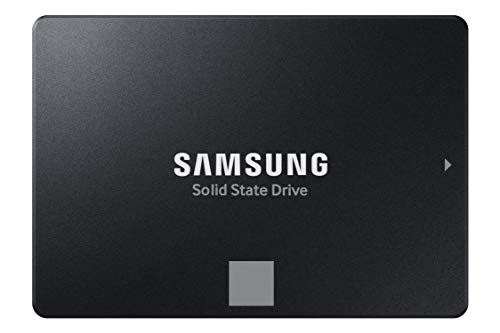
The 870 EVO is the benchmark SATA upgrade for a laptop with a 2.5-inch bay. It uses the SATA III 6 Gb/s interface in the standard 2.5-inch, 7mm shell that fits the drive bays of older laptops, and its stated speeds of up to 560 MB/s read and 530 MB/s write sit essentially at the ceiling of what SATA III allows. That ceiling is the key context: no SATA drive can go meaningfully faster, because the interface itself is the limit.
For a laptop that currently spins a mechanical hard drive, an 870 EVO still transforms boot times and application loading, even if the raw figures look small beside the NVMe drives above. It is also the simplest swap in this comparison, since 2.5-inch bays are usually the most accessible part of an older laptop. If your machine has no M.2 slot, this is the class of drive you are shopping for, and the 870 EVO is its best-known example.
| Spec | Detail |
|---|---|
| Interface | SATA III 6 Gb/s |
| Form factor | 2.5-inch, 7mm |
| Capacity | 1TB |
| Stated speeds | Up to 560 MB/s read, 530 MB/s write |
| Model | MZ-77E1T0B/AM |
Crucial MX500 1TB SATA SSD

The MX500 is the other established name in SATA upgrades. In 2.5-inch form it states speeds up to 560 MB/s read and 510 MB/s write, effectively matching the 870 EVO at the SATA ceiling, with a Crucial-stated endurance figure of 360 TBW at this capacity. For an older laptop, the practical difference between the two SATA picks here is small, since both are limited by the same interface.
One point of context recorded during research: the MX500 line has been reported as end-of-life, as Micron wound down the Crucial consumer business, with shipments reported through February 2026. That report is noted here for completeness; the drive remains the established SATA option on its specifications, and no claim about its current stock position is made either way. If you are upgrading a SATA-only laptop and find this model, its specification is well proven over many years of use.
| Spec | Detail |
|---|---|
| Interface | SATA |
| Form factor | 2.5-inch |
| Capacity | 1TB |
| Stated speeds | Up to 560 MB/s read, 510 MB/s write |
| Endurance | 360 TBW (Crucial-stated) |
| Model | CT1000MX500SSD1 |
How to choose
Check the hardware first. Look up whether your laptop has an M.2 slot that supports NVMe, a 2.5-inch SATA bay, or both, and buy for the connection you actually have; an NVMe drive cannot work in a SATA-only machine, and a SATA drive in an M.2-only machine has nowhere to go. Second, match the generation: a PCIe 4.0 drive in a PCIe 3.0 slot runs at the older slot’s speeds, which is fine but changes the value calculation. Third, check physical fit, especially heatsink height against slim bays. Finally, compare endurance ratings (TBW) and capacity against how much data you write, and remember every speed here is a stated sequential maximum, not a daily average.
Who should skip
Skip this upgrade entirely if your laptop’s storage is soldered to the board, as many thin ultrabooks and all Chromebooks in that style are; there is no slot or bay to fill. Skip the heatsink T500 if you cannot verify M.2 bay clearance in a slim laptop. Skip NVMe drives if your machine predates M.2 slots, and skip SATA drives if your laptop has already dropped the 2.5-inch bay. Anyone whose laptop still runs well on its existing SSD and who only browses and writes documents can also skip: the interface ceiling means an already-solid-state machine gains little from a same-interface swap.
FAQ
Will an NVMe SSD work in any M.2 slot?
No. Some M.2 slots are wired for SATA only, and an NVMe drive will not be recognised in them. Your laptop needs an M.2 slot that supports NVMe, ideally PCIe 4.0 to reach the stated speeds of the flagship drives here. Check the service manual before buying.
Is a SATA SSD still worth buying in a new upgrade?
Yes, if your laptop only has a 2.5-inch bay. The SATA interface caps speeds near the figures the 870 EVO and MX500 state, but moving from a mechanical hard drive to any SATA SSD is still a large, noticeable improvement in boot and loading times.
Will the Crucial T500 heatsink version fit my laptop?
Only if the M.2 bay has enough vertical clearance, which many slim laptops do not. Measure or check the manual first. The bare-drive T500 is a separate listing, so the heatsink model should never be assumed to be the slim version.
How much capacity should I choose?
Match it to what you store. The 2TB NVMe models here suit large game or media libraries, while 1TB is enough for most office and study laptops. Endurance ratings rise with capacity on many lines, so heavier writers get a side benefit from the larger drive.
Final verdict
The interface decides this contest before the drives do. Laptops with an M.2 NVMe slot should take the Samsung 990 PRO or WD_BLACK SN850X for the strongest stated performance, with the Crucial T500 heatsink model as an option only where bay clearance is confirmed. Laptops limited to a 2.5-inch bay are well served by the Samsung 870 EVO or Crucial MX500, both of which deliver everything the SATA interface allows.
More from Amazon
Programs that pair well with the guide above. Offers and eligibility are set by Amazon and may change.
A free business account with business pricing and bulk-buying tools for work, shop or home office.
Create a business accountFree shipping on eligible items, Prime Video and more. Eligible new members can start with a free trial.
Start a Prime free trialAudiobooks and podcasts to listen to on the go. Eligible new members can start with a free trial.
Try Audible freeAd-free music streaming. Eligible new subscribers can start with a free trial.
Try Music Unlimited freeAs an Amazon Associate we earn from qualifying purchases.


Write Your Review
No reviews yet. Be the first to share your experience!