

Key takeaways
- Learn how to choose a surge protector for your laptop setup, comparing joule ratings, outlet counts, cord lengths and a desk clamp option with USB.
A laptop setup is rarely just a laptop. There is the charger, an external monitor, a desk lamp, a phone charger, maybe a printer or a powered hub, all competing for the one or two wall sockets near the desk. A surge protector solves the socket problem and adds a layer of defense against voltage spikes from storms, grid switching, and large appliances, which can damage power supplies over time or all at once.
The five protectors here span the realistic range for a laptop desk: three Belkin strips with high joule ratings and long cords, an APC model that also protects phone, network, and coax lines, and an Anker desk clamp that trades raw capacity for USB ports and an off-the-floor mount. Choosing well means matching joule rating, outlet count, and cord length to your actual desk, not buying the biggest numbers on the shelf.
As an Amazon Associate, we earn from qualifying purchases.
Quick answer
For most laptop desks, pick a strip with at least 3,000 joules, enough outlets for every device plus two spares, and a cord that reaches the wall without stretching. The Belkins cover long cords and high ratings, the APC adds line protection, and the Anker clamp suits small desks.
Belkin Surge Protector Power Strip, 12 AC Outlets, 10 ft Flat Plug, 4,156 Joules


This Belkin strip is the long-reach option in the guide. Its listing states 12 AC outlets, a 10 ft cord, a flat plug, and a 4,156 joule rating. The flat plug matters more than it sounds: it sits close to the wall, so furniture can push nearer the socket, and the 10 ft cord reaches desks far from the nearest outlet.
Twelve outlets is generous for a laptop desk: charger, monitor, lamp, phone charger, printer, and a spare hub still leave room to grow, and a high joule figure gives more capacity to absorb surge energy. The listing does not add USB ports to this model, so phone charging still needs its own adapter in one of the AC outlets.
Availability for this listing can change, so check the product page to confirm it before building your desk plan around it. If it is available and your desk sits far from the wall socket, this is the most straightforward pick here: the most cord, a strong joule rating, and enough outlets that you stop thinking about power.
Belkin Surge Protector Power Strip, 12 AC Outlets, 8 ft Flat Plug, 3,940 Joules
The second Belkin is the close sibling of the first: 12 AC outlets, a flat plug, and a 3,940 joule rating, with an 8 ft cord instead of 10 ft. That two foot difference is the whole decision between them. If your desk stands near the outlet, the shorter cord is tidier, and the rating remains high for a full laptop setup.
Everything else matches the model above: the same flat plug and outlet count, and no USB ports, so charging runs through your own adapters.
Choose this version when the 8 ft reach is genuinely enough, measured along the cord’s real path, around desk legs and along walls, not in a straight line. Choose the 10 ft model above when the measurement is close or the desk might move later. On protection there is no wrong answer between the two; it is purely a question of cord length.
APC Surge Protector P11VNT3, 11 Outlets, 3,020 Joules, with Phone, Network, and Coax Protection

The APC P11VNT3 adds something the Belkin strips do not: protection for the data lines coming into the desk. Alongside 11 outlets and a 3,020 joule rating, the listing states phone, network, and coax protection ports. Surges do not only travel through power cords; a spike can arrive over a network or coax line, so a wired setup benefits from covering those paths too.
This makes the APC the natural pick for a laptop desk that behaves like a small office: wired Ethernet, a cable modem or TV tuner on coax, or a landline phone in the mix. If your desk is Wi-Fi only, those ports go unused and the Belkin strips offer more outlets and higher joule figures for the same role.
One honest gap: sources state this model’s cord length inconsistently, so this guide treats it as not stated. Measure your desk-to-outlet distance before ordering, and if the run is long, confirm the cord on the product page or choose a Belkin with a stated 8 or 10 ft cord. On protection breadth, the APC is the most complete option here.
Belkin Surge Protector with 8 Rotating and 4 Standard Outlets, 8 ft Cord, 4,320 Joules

This Belkin solves a different problem: bulky power bricks. Its listing states 12 outlets, split into 8 rotating outlets and 4 standard ones, an 8 ft cord, and a 4,320 joule rating, the highest figure in this guide. Rotating outlets pivot so a wide charger brick can turn sideways instead of blocking its neighbor, the most common reason a 12 outlet strip ends up holding only eight plugs.
Laptop setups collect exactly those awkward bricks: the laptop adapter, a monitor supply, a printer brick, and wall chargers. With rotating sockets, each can angle away from its neighbor, and the four fixed outlets take the slim plugs. The result is a strip whose stated outlet count is actually usable.
The trade-offs are minor: no USB ports, and at 8 ft the cord matches the shorter Belkin rather than the 10 ft model. But if your current strip wastes sockets to brick overlap, this is the pick that fixes it, and the 4,320 joule rating means you give up nothing on protection to get the rotating design. For brick-heavy desks, it is arguably the most practical protector here.
Anker Nano Power Strip Desk Clamp, White
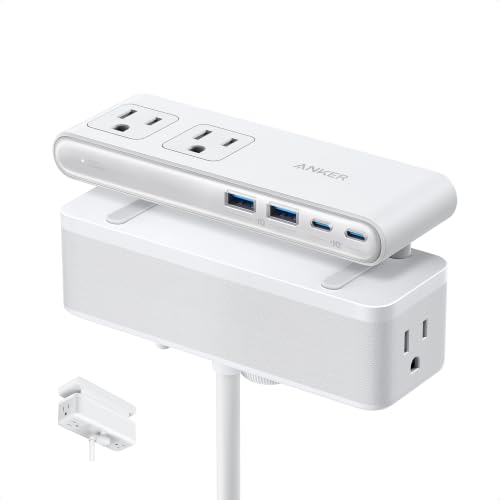
The Anker Nano Desk Clamp takes the opposite approach to a floor strip: it clamps to the desk edge. The listing states a clamp mount that fits tabletop edges from 0.6 to 1.8 inches thick, 6 AC outlets, 2 USB-A ports, and 2 USB-C ports, with a maximum USB output of 70W. The surge rating is 1,500 joules, lower than the floor strips here, the honest trade for the format.
What the clamp buys is order. Power sits at the back edge of the desk where you can reach it, phone and tablet charging runs through the built-in USB ports without extra bricks, and a 70W USB budget can fast-charge a phone while keeping a tablet or light laptop topped up. Nothing dangles to the floor, and the desk can move freely.
It suits a compact, tidy desk and fails a big one. Six AC outlets run out quickly once a monitor, printer, and lamp join the laptop, and 1,500 joules is a lighter rating for a desk full of expensive gear. Measure your desktop edge before ordering, because the clamp range is specific. For a laptop, a phone, and a lamp on a small desk, this is the neatest solution here.
How to choose
Start with the joule rating, which describes how much surge energy the protector can absorb. For a desk holding a laptop and a monitor, look for at least 3,000 joules; the strips here rated 3,020, 3,940, 4,156, and 4,320 joules all clear it. The Anker clamp’s 1,500 joules suits a lighter setup. Protection is consumed over time, so a higher rating also means a longer useful life.
Count outlets next, and count honestly. List every device with a plug, add the chargers that rotate through the desk, then add two spares. Most laptop desks land between eight and twelve, which is why the 11 and 12 outlet strips dominate here. Watch for brick overlap: rotating outlets, like the Belkin PivotPlug design, recover sockets that fixed strips lose.
Measure the cord run third, along the real path, not a straight line. Stated lengths here are 10 ft, 8 ft, and 8 ft; the APC’s cord is not stated, so verify it before relying on it. A flat plug helps where furniture sits against the socket. Finally, decide the extras: data line protection for wired network, phone, or coax; built-in USB if you charge phones at the desk; a clamp mount if floor space is your real problem.
Who should skip
Skip the Anker clamp if your desk edge falls outside its stated 0.6 to 1.8 inch clamp range, if you need more than six AC outlets, or if your gear deserves a higher rating than 1,500 joules. Skip the APC if your setup is Wi-Fi only with no coax or phone line, because its signature feature would sit unused while the Belkins give you more outlets and higher ratings.
Skip the 10 ft Belkin if your desk is beside the outlet, since two extra feet of cord becomes clutter. Skip all five if you need battery backup during outages; a surge protector is not a UPS and keeps nothing running when the power cuts. And do not treat any protector as permanent: surge components wear out, so plan to replace it every few years or after a major surge.
FAQ
What joule rating does a laptop setup actually need?
A rating around 3,000 joules or higher is a sensible target for a desk with a laptop, monitor, and peripherals, and most strips here meet it. Higher ratings, like the 4,320 joules on the rotating Belkin, add absorption capacity and service life. A lower rating like the Anker clamp’s 1,500 joules fits a smaller, lighter setup.
Is a flat plug worth looking for?
Yes, in most rooms. A flat plug sits close to the wall, so furniture can stand nearer the socket without stressing the plug. The two long-cord Belkin strips here use flat plugs, and the Anker avoids the wall entirely by clamping to the desk edge.
Do I need phone, network, and coax protection?
Only if those cables connect to your setup. Surges can travel over wired lines as well as power cords, so a desk with wired Ethernet, a coax modem or tuner, or a landline benefits from the APC P11VNT3, which states protection for all three. A Wi-Fi only desk gains nothing from those ports and can choose purely on outlets, joules, and cord length.
Can the Anker clamp replace a full surge protector strip?
For a small setup, yes; for a full desk, no. The clamp offers 6 AC outlets, four USB ports with 70W of USB output, and a 1,500 joule rating, covering a laptop, phone, tablet, and lamp at the desk edge. Once a monitor, printer, and extra chargers join in, the outlet count and rating both run short, and an 11 or 12 outlet strip is the better base.
Final verdict
For most laptop desks, the Belkin 4,156 joule strip with the 10 ft cord is the safest default: high rating, twelve outlets, and reach to spare, with its 8 ft, 3,940 joule sibling the tidier pick for desks near the socket. Brick-heavy setups should take the rotating Belkin and its guide-high 4,320 joules. Wired desks should take the APC for its phone, network, and coax protection. Small, tidy desks should take the Anker clamp. Match the rating, count, and cord to your room.
More from Amazon
Programs that pair well with the guide above. Offers and eligibility are set by Amazon and may change.
A free business account with business pricing and bulk-buying tools for work, shop or home office.
Create a business accountFree shipping on eligible items, Prime Video and more. Eligible new members can start with a free trial.
Start a Prime free trialAudiobooks and podcasts to listen to on the go. Eligible new members can start with a free trial.
Try Audible freeAd-free music streaming. Eligible new subscribers can start with a free trial.
Try Music Unlimited freeAs an Amazon Associate we earn from qualifying purchases.


Write Your Review
No reviews yet. Be the first to share your experience!