

Key takeaways
- Five 2TB portable hard drives compared for laptop backup, covering USB speed, size, weight, encryption and warranty so you can choose with confidence.
- Top Pick: WD 2TB Elements Portable External Hard Drive
- Runner-up: Seagate Portable 2TB External Hard Drive
- Also consider: Toshiba Canvio Basics 2TB Portable External Hard Drive
A laptop holds years of photos, documents, coursework and work files, and a single drive failure or stolen bag can take all of it at once. A portable hard drive is still the simplest backup habit to keep: plug it in, copy the files or run a scheduled backup, then store the drive somewhere separate from the laptop itself.
All five drives in this guide hold 2TB and connect over USB, so on paper they look alike. The real differences sit in the details around that shared capacity: how light the drive is, whether it arrives formatted for Windows or needs a reformat for a Mac, whether backup software and password protection are included, and how the enclosure handles daily travel. The picks below cover the plain plug-and-play route, a bundled rescue service, the lightest option, built-in encryption and a rugged travel design.
As an Amazon Associate, we earn from qualifying purchases.
Quick answer
All five picks here hold 2TB and draw power from the laptop’s USB port, so the real choice is about extras. The WD Elements is the plain plug-and-play option, the Seagate adds a rescue service, the Toshiba is the lightest, the WD My Passport adds password protection, and the LaCie Rugged Mini is built for rougher travel.
WD 2TB Elements Portable External Hard Drive

The WD Elements is the straightforward choice for anyone who wants a backup drive that simply works when it is plugged in. The listing describes a slim 2.5-inch portable enclosure with plug-and-play behaviour, so there is no software routine standing between the drive and a first backup. It connects over USB 3.2 Gen 1, which the listing also identifies as USB 3.0, and that is the port found on the large majority of laptops from the last decade.
The drive ships formatted in NTFS for Windows. Mac owners should note the listing’s wording carefully: a reformat is needed before the drive works as a Mac backup disk, which is a one-time setup step rather than a flaw, but it does mean the drive is not a shared Windows-and-Mac disk out of the box. There is no bundled backup software or encryption mentioned in the listing facts, so this pick suits readers who already use the backup tool built into their operating system and just need reliable space.
Specs:
- Capacity: 2TB
- Interface: USB 3.2 Gen 1 (USB 3.0)
- Form factor: 2.5-inch portable, slim enclosure
- Formatting: NTFS for Windows; reformat needed for Mac
- Setup: plug and play
Seagate Portable 2TB External Hard Drive

The Seagate Portable takes the same simple approach and adds two ownership details the other listings do not bundle in the same way. The drive is bus-powered, so it runs entirely from the laptop’s USB connection, and the box includes an 18-inch USB 3.0 cable. That cable length is worth a thought: it is tidy for a drive sitting beside a laptop on a desk, and less convenient if the drive needs to live further away.
Backup on this model is drag-and-drop per the listing, which fits a manual routine of copying libraries and project folders on a schedule the owner controls. The listing title also pairs a 1-year limited warranty with a 1-Year Rescue Service, a data-recovery style service that gives this pick a safety net the plainer drives here do not advertise. At 190 g it is not the lightest drive in the guide, but it stays easy to carry in a laptop sleeve.
Specs:
- Capacity: 2TB
- Interface: USB 3.0
- Power: bus-powered from the USB connection
- Cable: 18-inch USB 3.0 cable included
- Weight: 190 g
- Warranty: 1-year limited warranty and 1-Year Rescue Service per the listing title
Toshiba Canvio Basics 2TB Portable External Hard Drive

The Canvio Basics is the weight-watcher of the group. At 5.3 oz, with dimensions of 4.3 x 3.1 x 0.55 in, it is the lightest and one of the slimmest drives here, which matters if the backup drive travels in the same bag as the laptop every day. The listing states a 5400 RPM rotational speed, the only drive in this guide whose listing records that figure, and it connects over USB 3.0 with USB 2.0 compatibility for older ports.
No AC power adapter is needed, so the cable is the only connection to manage. Like the WD Elements, the drive is formatted in NTFS for Windows, and the listing does not describe Mac formatting, so Mac buyers should plan on the same one-time reformat. The matte finish is a small but practical touch on a device that gets handled and slid across desks constantly. Nothing in the listing facts points to bundled software or encryption, keeping this a clean, light, basic drive.
Specs:
- Capacity: 2TB
- Interface: USB 3.0 and USB 2.0
- Rotational speed: 5400 RPM
- Weight: 5.3 oz
- Dimensions: 4.3 x 3.1 x 0.55 in
- Power: no AC power adapter needed
- Formatting: NTFS for Windows
- Finish: matte
WD 2TB My Passport Portable External Hard Drive

The My Passport is the pick for readers who want the drive itself to help with the backup routine and with privacy. The listing states that backup software is included, which suits a set-and-forget schedule rather than manual copying. It also lists password protection with 256-bit AES hardware encryption per the listing copy, a meaningful step up for a drive that will hold tax records, client files or a full photo library and may be stored off-site or carried between locations.
Physically it is the slimmest drive in the guide at 4.22 x 2.95 x 0.44 in and 4.2 oz, in a black finish, and it connects over USB 3.1 and USB 3.0. The combination is coherent: the lightest-touch carrying experience paired with the strongest stated data protection of the five. Readers who never store anything sensitive and already run their own backup software may not need those extras, but for a single drive that does backup and basic security in one box, this is the most complete listing here.
Specs:
- Capacity: 2TB
- Interface: USB 3.1 and USB 3.0
- Software: backup software included
- Security: password protection with 256-bit AES hardware encryption per listing copy
- Weight: 4.2 oz
- Dimensions: 4.22 x 2.95 x 0.44 in
- Colour: black
LaCie Rugged Mini 2TB Portable External Hard Drive
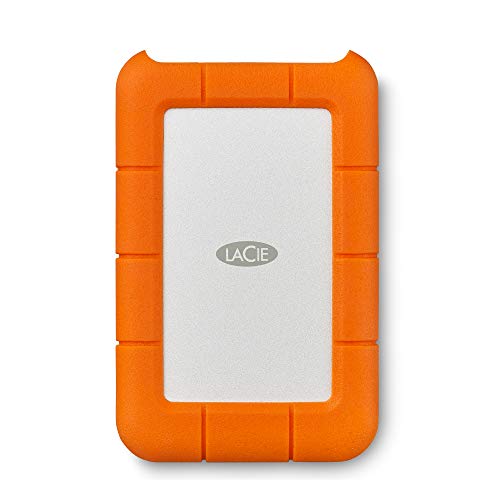
The Rugged Mini answers a different question: what if the backup drive gets dropped, knocked around in a bag or caught in the rain on the way to the office? The listing describes the orange enclosure as drop, shock, dust and rain resistant, which makes it the natural pick for field work, site visits, travel photography and student life where gear is handled roughly. At 280 g it is the heaviest drive here, the direct trade for that protective shell.
The listing quotes transfer speeds of up to 130 MB/s over its USB 3.0 connection, the only explicit speed figure among the five listings. It also records a 2-year limited warranty, the longest warranty period stated in this guide, and the listing copy mentions a 1-month Adobe Creative Cloud offer, a small extra for creative users. If the drive will live on a desk, the rugged build is more than needed; if it will live in a backpack, it is the point.
Specs:
- Capacity: 2TB
- Interface: USB 3.0
- Transfer speed: up to 130 MB/s per listing
- Build: drop, shock, dust and rain resistant
- Colour: orange
- Weight: 280 g
- Warranty: 2-year limited warranty per the listing
How to choose
Start with capacity planning. Every drive here holds 2TB, which comfortably covers the internal drive of most laptops with room for several generations of backups. If a laptop’s internal storage is already close to 2TB and full, or if large video libraries are involved, a bigger drive than any of these would be the honest recommendation.
Next, check formatting against the operating system. The WD Elements and the Toshiba Canvio Basics are recorded as NTFS for Windows, with a reformat needed for Mac use on the Elements. A reformat is quick, but it erases the drive, so it belongs at setup time, not after the first backup. Then decide how the backup will actually run. Drag-and-drop copying, as described for the Seagate, works for disciplined routines. The My Passport’s included backup software suits readers who prefer an automatic schedule. Finally, weigh the extras that match real life: encryption for sensitive files, a rescue service for irreplaceable data, low weight for daily carrying, or a rugged shell for travel.
Who should skip
Skip this whole category if fast restores and constant file transfers matter more than capacity per drive; a portable solid-state drive is the better tool for that job, and none of these spinning drives competes on speed. Skip the 2TB size if the laptop and its media libraries already exceed it. Skip the plain drives, the Elements and the Canvio Basics, if the backup will hold sensitive records and encryption is a requirement rather than a nicety; the My Passport is the recorded pick for that. And skip the LaCie Rugged Mini if the drive will never leave a desk, since its weight buys protection that scenario never uses.
FAQ
Do these drives need a separate power adapter?
No separate adapter is part of any setup here. The Seagate listing states the drive is bus-powered, the Toshiba listing states no AC power adapter is needed, and the remaining picks are slim portable USB drives in the same class. One USB cable is the whole connection for each.
Will these drives work with a Mac?
Two of the listings address this directly. The WD Elements is NTFS formatted for Windows and the listing states a reformat is needed for Mac. The Toshiba Canvio Basics is also listed as NTFS for Windows. A reformat at setup makes either drive Mac-ready, but it erases the disk, so do it before the first backup.
What is the difference between the two WD drives?
The Elements is the plain option: plug and play, NTFS formatting, and no bundled software or encryption in its listing facts. The My Passport adds backup software and password protection with 256-bit AES hardware encryption per its listing copy, in a slimmer and lighter enclosure. Same capacity and brand, different job.
Is 2TB enough for a laptop backup?
For most laptops, yes. A backup drive should hold at least the full contents of the internal drive, and 2TB covers the internal storage fitted to most mainstream laptops with room for multiple backup generations. Owners of nearly full 2TB internal drives, or large raw video archives, should look beyond this size class.
Final verdict
For a simple, dependable backup drive, the WD Elements is the default pick, and the Toshiba Canvio Basics matches it for readers who count every ounce. The Seagate Portable earns its place with the bundled rescue service, the WD My Passport is the strongest all-round listing thanks to its backup software and hardware encryption, and the LaCie Rugged Mini is the one to buy when the drive travels as hard as the laptop does.
More from Amazon
Programs that pair well with the guide above. Offers and eligibility are set by Amazon and may change.
A free business account with business pricing and bulk-buying tools for work, shop or home office.
Create a business accountFree shipping on eligible items, Prime Video and more. Eligible new members can start with a free trial.
Start a Prime free trialAudiobooks and podcasts to listen to on the go. Eligible new members can start with a free trial.
Try Audible freeAd-free music streaming. Eligible new subscribers can start with a free trial.
Try Music Unlimited freeAs an Amazon Associate we earn from qualifying purchases.


Write Your Review
No reviews yet. Be the first to share your experience!