

Key takeaways
- Compare five numeric keypads for fast laptop data entry, from a 34-key Bluetooth model to a simple wired pad, with key counts, connections and OS limits.
- Top Pick: Satechi Bluetooth Extended Numeric Keypad, 34-Key, Space Gray
- Runner-up: 8BitDo Retro 18 Mechanical Numpad, Xbox Edition
- Also consider: MOFII Wireless Number Pad, Purple, 18 Keys
Most thin laptops drop the numeric keypad to save width, which is fine until the work turns into column after column of figures. Spreadsheet entry, bookkeeping, inventory counts and order processing all go faster when numbers sit in the familiar calculator grid under one hand instead of along the keyboard’s top row. A separate numeric keypad restores that grid without replacing the laptop or forcing a full-size external keyboard onto a small desk.
The five pads below differ in the ways that matter for entry work: how many keys they carry, how they connect, what powers them and which operating systems they support. One is a 34-key extended pad with navigation keys built in, one doubles as a standalone calculator, and one is a wired pad with no battery or pairing to manage. Read the compatibility notes closely, because two of the five do not support macOS at all, and a pad that cannot talk to your laptop is no use however good its keys feel.
As an Amazon Associate, we earn from qualifying purchases.
Quick answer
For most laptop users, the Satechi Extended Keypad is the most complete option, with 34 keys and a Bluetooth connection. Windows users who want extra shortcut keys should look at the Foloda 22-key pad, mechanical-key fans at the 8BitDo Retro 18, and anyone who wants zero setup should pick the wired Perixx Peripad-201.
Satechi Bluetooth Extended Numeric Keypad, 34-Key, Space Gray

The Satechi is the closest thing here to the right-hand section of a full desktop keyboard. Its 34 keys cover the number grid plus navigation arrows and macOS shortcut keys, so moving around a spreadsheet does not mean reaching back to the laptop keyboard between entries. For data entry that mixes figures with cell navigation, that extra layout is the main reason to choose it over the smaller pads in this guide.
It connects over Bluetooth, so no USB port is taken up and there is no receiver to lose, and it recharges over USB-C when the battery runs low. The body is aluminum, and the layout is U.S. English. Note that this listing is the Space Gray finish; the Silver colourway is a separate listing, so check the finish name on the page before ordering if the colour matters to you.
| Feature | Detail |
|---|---|
| Keys | 34, including navigation arrows and macOS shortcut keys |
| Connection | Bluetooth |
| Power | USB-C rechargeable |
| Body | Aluminum |
| Layout | U.S. English |
| Model | ST-XLABKM |
8BitDo Retro 18 Mechanical Numpad, Xbox Edition
The 8BitDo Retro 18 is the pick for anyone who wants mechanical keys on a number pad. Its 18 keys use Kailh Jellyfish X switches, and the PCB is hot-swappable, so the switches can be changed later without soldering. It is also the most flexible connector here, with Bluetooth, a 2.4 GHz wireless mode and a USB-C wired mode on the same unit, which makes it easy to move between a laptop and a desk setup.
Its party trick is a standalone calculator mode with an LED display: away from the computer it works as a basic calculator, then switches back to numpad duty when connected. The limits matter, though. The listing states Windows and Android support only, so Mac users should look elsewhere in this list. This is also specifically the Xbox Edition; the other Retro 18 editions are different listings with different designs and switches, and their details do not transfer to this one.
| Feature | Detail |
|---|---|
| Keys | 18 mechanical keys |
| Switches | Kailh Jellyfish X, hot-swappable PCB |
| Connection | Bluetooth, 2.4 GHz wireless, USB-C wired |
| Extra feature | Standalone calculator mode with LED display |
| Compatibility | Windows and Android only |
MOFII Wireless Number Pad, Purple, 18 Keys

The MOFII pad keeps things simple: 18 keys, a 2.4 GHz USB receiver, and a plug-and-play setup with no pairing menus. The receiver design suits older laptops and shared work machines where Bluetooth is unavailable or locked down, and the listing positions it for laptop, PC and Surface Pro use. The round keycaps give it a typewriter-style look that stands out from the other pads here, and this listing is the Purple colourway.
Power comes from a single AAA battery, per the listing copy, which means no charging cable but also a battery to replace eventually. With 18 keys there are no navigation or shortcut extras, so this is a pad for straightforward number entry rather than spreadsheet navigation. If your work is mostly figures with the occasional Enter key, that simpler layout is enough, and the small footprint leaves more desk room for paperwork or a mouse.
| Feature | Detail |
|---|---|
| Keys | 18 |
| Connection | 2.4 GHz USB receiver |
| Power | 1 AAA battery |
| Keycaps | Round |
| Colour | Purple |
| Stated use | Laptop, PC and Surface Pro |
Foloda Wireless Number Pad, 22 Keys
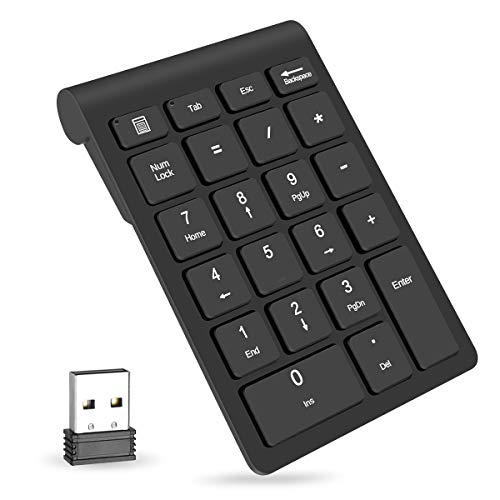
The Foloda splits the difference between the compact 18-key pads and the Satechi’s extended layout. Its 22 keys include a calculator shortcut key that opens the calculator app directly, a small time-saver when entry work alternates between a spreadsheet and quick side calculations. The 2.4 GHz receiver stores inside the battery compartment when the pad is not in use, which reduces the chance of losing it in a laptop bag.
The compatibility limit is strict and worth stating plainly: the listing says Windows only, and not compatible with Mac OS. It also runs on 2 AAA batteries that are not included, so budget for a pack when you order. For a Windows laptop user who wants more than the basic grid without paying for Bluetooth or mechanical switches, this is a sensible middle option, as long as the battery and platform limits fit how you work.
| Feature | Detail |
|---|---|
| Keys | 22, including a calculator shortcut key |
| Connection | 2.4 GHz receiver, stores in the battery compartment |
| Power | 2 AAA batteries, not included |
| Compatibility | Windows only, not compatible with Mac OS |
| Model | H-107 |
Perixx Peripad-201 Wired USB Numeric Keypad

The Perixx Peripad-201 is the wired pick, and it states its case plainly: plug the USB cable in and type. There is no battery to charge, no receiver to keep track of and no pairing step, which makes it a good fit for a fixed desk, a shared workstation or anyone who has been let down by wireless accessories before. The trade-off is a cable across the desk and one USB port permanently occupied.
Its 19 full-size keys carry big-print legends that are easy to read at a glance, and the layout includes a Tab key, which speeds up moving across spreadsheet cells during entry. The listing states compatibility with Windows XP through 10, so it covers older machines as well as current ones, though Windows 11 is not named in the listing and support there is not stated. The model is listed as PERIPAD-201III B.
| Feature | Detail |
|---|---|
| Keys | 19 full-size keys, including Tab |
| Connection | Wired USB |
| Power | None, powered over USB |
| Legends | Big print |
| Compatibility | Windows XP through 10 |
| Model | PERIPAD-201III B |
How to choose
Start with key count. An 18-key pad covers the number grid and little else, which is fine for pure figure entry. A 22-key pad adds shortcuts such as a calculator key, and the 34-key Satechi adds navigation arrows and system shortcuts for people who move around documents as much as they type numbers.
Connection comes next. Bluetooth pads like the Satechi keep every USB port free and suit modern laptops with few ports. A 2.4 GHz receiver is simpler and works on machines without Bluetooth, but it occupies a USB-A port, which many thin laptops no longer have without an adapter. A wired pad removes batteries and pairing from the equation entirely, at the cost of a cable.
Then check the two details buyers most often miss. The first is operating system support: the Foloda is Windows only and the 8BitDo lists Windows and Android, while the Satechi’s shortcut keys are aimed at macOS. The second is power. Rechargeable pads need a cable now and then, battery pads need spares on hand, and only the wired Perixx never needs either.
Who should skip
Skip this whole category if your laptop already has a built-in numeric keypad, or if you type numbers so rarely that the top row never slows you down. Mac users should skip the Foloda entirely and note the 8BitDo’s Windows and Android limit before considering it. If your desk work needs a full keyboard with function keys and a proper arrow cluster all day, a separate pad will feel like a compromise; a full-size external keyboard is the better buy. And if you cannot tolerate any cable on the desk, the wired Perixx is not for you.
FAQ
Will a numeric keypad work with my laptop?
It depends on the operating system and the connection. Each pad in this guide states its own compatibility: the Foloda is Windows only, the 8BitDo lists Windows and Android, and the Perixx covers Windows XP through 10. Check the pad’s stated support against your laptop before ordering rather than assuming any pad works everywhere.
Is Bluetooth or a 2.4 GHz receiver better for data entry?
Both are reliable for typing numbers. Bluetooth leaves your USB ports free, which matters on thin laptops, while a receiver pad works on machines without Bluetooth and needs no pairing. Choose based on your laptop’s ports and whether you mind keeping track of a small receiver.
Can the 8BitDo numpad work without a computer?
Yes, within limits. The listing describes a standalone calculator mode with an LED display, so it can handle basic calculations on its own. Connected to a computer over Bluetooth, 2.4 GHz or USB-C, it works as a mechanical numeric keypad instead.
Do numeric keypads need batteries?
Most do, but the details differ per model. The Satechi recharges over USB-C, the MOFII uses one AAA battery, and the Foloda uses two AAA batteries that are not included. Only the wired Perixx needs no battery at all, since it draws power over its USB cable.
Final verdict
For a complete extended layout and a cable-free desk, the Satechi 34-key pad is the strongest all-round choice, especially for Mac users. The 8BitDo Retro 18 suits mechanical-key fans and adds a genuinely useful calculator mode, the Foloda gives Windows users extra keys at the middle of the range, the MOFII is the simple plug-in option, and the Perixx remains the dependable wired pad for anyone who wants to plug in and forget about it.
More from Amazon
Programs that pair well with the guide above. Offers and eligibility are set by Amazon and may change.
A free business account with business pricing and bulk-buying tools for work, shop or home office.
Create a business accountFree shipping on eligible items, Prime Video and more. Eligible new members can start with a free trial.
Start a Prime free trialAudiobooks and podcasts to listen to on the go. Eligible new members can start with a free trial.
Try Audible freeAd-free music streaming. Eligible new subscribers can start with a free trial.
Try Music Unlimited freeAs an Amazon Associate we earn from qualifying purchases.


Write Your Review
No reviews yet. Be the first to share your experience!