
Cobalt Core is a deckbuilding roguelite about piloting a scrappy spaceship one card at a time. Battles play out along a single axis, so every turn is a small puzzle of dodging incoming fire, lining up your own shots, and building a deck that holds together as a run unfolds. It is a thinking game rather than a reflex game, and sessions stretch across an evening.
The hardware side is unusually friendly. The publisher’s system requirements are tiny by modern standards, and the game ships in both Windows and macOS editions, so Mac owners are not left improvising. The real decision is less about clearing a minimum bar and more about the screen, the weight, and the headroom you want for the rest of your work and play.
As an Amazon Associate, we earn from qualifying purchases.
How to Choose a Laptop for Cobalt Core
Start with the platform facts. The game’s Steam page publishes two editions. The Windows minimum asks for a 64-bit system running Windows 7, 2 GB of RAM, and 500 MB of storage, with a processor line the publisher writes as a joke: “Anything, really.” The macOS minimum asks for macOS 10.15 or later, an Apple Silicon or Intel processor, 4 GB of RAM, and the same 500 MB of storage. That macOS floor dates to 2019, but the block names Apple Silicon outright, so current M-series Macs are covered by the published support. No Linux requirements block is published.
Graphics is the easiest part. With a published minimum that playful, any current integrated graphics clears the bar, and a dedicated card does nothing for this game in particular.
Memory and storage are nearly as simple. Every pick below carries at least 16 GB of memory — four times the Mac minimum, eight times the Windows minimum — leaving room for a browser beside the game, and the 500 MB install means drive size should be chosen for the rest of your library. The screen is where the picks separate: in a turn-based game, sharpness and color matter more than refresh figures. One caution applies to the Windows-on-ARM pick below — its Windows edition is a conventional build, so check the game’s current ARM guidance first.
Apple MacBook Air 13 M4

The MacBook Air 13 is the most natural home for Cobalt Core on this list. The publisher’s macOS minimum names Apple Silicon directly, and the M4 chip is several generations past that floor, so the native Mac edition runs on hardware the developer’s own block describes. Its 16 GB of unified memory quadruples the published 4 GB Mac minimum, and the 256 GB SSD swallows the install without a thought.
The 13.6-inch Liquid Retina display renders the game’s art at 2560×1664, keeping card text crisp, and the fanless chassis stays silent while you think through a turn. At about 2.7 pounds as listed, it travels easily.
Specs
- Processor: Apple M4 chip
- Memory: 16 GB unified memory
- Storage: 256 GB SSD
- Display: 13.6-inch Liquid Retina, 2560×1664
- Graphics: Integrated Apple M4 graphics
- Weight: About 2.7 lbs as listed
- Operating system: macOS
- ASIN: B0DZD9S5GC
Apple MacBook Air 15 M4

If your sessions run long, the 15-inch Air is the same formula with more room to breathe. The 15.3-inch Liquid Retina display at 2880×1864 gives the battlefield, your hand of cards, and the status readouts more space, making turns easier to plan. It runs the same native macOS edition, with Apple Silicon named in the publisher’s minimum block.
This configuration doubles storage to 512 GB and keeps 16 GB of unified memory, holding a larger library while staying far above the 4 GB Mac minimum. It keeps the slim Air profile and the same Touch ID and 12MP Center Stage camera as its sibling. Pick it if the laptop lives mostly on a desk or couch.
Specs
- Processor: Apple M4 chip
- Memory: 16 GB unified memory
- Storage: 512 GB SSD
- Display: 15.3-inch Liquid Retina, 2880×1864
- Graphics: Integrated Apple M4 graphics
- Camera: 12MP Center Stage camera
- Operating system: macOS
- ASIN: B0DZD9VLQ4
Lenovo Yoga Slim 7x

The Yoga Slim 7x is the Windows pick for readers who want the sharpest screen in this group. Its 14.5-inch 3K OLED touch display runs at 2944×1840 with a 90Hz refresh figure as listed, and OLED contrast flatters the game’s colorful art. The Snapdragon X Elite chip pairs with 32 GB of LPDDR5X memory and a 1 TB SSD — enormous headroom over a game asking for 2 GB of RAM.
One honest note matters here. This is a Windows-on-ARM machine running Windows 11 Pro, and Cobalt Core’s Windows edition is a conventional build, so the game reaches it through the ARM compatibility layer rather than a native build. Check the game’s current ARM guidance before buying it for this game.
Specs
- Processor: Snapdragon X Elite X1E-78-100
- Memory: 32 GB LPDDR5X
- Storage: 1 TB SSD
- Display: 14.5-inch 3K OLED touch, 2944×1840, 90Hz as listed
- Battery: 70Wh
- Weight: 2.82 lbs as listed
- Operating system: Windows 11 Pro
- ASIN: B0FBMMMMWX
ASUS Zenbook 14 OLED

The Zenbook 14 OLED is the conventional Windows route: an x86 machine that runs the Windows edition natively, with no compatibility questions. Its Ryzen 7 8840HS and Radeon 780M integrated graphics sit far above a published minimum the developer wrote as a joke, and 16 GB of LPDDR5X memory with a 512 GB SSD leaves room for guides beside the game.
The 14-inch WUXGA OLED touchscreen at 1920×1200 is the highlight, giving the game’s art deep blacks and saturated color in a chassis weighing about 2.65 pounds as listed. The listing names a USB 4.0 Type-C port at up to 40Gbps alongside HDMI 2.1, so docking is simple.
Specs
- Processor: AMD Ryzen 7 8840HS
- Memory: 16 GB LPDDR5X
- Storage: 512 GB M.2 NVMe PCIe 4.0 SSD
- Display: 14-inch WUXGA OLED touchscreen, 1920×1200
- Graphics: AMD Radeon 780M integrated
- Battery: 75Wh
- Operating system: Windows 11 Home
- ASIN: B0DFWZ77LB
HP Victus 15

The Victus 15 is the pick for players whose library extends well past Cobalt Core. Its dedicated RTX 5060 graphics, Ryzen AI 7 350 processor, 32 GB of DDR5 memory, and 1 TB SSD are massively more than this game asks for, and none of that headroom changes Cobalt Core itself. What it buys is a machine that also handles demanding modern titles, so one laptop covers the whole library.
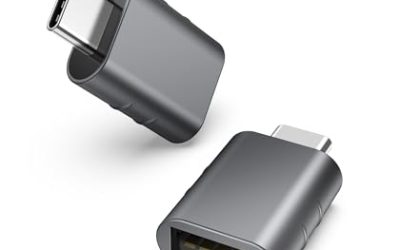
The 15.6-inch FHD screen is listed at 144Hz, the keyboard is an RGB backlit unit with a numeric keypad, and an RJ-45 Ethernet port gives a wired connection for downloads. The listing bundles a Thunderobot 7-in-1 USB-C hub. It is the heaviest machine here, but it earns its slot.
Specs
- Processor: AMD Ryzen AI 7 350
- Graphics: NVIDIA GeForce RTX 5060, 8 GB GDDR7, dedicated
- Memory: 32 GB DDR5
- Storage: 1 TB SSD
- Display: 15.6-inch FHD, 144Hz as listed
- Networking: RJ-45 Ethernet, Wi-Fi
- Operating system: Windows 11 Home
- ASIN: B0G1N8R9Z4
Comparison Table
| Product | Best for | Key spec |
|---|---|---|
| Apple MacBook Air 13 M4 | Native Mac play on the go | M4 chip, 16 GB memory, 13.6-inch Liquid Retina |
| Apple MacBook Air 15 M4 | Long Mac sessions at home | M4 chip, 512 GB SSD, 15.3-inch Liquid Retina |
| Lenovo Yoga Slim 7x | Sharpest Windows screen | Snapdragon X Elite, 32 GB memory, 3K OLED touch |
| ASUS Zenbook 14 OLED | Native Windows in a slim body | Ryzen 7 8840HS, 16 GB memory, OLED touchscreen |
| HP Victus 15 | A library beyond Cobalt Core | RTX 5060 dedicated graphics, 32 GB memory, 1 TB SSD |
FAQ
Does Cobalt Core run on a Mac?
Yes. The game’s Steam page publishes a macOS edition with a minimum of macOS 10.15 or later, an Apple Silicon or Intel processor, and 4 GB of RAM. The floor is a 2019 baseline, but the block names Apple Silicon outright, so current M-series Macs are covered.
Do I need a gaming laptop with a dedicated graphics card for Cobalt Core?
No. The published Windows minimum asks for 2 GB of RAM and describes its processor and graphics requirements in deliberately playful terms, and every laptop here clears that bar many times over. A dedicated card such as the one in the Victus 15 is worth having for heavier games, not this one.
Will Cobalt Core run on a Snapdragon Windows laptop like the Yoga Slim 7x?
The Windows edition is a conventional build, and the Yoga Slim 7x runs Windows on ARM, so the game would rely on the built-in compatibility layer rather than a native ARM build. Its hardware exceeds the published minimums on paper, but check the game’s current ARM guidance first.
Conclusion
Cobalt Core asks almost nothing of hardware and gives Mac and Windows players equal footing, so buy for the screen, the weight, and the rest of your library. The Air models run the native Mac edition in silence, the Zenbook covers native Windows in a slim OLED body, the Yoga Slim 7x offers the sharpest display with an ARM caveat, and the Victus 15 is there for far heavier titles.
More from Amazon
Programs that pair well with the guide above. Offers and eligibility are set by Amazon and may change.
A free business account with business pricing and bulk-buying tools for work, shop or home office.
Create a business accountFree shipping on eligible items, Prime Video and more. Eligible new members can start with a free trial.
Start a Prime free trialAudiobooks and podcasts to listen to on the go. Eligible new members can start with a free trial.
Try Audible freeAd-free music streaming. Eligible new subscribers can start with a free trial.
Try Music Unlimited freeAs an Amazon Associate we earn from qualifying purchases.
Write Your Review
No reviews yet. Be the first to share your experience!