

Our Top Picks
 Dell Latitude 5420 14" FHD Business Laptop Computeri5-1145G7-16-256-SV-Win1112.76 x 8.35 x 0.76 inches3 poundsCheck on Amazon

Let us be straight: $400 is where this series finally stops being an apology. Every guide so far has ended the same way — no machine under the budget is genuinely good for video editing — because no machine had a discrete GPU. Now: a refurbished Lenovo ThinkPad P15s Gen 1, with an NVIDIA Quadro card, 16GB of RAM, and a 512GB SSD, sells for $380.79.
It is not a clean win: the source claims the Quadro has 4GB of video memory — wrong; Lenovo’s spec sheets say 2GB, corrected below. But for the first time, a machine here meets Premiere Pro’s hardware minimum and Resolve’s memory minimum at once — and a refurbished MacBook Air M1 at $399 is the first Mac here.
Top pick: the Lenovo ThinkPad P15s Gen 1 (Refurbished), $380.79 — i7-10510U, Quadro P520, 16GB RAM (to 32GB), 512GB SSD, 15.6″ FHD, Thunderbolt 3.
Our top picks
Best for: A beginner who wants the first machine in this series with a real graphics card and can buy refurbished, carefully
Check price on Amazon
Best for: A beginner who edits in Final Cut Pro or DaVinci Resolve on macOS
Check price on Amazon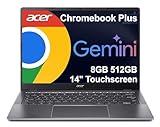
Best for: A beginner who wants a new machine with a warranty and a big SSD — and edits in a browser
Check price on Amazon
Best for: A beginner who wants 16GB of RAM for the least money
Check price on Amazon
Best for: A beginner who wants a new Windows laptop with a warranty
Check price on AmazonThe Honest Price Ladder
| Budget | What it actually buys in November 2026 |
|---|---|
| $150 | First 8GB/128GB machine: ASUS CM30 refurbished, $149.99 |
| $200 | First NEW 8GB machine: Acer 315 touchscreen $199; first new Windows: HP 14 $199 |
| $250 | First used Windows machine that opens Premiere Pro: T480, ~$204 |
| $270 | First NEW Windows 8GB machine: Slim 3i, $269.99 — doorbuster |
| $290 | First 16GB machine: Latitude 5420 (Renewed), ~$289 |
| $300 | First new 8GB Chromebook with a 2K touchscreen: Slim 3, $299 |
| $320 | First NEW 512GB machine: Chromebook Plus 514, $319 |
| $370 | Cheapest new Windows machine with a Ryzen chip and a real SSD: Aspire Go 15, $369.99 |
| $381 | First discrete GPU: P15s Gen 1 (Refurbished), $380.79 |
| $400 | First Mac: MacBook Air M1 (Refurbished), ~$399 Fair grade |
| $420 | MacBook Pro 15″ (2019), $419.99 — first 6-core chip, 4GB GPU |
| $500 | First NEW Windows 16GB machine with a warranty: Vivobook Go 15, $499 |
Quick Picks
| Laptop | Best for | Key specs | Price note |
|---|---|---|---|
| Lenovo ThinkPad P15s Gen 1 (Refurbished) | First discrete GPU | i7-10510U, Quadro P520, 16GB, 512GB SSD | $380.79, Online Used Laptops |
| Apple MacBook Air M1 (Refurbished) | Fastest 1080p editor | Apple M1, 8GB unified, 256GB SSD, 13.3″ Retina P3 | ~$399 Fair grade, MacSales.com |
| Acer Chromebook Plus 514 (new) | Best new machine | Core 3 N355 8-core, 8GB, 512GB Gen4, 14″ WUXGA touch | $319, Walmart Black Friday deal |
| Dell Latitude 5420 (Renewed) | Best value 16GB machine | i5-1145G7, 16GB to 64GB, 256GB SSD, 14″ FHD | ~$289, Amazon Renewed |
| Acer Aspire Go 15 (new) | Cheapest new Windows machine | Ryzen 3 7320U, 8GB, 128GB SSD, 15.6″ FHD | $369.99, Walmart |
How to Choose a Laptop for Video Editing Under $400
A discrete GPU finally fits — but check the video memory, not just the badge
Premiere Pro wants 8GB of RAM and a GPU with 4GB of video memory (hard minimum 2GB); DaVinci Resolve wants 16GB of RAM and a 4GB GPU. The ThinkPad P15s Gen 1 is the first machine under $400 with one — an NVIDIA Quadro P520 with CUDA and NVENC, which cuts export times versus CPU-only exports. But the P520 has 2GB of video memory, not 4GB: it meets Premiere Pro’s hard GPU minimum and Resolve’s RAM minimum, not Resolve’s 4GB floor.
At $400 the choice splits: Windows workstation or Mac
The two best editors under $400 run different operating systems. The P15s runs Windows 11 Pro, so it installs Premiere Pro and DaVinci Resolve, and its 16GB of RAM upgrades to 32GB for about $40. The MacBook Air M1 runs macOS, so it runs Final Cut Pro and DaVinci Resolve, which runs well on Apple silicon despite 8GB of unified memory, because the M1’s media engine handles H.264 and HEVC in hardware. Pick the P15s for Premiere Pro on Windows; pick the M1 Air for Final Cut Pro or for a silent 2.8-pound machine.
1. Lenovo ThinkPad P15s Gen 1 (Refurbished)
Best for: A beginner who wants the first machine in this series with a real graphics card and can buy refurbished, carefully.
The ThinkPad P15s Gen 1 is a 2020 mobile workstation, and the first machine under $400 with a discrete GPU: an NVIDIA Quadro P520, ISV-certified, with CUDA acceleration and NVENC hardware encoding. It also has a quad-core i7-10510U, 16GB of RAM, a 512GB SSD, a 15.6-inch FHD IPS display, Thunderbolt 3, and Windows 11 Pro. It is $380.79 at Online Used Laptops, a Reno refurbisher — it fits by $19.21 — but the same configuration is $457.83 on Amazon Renewed, so buy it while it is live — budget $460 if it is gone.
Specs: i7-10510U (quad-core, up to 4.9 GHz); Quadro P520, 2GB GDDR5; 16GB DDR4, one open slot to 32GB; 512GB NVMe SSD; 15.6-inch FHD IPS; Thunderbolt 3, USB-A, HDMI, SD card; Wi-Fi 6; Windows 11 Pro; 4.1 lb.
Pros: First discrete GPU in the series; 16GB of RAM, to 32GB for about $40; 512GB NVMe SSD; Thunderbolt 3.
Cons: Quadro is 2GB, not 4GB; 15-watt processor; six years old, tired battery; single-seller price — Amazon Renewed is $457.83; screen lottery.
2. Apple MacBook Air M1 (Refurbished)
Best for: A beginner who edits in Final Cut Pro or DaVinci Resolve on macOS.
The MacBook Air M1 is the first Mac in this series, and the fastest 1080p editor under $400 in Final Cut Pro. The M1 chip’s hardware media engine encodes H.264 and HEVC without touching the CPU, and Final Cut Pro is optimized for the hardware it runs on. It is fanless and silent, weighs 2.8 pounds, and its 13.3-inch Retina display covers the P3 wide color gamut. It is $399 in Fair grade at MacSales.com, tracked by refurb.me on November 17, 2026 — it fits by $1; Excellent starts at $479 and the 16GB configuration at $511. The catalog’s $399.99 refurbished M1 Air is the 8GB/128GB variant, not the 256GB one.
Specs: Apple M1 (8-core CPU, 7-core GPU); 8GB unified, soldered; 256GB SSD, soldered; 13.3-inch Retina 2560 x 1600, P3; 2x Thunderbolt / USB 4; fanless; macOS; 2.8 lb.
Pros: Fastest 1080p editor under $400; Final Cut Pro and hardware media engine; silent and light.
Cons: 8GB is below Resolve’s RAM minimum and soldered forever; 256GB fills fast; Fair grade at $399, Excellent at $479; fanless throttling on long exports; two ports only.
3. Acer Chromebook Plus 514 (New)
Best for: A beginner who wants a new machine with a warranty and a big SSD — and edits in a browser.
The Chromebook Plus 514 (model CB514-6HT-368E) is the first new machine in this series where storage is not the bottleneck: an 8-core Core 3 N355, 8GB of LPDDR5X RAM, and a 512GB PCIe Gen4 SSD, behind a 14-inch 1920 x 1200 IPS touchscreen. It is $319 at Walmart, sold by Walmart, as a Black Friday deal — list $449.98 — and it fits by $81. ChromeOS updates run through June 2035. The screen is the story: 1920 x 1200 is taller than Full HD, so more timeline fits on screen.
Specs: Core 3 N355 (8-core, up to 3.9 GHz); 8GB LPDDR5X, soldered; 512GB PCIe Gen4 SSD; 14-inch WUXGA IPS touchscreen; Wi-Fi 6E, Bluetooth 5.3, HDMI; ChromeOS, updates to June 2035; 3.09 lb.
Pros: First new 512GB machine in the series; 8-core chip; sharp 16:10 touchscreen; updates to June 2035.
Cons: $319 is a Black Friday deal — list is $449.98; still a Chromebook, so no Premiere Pro or DaVinci Resolve; 8GB soldered; three configs share the name — match CB514-6HT-368E.
4. Dell Latitude 5420 (Renewed)
Best for: A beginner who wants 16GB of RAM for the least money.
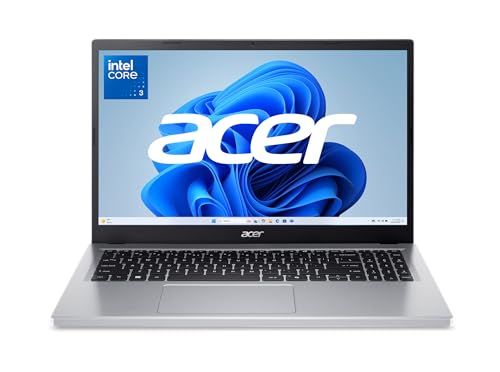
The Latitude 5420 returns from our under-$300 guide, where it was the top pick: a 2021 business laptop with an 11th-gen i5, 16GB of RAM that upgrades to 64GB, a 256GB SSD, a 14-inch Full HD display, and two Thunderbolt 4 ports, at $289 on Amazon Renewed. At $400 it leaves $111 — enough for a 32GB RAM upgrade or a fast external SSD. The price is a grade range: Acceptable from $182.99, Good $229.99, Excellent $258.70, typical $249.99. The 512GB configuration is $314.57 — it fits here.
Specs: i5-1145G7 (quad-core, up to 4.4 GHz); 16GB DDR4, two slots to 64GB; 256GB NVMe SSD; 14-inch FHD; Thunderbolt 4 x2; Windows 11 Pro; Amazon Renewed 90-day guarantee.
Pros: Cheapest 16GB machine here; RAM upgrades to 64GB; leaves $111 for upgrades.
Cons: Renewed, five years old; no discrete GPU; screen lottery; sealed battery is tired.
5. Acer Aspire Go 15 (New)
Best for: A beginner who wants a new Windows laptop with a warranty.
The Aspire Go 15 (model AG15-21P-R42Z) is the cheapest new Windows machine here with a real SSD: a Ryzen 3 7320U quad-core, 8GB of LPDDR5 RAM, a 128GB PCIe NVMe SSD, and a 15.6-inch Full HD IPS display, at $369.99 at Walmart. It fits by $30.01. Other sellers list it at $378.99 and $394.99; Acer’s own store lists it at $429.99, out of stock. Match AG15-21P-R42Z before you pay: the same name covers an Intel N355 with 128GB of UFS storage at $299.99 — UFS, not an SSD — a Ryzen 5 16GB/512GB at $549.99, and a Ryzen 7 16GB/512GB at $549.99–$570.
Specs: Ryzen 3 7320U (quad-core, up to 4.1 GHz); Radeon 610M; 8GB LPDDR5; 128GB PCIe NVMe SSD; 15.6-inch FHD IPS; Wi-Fi 6; Windows 11 Home; 3.9 lb.
Pros: Cheapest new Windows machine here with a real SSD; full-size 1080p IPS screen; a real warranty.
Cons: 128GB SSD holds one project at a time; 8GB is the ceiling; Ryzen 3 is entry-level; the name covers at least five machines — match AG15-21P-R42Z; some listings ship Windows 11 in S mode.
What to Avoid
Correction: the Quadro P520 is 2GB, not 4GB. The November 2026 roundup that lists the P15s at $380.79 says the Quadro P520 has “4GB GDDR5” — but Lenovo’s own spec sheets all say 2GB GDDR5. It meets Premiere Pro’s hard GPU minimum of 2GB, but not DaVinci Resolve’s 4GB floor — and neither does any machine under $400. Check the panel too: the listing claims 100% sRGB, but cheaper P15s configurations shipped with a dimmer panel.
Correction to batch 128: the IdeaPad Slim 3i doorbuster may be over. Best Buy’s doorbusters ended November 15, with no rain checks. If it is gone, the honest budget for that machine is $400 — and the P15s is the better buy.
Do not buy the wrong “Acer Chromebook Plus 514.” Three machines share the name: CB514-3H (Ryzen 3 7320C, 128GB), CB514-4HT (i3-N305, 512GB), and CB514-6H (Core 3 N355, 512GB). Only the last is the $319 machine — match CB514-6HT-368E.
Do not buy the wrong “Aspire Go 15.” Ryzen 3 with a 128GB SSD is $369.99; Intel N355 with 128GB of UFS storage is $299.99 — UFS is not an SSD; Ryzen 5 with 16GB and 512GB is $549.99; and there is an Aspire Go 15 Chromebook too. Match the model code.
Do not trust catalog-only prices. The catalog showed the Chromebook Plus 514 at $25 and $29, an HP 15 with Ryzen AI and 16GB at $100, a MacBook Air at $200, and a Vivobook Go 15 (Ryzen 5, 8GB, 512GB) at $299 — but no major retailer confirms it, and the verified Go 15 with 16GB is $499.
Still Doesn’t Fit
- Apple MacBook Pro 15″ (2019), $419.99 — 6-core i7-9750H, Radeon Pro 555X 4GB, 16GB RAM, 256GB SSD. First 4GB GPU and 6-core chip here — but $20 over budget, and the butterfly keyboard is a risk. Honest budget: $420.
- Lenovo ThinkPad P15 Gen 1, ~$330–$460 on eBay — i7-10750H 6-core, Quadro T1000 4GB, 16GB RAM, 512GB SSD. The first machine that would meet Resolve’s video-memory floor — but sold data is thin and the $329.99 listing is from July. Honest budget: $450.
- ASUS Vivobook Go 15, $499 — Ryzen 5 7520U, 16GB, 512GB SSD. Still the first NEW Windows machine with 16GB and 512GB and a warranty. Honest budget: $500.
- Acer Aspire Go 15 (Ryzen 5, 16GB, 512GB), $549.99 — $599.99 at Best Buy. Honest budget: $550.
- Apple MacBook Neo, $686–$689 — A18 Pro, 8GB, 256GB SSD. Honest budget: $700.
FAQ
What is the best laptop for video editing under $400?
The refurbished Lenovo ThinkPad P15s Gen 1, at $380.79 — the first machine in this series with a discrete GPU, 16GB of RAM, and a 512GB SSD.
Is the Quadro P520 in the P15s really 4GB?
No. The roundup says 4GB, but Lenovo’s own spec sheets say 2GB GDDR5. It meets Premiere Pro’s 2GB GPU minimum, but not Resolve’s 4GB floor.
Should I buy the ThinkPad P15s or the MacBook Air M1?
For Premiere Pro on Windows or for a machine you can upgrade, buy the P15s. For Final Cut Pro or for a silent 2.8-pound machine, buy the M1 Air — Fair grade at $399, Excellent at $479.
Can a $400 laptop run DaVinci Resolve?
Barely, and only these two. The P15s meets Resolve’s 16GB RAM minimum but not its 4GB video-memory floor. The M1 Air runs Resolve well despite 8GB, because its media engine handles H.264 and HEVC in hardware. Both cut 1080p.
Verdict
The best laptop for video editing under $400 is the first machine in this series with a graphics card: the refurbished Lenovo ThinkPad P15s Gen 1, at $380.79. It has a discrete Quadro GPU with CUDA and NVENC, 16GB of RAM that upgrades to 32GB for about $40, and a 512GB SSD. Buy it while it is live — the same configuration is $457.83 on Amazon Renewed — and remember the Quadro has 2GB of video memory, not 4GB.
If you edit in Final Cut Pro, buy the refurbished MacBook Air M1 at $399 in Fair grade. If you want a new machine, buy the Acer Chromebook Plus 514 at $319 — but only if you edit in a browser. If the budget is tight, the Dell Latitude 5420 at $289 is the cheapest 16GB machine here.
As an Amazon Associate, we earn from qualifying purchases.
Suggested internal links for topbestlaptops.com
- Best laptop for video editing under $1000 —
/best-laptop-for-video-editing-under-1000/ - Best laptop for video editing under $1100 —
/best-laptop-for-video-editing-under-1100/ - Best laptop for programming under $500 —
/best-laptop-for-programming-under-500/
More from Amazon
Programs that pair well with the guide above. Offers and eligibility are set by Amazon and may change.
A free business account with business pricing and bulk-buying tools for work, shop or home office.
Create a business accountFree shipping on eligible items, Prime Video and more. Eligible new members can start with a free trial.
Start a Prime free trialAudiobooks and podcasts to listen to on the go. Eligible new members can start with a free trial.
Try Audible freeAd-free music streaming. Eligible new subscribers can start with a free trial.
Try Music Unlimited freeAs an Amazon Associate we earn from qualifying purchases.










Write Your Review
No reviews yet. Be the first to share your experience!