

Key takeaways
- Ten Lenovo ThinkPad laptops for business compared by series, RAM, SSD, ports and seller configuration, with a guide to decoding reseller listing titles.
The best Lenovo ThinkPad laptops for business in this group are the T14 Gen 6 and T16 Gen 4, because both list 32GB of memory, a 1TB SSD, a fingerprint reader and a backlit keyboard in the title. The E16 Gen 3 with Ryzen 5 230 is the sensible lower-memory option. Ten listings are covered, one of them a Lenovo V15 that is not a ThinkPad, kept as a clearly marked runner-up. Several titles come from third-party sellers with customised configurations, so the notes below explain how to read them before ordering.
Quick picks
Our top picks




As an Amazon Associate we earn from qualifying purchases at no extra cost to you.
- Best-specified 14-inch: ThinkPad T14 Gen 6 (Ultra 7 255U, 32GB DDR5, 1TB).
- Best-specified 16-inch: ThinkPad T16 Gen 4 (Ultra 7 258V, 32GB, RJ-45, HDMI).
- Lower-memory value: ThinkPad E16 Gen 3 AI (Ryzen 5 230, 16GB, 512GB).
- Touchscreen with 32GB: ThinkPad E16 Gen 3 (Core 5 210H, 1TB).
- Not a ThinkPad: Lenovo V15, listed as a runner-up only.
Comparison table
| Model | Key point from the title | Best for |
|---|---|---|
| ThinkPad T14 Gen 6 | 14in FHD+ IPS, Ultra 7 255U, 32GB, 1TB, 2x TB4 | Mobile all-rounder |
| ThinkPad T16 Gen 4 | 16in FHD+, Ultra 7 258V, 32GB, 1TB, RJ-45, HDMI | Large-screen office work |
| ThinkPad T14 (Core i7) | Core i7, 16GB, 512GB, RJ45, TB4, generation not stated | Shoppers who will verify the CPU |
| ThinkPad E16 Gen 3 AI | Ryzen 5 230, 16GB, 512GB, TB4, 5MP webcam | Budget-minded teams |
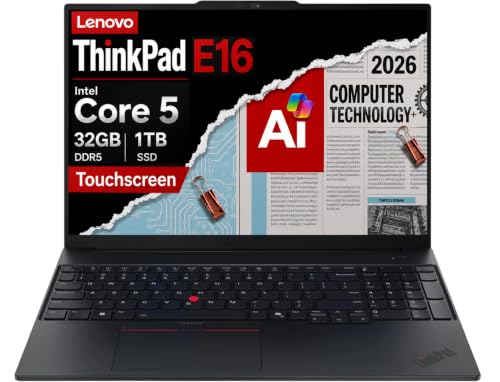
| ThinkPad E16 Gen 3 | Touchscreen, Core 5 210H, 32GB, 1TB | Touch plus extra memory |
| ThinkPad E16 (Ryzen) | Ryzen 5 7535U, 16GB, 512GB, Ethernet | Plain 16in office use |
| ThinkPad E14 Gen 7 | 14in, Core 5 210H, IR webcam, custom RAM/SSD | Configurable 14in |
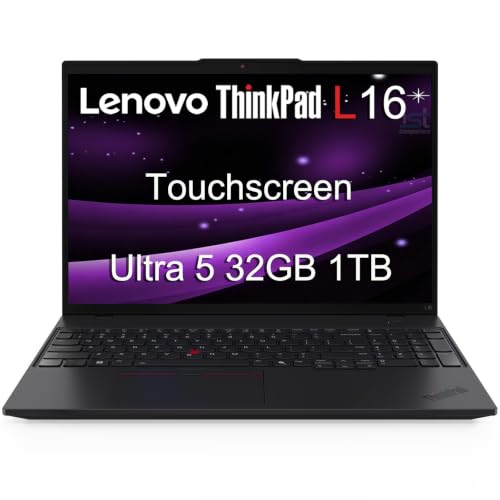
| ThinkPad L16 | 16in, Ultra 5 225U, 2x TB4, custom RAM/SSD | Configurable 16in |
| ThinkPad L16 touchscreen | Ultra 5 225U, 32GB, 1TB, touch, numeric keypad | Touch with fixed 32GB |
| Lenovo V15 (not a ThinkPad) | Ryzen 5 7520U, 16GB, 512GB, 15.6in | Cheapest fallback |
Lenovo ThinkPad T14 Gen 6
The title lists a 14-inch FHD+ IPS display, Intel Ultra 7 255U, 32GB DDR5, a 1TB SSD, a 5MP webcam, fingerprint reader, backlit keyboard, Wi-Fi 6E and two Thunderbolt 4 ports. Lenovo is the named brand, not a reseller. The T-series is generally Lenovo’s mainstream business line, so this is the most conventional choice here. Check the listing for the exact warranty and whether the unit ships new. Confirm the memory is not soldered if you ever plan to expand it, since the title does not say.
Pros
- 32GB and 1TB leave headroom for years of use
- Two Thunderbolt 4 ports for docks and monitors
Cons
- Upgradability of memory is not stated
- Premium-priced for a 14-inch machine
Who it’s for: a professional who travels and wants one machine with no configuration compromises.
Lenovo ThinkPad T14, Intel Core i7
The title lists a 14-inch Full HD screen, Intel Core i7, 16GB RAM, a 512GB SSD, a backlit keyboard, fingerprint reader, an RJ45 Ethernet port and Thunderbolt 4 for power delivery, data and DisplayPort. The weak point is the vague wording: no generation, processor model or Gen number is given, so two machines with this title could differ a lot. Ask for or find the exact model before ordering, and compare it with the Gen 6 listing above, which spells everything out.
Pros
- Ethernet and Thunderbolt 4 on a 14-inch body
- Lenovo is the named brand
Cons
- Processor generation and model are not stated
- 16GB and 512GB are the minimum for modern business use
Who it’s for: a buyer who wants a compact ThinkPad and will confirm the exact model on the listing.
Lenovo ThinkPad T16 Gen 4 AI
A 16-inch FHD+ display, Intel Ultra 7 258V, 32GB LPDDR5X, 1TB SSD, fingerprint reader, backlit keyboard, Wi-Fi 6E with Bluetooth, an RJ-45 Ethernet port and HDMI. The title says a 5MB webcam, which is almost certainly a typo for 5MP, so check the listing. LPDDR5X memory is usually soldered, which matters for future upgrades. The larger body suits a desk-bound setup better than a bag, and the port list means fewer adapters on a shared desk.
Pros
- Ethernet and HDMI are built in, so fewer adapters
- 32GB and 1TB in the title
Cons
- Webcam spec has a typo
- LPDDR5X is typically not user-upgradable
Who it’s for: a finance or operations user who spends the day in spreadsheets on a larger screen.
Lenovo ThinkPad E16 Gen 3 AI, Ryzen 5 230
This Lenovo-branded listing names a 16-inch IPS FHD+ display, AMD Ryzen 5 230, 16GB DDR5, a 512GB SSD, fingerprint reader, backlit keyboard, Thunderbolt 4, a 5MP RGB webcam and Windows 11 Pro with Copilot. The odd phrase comparing it with a Ryzen 5 7535U is seller wording, not a spec. It is the leanest of the Lenovo-sold picks and the one to consider when 16GB is enough; larger files and virtual machines would call for more memory.
Pros
- Thunderbolt 4 and a 5MP webcam in a 16in body
- Sold under the Lenovo brand, not a reseller
Cons
- 16GB and 512GB may feel tight with heavy multitasking
- Comparative claim in the title is unverified
Who it’s for: a small office buying several machines for email, documents and video calls.
Lenovo ThinkPad E16 Gen 3 touchscreen, Core 5 210H
The listing names a 16-inch FHD+ touchscreen, Intel Core 5 210H, 32GB DDR5, a 1TB SSD, a numeric keypad, Thunderbolt 4, Ethernet and a backlit keyboard. It also says IPS anti-glare, which sits oddly beside touch, so check the actual panel finish. The seller is a third-party reseller, so confirm warranty terms. The parenthetical comparison to a different Ultra 7 chip is marketing text, not a specification, so judge the Core 5 210H on its own name.
Pros
- 32GB and 1TB with a touchscreen
- Numeric keypad and Ethernet help data entry
Cons
- Reseller-sold, so warranty terms need checking
- Panel finish wording is contradictory
Who it’s for: anyone who wants touch input and a large memory pool without paying for a T-series.
Lenovo ThinkPad E16 Business Laptop, Ryzen 5 7535U
A 16-inch FHD+ anti-glare display, AMD Ryzen 5 7535U, 16GB DDR5, a 512GB SSD, fast charge, numeric keypad, Ethernet, fingerprint reader, backlit keyboard and a military-grade durability claim. Windows 11 Pro is included. It is an older-generation processor than the Ryzen 5 230 listing above, but the title shows a more complete port and security list. The seller is a reseller, so check what the warranty covers and how returns are handled for business accounts.
Pros
- Ethernet, fingerprint reader and numeric keypad
- Anti-glare screen for bright offices
Cons
- Older AMD chip than the newer E16 listing
- Durability claim needs the listing’s certification detail
Who it’s for: an office worker who wants a straightforward 16-inch machine for daily tasks.
Lenovo ThinkPad E14 Gen 7, customisable
This is a 14-inch FHD+ ThinkPad with Intel Core 5 210H, fingerprint reader, IR webcam, backlit keyboard and Thunderbolt 4. The seller offers RAM of 16GB, 32GB or 64GB and SSDs of 512GB, 1TB or 2TB, so the price you see depends on the option you select. That flexibility is useful, but it means the headline spec may not be what ships unless the right variant is chosen, so screenshot the selection before paying.
Pros
- Wide range of RAM and SSD choices
- IR webcam for face login
Cons
- Headline price may not match the chosen configuration
- Third-party customisation, so warranty needs checking
Who it’s for: a buyer who wants exactly 32GB or more in a compact body and is willing to configure carefully.
Lenovo ThinkPad L16 Business Laptop, customisable
The 16-inch FHD+ L16 lists Intel 12-core Ultra 5 225U, two Thunderbolt 4 ports, Windows 11 Pro, and the same 16GB, 32GB or 64GB RAM and 512GB to 2TB SSD options from an IST reseller. The comparison with an Ultra 7 chip in the title is a seller claim. Check that the selected variant actually matches the memory and storage you intend to buy before ordering, and ask the seller how the build is warrantied.
Pros
- Two Thunderbolt 4 ports for docking
- Flexible memory and storage options
Cons
- Configuration-dependent pricing
- Unverified processor comparison in the title
Who it’s for: a team that standardises on a particular RAM and SSD size and wants a larger screen.
Lenovo ThinkPad L16 touchscreen, Ultra 5 225U
A fixed configuration: 16-inch FHD+ touchscreen, Intel Ultra 5 225U, 32GB DDR5, 1TB SSD, two Thunderbolt 4 ports, a numeric keypad and Windows 11 Pro. The title also says Premium E16 and IPS anti-glare, which conflicts with the L16 name and touch, so open the listing images and the model line before buying. The reseller sells many near-identical titles, so compare carefully against the other L16 listing, which has user-selectable options instead.
Pros
- Fixed 32GB and 1TB, no option guesswork
- Touchscreen plus numeric keypad
Cons
- Conflicting model name wording (L16 versus E16)
- Reseller-sold, so warranty needs checking
Who it’s for: a user who wants touch, a big display and 32GB, and who will confirm the exact model first.
Lenovo V15, a runner-up only: not a ThinkPad
This listing is a Lenovo V15, a 15.6-inch FHD laptop with AMD Ryzen 5 7520U, 16GB DDR5, a 512GB SSD, a webcam shutter and a numeric keypad. The title says it is for business and student use and beats the IdeaPad, which is marketing text. It is included only because it appears in this keyword group. Ports, build and security features are not listed, so it is a budget alternative rather than a ThinkPad, and not a like-for-like swap for the T or E lines.
Pros
- Webcam shutter and numeric keypad
- 16GB and 512GB at the lowest tier
Cons
- Not a ThinkPad, and few business features named
- Title lists no Thunderbolt or fingerprint reader
Who it’s for: a cost-conscious buyer who needs a basic office laptop and does not care about the ThinkPad name.
How these were chosen
We worked from the published titles in this keyword group: processor, memory, storage, ports, security hardware and display wording. Seller-supplied comparisons such as a greater-than sign followed by another chip were treated as marketing, not spec. Nobody on the team used or measured these units. Where a title offers several configurations, we describe the range and send the reader to the listing. For broader Lenovo coverage see Lenovo laptops sorted by RAM, storage and daily use.
Reading a ThinkPad listing before you commit
Series, size and generation
ThinkPad T-series machines are generally Lenovo’s mainstream business models, E-series is positioned as a lower-cost line, and L-series sits between them; confirm the current positioning on Lenovo’s own site. The number after the letter (14 or 16) is the screen size in inches, and Gen 3, 4, 6 or 7 marks the generation. A title with only “T14” and “Core i7”, like one here, hides the generation, which can change battery life, port layout and how long the model stays supported.
Custom-configuration sellers
Titles that list “16GB/32GB/64GB RAM” and “512GB/1TB/2TB SSD” are variation listings. Select the option, then re-read the title and image. Many ship from resellers, so check who provides the warranty and whether the operating system licence is Windows 11 Pro.
Memory and storage targets
Sixteen gigabytes covers browsers, Teams and office apps for most staff. If you run virtual machines or large datasets, 32GB is safer; see laptops for virtualization sorted by RAM. A 512GB drive fills quickly with email archives and local files, so 1TB is worth considering for anyone who keeps local copies of client files, presentations or recordings.
Ports, security and screen
A fingerprint reader and IR webcam help with sign-in, Thunderbolt 4 handles docks and monitors, and an RJ45 port avoids adapters in the office. Anti-glare panels suit bright rooms; touchscreens add convenience but use more battery. Titles rarely list brightness, so check the listing.
A quick fit test
Worked example: a sales team keeps 25 browser tabs, a CRM, Teams and Excel open. They need 16GB minimum, a fingerprint reader for sign-in, an HDMI or Thunderbolt route to client screens, and a webcam. The E16 Gen 3 AI meets that on paper; the T14 Gen 6 adds headroom. AMD-based buyers can also browse Ryzen laptop listings.
Common slip-ups
Buyers often assume the comparison text in a title is a rating from Lenovo; it is the seller’s claim. Another trap is choosing by the highest RAM number without checking whether it ships fixed or varies by option. Skipping the port check leads to missing HDMI or Ethernet, and ignoring reseller warranty terms can leave a business without support. Finally, a V15 or IdeaPad is not a ThinkPad, whatever the keyword says. A higher generation number does not always mean a better fit, so compare processors by name.
Verdict
Choose the T14 Gen 6 for a compact all-rounder or the T16 Gen 4 for a larger screen with Ethernet and HDMI. Pick the E16 Gen 3 AI when 16GB is enough, and use the customisable E14 or L16 only if you will confirm the exact variant. Treat the V15 as a fallback, and verify warranty terms on reseller listings before a bulk order.
Questions buyers ask
Which ThinkPad series suits business use best?
T-series models are generally Lenovo’s mainstream business line, while E-series is positioned as lower cost and L-series sits between. All can run Windows 11 Pro. Choose by screen size, memory and the ports your office needs, and confirm the current positioning on Lenovo’s own website before ordering. The generation number matters too.
Is 16GB of RAM enough for a business laptop?
For email, documents, video calls and browser-based tools, 16GB is usually workable. Heavy spreadsheets, virtual machines or several large applications benefit from 32GB. Because some memory is soldered, as the LPDDR5X wording suggests, pick the amount you need at purchase instead of planning to upgrade later, and check the listing for details.
What does the greater-than text in a title mean?
Symbols such as a processor name followed by a greater-than sign and another chip are seller marketing, claiming the first processor beats the second. They are not an official Lenovo specification. Ignore the comparison, note the processor actually named first, and look that exact model up on the maker’s website to see its core count and intended use.
Are reseller ThinkPad listings safe to buy?
Many are legitimate, but warranty and support can differ from Lenovo-sold units. Check who handles returns, how long coverage lasts and whether the exact configuration is confirmed on the page. For a company purchase, ask whether the reseller provides proper invoices and business support, and keep the order details in case of a claim.
Is the Lenovo V15 a ThinkPad?
No. The V15 is a separate Lenovo line aimed at budget business and student use. It is included here only because it appears in this keyword group. Its title lists no Thunderbolt port or fingerprint reader, so compare ports, security features and warranty carefully if you consider it for office use.







Write Your Review
No reviews yet. Be the first to share your experience!