
Victoria 3 is a grand strategy game about guiding a nation from 1836 to 1936, balancing industry, trade, and laws while a deep economic simulation tracks goods, markets, and millions of simulated people. That simulation, not the graphics, loads the hardware, so the processor and memory matter most. As an Amazon Associate, we earn from qualifying purchases.
The five laptops below were chosen with that profile in mind: strong single-core CPU performance first, generous memory second, then screen size and storage. One pick is a Mac, because the game runs natively on macOS as well as Windows.
How to Choose a Laptop for Victoria 3
Start with the platform fact: Victoria 3 runs natively on both Windows and macOS, and the same Steam library covers either side. A MacBook is a genuine option here rather than a workaround.
The processor is the deciding part. The simulation leans heavily on single-core CPU strength, especially as a campaign advances and the simulated population grows. A modern chip with high boost clocks matters more here than a flagship graphics card. Memory comes second: 16GB is a workable floor, while 32GB or more gives the simulation room alongside your browser and chat apps. We make no promises about how fast any machine moves through the late game, since that depends on the campaign and your settings.
Graphics needs are modest. The map is drawn in 3D and looks better with a dedicated GPU, yet integrated graphics on a recent chip can run the game at reduced settings. A larger screen helps with the dense interface panels, and a fast SSD helps because the game, its expansions, and large save files add up.
Apple MacBook Pro 14 (M4 Pro)

The MacBook Pro 14 with the M4 Pro chip is the native Mac pick, and it suits Victoria 3 because the game rewards exactly what this chip does best. Its 12-core CPU brings strong single-core speed, and the 24GB of unified memory gives the simulation headroom while leaving space for a browser beside the game.
The screen suits map time well, with the listing naming a 3024 x 1964 resolution and ProMotion up to 120Hz, so panning feels fluid and small interface text stays crisp. Battery figures on the listing run up to 22 hours as the maker claims. If your library already lives on macOS, this is the simplest way to play.
Specs
– Chip: Apple M4 Pro, 12-core CPU, 16-core GPU
– Memory: 24GB unified memory
– Storage: 512GB SSD
– Display: 14.2-inch Liquid Retina XDR, 3024 x 1964, ProMotion up to 120Hz
– Brightness: up to 1600 nits peak as listed
– Ports: HDMI and SDXC card slot as listed
– Operating system: macOS
– ASIN: B0DLHY2BJ6
Lenovo Legion Pro 7i Gen 10

The Legion Pro 7i Gen 10 is the no-compromise Windows pick, built around an Intel Core Ultra 9 275HX with boost clocks up to 5.4 GHz as listed. Single-core strength is the headline for Victoria 3, and this chip brings plenty of it, backed by 64GB of DDR5-6400 memory. Storage is 2TB across two drives as listed, so the game and a large save archive fit comfortably.
The RTX 5080 is far beyond what this game asks for, which simply means the 16-inch OLED display always looks smooth while you scroll the map. One honest note: this is a seller-configured listing, so confirm the exact configuration on the page before ordering. At a starting weight of 5.67 lb as listed, it is a desk-first machine with the strongest simulation hardware here.
Specs
– CPU: Intel Core Ultra 9 275HX, 24 cores, up to 5.4 GHz
– GPU: NVIDIA GeForce RTX 5080, 16GB GDDR7
– Memory: 64GB DDR5-6400
– Storage: 2TB SSD across two drives
– Display: 16-inch OLED, 2560 x 1600, 240Hz, 500 nits
– Battery: 80Wh
– Operating system: Windows 11 Home
– ASIN: B0G36QXZWW
ASUS ROG Zephyrus G16 (2025)

The Zephyrus G16 (model GU605CR-XS97) suits players who want strong simulation hardware in a travel-friendly body. Its Intel Core Ultra 9 285H brings the high clocks this game favors, and 32GB of LPDDR5X memory is comfortable for late-game campaigns. The listing names a 2TB SSD, so storage is a non-issue.
At 4.30 lb as listed, it is easier to carry than the Legion above, yet the 16-inch ROG Nebula OLED screen at 2560 x 1600 with G-SYNC as listed keeps the map large and readable. The RTX 5070 Ti is more graphics power than Victoria 3 needs, making this a sensible single machine for a mixed library. Windows 11 Pro comes installed as listed.
Specs
– CPU: Intel Core Ultra 9 285H
– GPU: NVIDIA GeForce RTX 5070 Ti, 12GB GDDR7
– Memory: 32GB LPDDR5X
– Storage: 2TB SSD
– Display: 16-inch ROG Nebula OLED, 2560 x 1600, 240Hz, G-SYNC
– Weight: 4.30 lb as listed
– Operating system: Windows 11 Pro
– ASIN: B0G1W7V6VP
Dell XPS 13 9350
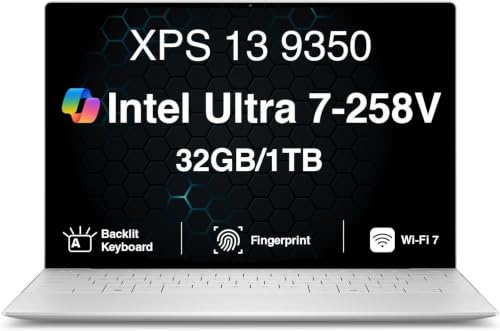
The XPS 13 9350 is the honest lightweight pick, and its place here rests on the processor rather than graphics. The Intel Core Ultra 7 258V reaches up to 4.8 GHz as listed, the kind of single-core strength the simulation leans on, and its integrated Intel Arc 140V graphics can run the game at modest settings. In exchange, you get a machine weighing about 2.6 lb as listed.
The 32GB of memory is the quiet advantage, doubling the floor most compact laptops offer. The listing names a 13.4-inch FHD+ screen at 1920 x 1200 with a 120Hz refresh and 500 nits, two Thunderbolt 4 ports, Wi-Fi 7, and a fingerprint reader. Battery claims run up to 26 hours as the maker claims; real mixed use lands below that, but this remains the pick for café campaign sessions.
Specs
– CPU: Intel Core Ultra 7 258V, up to 4.8 GHz
– GPU: Intel Arc 140V integrated graphics
– Memory: 32GB LPDDR5X
– Storage: 1TB SSD
– Display: 13.4-inch FHD+, 1920 x 1200, 120Hz, 500 nits
– Ports: 2x Thunderbolt 4, Wi-Fi 7 as listed
– Operating system: Windows 11 Pro
– ASIN: B0H5TKFRVM
Lenovo Legion 5 Gen 10

The Legion 5 Gen 10 is the balanced pick, pairing an AMD Ryzen 7 260 that boosts up to 5.1 GHz as listed with an RTX 5060 graphics chip. That CPU speed is what the simulation wants, and the dedicated GPU keeps the 3D map looking its best on the 15.1-inch WQXGA OLED display.
Memory is 16GB of DDR5-5600 fitted in slots that accept up to 32GB as listed, so an upgrade path exists. The listing also names a 1TB SSD, an 80Wh battery, a 24-zone RGB backlit keyboard, and ports including USB4, HDMI 2.1, and Ethernet. Windows 11 Home comes installed.
Specs
– CPU: AMD Ryzen 7 260, up to 5.1 GHz
– GPU: NVIDIA GeForce RTX 5060, 8GB GDDR7
– Memory: 16GB DDR5-5600, slots up to 32GB as listed
– Storage: 1TB SSD
– Display: 15.1-inch WQXGA OLED, 2560 x 1600, 165Hz, 500 nits
– Battery: 80Wh
– Operating system: Windows 11 Home
– ASIN: B0FXMY8FYW
Comparison Table
| Product | Best for | Key spec |
|---|---|---|
| Apple MacBook Pro 14 (M4 Pro) | Native macOS play | M4 Pro 12-core CPU, 24GB unified memory |
| Lenovo Legion Pro 7i Gen 10 | Strongest simulation hardware | Ultra 9 275HX up to 5.4 GHz, 64GB memory |
| ASUS ROG Zephyrus G16 (2025) | Power that still travels | Ultra 9 285H, 32GB memory, 4.30 lb |
| Dell XPS 13 9350 | Lightest carry for campaigns | Ultra 7 258V, 32GB memory, about 2.6 lb |
| Lenovo Legion 5 Gen 10 | Balanced gaming and strategy | Ryzen 7 260 up to 5.1 GHz, RTX 5060 |
FAQ
Does Victoria 3 run natively on a Mac?
Yes. The game has a native macOS version alongside the Windows version, so the MacBook Pro 14 in this roundup plays it directly on macOS with no workaround involved. Your Steam library covers both platforms with a single copy.
How much memory does Victoria 3 need on a laptop?
The game lists 16GB as a comfortable amount, and every pick here meets or passes that figure. More memory, such as the 24GB in the MacBook Pro or the 32GB and 64GB in several Windows picks, mainly helps when you keep browsers and guides open beside a long campaign.
Is a dedicated graphics card required for Victoria 3?
No. The map is 3D, and a dedicated GPU makes it look better, but the simulation is the demanding part, not the visuals. A recent integrated GPU such as the Intel Arc 140V in the XPS 13 can run the game at modest settings, while stronger picks add dedicated graphics for higher detail.
Conclusion
Victoria 3 rewards processor strength and memory far more than graphics power, so choose by the CPU first. The MacBook Pro 14 is the native Mac answer, the Legion Pro 7i brings the most simulation headroom, the Zephyrus G16 balances power with portability, the XPS 13 keeps things light, and the Legion 5 sits in the middle for mixed libraries.
More from Amazon
Programs that pair well with the guide above. Offers and eligibility are set by Amazon and may change.
A free business account with business pricing and bulk-buying tools for work, shop or home office.
Create a business accountFree shipping on eligible items, Prime Video and more. Eligible new members can start with a free trial.
Start a Prime free trialAudiobooks and podcasts to listen to on the go. Eligible new members can start with a free trial.
Try Audible freeAd-free music streaming. Eligible new subscribers can start with a free trial.
Try Music Unlimited freeAs an Amazon Associate we earn from qualifying purchases.










Write Your Review
No reviews yet. Be the first to share your experience!