
Plenty of laptops now ship with USB-C as their only video output, while many desktop monitors still work best over DisplayPort. A single USB-C to DisplayPort cable bridges that gap without a dock or a separate adapter, carrying the picture from the laptop’s USB-C port straight into the monitor’s DisplayPort input.
The five cables below cover the main buying angles: full DisplayPort 1.4 leads for high-refresh monitors, a twin pack for dual-screen desks, a VESA certified option, and one short, basic DisplayPort 1.2 cable for simpler 4K setups. Every pick runs one way only, from a USB-C source to a DisplayPort display, and none of them charges your laptop or works in reverse.
As an Amazon Associate, we earn from qualifying purchases.
Our top picks
Quick answer
For most laptop users, a DisplayPort 1.4 cable such as the UGREEN 6.6FT or the Maxonar VESA certified lead is the safest buy, since both carry 8K at 60Hz with 32.4 Gbps of bandwidth. The Cable Matters 2-Pack suits dual-monitor desks, the Warrky adds a metal case and gold-plated plug, and the short uni cable covers basic 4K at 60Hz setups.
How to choose a USB-C to DisplayPort cable
Check the direction first. Every cable in this guide is unidirectional: the USB-C end plugs into the laptop and the DisplayPort end plugs into the monitor. None of them works the other way round, so if your plan is to feed a USB-C monitor from a DisplayPort source, this entire cable type is the wrong tool. None of them carries power to charge the laptop either.
Match the DisplayPort version to your monitor. DisplayPort 1.4 is the version to pick for high-refresh gaming or an 8K screen: the DP 1.4 cables below are rated for 8K at 60Hz and 4K at 240Hz, and the two that state a bandwidth figure both list 32.4 Gbps. DisplayPort 1.2, represented here by the uni cable, tops out at 4K at 60Hz, which is still enough for a standard office monitor.
Confirm your laptop can output video over USB-C. The listings state Thunderbolt compatibility for most of these cables (Thunderbolt 3, 4 or, for the Warrky, Thunderbolt 5), and a Thunderbolt port is the clearest sign that the USB-C socket carries a display signal. Where a listing does not state compatibility, the spec tables below say so rather than guess.
Pick a length that fits the desk. Three feet suits a monitor on a stand right beside the laptop. Six feet or 6.6 feet gives slack for monitor arms, standing desks and routing behind furniture.
1. UGREEN USB C to DisplayPort 1.4 Cable 6.6FT

The UGREEN 6.6FT is the straightforward default for a single-monitor desk. It runs DisplayPort 1.4 with 32.4 Gbps of bandwidth, which the listing rates for 8K at 60Hz and 4K at 240Hz, so it covers everything from a basic office panel to a high-refresh gaming monitor. At 6.6 feet it is long enough to reach a monitor on an arm or a raised shelf without leaving a coil of spare cable on the desk.
The listing states compatibility with Thunderbolt 4 and Thunderbolt 3 hosts, which covers most recent laptops with those ports. Like every cable here it is unidirectional, so the USB-C end belongs in the laptop. The listing does not state a jacket material or a certification, so if a certified cable matters to you, look at the Maxonar below instead. If your setup is one laptop and one DisplayPort monitor and you do not want to think further about versions or bandwidth, this is the pick to beat.
Specs
- DisplayPort version: 1.4
- Maximum resolution: 8K at 60Hz; 4K at 240Hz
- Bandwidth: 32.4 Gbps
- Length: 6.6 ft
- Direction: Unidirectional (USB-C source to DisplayPort display)
- Host compatibility: Thunderbolt 4 and Thunderbolt 3
- Certification: Not stated
- Jacket material: Not stated
2. Cable Matters 2-Pack Unidirectional USB C to DisplayPort 1.4 Cable — 6ft
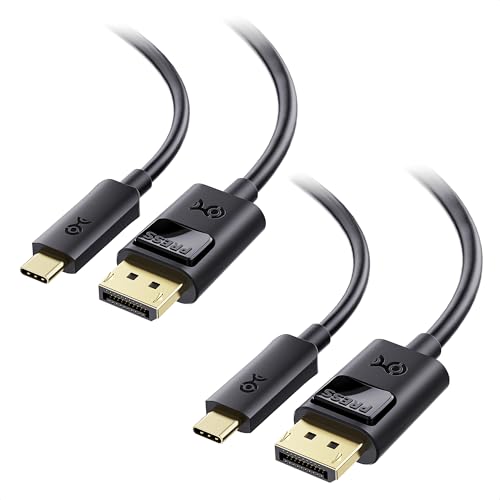
The Cable Matters entry is a 2-pack of 6-foot DisplayPort 1.4 cables, which makes it the natural choice for a dual-monitor desk: one purchase wires both screens to the same standard. Each cable is rated for 8K at 60Hz and 4K at 240Hz, matching the single cables in this guide on headline performance, and each one is unidirectional.
The listing is explicit that these cables are not for portable USB-C monitors, which is a limit shared in practice by this whole cable type: the DisplayPort end needs a monitor with a DisplayPort input. The listing does not state a bandwidth figure or Thunderbolt compatibility, so those fields are recorded as not stated rather than assumed from the DP 1.4 rating. For a home office with two matching monitors, the twin pack removes the guesswork of buying two separate cables and hoping they behave the same way.
Specs
- Pack size: 2 cables
- DisplayPort version: 1.4
- Maximum resolution: 8K at 60Hz; 4K at 240Hz
- Length: 6 ft
- Direction: Unidirectional (USB-C source to DisplayPort display)
- Bandwidth: Not stated
- Host compatibility: Not stated
- Portable USB-C monitors: Not suitable, per the listing
3. Warrky USB C to DisplayPort Cable 8K 60Hz

The Warrky cable matches the other DP 1.4 picks on resolution — 8K at 60Hz, 4K at 240Hz and 2K at 360Hz — and adds the broadest stated host compatibility of the set, covering Thunderbolt 5, 4 and 3. Its hardware touches are the draw: a gold-plated plug and a metal connector case, where the other listings do not state their plug finish or housing material.
That makes it a sensible pick for a cable that gets unplugged and replugged often, such as a hot-desking setup or a laptop that travels between home and office. The listing does not state the cable’s length or bandwidth, so both are recorded as not stated below; check the product page if either figure is critical to your setup. Direction is the same story as the rest of the set: USB-C source, DisplayPort display, one way only.
Specs
- DisplayPort version: 1.4
- Maximum resolution: 8K at 60Hz; 4K at 240Hz; 2K at 360Hz
- Plug finish: Gold-plated
- Connector housing: Metal case
- Host compatibility: Thunderbolt 5, Thunderbolt 4 and Thunderbolt 3
- Length: Not stated
- Bandwidth: Not stated
4. Maxonar USB C to DisplayPort VESA Certified Cable 6.6FT/2M

The Maxonar is the certification-led pick of the set: it is VESA certified, runs DisplayPort 1.4 with HBR3 and states 32.4 Gbps of bandwidth, rated for 8K at 60Hz. At 6.6 feet (2 metres) it matches the UGREEN on length, so it suits the same monitor-arm and standing-desk layouts.
The listing describes the cable as non-bidirectional, so it follows the same rule as the rest of the guide — laptop USB-C at one end, monitor DisplayPort at the other. Thunderbolt compatibility is not stated in the listing, so it appears as not stated in the specs rather than being inferred from the DP 1.4 label. For a single high-resolution monitor in a fixed desk setup, it covers the same ground as the UGREEN, with the VESA certification as the deciding extra. If you want a cable whose headline claims are backed by a certification programme, this is the one in the set that offers it.
Specs
- Certification: VESA certified
- DisplayPort version: 1.4 (HBR3)
- Maximum resolution: 8K at 60Hz
- Bandwidth: 32.4 Gbps
- Length: 6.6 ft (2 m)
- Direction: Non-bidirectional (USB-C source to DisplayPort display)
- Host compatibility: Not stated
5. uni USB C to DisplayPort Cable 3FT

The uni cable is the honest basic option of the set: a 3-foot braided lead on the older DisplayPort 1.2 standard, rated for 4K at 60Hz. That is enough for a standard office monitor or a second screen used at its native refresh rate, and the short length keeps a tidy desk free of cable slack. The listing states Thunderbolt 3 and 4 compatibility and gives the model number UA15-23.
What it cannot do is high-refresh output: 4K at 60Hz is its ceiling, and its bandwidth is not stated. Frame it as the short, simple option for a straightforward setup, and step up to any of the DP 1.4 cables above if your monitor runs faster than 60Hz.
Specs
- DisplayPort version: 1.2
- Maximum resolution: 4K at 60Hz
- Length: 3 ft
- Jacket: Braided
- Direction: One-way (USB-C source to DisplayPort display)
- Model: UA15-23
- Host compatibility: Thunderbolt 3 and Thunderbolt 4
- Bandwidth: Not stated
Who should skip
Skip this whole cable type if your monitor only offers HDMI or USB-C inputs, since the DisplayPort plug has nowhere to go. Skip it if you want one cable that also charges the laptop, because none of these carries power. Skip it if your plan involves a portable USB-C monitor, which needs a USB-C input rather than a DisplayPort one; the Cable Matters listing states that exclusion outright. Skip the uni DP 1.2 cable if your monitor runs above 60Hz at 4K, because its ceiling is 4K at 60Hz. And if your laptop’s USB-C port does not output video at all, no cable fixes that; a docking station with its own display hardware is the route instead.
FAQ
Can I use one of these cables from a DisplayPort source into a USB-C monitor?
No. All five cables are unidirectional or non-bidirectional: the signal flows from a USB-C source to a DisplayPort display only. Feeding a USB-C monitor from a DisplayPort output takes a different cable type entirely.
Will one of these cables charge my laptop while I use the monitor?
No. None of the five listings describes power delivery, and this cable type carries video only. Your laptop still needs its own charger or a powered dock for power.
Do I need DisplayPort 1.4 for a 4K monitor?
Only if the monitor runs above 60Hz. The uni DP 1.2 cable covers 4K at 60Hz, while the DP 1.4 picks are rated for 4K at 240Hz and 8K at 60Hz, so match the cable version to the fastest mode you actually plan to use.
What cable length should I buy?
The uni’s 3 feet suits a monitor sitting right next to the laptop. The 6-foot Cable Matters cables and the 6.6-foot UGREEN and Maxonar leads give slack for monitor arms, standing desks and cable routing. The Warrky listing does not state a length, so treat that figure as not stated when comparing.
Final verdict
For a single modern monitor, the UGREEN 6.6FT and the Maxonar are the safest defaults: both are DP 1.4 leads with 32.4 Gbps stated, and the Maxonar adds VESA certification. Dual-monitor desks are best served by the Cable Matters 2-Pack, the Warrky suits anyone who plugs and unplugs daily, and the uni 3FT is a fair short cable for a plain 4K at 60Hz setup. Whichever you choose, confirm the direction, the DisplayPort version and the length before ordering, because those three points decide whether the cable works at all.
Product and ASIN Reference
| Product | ASIN |
|---|---|
| UGREEN USB C to DisplayPort 1.4 Cable 6.6FT | B0C4DB8MLL |
| Cable Matters 2-Pack Unidirectional USB C to DisplayPort 1.4 Cable — 6ft | B0BNW5SS4M |
| Warrky USB C to DisplayPort Cable 8K 60Hz | B07RY75V7Q |
| Maxonar USB C to DisplayPort VESA Certified Cable 6.6FT/2M | B08B3XNZGS |
| uni USB C to DisplayPort Cable 3FT | B0C7BY2CKB |
More from Amazon
Programs that pair well with the guide above. Offers and eligibility are set by Amazon and may change.
A free business account with business pricing and bulk-buying tools for work, shop or home office.
Create a business accountFree shipping on eligible items, Prime Video and more. Eligible new members can start with a free trial.
Start a Prime free trialAudiobooks and podcasts to listen to on the go. Eligible new members can start with a free trial.
Try Audible freeAd-free music streaming. Eligible new subscribers can start with a free trial.
Try Music Unlimited freeAs an Amazon Associate we earn from qualifying purchases.










Write Your Review
No reviews yet. Be the first to share your experience!