

Key takeaways
- Compare the best laptop screen extenders, from single clip-on panels to a triple-screen setup and a stacked dual monitor, with fit, resolution and ports.
- Top Pick: FQQ 14" Laptop Screen Extender S7, Gray
- Runner-up: FQQ 14" Laptop Screen Extender S7C
- Also consider: FQQ 15.6" Laptop Screen Extender S10
A laptop screen extender adds one or more extra displays to a laptop without a separate desk monitor, a docking station, or a permanent setup. Most models clip onto the laptop lid and draw signal and power over USB-C or HDMI, so the workstation folds away into a laptop bag afterwards. This guide compares five options: three single panels from FQQ in two sizes, a triple-screen extender from Funhill, and a free-standing stacked dual monitor from InnoView that takes a different approach to the same problem.
The differences that matter are panel size, resolution, the range of laptop sizes each model fits, and what your laptop needs in the way of ports. Compatibility is not universal, either: one listing below rules out certain MacBooks in its own FAQ, and another needs a driver before a Mac can use its extended mode. Read the fit and port notes for each pick first: an extender that does not match your laptop’s size or outputs will not work.
As an Amazon Associate, we earn from qualifying purchases.
Quick answer
For most laptop users, a single clip-on panel such as the FQQ S7 or S7C is the simplest way to add a second screen, while the larger FQQ S10 suits bigger laptops. The Funhill adds two panels for a triple-screen desk. The InnoView is different: a free-standing stacked dual monitor for a fixed workspace rather than travel.
FQQ 14″ Laptop Screen Extender S7, Gray
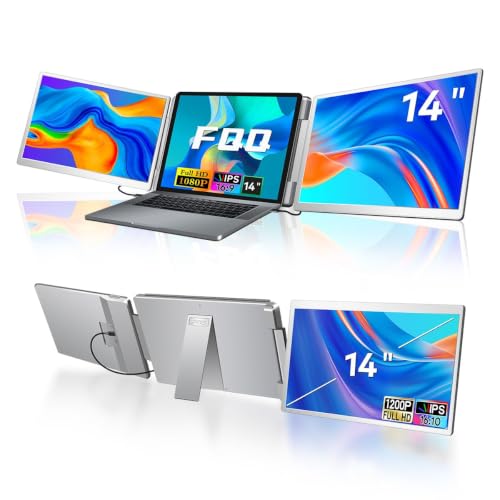
The FQQ S7 is the straightforward single-panel option in this line-up. It attaches to the laptop as one extra screen and pairs a 1920×1200 FHD IPS panel with a 16:10 aspect ratio, which gives a little more vertical room than a standard 1080p panel of the same size. That extra height suits documents, spreadsheets, and code, where a few more visible lines reduce scrolling.
Connection is plug and play over USB-C or HDMI with no drivers to install, and the box is well stocked: the panel, a carry bag, two USB-C cables, a USB-A to USB-C cable, and an HDMI to mini-HDMI cable are all included. The fit range covers laptops from 12 to 16.5 inches. One compatibility limit is stated plainly in the listing’s own FAQ: this extender is not for base M1, M2, or M3 MacBooks, so owners of those machines should look at the other picks and check their listings carefully instead.
Specs
- Screen size: 14 inches
- Resolution: 1920×1200, FHD IPS
- Aspect ratio: 16:10
- Refresh rate: 60 Hz
- Brightness: 250 cd/m² as listed
- Laptop fit: 12 to 16.5 inches
- Connections: USB-C and HDMI, plug and play, no drivers
- Included: panel, carry bag, 2 USB-C cables, USB-A to USB-C cable, HDMI to mini-HDMI cable
- Mac note: not for base M1/M2/M3 MacBooks, per the listing FAQ
FQQ 14″ Laptop Screen Extender S7C

The S7C is a separate FQQ model, not a variant of the S7, and it should be judged on its own listing. Its distinguishing feature is a 360-degree flip left screen, which lets the panel rotate around for sharing content with someone sitting opposite, then fold back for normal side-by-side work. The resolution matches the S7 at 1920×1200.
The S7C also fits a slightly wider range of laptops, from 12 to 17.3 inches, and its weight is listed at 1.61 kg. Beyond those figures, the listing records less detail than the S7’s: brightness and refresh rate are not stated, and the box contents are not stated either, so do not assume the same cable bundle is included. Buyers who need a confirmed brightness figure or a specific cable in the box should treat those points as open questions for this model.
Specs
- Screen size: 14 inches
- Resolution: 1920×1200
- Panel feature: 360-degree flip left screen
- Laptop fit: 12 to 17.3 inches
- Weight: 1.61 kg
- Brightness: not stated
- Refresh rate: not stated
- Box contents: not stated
FQQ 15.6″ Laptop Screen Extender S10

The S10 is the larger FQQ option, built around a 15.6-inch panel for people whose laptops and workloads feel cramped on a 14-inch add-on screen. Its resolution is 1920×1080 with a 16:9 aspect ratio, the same shape as most laptop displays and most video content, so windows and media scale in a familiar way.
Brightness is listed at 250 cd/m², matching the smaller S7. The fit range is the widest of the three FQQ models here, covering laptops from 12 to 18.5 inches, which makes the S10 the natural candidate for owners of large 17-inch-class machines. At 4.18 lb it is also the heaviest FQQ pick, a fair trade for the bigger panel but worth noting for daily travel. The listing does not state a refresh rate or panel type for this model, so those details are recorded as not stated rather than assumed from its siblings.
Specs
- Screen size: 15.6 inches
- Resolution: 1920×1080
- Aspect ratio: 16:9
- Brightness: 250 cd/m² as listed
- Laptop fit: 12 to 18.5 inches
- Weight: 4.18 lb
- Refresh rate: not stated
- Panel type: not stated
Funhill 14″ Laptop Screen Extender (Triple Screen)

The Funhill takes the extender idea further by adding two 14-inch panels, turning the laptop into a triple-screen workstation with the laptop display in the middle. Each added panel is FHD IPS at 1920×1080 with a 60 Hz refresh rate. This is the pick for people who routinely keep three applications visible at once, such as a document, a reference page, and a chat or monitoring window.
That extra screen comes with a firmer port requirement: the laptop needs either two USB-C ports with DisplayPort support or one such USB-C port plus one HDMI port. Cables and a DC charger are included, and the fit range covers laptops from 13 to 17.3 inches. Check your laptop’s port list against that requirement before ordering, because a machine with a single video-capable port and no HDMI cannot drive both panels. Weight is not stated in the listing.
Specs
- Configuration: two attachable panels, triple-screen setup with the laptop display
- Screen size: 14 inches each
- Resolution: 1920×1080, FHD IPS
- Refresh rate: 60 Hz
- Port requirement: two USB-C DP ports, or one USB-C DP port plus one HDMI port
- Laptop fit: 13 to 17.3 inches
- Included: cables and DC charger
- Weight: not stated
InnoView Portable Dual Monitor 15.6″ (INVPM009 05B / PM009)
The InnoView is not a clip-on extender at all, and it is included as the desk-style alternative: a free-standing portable monitor with two 15.6-inch IPS panels stacked one above the other in a foldable frame. Each panel runs at 1920×1080 and 60 Hz, brightness is listed at 300 cd/m², and contrast is listed at 1000:1. At 3.5 lb it sits on the desk beside or behind the laptop rather than hanging off the lid, which suits a fixed workspace, a small desk where vertical stacking saves width, or anyone whose laptop lid should not carry extra weight.
Connection is over USB-C or HDMI. On Windows it is plug and play with no driver; on a Mac, extended mode requires a driver install, and HDMI connections support duplicate and split-screen modes only. A 30W adapter is included. Treat it as a compact second monitor system that happens to fold for storage, not as a travel extender in the same sense as the FQQ and Funhill models.
Specs
- Configuration: free-standing stacked dual monitor, foldable; not a clip-on extender
- Screen size: two 15.6-inch IPS panels
- Resolution: 1920×1080 per panel
- Refresh rate: 60 Hz
- Brightness: 300 cd/m² as listed
- Contrast: 1000:1 as listed
- Weight: 3.5 lb
- Connections: USB-C and HDMI
- Driver note: Windows plug and play; Mac extended mode requires a driver install; HDMI supports duplicate and split-screen only
- Included: 30W adapter
How to choose
Start with fit. Measure your laptop and match it against each model’s stated range: the S7 covers 12 to 16.5 inches, the S7C 12 to 17.3 inches, the S10 12 to 18.5 inches, and the Funhill 13 to 17.3 inches. A panel outside its fit range may not grip or align properly.
Next, count your ports. A single-panel extender needs one suitable USB-C or HDMI connection. The Funhill triple needs two video outputs in the specific combinations its listing states, so it rules out laptops with limited ports. Then decide how many screens you actually use: one extra panel covers most reference-and-write workflows, while two extra panels only pay off if three windows are genuinely open all day.
Finally, check operating system notes model by model. The S7’s listing excludes base M1, M2, and M3 MacBooks, and the InnoView needs a driver for Mac extended mode. Weight matters too if the extender travels: the S7C is listed at 1.61 kg, the S10 at 4.18 lb, and the InnoView at 3.5 lb, while the S7 and Funhill do not state a weight.
Who should skip
Skip this category if your laptop lacks the ports the listings require, especially if you are considering the Funhill and your machine has a single video output. Owners of base M1, M2, or M3 MacBooks should skip the FQQ S7 in particular, since its own FAQ rules those machines out, and should verify any other model before buying. If your desk is permanent and space allows, a conventional standalone monitor may serve better than any extender. And if you need a resolution above 1920×1200, none of these five listings offers one, so look elsewhere.
FAQ
Will a laptop screen extender work with any laptop?
No. The laptop has to fall inside the model’s stated fit range and provide the ports the listing requires. The Funhill, for example, needs two USB-C DP ports or one USB-C DP port plus one HDMI port, and the FQQ S7’s FAQ excludes base M1, M2, and M3 MacBooks.
Do these extenders need drivers?
It depends on the model and the computer. The FQQ S7 is plug and play with no drivers, and the InnoView is plug and play on Windows, but its Mac extended mode requires a driver install. Where a listing does not state driver requirements, treat that detail as unconfirmed and check before relying on it.
How many extra screens can I add?
One with the FQQ S7, S7C, or S10, two with the Funhill for a triple-screen layout, and two stacked panels with the InnoView, although the InnoView is a free-standing desk monitor rather than a clip-on extender.
Which pick suits a large 17-inch laptop?
The FQQ S10 has the widest stated fit range, up to 18.5 inches, followed by the S7C and the Funhill at 17.3 inches. Match your exact laptop size against the range rather than relying on the panel size alone.
Final verdict
For a single extra screen, the FQQ S7 is the most completely specified pick, with a 1920×1200 panel, a full cable bundle, and plug-and-play setup, provided your laptop is not one of the excluded base-chip MacBooks. The S7C adds a full-flip screen for sharing, and the S10 stretches to larger laptops with a 15.6-inch panel. The Funhill is the choice for a genuine triple-screen desk, as long as your ports qualify. The InnoView stands apart as a free-standing stacked dual monitor for a fixed workspace, and judged on those terms it is a tidy way to get two extra screens without touching your laptop lid.

More from Amazon
Programs that pair well with the guide above. Offers and eligibility are set by Amazon and may change.
A free business account with business pricing and bulk-buying tools for work, shop or home office.
Create a business accountFree shipping on eligible items, Prime Video and more. Eligible new members can start with a free trial.
Start a Prime free trialAudiobooks and podcasts to listen to on the go. Eligible new members can start with a free trial.
Try Audible freeAd-free music streaming. Eligible new subscribers can start with a free trial.
Try Music Unlimited freeAs an Amazon Associate we earn from qualifying purchases.


Write Your Review
No reviews yet. Be the first to share your experience!