

Key takeaways
- How to choose a USB WiFi adapter for an old laptop: compare TP-Link, NETGEAR and BrosTrend picks by WiFi class, antennas, USB speed and drivers.
- Top Pick: TP-Link Archer T3U Plus AC1300 USB WiFi Adapter
- Runner-up: TP-Link Archer T3U AC1300 Mini USB WiFi Adapter
- Also consider: TP-Link Archer TX20U Plus AX1800 WiFi 6 USB Adapter
An older laptop usually fails at WiFi in one of three ways: its internal card only handles the crowded 2.4 GHz band, it predates modern WiFi standards entirely, or the card has simply stopped working. A USB WiFi adapter addresses all three without opening the machine. You plug it in, install a driver where needed, and the laptop gains a newer, faster connection than the one it shipped with.
Choosing well means looking past the headline class number. The speeds printed on adapter boxes are manufacturer-stated theoretical maximums, usually the sum of every band added together under ideal conditions, and real throughput is always lower. Two harder limits matter more. First, the adapter cannot push data through your laptop faster than the USB port allows, so a USB 2.0 port will cap even a fast adapter. Second, the adapter is only as good as your router and internet plan; it cannot make a slow plan faster. The five picks below span WiFi 5 and WiFi 6 classes, mini and antenna designs, and different operating-system support, which for an old laptop is often the deciding factor.
As an Amazon Associate, we earn from qualifying purchases.
Quick answer
For an older Windows or Mac laptop, the TP-Link Archer T3U Plus adds dual-band AC1300 WiFi with a signal-friendly adjustable antenna. If the laptop runs Windows 10 or 11 and your router supports WiFi 6, step up to the TP-Link Archer TX20U Plus or BrosTrend AX1800. The NETGEAR A8000 is the premium pick for WiFi 6E routers, and the Archer T3U mini is the leave-it-plugged-in option.
TP-Link Archer T3U Plus AC1300 USB WiFi Adapter

The T3U Plus is the antenna-equipped version of TP-Link’s AC1300 adapter line. Its listing states AC1300 speeds of 867 Mbps on the 5 GHz band plus 400 Mbps on the 2.4 GHz band, a USB 3.0 connection, MU-MIMO support, and a high-gain antenna that can be adjusted to point toward your router, which helps when the laptop sits in a weak-signal room. Those band figures are the listing’s stated maximums, not expected everyday speeds.
Operating-system support is this pick’s quiet strength for older machines: the listing covers Windows 11, 10, 8.1, 8, 7 and XP, plus macOS 10.9 to 10.15. That breadth makes it the safest choice here for genuinely old laptops. Note that the T3U Plus and the smaller T3U below are different listings with different hardware; the antenna is the visible difference, and their details should not be merged. Listings and availability can change, so confirm current availability on the product listing before ordering.
| Spec | Detail |
|---|---|
| WiFi class | AC1300 (867 Mbps on 5 GHz plus 400 Mbps on 2.4 GHz, listing-stated) |
| USB connection | USB 3.0 |
| Antenna | High-gain, adjustable |
| Features | MU-MIMO |
| OS support | Windows 11/10/8.1/8/7/XP and macOS 10.9 to 10.15 |
TP-Link Archer T3U AC1300 Mini USB WiFi Adapter
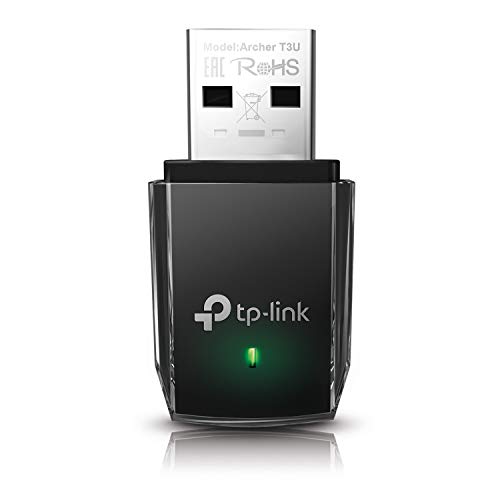
The standard Archer T3U takes the same AC1300 class and USB 3.0 connection as the Plus and shrinks them into a mini adapter that sits nearly flush with the laptop’s side. That makes it the pick for a laptop that travels, because it can stay in the port in a bag without snapping or catching. The trade-off is the lack of an external antenna, so it leans more on being reasonably close to the router.
Its listing states MU-MIMO support and driver coverage for Windows and Mac OS X 10.9 to 10.14, which still reaches back to genuinely old systems, though the Mac range ends one version earlier than the Plus model’s. Keep the two T3U versions separate in your mind when comparing: the Plus is the antenna model for fixed desks and weak rooms, and this mini is the portable one. Listings and availability can change, so confirm current availability on the product listing before ordering.
| Spec | Detail |
|---|---|
| WiFi class | AC1300 |
| USB connection | USB 3.0 |
| Antenna | Internal, mini form factor |
| Features | MU-MIMO |
| OS support | Windows and Mac OS X 10.9 to 10.14 |
TP-Link Archer TX20U Plus AX1800 WiFi 6 USB Adapter

The TX20U Plus moves up to WiFi 6, with a listing-stated AX1800 class split as 1,201 Mbps on 5 GHz plus 574 Mbps on 2.4 GHz. It carries dual 5dBi high-gain antennas, WPA3 security, and MU-MIMO with OFDMA, the WiFi 6 feature set that helps in busy households with many devices. A 1-meter USB 3.0 extension cable is included, which lets you position the adapter for a better signal instead of leaving it behind the laptop screen.
The hard limit is operating-system support: this adapter is Windows 10 and 11 only, per its listing. That makes it a poor match for the oldest machines in this guide’s audience despite the newer WiFi class, and a good one for a mid-life Windows laptop whose original card is the bottleneck. As with every pick here, its class speeds are manufacturer-stated maximums. Listings and availability can change, so confirm current availability on the product listing before ordering.
| Spec | Detail |
|---|---|
| WiFi class | WiFi 6 AX1800 (1,201 Mbps plus 574 Mbps, listing-stated) |
| USB connection | USB 3.0, 1-meter extension cable included |
| Antennas | Dual 5dBi high-gain |
| Security | WPA3 |
| OS support | Windows 10 and 11 only |
NETGEAR Nighthawk A8000 AXE3000 WiFi 6E USB Adapter

The A8000 is the flagship option, adding the 6 GHz band of WiFi 6E to the usual two bands. NETGEAR states an AXE3000 class made of 600 plus 1,200 plus 1,200 Mbps across its three bands, over a USB 3.0 connection, with support for Windows 10 and 11. The model number is A8000-100PAS.
The 6 GHz band comes with conditions that should be stated plainly. It requires Windows 11 and a WiFi 6E router; on Windows 10 the adapter falls back to the 5 GHz and 2.4 GHz bands, and without a 6E router there is no 6 GHz network to join. Buy this adapter if you already own, or firmly plan to buy, a WiFi 6E router and run Windows 11. Otherwise its headline band is unusable and the WiFi 6 picks above make more sense.
| Spec | Detail |
|---|---|
| WiFi class | WiFi 6E AXE3000 (600 plus 1,200 plus 1,200 Mbps, listing-stated) |
| Bands | 2.4 GHz, 5 GHz and 6 GHz |
| USB connection | USB 3.0 |
| OS support | Windows 10 and 11 (6 GHz requires Windows 11) |
| Model | A8000-100PAS |
BrosTrend AX1800 WiFi 6 USB Adapter

The BrosTrend adapter matches the TX20U Plus on class: WiFi 6 AX1800, stated as 1,201 Mbps on 5 GHz plus 574 Mbps on 2.4 GHz, through a USB 3.0 connection with two high-gain antennas for reception. Its distinguishing feature is a pre-loaded driver, which simplifies setup on a laptop whose existing connection is too poor to download drivers comfortably.
Support is Windows 11 and 10 only, so like the other WiFi 6 picks it suits a mid-life Windows laptop rather than an XP or Mac machine. Between this and the TX20U Plus, the choice comes down to setup style and antenna arrangement rather than class, since both state the same band figures. Either way, the standing limits apply: the figures are theoretical maximums, and a USB 2.0 port will hold the adapter back regardless of its class.
| Spec | Detail |
|---|---|
| WiFi class | WiFi 6 AX1800 (1,201 Mbps plus 574 Mbps, listing-stated) |
| USB connection | USB 3.0 |
| Antennas | Two high-gain |
| Driver | Pre-loaded |
| OS support | Windows 11 and 10 only |
How to choose
Work through four checks. First, the operating system: list your laptop’s exact OS version, then match it against each adapter’s stated driver support, because the WiFi 6 models here are Windows-only while the Archer T3U pair reaches older Windows and Mac versions. Second, the router: an adapter can only use bands and standards your router offers, so a WiFi 6E adapter is wasted on a WiFi 5 router. Third, the port: plug into a USB 3.0 port if the laptop has one, since a USB 2.0 port caps throughput below what these classes promise. Fourth, the shape: choose an antenna model for a desk in a weak-signal room, or a mini model if the adapter will live in the port while travelling.
Who should skip
Skip the Windows-only adapters (TX20U Plus, A8000, BrosTrend) if the old laptop runs macOS or a Windows version older than 10; the T3U pair is the route there. Skip the A8000 if you have no WiFi 6E router and no plan to get one, since its 6 GHz band will sit unused. Skip adapters altogether if the laptop’s real problem is a slow internet plan or a failing router, because no adapter can exceed the connection feeding it. And if the laptop has a free internal slot and you are comfortable opening it, an internal card replacement avoids tying up a USB port, though it is a bigger job than any pick here.
FAQ
Will a USB WiFi adapter work if my laptop’s built-in WiFi has died?
Yes. The adapter is an independent network device, so the laptop connects through it instead. You may need to disable the faulty internal card in settings so the system does not keep trying to use it, and the driver for the adapter may need to be fetched on another device if the laptop has no connection at all.
Why is my adapter slower than the speed printed on the box?
The printed class is a theoretical maximum, usually all bands added together, measured under ideal conditions. Real speed is limited by distance, walls, network congestion, your router, your internet plan, and the USB port version; a USB 2.0 port alone caps any of these adapters well below their class figures.
Do I need a new router to use a WiFi 6 or 6E adapter?
To use the new bands and features, yes. A WiFi 6 adapter still connects to an older router, but only at the older standard. The 6 GHz band of the A8000 additionally needs a WiFi 6E router and Windows 11; without both, it falls back to 5 GHz and 2.4 GHz.
Can I leave a mini adapter plugged in all the time?
That is exactly what the mini design is for. The Archer T3U sits nearly flush with the laptop’s edge, so it can stay in the port in a bag. Larger antenna models should be removed before packing to protect both the adapter and the port.
Final verdict
For the broadest fit on genuinely old laptops, the TP-Link Archer T3U Plus is the safest buy, pairing dual-band AC1300 with the widest driver support here and an antenna for weak rooms; its mini sibling suits travellers. On Windows 10 or 11 with a WiFi 6 router, the Archer TX20U Plus and BrosTrend AX1800 are the modern picks, while the NETGEAR A8000 only earns its premium when a WiFi 6E router and Windows 11 are already in place.
More from Amazon
Programs that pair well with the guide above. Offers and eligibility are set by Amazon and may change.
A free business account with business pricing and bulk-buying tools for work, shop or home office.
Create a business accountFree shipping on eligible items, Prime Video and more. Eligible new members can start with a free trial.
Start a Prime free trialAudiobooks and podcasts to listen to on the go. Eligible new members can start with a free trial.
Try Audible freeAd-free music streaming. Eligible new subscribers can start with a free trial.
Try Music Unlimited freeAs an Amazon Associate we earn from qualifying purchases.


Write Your Review
No reviews yet. Be the first to share your experience!