

Key takeaways
- Learn how to choose a USB-C to HDMI adapter for a laptop: check DisplayPort Alt Mode first, then compare five dongle and cable picks with 4K output.
Connecting a laptop to a monitor or TV over USB-C looks simple, and the adapters themselves are small and cheap-looking. The catch is the port. Not every USB-C port outputs video: the port must support DisplayPort Alt Mode, or be a Thunderbolt port, before any of these adapters can carry a picture. A USB-C port wired only for charging and data will leave you with a black screen no matter which adapter you buy, so checking your port comes before choosing a product.
Once the port is confirmed, the choice is about form and reach. A compact dongle plugs into the laptop and works with an HDMI cable you already own. A one-piece cable runs straight from the laptop to the display at a fixed length. Every pick in this guide is unidirectional — it sends video from a USB-C source to an HDMI display and does not work in reverse — and the resolution figures quoted are the listings’ own stated figures.
As an Amazon Associate, we earn from qualifying purchases.
Quick answer
First confirm your laptop’s USB-C port supports DisplayPort Alt Mode or Thunderbolt video output; without it, no adapter here will work. Then pick the form: a compact dongle suits travel and short reaches, while a one-piece cable of about 6 feet suits a fixed desk or TV. All five picks output 4K-class video one way, from USB-C to HDMI.
Anker USB C to HDMI Adapter (4K@60Hz), 310 USB-C Adapter

The Anker 310 is the travel-friendly form: a compact adapter that sits at the laptop’s port and accepts a standard HDMI cable on the other side. That means the reach is set by whatever HDMI cable you pair with it, and the adapter itself adds almost nothing to a laptop bag.
The listing title states support for 4K at 60Hz, and the adapter is listed as Thunderbolt 3 compatible. As with every pick here, the laptop’s USB-C port must support video output over DisplayPort Alt Mode for it to work. Choose this style if you present in different rooms and cannot predict the cable length you will need.
| Feature | Detail |
|---|---|
| Form | Compact adapter (dongle) |
| Output | 4K at 60Hz (listing-stated) |
| Compatibility | Thunderbolt 3 |
| Requirement | USB-C port with DisplayPort Alt Mode |
UGREEN USB C to HDMI Cable (4K@60Hz), 6.6FT

The UGREEN option removes the separate HDMI cable from the chain: it is a one-piece cable, 6.6 ft long, with USB-C at one end and HDMI at the other. One less connection point means one less thing to come loose behind a desk or TV.
The listing states 4K at 60Hz at 3840×2160, with backward compatibility for 2K at 120Hz and 1080P. It is unidirectional, running from USB-C to HDMI only, and it requires a DisplayPort Alt Mode USB-C port on the laptop. At 6.6 ft it is the longest one-piece reach in this guide, which suits a TV or a monitor that sits well away from the laptop. Availability can change, so confirm the current listing details before you order.
| Feature | Detail |
|---|---|
| Form | One-piece cable |
| Length | 6.6 ft |
| Output | 4K at 60Hz (3840×2160); listing also states 2K at 120Hz and 1080P support |
| Direction | Unidirectional, USB-C to HDMI |
uni USB C to HDMI Cable for Home Office, 6ft (4K@60Hz)
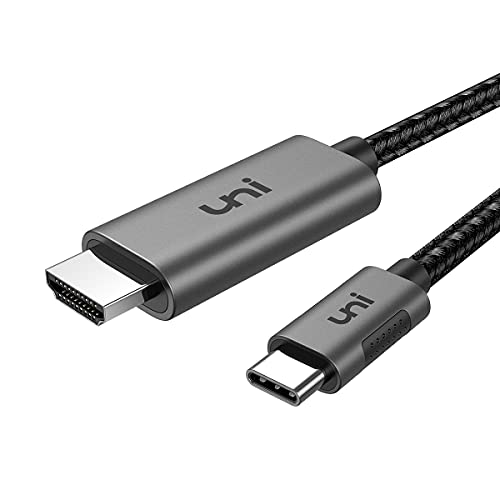
The uni cable is the straightforward desk option: a one-piece 6 ft cable aimed at home office setups, where the monitor sits at a predictable distance from the laptop. It states 4K at 60Hz output and compatibility with Thunderbolt 3 and Thunderbolt 4 ports.
Like the UGREEN, it is uni-directional, sending video from the USB-C source to the HDMI display only. The model number is UNICHDMIM01. If your desk layout is fixed and 6 ft covers the run, this is the simplest form of the connection: one cable, no dongle, nothing extra to carry or lose.
| Feature | Detail |
|---|---|
| Form | One-piece cable |
| Length | 6 ft |
| Output | 4K at 60Hz (listing-stated) |
| Compatibility | Thunderbolt 3 and Thunderbolt 4 |
| Model | UNICHDMIM01 |
QGeeM USB C to HDMI Cable Adapter, 6FT, 4K
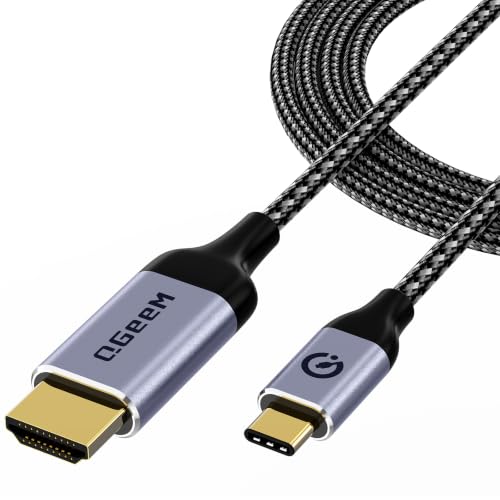
The QGeeM is another one-piece 6 ft cable, model XCHM18, but it comes with a caution that belongs in any honest guide. Its listing is internally inconsistent about refresh rate: the product description states 4K at 30Hz, while other text in the same listing states up to 4K at 60Hz. Both figures are reported here exactly as the listing gives them, and they should not be merged into a single claim.
If your display runs at 30Hz or you are feeding a TV for video and presentations, that inconsistency may not matter to you. If a 60Hz desktop is the whole point of the purchase, treat the listing’s mixed figures as a reason to pick one of the clearer options above. Availability can change, so confirm the current listing details before you order.
| Feature | Detail |
|---|---|
| Form | One-piece cable |
| Length | 6 ft |
| Resolution | As listed: description states 4K at 30Hz; other listing text states up to 4K at 60Hz |
| Model | XCHM18 |
Plugable USB C to HDMI Adapter, HDMI 2.0 (USBC-HDMI)

The Plugable adapter is the second dongle in this guide, and it is the most explicitly specified. Its output is HDMI 2.0, at up to 3840×2160 at 60Hz, and it is driverless: plug and play, with nothing to install. The host port must support USB-C Alt Mode video, the same requirement as every other pick here.
The model is USBC-HDMI, with UPC 819927010968. Choose this form if you already own a good HDMI cable, move between displays, or want the adapter to stay useful as your cable lengths change. Between this and the Anker 310, the decision is mostly about which stated specification set matches your display.
| Feature | Detail |
|---|---|
| Form | Compact adapter (dongle) |
| Standard | HDMI 2.0 |
| Output | Up to 3840×2160 at 60Hz |
| Setup | Driverless, plug and play |
| Model | USBC-HDMI |
How to choose
Check the port before anything else. Your laptop’s USB-C port must support DisplayPort Alt Mode video output, or be a Thunderbolt port. Laptop makers state this in the port specifications; a port described only for charging and data will not drive a display through any adapter in this guide, and no adapter can add that capability.
Pick the form next. A dongle plus your own HDMI cable gives you flexible length and a small carry item, at the cost of an extra connection. A one-piece cable is simpler and tidier but fixes the reach at the lengths listed here — 6 ft or 6.6 ft — so measure the run from laptop to display before ordering.
Match the output to your screen. The stated figures here are 4K-class, mostly at 60Hz, and they are listing-stated figures. If a listing gives you two different refresh figures in different places, as the QGeeM does, read that as a warning sign for a 60Hz purchase rather than averaging the numbers.
Finally, remember direction. Every adapter and cable here is unidirectional, from a USB-C source to an HDMI display. None of them can take an HDMI signal from a games console or Blu-ray player and feed a USB-C monitor.
Who should skip
Skip every pick in this guide if your laptop’s USB-C port lacks DisplayPort Alt Mode and is not a Thunderbolt port; you would need a docking solution with its own display hardware instead. Skip the one-piece cables if your display sits much further than about 6.6 ft from the laptop, since their length is fixed. And skip adapters altogether if your laptop already has a full-size HDMI port — a plain HDMI cable does the same job with no conversion involved.
FAQ
Why does my USB-C to HDMI adapter show no picture?
The most common reason is the port. If the laptop’s USB-C port does not support DisplayPort Alt Mode or Thunderbolt video output, it cannot send video to any of these adapters. Check the laptop’s port specifications, and try a different USB-C port if the machine has more than one, since ports on the same laptop can differ.
Can these adapters work in reverse, from HDMI to USB-C?
No. All five picks are unidirectional: they take video from a USB-C source and deliver it to an HDMI display. They cannot carry an HDMI signal into a USB-C monitor or laptop.
Should I choose a dongle or a one-piece cable?
Choose a dongle if you travel, present in different rooms, or already own HDMI cables of the lengths you need. Choose a one-piece cable for a fixed desk or TV setup where one known length covers the run and you want the fewest possible connections.
Do these work with Thunderbolt ports?
Thunderbolt ports support the video output these adapters need. The Anker 310 is listed as Thunderbolt 3 compatible, and the uni cable lists Thunderbolt 3 and Thunderbolt 4 compatibility. The underlying requirement in every case is that the port supports DisplayPort Alt Mode video.
Final verdict
Start with your port, not the product: confirm DisplayPort Alt Mode or Thunderbolt video support first. For travel and flexible lengths, choose a dongle — the Anker 310 for a compact 4K at 60Hz adapter, or the Plugable for its explicit HDMI 2.0, driverless specification. For a fixed setup, the UGREEN’s 6.6 ft reach is the longest one-piece option here, and the uni is the plain 6 ft desk cable. Consider the QGeeM only if its listing’s inconsistent refresh figures do not affect your display.
More from Amazon
Programs that pair well with the guide above. Offers and eligibility are set by Amazon and may change.
A free business account with business pricing and bulk-buying tools for work, shop or home office.
Create a business accountFree shipping on eligible items, Prime Video and more. Eligible new members can start with a free trial.
Start a Prime free trialAudiobooks and podcasts to listen to on the go. Eligible new members can start with a free trial.
Try Audible freeAd-free music streaming. Eligible new subscribers can start with a free trial.
Try Music Unlimited freeAs an Amazon Associate we earn from qualifying purchases.


Write Your Review
No reviews yet. Be the first to share your experience!