
Judgment and Lost Judgment put you in the shoes of Takayuki Yagami, a former lawyer turned private detective working cases in Kamurocho. Both games mix street brawls, tailing missions, clue hunting, and long story scenes, and both reached PC through Steam in September 2022. If you want a laptop that handles the Dragon Engine’s busy city streets without turning every session into a settings-tweaking exercise, this guide walks through five Windows laptops that fit the job. Every pick below clears the published system requirements for both games with room to spare, and each one suits a different kind of player, from full gaming rigs to a slim travel machine.
As an Amazon Associate, we earn from qualifying purchases.
How to Choose the Best Laptop for Judgment
Start with the platform, because it rules out a whole shelf of machines: Judgment and Lost Judgment are Windows-only on PC. Steam publishes Windows 10 requirements for both games, and no macOS or Linux edition exists, so every laptop in this guide runs Windows. There is no way around that with these two titles, and it is the first thing to settle before comparing hardware.
The good news is that neither game asks for exotic parts. The published minimum for both lists an Intel Core i5-3470 or AMD Ryzen 3 1200, 8 GB of memory, and a GeForce GTX 960 with 2 GB of graphics memory. The recommended tier steps up to a Core i7-4790 or Ryzen 5 1600 and a GeForce RTX 2060. Storage is the sneaky part: Judgment wants 40 GB free at minimum and 60 GB at the recommended tier, while Lost Judgment wants 60 GB at minimum and 80 GB recommended, so a 1 TB SSD leaves comfortable room for both games plus the rest of your library.
From there, think about the screen and memory. The Dragon Engine keeps Kamurocho crowded and brightly lit, so a high-refresh panel makes fights and chases easier to follow, and 16 GB of memory is the sensible floor for keeping the game and your everyday apps open together. Recent dedicated graphics clear the recommended bar by a wide margin. The one exception in this guide is the final pick, which uses integrated graphics; its section explains that trade clearly.
HP Victus 15

The Victus 15 is the straightforward power pick of this group. Its AMD Ryzen AI 7 350 processor and GeForce RTX 5060 graphics sit far above the recommended hardware for both Judgment games, and the 32 GB of DDR5 memory doubles the sensible floor, so the game, a browser full of guides, and a chat app can all stay open at once.
The 15.6-inch Full HD screen refreshes at 144Hz, which suits the fast hand-to-hand fights, and the 1 TB SSD holds both games and their combined recommended storage footprints without any juggling. An RJ-45 Ethernet port is there if you want a wired connection for downloads, and the RGB backlit keyboard rounds out a practical desk setup.
Specs
- Processor: AMD Ryzen AI 7 350, up to 5.0 GHz as listed
- Graphics: NVIDIA GeForce RTX 5060 dedicated graphics
- Memory: 32 GB DDR5
- Storage: 1 TB SSD
- Display: 15.6-inch Full HD (1920×1080), 144Hz as listed
- Keyboard: RGB backlit
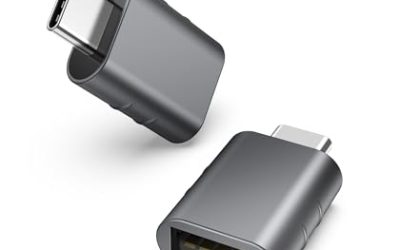
- Ports: RJ-45 Ethernet; bundled Thunderobot 7-in-1 USB-C hub as listed
- Operating system: Windows 11 Home
- Color: Black
- ASIN: B0G1N8R9Z4
Lenovo Legion 5 Gen 10

The Legion 5 Gen 10 is the pick for players who care most about the picture. Its 15.1-inch OLED screen runs at 2560×1600 with a 165Hz refresh rate and 500 nits of brightness as listed, so Kamurocho’s neon signs and night streets get deep blacks and sharp detail that a plain Full HD panel cannot match.
Under the hood, a Ryzen 7 260 and an RTX 5060 handle the Dragon Engine’s crowds, while 16 GB of DDR5-5600 memory and a 1 TB SSD cover the recommended storage tier for both games. USB4 and HDMI 2.1 give you modern options for docks and external screens, and the 24-zone RGB backlit keyboard suits late-night sessions.
Specs
- Processor: AMD Ryzen 7 260, up to 5.1 GHz as listed
- Graphics: NVIDIA GeForce RTX 5060 Laptop GPU, 8 GB GDDR7
- Memory: 16 GB DDR5-5600
- Storage: 1 TB SSD M.2 PCIe Gen4
- Display: 15.1-inch WQXGA OLED (2560×1600), 165Hz, 500 nits as listed
- Keyboard: 24-zone RGB backlit
- Ports: USB4 40Gbps, HDMI 2.1, Ethernet RJ-45
- Operating system: Windows 11 Home
- ASIN: B0FXMY8FYW
Acer Nitro V 15 ANV15-51-99XD

The Nitro V 15 leads with processor muscle. Its Intel Core i9-13900H is the strongest CPU in this guide, which helps in the Dragon Engine’s crowded street scenes, and the GeForce RTX 4060 clears the recommended graphics bar for both games with headroom to spare.
The 15.6-inch Full HD IPS screen refreshes at 180Hz, the fastest panel here, and the 1 TB Gen 4 SSD covers both games easily. Memory starts at 16 GB of DDR5 and can reach 32 GB across two slots, so there is an upgrade path later. Thunderbolt 4, HDMI 2.1, and Ethernet cover wired desk setups, and the backlit keyboard keeps things simple.
Specs
- Processor: Intel Core i9-13900H
- Graphics: NVIDIA GeForce RTX 4060 Laptop GPU
- Memory: 16 GB DDR5, up to 32 GB as listed
- Storage: 1 TB PCIe Gen 4 SSD
- Display: 15.6-inch FHD IPS, 180Hz as listed
- Ports: Thunderbolt 4, HDMI 2.1, Ethernet RJ-45
- Wireless: Wi-Fi 6
- Weight: 4.66 lbs as listed
- Operating system: Windows 11 Home
- ASIN: B0D8JTYXQM
MSI Katana 15 B13VEK-277US

The Katana 15 is the traditional gaming-laptop pick: a 13th Gen Intel Core i7-13620H, a GeForce RTX 4050 with 6 GB of GDDR6, and a 15.6-inch Full HD screen at 144Hz. That combination clears the published minimum for both games by a wide margin and matches the class of hardware named on the recommended list.
You get 16 GB of DDR5-4800 memory and a 1 TB NVMe SSD, enough for both games and a healthy backlog. At 4.96 lbs as listed, it is a machine you can carry between rooms or take along to a friend’s place, and USB Type-C plus Windows 11 Home keep the setup familiar.
Specs
- Processor: Intel Core i7-13620H
- Graphics: NVIDIA GeForce RTX 4050, 6 GB GDDR6
- Memory: 16 GB DDR5-4800
- Storage: 1 TB NVMe SSD
- Display: 15.6-inch Full HD IPS, 144Hz as listed
- Ports: USB Type-C as listed
- Weight: 4.96 lbs as listed
- Operating system: Windows 11 Home
- Color: Black
- ASIN: B0BZBN3857
ASUS Zenbook 14 OLED UM3406HA

The Zenbook 14 OLED is the honest outlier in this guide, and it earns its place for portability rather than raw graphics power. At about 2.65 lbs as listed, with a 14-inch WUXGA OLED touchscreen and a 75Wh battery, it is the laptop you would actually carry every day, and its Ryzen 7 8840HS processor is strong.
The trade is the graphics: the Radeon 780M is integrated, and it sits below the dedicated cards in the other four picks. It lands around the older minimum tier for these games rather than the recommended one, so expect to choose settings with care and lean on the games’ built-in upscaling options. Storage is also tighter at 512 GB, which still fits both games with less room left over. Treat this as the light-duty way to play.
Specs
- Processor: AMD Ryzen 7 8840HS, up to 5.1 GHz as listed
- Graphics: AMD Radeon 780M integrated
- Memory: 16 GB LPDDR5X
- Storage: 512 GB M.2 NVMe PCIe 4.0 SSD
- Display: 14-inch WUXGA OLED touchscreen (1920×1200)
- Wireless: Wi-Fi 6E, Bluetooth 5.3
- Battery: 75Wh
- Weight: about 2.65 lbs as listed
- Operating system: Windows 11 Home
- Color: Jade Black
- ASIN: B0DFWZ77LB
Comparison Table
| Product | Best for | Key spec |
|---|---|---|
| HP Victus 15 | All-round power | RTX 5060, 32 GB DDR5 |
| Lenovo Legion 5 Gen 10 | Screen quality | 15.1-inch WQXGA OLED, 165Hz |
| Acer Nitro V 15 | Processor strength | Core i9-13900H, RTX 4060 |
| MSI Katana 15 | Classic gaming setup | RTX 4050, 144Hz screen |
| ASUS Zenbook 14 OLED | Portability | Radeon 780M integrated, 2.65 lbs |
FAQ
Can I play Judgment and Lost Judgment on a Mac?
No. Both games are Windows-only on PC: Steam lists Windows 10 requirements for each and publishes no macOS edition, so you need a Windows laptop like the five in this guide.
How much storage do the two games need?
Judgment lists 40 GB at minimum and 60 GB at the recommended tier, while Lost Judgment lists 60 GB at minimum and 80 GB recommended. A 1 TB SSD covers both easily, and the Zenbook’s 512 GB drive still fits both games.
Do I need a high-end graphics card for these games?
No. The published minimum is a GeForce GTX 960 with 2 GB, and the recommended tier names an RTX 2060. Every dedicated card in this guide clears those bars; only the Zenbook’s integrated Radeon 780M asks you to pick settings with care.
Conclusion
Judgment and Lost Judgment are easy games to equip for once you accept the one hard rule: Windows only. The Victus 15 and Legion 5 Gen 10 are the strongest all-round picks, the Nitro V 15 brings the most processor muscle, the Katana 15 keeps the classic gaming formula, and the Zenbook 14 OLED trades graphics headroom for a genuinely light bag. Pick by screen, storage, and how much you travel, and Kamurocho is yours to work.
More from Amazon
Programs that pair well with the guide above. Offers and eligibility are set by Amazon and may change.
A free business account with business pricing and bulk-buying tools for work, shop or home office.
Create a business accountFree shipping on eligible items, Prime Video and more. Eligible new members can start with a free trial.
Start a Prime free trialAudiobooks and podcasts to listen to on the go. Eligible new members can start with a free trial.
Try Audible freeAd-free music streaming. Eligible new subscribers can start with a free trial.
Try Music Unlimited freeAs an Amazon Associate we earn from qualifying purchases.
Write Your Review
No reviews yet. Be the first to share your experience!