
A laptop microphone that sits on the desk picks up keyboard taps, desk bumps and fan noise, and it competes for space with the laptop itself. A boom arm solves the positioning problem: it clamps to the edge of the desk, holds the microphone up near mouth level and swings it aside when the call or recording session ends. For laptop users this matters more than for desktop setups, because the screen is closer, the desk area is smaller and the microphone needs to reach around the laptop without blocking the display.
This guide compares five boom arms that suit laptop desks. Two are low-profile designs that run close to the desk surface, which helps when a monitor, shelf or laptop stand limits the space above the desk. Two are long-established studio arms from RØDE, and one is Elgato’s standard suspension boom arm. Each pick is covered on the facts its listing records, with anything the listing does not state marked as not stated.
As an Amazon Associate, we earn from qualifying purchases.
Quick answer
The five picks split into two shapes. The TONOR T40LP and IXTECH Lizard White sit low over the desk, suiting laptop setups with limited clearance. The RØDE PSA1 and PSA1+ are classic studio arms, while the standard Elgato Wave Mic Arm is a suspension boom design. Check clamp fit, profile height and cable routing before choosing. Each one clamps to the desk edge, freeing surface space.
How to choose
Start with the space above your desk. A low-profile arm runs horizontally close to the desk and keeps the microphone below shelf or monitor height, suiting laptop desks tucked under shelving. A conventional studio arm rises higher and reaches further, which works when nothing hangs over the desk but can crowd a small workspace. Decide which shape your desk allows before comparing anything else.
Next, check the clamp. Every arm here mounts at the desk edge, and the desk thickness has to fall inside the clamp’s range. Only one pick in this guide states a desk thickness figure, so for the others the clamp range is not stated and needs confirming on the product page, especially if the desk has a thick edge, a bevel or a cable tray underneath.
Then think about cable routing. A loose microphone cable draped over a laptop keyboard is a constant annoyance, so arms with built-in cable management keep the run tidy along the arm itself. Three of the five picks record some form of cable management; where a listing does not mention it, that is noted as not stated.
Finally, match the arm to the microphone you own. Boom arms differ in the weight they are balanced for and in their mounting threads, and none of the listings in this guide states a full compatibility table, so treat thread size and supported microphone weight as not stated here and confirm them for your exact microphone before ordering. An arm balanced for a light microphone will droop or spring up with a heavy one.
TONOR Microphone Boom Arm, Low Profile Mic Arm (T40LP), Black

The TONOR T40LP is the first of the two low-profile picks. Its arm runs low over the desk rather than arching high above it, which suits laptop setups where the microphone needs to slide in under a monitor or shelf. The listing records a metal clamp that supports desks up to 2.76 in thick, given as 7 cm in the same record, which is the only explicit desk-thickness figure among the five picks. Cable management is also recorded, so the microphone cable can be routed along the arm instead of hanging loose across the desk.
This is the pick to look at first if your desk edge is unusually thick, because it is the one model here whose clamp limit is actually stated. The low stance also helps on standard desks: the microphone approaches from the side at desk level, keeping the top of the frame clear during video calls.
Specs
- Model: T40LP
- Profile: Low profile
- Color: Black
- Clamp: Metal clamp, supports desks up to 2.76 in / 7 cm thick
- Cable management: Recorded in the listing
- Microphone thread size: Not stated
- Supported microphone weight: Not stated
RODE PSA1 Swivel Mount Studio Microphone Boom Arm

The RODE PSA1 is the long-running studio standard in this group, sold under the RODE name without the diacritic used on the newer model below. It is a swivel mount studio boom arm of the conventional type: it rises from a desk-edge mount and positions the microphone over the desk. The retrieved listing copy records an item weight of 1.74 kg for the arm itself, but it does not state a clamp thickness range or a cable management feature, so both are marked not stated here.
Choose the PSA1 if you want the traditional studio arm shape and your desk has clear space above it. Because its record is thin on desk-fit figures, measure your desk edge and confirm the mounting details on the product page first.
Specs
- Model: PSA1
- Type: Swivel mount studio boom arm
- Item weight: 1.74 kg
- Clamp thickness range: Not stated
- Cable management: Not stated
- Microphone thread size: Not stated
- Supported microphone weight: Not stated
RØDE PSA1+ Professional Studio Arm with Spring Damping and Cable Management, Black
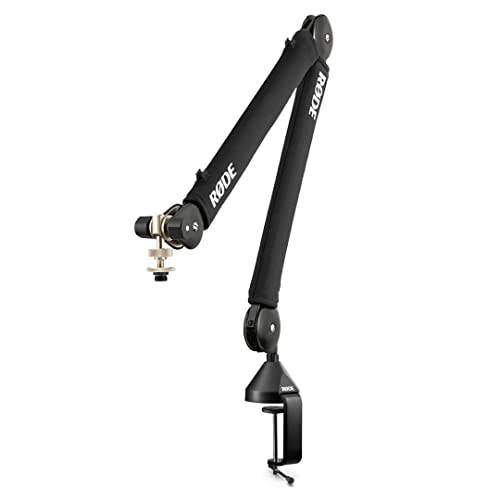
The PSA1+ is RØDE’s newer professional studio arm, and it should not be confused with the PSA1 above: they are separate listings with separate records. The features its listing records are spring damping and cable management. Spring damping addresses the faint spring resonance and movement noise that simpler arms can transmit when repositioned, and the built-in cable management keeps the microphone cable routed through the arm rather than clipped along the outside. The listing records the model as PSA1+ and the color as black.
Pick the PSA1+ over the PSA1 if the cable management and damped movement matter to you, since those are the recorded differences between the two RØDE arms here. Its clamp range and thread details are not stated in the retrieved copy, so confirm them on the product page.
Specs
- Model: PSA1+
- Type: Professional studio arm
- Spring damping: Recorded in the listing
- Cable management: Recorded in the listing
- Color: Black
- Clamp thickness range: Not stated
- Microphone thread size: Not stated
- Supported microphone weight: Not stated
Elgato Wave Mic Arm

The Elgato Wave Mic Arm in this guide is the standard model, a suspension boom arm recorded under model 10AAM9901. It is a distinct listing from Elgato’s low-profile variant, and it is not a low-profile arm: it follows the conventional suspension boom shape that lifts the microphone up and over the desk. That distinction matters because the two Elgato arms solve different desk problems, and this standard version is the one for desks with open space above them.
The retrieved copy does not state a clamp thickness range, thread size or supported microphone weight, so those details are marked not stated and should be confirmed against your microphone and desk before ordering.
Specs
- Model: 10AAM9901
- Type: Suspension boom arm, standard profile
- Profile: Standard (not the low-profile variant)
- Clamp thickness range: Not stated
- Cable management: Not stated
- Microphone thread size: Not stated
- Supported microphone weight: Not stated
IXTECH White Microphone Boom Arm Stand, Low Profile (LIZARD WHITE, model IX-MI05)

The IXTECH Lizard White is the second low-profile pick and the only white arm in the group, which makes it the natural match for light-colored desk setups where a black arm would stand out. Its listing records built-in cable management and a 360° swivel, so the arm can rotate fully at its mount to swing the microphone in and out of position. The model is recorded as IX-MI05 in the Lizard White version.
Choose this arm if you want the low stance of the TONOR but in a white finish, or if the full swivel matters for a corner desk where the microphone parks along a side edge. Its clamp thickness range and thread size are not stated in the retrieved copy, so check both on the product page.
Specs
- Model: IX-MI05
- Version: Lizard White
- Profile: Low profile
- Swivel: 360°
- Cable management: Built in, per the listing
- Clamp thickness range: Not stated
- Microphone thread size: Not stated
- Supported microphone weight: Not stated
Who should skip
Skip boom arms entirely if your microphone is the one built into your laptop and you have no plans to add an external microphone; an arm has nothing to hold. Skip the low-profile models if your desk sits in open space and you regularly need the microphone high and far-reaching, since the standard-profile arms cover that ground better. Skip the standard-profile models if a shelf, hutch or wall-mounted monitor leaves only a shallow gap above your desk, because the arm will not have room to rise. And skip every pick here until you have confirmed the mounting thread and weight balance for your specific microphone, because the listings do not state those figures.
FAQ
Will a boom arm work with a laptop desk?
Yes, provided the desk has an edge the clamp can grip and enough clearance for the arm’s shape. Low-profile arms such as the TONOR T40LP and the IXTECH Lizard White need the least vertical room, which suits laptop desks under shelves. For any model whose clamp range is not stated, confirm the desk thickness on the product page first.
What is the difference between the RØDE PSA1 and the PSA1+?
They are separate listings. The PSA1 is the long-established swivel mount studio arm, and its retrieved copy records an item weight of 1.74 kg. The PSA1+ is the newer professional arm whose listing records spring damping and cable management. Facts are not shared between the two records, so compare them on what each listing actually states.
Is the Elgato Wave Mic Arm in this guide the low-profile model?
No. This guide covers the standard Elgato Wave Mic Arm, model 10AAM9901, which is a conventional suspension boom arm. Elgato also sells a separate low-profile variant under a different listing; the low-profile picks in this guide are the TONOR T40LP and the IXTECH Lizard White.
How do I know whether an arm fits my microphone?
Check the microphone’s mounting thread and its weight against the arm’s product page before ordering. The listings retrieved for this guide do not state thread sizes or supported microphone weights for these five arms, so those figures are marked not stated here rather than guessed.
Final verdict
For a laptop desk with limited clearance, start with the low-profile pair: the TONOR T40LP if you want the one stated clamp figure in the group, or the IXTECH Lizard White if a white finish and a full 360° swivel fit your setup better. For a desk with open space above it, the RØDE PSA1 remains the plain studio standard, the PSA1+ adds recorded spring damping and cable management, and the standard Elgato Wave Mic Arm covers buyers who prefer that suspension design. Whichever shape you choose, confirm the clamp range, thread and weight balance for your own desk and microphone on the product page, since several of those figures are not stated in the listings.
Product and ASIN Reference
| Product | ASIN |
|---|---|
| TONOR Microphone Boom Arm, Low Profile Mic Arm (T40LP), Black | B0CRYTR71S |
| RODE PSA1 Swivel Mount Studio Microphone Boom Arm | B001D7UYBO |
| RØDE PSA1+ Professional Studio Arm with Spring Damping and Cable Management, Black | B09JBVR5B4 |
| Elgato Wave Mic Arm | B09737ZXMK |
| IXTECH White Microphone Boom Arm Stand, Low Profile (LIZARD WHITE, model IX-MI05) | B0CW3MF8PX |
More from Amazon
Programs that pair well with the guide above. Offers and eligibility are set by Amazon and may change.
A free business account with business pricing and bulk-buying tools for work, shop or home office.
Create a business accountFree shipping on eligible items, Prime Video and more. Eligible new members can start with a free trial.
Start a Prime free trialAudiobooks and podcasts to listen to on the go. Eligible new members can start with a free trial.
Try Audible freeAd-free music streaming. Eligible new subscribers can start with a free trial.
Try Music Unlimited freeAs an Amazon Associate we earn from qualifying purchases.
Write Your Review
No reviews yet. Be the first to share your experience!