

Key takeaways
- Compare the best laptop cooling pads for MacBook Air, from slim travel pads to adjustable stands, with fit guidance for 13 and 15 inch models.
Short answer: The best laptop cooling pad for a MacBook Air is the Cooler Master NotePal ErgoStand Lite, because its height adjusts for typing comfort and its fan moves to sit under the warmest part of the chassis. For a slimmer desk setup, the Cooler Master NotePal X-Slim is the better fit, the TECKNET N5 is the budget pick, and the Targus Lap Chill Mat is the pick for couch or bed use. The MacBook Air has no internal fan, so a pad works by lifting the aluminum chassis into moving air, not by forcing air into intake vents.
A MacBook Air stays silent because Apple left the fan out entirely. The aluminum body spreads heat away from the chip, and the machine draws air in around the keyboard and hinge area. That design works well for everyday work, but under a long video export, a big compile, or an extended game, the chip warms up and the Air slows itself down. A cooling pad cannot add an internal fan, but it can keep the chassis cooler for longer, which delays that slowdown and keeps the palm rests more comfortable.
As an Amazon Associate, we earn from qualifying purchases.
Table of Contents
- Short Answer
- How to Choose a Laptop Cooling Pad for MacBook Air
- 1. Cooler Master NotePal ErgoStand Lite (Premium)
- 2. Cooler Master NotePal X-Slim (Mid-range)
- 3. TECKNET N5 Laptop Cooling Pad (Budget)
- 4. TECKNET N8 Laptop Cooling Pad (Mid-range)
- 5. Targus Lap Chill Mat AWE55US (Budget)
- Frequently Asked Questions
- Conclusion
- Product and ASIN Reference
Short Answer
The Cooler Master NotePal ErgoStand Lite is the best all-around pick for a MacBook Air, with an adjustable stand and a fan that moves to the warmest spot under the chassis. The Cooler Master NotePal X-Slim suits a thin desk setup and a 13 inch Air, the TECKNET N5 is the budget pick with two quiet fans, the TECKNET N8 is the slim travel pick with three fans, and the Targus Lap Chill Mat is the pick for lap use, with a soft neoprene base and dual fans. Every pad below fits at least a 15.6 inch laptop.
How to Choose a Laptop Cooling Pad for MacBook Air
Fan layout matters more than fan count for a MacBook Air. The Air has no bottom intake vents, so a sealed turbofan pad with a foam ring has nothing to pressurize. Open multi-fan pads and large single-fan pads suit the Air better, because they move air across the whole aluminum base. Look for fans under the middle and rear of the chassis, where the most heat is generated.
Size and fit come next. The 13 inch MacBook Air measures about 13.6 inches across the display, and the 15 inch model measures about 15.3 inches. A pad rated for laptops up to 15.6 inches fits both models, but a pad rated only to 14 inches leaves the 15 inch Air hanging over the edges. Check the deck width, and confirm the front lip holds the thin Air in place when the pad tilts.
Height adjustment decides comfort. A pad that raises the rear of the Air brings the screen closer to eye level and opens a gap under the chassis for air to move. Power needs a plan too, because every pad below runs on USB-A power while the MacBook Air has only USB-C ports, so a small USB-C adapter or hub is needed. The Air charges through its separate MagSafe 3 port, so the pad does not take the charging port.
1. Cooler Master NotePal ErgoStand Lite (Premium)

The Cooler Master NotePal ErgoStand Lite is the best all-around pick for a MacBook Air because it adjusts in two ways that matter for a fanless laptop. The stand raises the Air to a comfortable typing angle, and the fan moves to sit under the warmest part of the chassis instead of staying fixed in the middle. Heat concentrates around the logic board, so that combination suits the Air well.
It fits laptops up to 15.6 inches, which covers both Air sizes. The adjustable fan aims airflow at the rear of the chassis, where the Air draws air in around the hinge, and the height adjustment opens a gap under the aluminum body so warm air escapes. The stand folds flatter for travel, and the single fan moves less air than a multi-fan pad, so it suits everyday work better than full-load use.
| Specs | Details |
|---|---|
| Fan | Single adjustable fan |
| Fits | Laptops up to 15.6 inches |
| Height adjustment | Yes, adjustable stand |
| Power | USB |
| Best for | Desk use, ergonomic typing angle |
| ASIN | B00EQV0VRG |
2. Cooler Master NotePal X-Slim (Mid-range)
The Cooler Master NotePal X-Slim is the slimmest pick in this guide, and that thin profile suits the MacBook Air better than a tall gaming pad does. A single 160 mm fan sits under a low metal mesh deck, so the Air rests almost flat while still getting airflow across its aluminum base.
It fits laptops up to 15.6 inches, which covers both Air sizes, and its low height keeps the keyboard close to the desk surface. That matters for typing, because a tall pad can force the wrists into an awkward angle on a thin laptop. The single large fan moves air broadly rather than concentrating it, which matches the Air’s heat pattern, since the whole aluminum chassis acts as a heat spreader. One fan cannot match a four-fan pad, and the fixed wedge offers no height adjustment, but the fan is quiet and the USB power draw is light.
| Specs | Details |
|---|---|
| Fan | Single 160 mm fan |
| Fits | Laptops up to 15.6 inches |
| Height adjustment | Fixed wedge shape |
| Power | USB |
| Best for | Slim desk setup, travel |
| ASIN | ⚠ B005C31HC0 |
3. TECKNET N5 Laptop Cooling Pad (Budget)
The TECKNET N5 is the budget pick, with two quiet 110 mm fans and a metal mesh deck that grips the MacBook Air. The mesh surface is anti-skid, so the thin Air stays put on a slope, and the dual fans push air up across the aluminum base.
It fits laptops up to 16 inches, which covers both Air sizes. Two USB ports sit on the side, with one spare for a mouse or keyboard dongle, and a power switch turns the fans on and off without unplugging the cable. The sloped wedge raises the rear of the Air for a better typing angle. The N5 has been recommended for the M1 MacBook Air in accessory guides, and it has no speed control, but for everyday work that single level is quiet enough.
| Specs | Details |
|---|---|
| Fans | Two 110 mm fans |
| Fits | Laptops up to 16 inches |
| Height adjustment | Fixed sloped wedge |
| USB ports | Two, one spare |
| Power | USB |
| Best for | Budget cooling, everyday work |
| ASIN | ⚠ B014F4SBMK |
4. TECKNET N8 Laptop Cooling Pad (Mid-range)
The TECKNET N8 is the slim travel pick, with three blue LED fans in a portable frame that fits laptops from 12 to 17 inches. Three fans spread airflow across the underside of the Air instead of concentrating it in one spot, which suits a fanless laptop whose whole base warms up under load. The pad is light and flat, so it packs into a bag next to the Air.
It runs at 1200 RPM, which keeps fan noise low, and two USB ports let the user pass power through to another device. The open edges let warm air escape sideways, and the slim profile keeps the typing feel close to normal. The blue LEDs stay on with the fans, so the N8 is better for a bright office than for a dark room.
| Specs | Details |
|---|---|
| Fans | Three blue LED fans, 1200 RPM |
| Fits | Laptops 12 to 17 inches |
| Height adjustment | Fixed slim profile |
| USB ports | Two |
| Power | USB |
| Best for | Travel, 15 inch Air |
| ASIN | ⚠ B016CL2DE6 |
5. Targus Lap Chill Mat AWE55US (Budget)
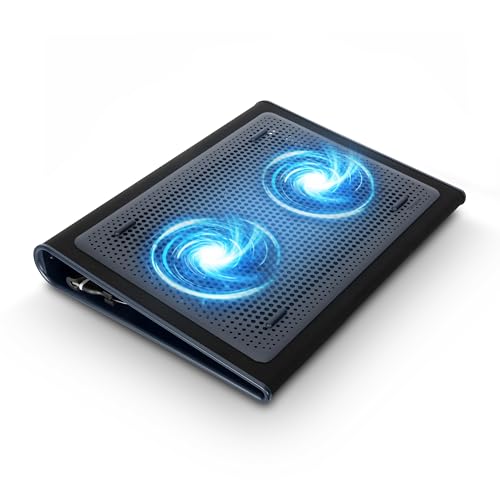
The Targus Lap Chill Mat AWE55US is the pick for using a MacBook Air away from a desk. A soft neoprene base sits on the lap and shields legs from the warm aluminum chassis, while dual fans push air across the underside of the Air. The neoprene also stops the thin Air from sliding around on a couch or bed.
It fits laptops up to 17 inches, so both Air sizes sit on it with room to spare, and the dual fans run from a USB-A connection. The mat is wider than the Air, which spreads the laptop’s weight across the lap. The neoprene insulates the legs from heat, which matters most on a fanless laptop. It has no height adjustment, so the typing angle stays flat. Confirm the exact AWE55US listing before ordering, since Targus sells several Chill Mat versions under similar names.
| Specs | Details |
|---|---|
| Fans | Dual fans |
| Fits | Laptops up to 17 inches |
| Height adjustment | None, flat lap mat |
| Power | USB-A |
| Best for | Lap use, couch and bed |
| ASIN | B002NU5O9C |
Frequently Asked Questions
Does a MacBook Air need a cooling pad?
A MacBook Air does not need a cooling pad for everyday work, because the fanless design handles browsing, documents, and video calls without overheating. A pad helps under sustained heavy loads, such as long video exports, big compiles, or extended games, where the Air slows itself down as it warms. A pad lifts the aluminum chassis into moving air, which keeps the machine cooler for longer.
What size cooling pad fits a 13 inch or 15 inch MacBook Air?
The 13 inch MacBook Air measures about 13.6 inches across, and the 15 inch model measures about 15.3 inches. A pad rated for laptops up to 15.6 inches fits both models, and a pad rated from 12 to 17 inches fits both as well. Check the deck width before ordering, since a pad rated only to 14 inches leaves the 15 inch Air hanging over the edges.
Do cooling pads work with a USB-C only MacBook Air?
Cooling pads work with a MacBook Air, but they need a USB-C adapter or a hub, because the pads run on USB-A power and the Air has only USB-C ports. The Air charges through its separate MagSafe 3 port, so the pad does not take the charging port. A pad with a spare USB port passes power through to a mouse or keyboard dongle.
Are sealed turbofan pads good for a MacBook Air?
Sealed turbofan pads are a poor match for a MacBook Air. Those pads use a foam ring to build pressure and force air into bottom intake vents, but the Air has no bottom intake vents to pressurize, since it draws air in around the keyboard and hinge area. Open multi-fan pads and large single-fan pads suit the Air better, because they move air across the whole aluminum base.
Conclusion
The best laptop cooling pad for a MacBook Air is the Cooler Master NotePal ErgoStand Lite, because its adjustable stand and movable fan suit a fanless laptop better than a fixed pad does. The Cooler Master NotePal X-Slim is the slimmest choice for a 13 inch Air that travels, the TECKNET N5 is the budget pick for everyday work, the TECKNET N8 is the slim travel pick that covers the wider 15 inch Air, and the Targus Lap Chill Mat is the pick for couch and bed use. Pick by size first, then by fan layout.
More from Amazon
Programs that pair well with the guide above. Offers and eligibility are set by Amazon and may change.
A free business account with business pricing and bulk-buying tools for work, shop or home office.
Create a business accountFree shipping on eligible items, Prime Video and more. Eligible new members can start with a free trial.
Start a Prime free trialAudiobooks and podcasts to listen to on the go. Eligible new members can start with a free trial.
Try Audible freeAd-free music streaming. Eligible new subscribers can start with a free trial.
Try Music Unlimited freeAs an Amazon Associate we earn from qualifying purchases.


Write Your Review
No reviews yet. Be the first to share your experience!